
Latest ads
-
V2ray VPN for Tunneling
- hu KANNA
- Updated:
-
 ඕනම රටකට සෙට් වෙන CV එකක්
- ErMurazor
- Updated:
-
 Hambantota 7 Acres Beachfront Land For Sell DownSouth , PerPerch Price 420 000
- 1024 Digital
- Updated:
-
 Baseus PI LITE INDOOR CAMERA
- ErMurazor
- Updated:

shift delete karapu file ekak ganne kohomada
- Thread starter imeshSJ
- Start date
You are using an out of date browser. It may not display this or other websites correctly.
You should upgrade or use an alternative browser.
You should upgrade or use an alternative browser.


Yes, use a file recovery softaware. I’ve used Active@ UNDELETE, here are some torrent links, here is a Rapidshare link


Get Data Back NTFS , FAT. Niyama Software eka..Process Wenna dala magin stop karanna epa..ethakota recovery wena files adu wenawa..1st time digatama danna..
Runtime GetDataBack for FAT/ NTFS 4.00
Category: Windows, MacOS, Unix/Linux, Mobile
Tag: Window
Description
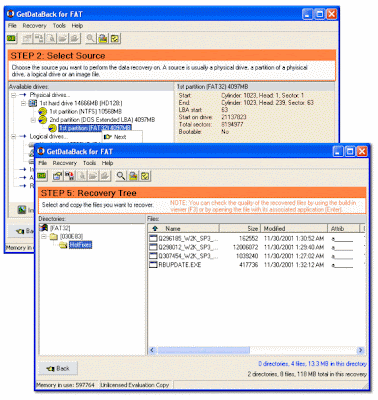
[FONT=arial,sans-serif]Data Recovery Software[/FONT] for NT [FONT=arial,sans-serif]file systems[/FONT] - GetDataBack is a highly advanced data recovery software, which will help you to get your data back when your drive's [FONT=arial,sans-serif]partition table[/FONT], boot record, Master File Table or [FONT=arial,sans-serif]root directory[/FONT] is corrupt or lost, when a virus has hit [FONT=arial,sans-serif]the drive[/FONT], files were deleted, the drive was formatted or struck by a power failure. GetDataBack comes in two flavours, NTFS and FAT depending on what file system you have.
GetDataBack will recover your data if the hard drive's partition table, boot record, FAT/MFT or root directory are lost or damaged, data was lost due to a virus attack, the drive was formatted, fdisk has been run, a power failure has caused a system crash, files were lost due to a software failure, files were accidentally deleted...
GetDataBack can even recover your data when the drive is no longer recognized by Windows. It can likewise be used even if all [FONT=arial,sans-serif]directory information[/FONT] - not just the root directory - is missing. GetDataBack can even recover your data when the drive is no longer recognized by Windows. It can likewise be used even if all directory information - not just the root directory - is missing.
The tool works at partition level and will restore files and folders exactly how they used to be. It recovers data from floppy and ZIP disks, drive images and even remote drives connected by a serial cable or TCP/IP. As the name says, it restores files from FAT/ NTFS disks - file system used by Windows NT/2000/XP, yet works on all Windows systems. Make sure you never install the program on the to-be-recovered drive and you will never lose important data.
Advanced algorithms will make sure that all directories and sub directories are put together as they were, and that long file names are reconstructed correctly. GetDataBack is read-only, meaning the program will never attempt to write to the drive you are about to recover. Please make sure to read the safety instructions...
The software enables the regular user to conduct his own data recovery by guiding him through three easy to understand steps, thus gives the advanced user the possibility to interfere with the recovery and improve the results, by examining the scan log, the file system details, file and directory information, by selecting the sector range to be scanned, by choosing excessive search for file systems or search for lost files, by calling Runtime's DiskExplorer.
Recover files over your local network or over a serial cable - This feature enables you to run GetDataBack on one computer ("remote") while accessing the drives of another computer ("host"). Recovering data over a network is useful, especially when you are not able to remove the drive you want to recover from and attach it to another computer.
GetDataBack recovers from:
* Hard drives (IDE, SCSI, SATA)
* USB drives
* Firewire drives
* Partitions
* Dynamic Disks
* Floppy drives
* Drive images
* Zip/Jaz drive
* [FONT=arial,sans-serif]Compact Flash Cards[/FONT]
* Smart Media Cards
* Secure Digital Cards
* USB Flash Drive
* iPod Disks
Size: 5.25 MB
(Download file includes both FAT and NTFS versions)
http://rapidshare.com/files/243783466/RuntimeGDB.FAT.NTFS.400.DOA.skillware.rar
Runtime GetDataBack for FAT/ NTFS 4.00
Category: Windows, MacOS, Unix/Linux, Mobile
Tag: Window
Description
[FONT=arial,sans-serif]Data Recovery Software[/FONT] for NT [FONT=arial,sans-serif]file systems[/FONT] - GetDataBack is a highly advanced data recovery software, which will help you to get your data back when your drive's [FONT=arial,sans-serif]partition table[/FONT], boot record, Master File Table or [FONT=arial,sans-serif]root directory[/FONT] is corrupt or lost, when a virus has hit [FONT=arial,sans-serif]the drive[/FONT], files were deleted, the drive was formatted or struck by a power failure. GetDataBack comes in two flavours, NTFS and FAT depending on what file system you have.
GetDataBack will recover your data if the hard drive's partition table, boot record, FAT/MFT or root directory are lost or damaged, data was lost due to a virus attack, the drive was formatted, fdisk has been run, a power failure has caused a system crash, files were lost due to a software failure, files were accidentally deleted...
GetDataBack can even recover your data when the drive is no longer recognized by Windows. It can likewise be used even if all [FONT=arial,sans-serif]directory information[/FONT] - not just the root directory - is missing. GetDataBack can even recover your data when the drive is no longer recognized by Windows. It can likewise be used even if all directory information - not just the root directory - is missing.
The tool works at partition level and will restore files and folders exactly how they used to be. It recovers data from floppy and ZIP disks, drive images and even remote drives connected by a serial cable or TCP/IP. As the name says, it restores files from FAT/ NTFS disks - file system used by Windows NT/2000/XP, yet works on all Windows systems. Make sure you never install the program on the to-be-recovered drive and you will never lose important data.
Advanced algorithms will make sure that all directories and sub directories are put together as they were, and that long file names are reconstructed correctly. GetDataBack is read-only, meaning the program will never attempt to write to the drive you are about to recover. Please make sure to read the safety instructions...
The software enables the regular user to conduct his own data recovery by guiding him through three easy to understand steps, thus gives the advanced user the possibility to interfere with the recovery and improve the results, by examining the scan log, the file system details, file and directory information, by selecting the sector range to be scanned, by choosing excessive search for file systems or search for lost files, by calling Runtime's DiskExplorer.
Recover files over your local network or over a serial cable - This feature enables you to run GetDataBack on one computer ("remote") while accessing the drives of another computer ("host"). Recovering data over a network is useful, especially when you are not able to remove the drive you want to recover from and attach it to another computer.
GetDataBack recovers from:
* Hard drives (IDE, SCSI, SATA)
* USB drives
* Firewire drives
* Partitions
* Dynamic Disks
* Floppy drives
* Drive images
* Zip/Jaz drive
* [FONT=arial,sans-serif]Compact Flash Cards[/FONT]
* Smart Media Cards
* Secure Digital Cards
* USB Flash Drive
* iPod Disks
Size: 5.25 MB
(Download file includes both FAT and NTFS versions)
http://rapidshare.com/files/243783466/RuntimeGDB.FAT.NTFS.400.DOA.skillware.rar


oya tiyenne baduGet Data Back NTFS , FAT. Niyama Software eka..Process Wenna dala magin stop karanna epa..ethakota recovery wena files adu wenawa..1st time digatama danna..
Runtime GetDataBack for FAT/ NTFS 4.00
Category: Windows, MacOS, Unix/Linux, Mobile
Tag: Window
Description
[FONT=arial,sans-serif]Data Recovery Software[/FONT] for NT [FONT=arial,sans-serif]file systems[/FONT] - GetDataBack is a highly advanced data recovery software, which will help you to get your data back when your drive's [FONT=arial,sans-serif]partition table[/FONT], boot record, Master File Table or [FONT=arial,sans-serif]root directory[/FONT] is corrupt or lost, when a virus has hit [FONT=arial,sans-serif]the drive[/FONT], files were deleted, the drive was formatted or struck by a power failure. GetDataBack comes in two flavours, NTFS and FAT depending on what file system you have.
GetDataBack will recover your data if the hard drive's partition table, boot record, FAT/MFT or root directory are lost or damaged, data was lost due to a virus attack, the drive was formatted, fdisk has been run, a power failure has caused a system crash, files were lost due to a software failure, files were accidentally deleted...
GetDataBack can even recover your data when the drive is no longer recognized by Windows. It can likewise be used even if all [FONT=arial,sans-serif]directory information[/FONT] - not just the root directory - is missing. GetDataBack can even recover your data when the drive is no longer recognized by Windows. It can likewise be used even if all directory information - not just the root directory - is missing.
The tool works at partition level and will restore files and folders exactly how they used to be. It recovers data from floppy and ZIP disks, drive images and even remote drives connected by a serial cable or TCP/IP. As the name says, it restores files from FAT/ NTFS disks - file system used by Windows NT/2000/XP, yet works on all Windows systems. Make sure you never install the program on the to-be-recovered drive and you will never lose important data.
Advanced algorithms will make sure that all directories and sub directories are put together as they were, and that long file names are reconstructed correctly. GetDataBack is read-only, meaning the program will never attempt to write to the drive you are about to recover. Please make sure to read the safety instructions...
The software enables the regular user to conduct his own data recovery by guiding him through three easy to understand steps, thus gives the advanced user the possibility to interfere with the recovery and improve the results, by examining the scan log, the file system details, file and directory information, by selecting the sector range to be scanned, by choosing excessive search for file systems or search for lost files, by calling Runtime's DiskExplorer.
Recover files over your local network or over a serial cable - This feature enables you to run GetDataBack on one computer ("remote") while accessing the drives of another computer ("host"). Recovering data over a network is useful, especially when you are not able to remove the drive you want to recover from and attach it to another computer.
GetDataBack recovers from:
* Hard drives (IDE, SCSI, SATA)
* USB drives
* Firewire drives
* Partitions
* Dynamic Disks
* Floppy drives
* Drive images
* Zip/Jaz drive
* [FONT=arial,sans-serif]Compact Flash Cards[/FONT]
* Smart Media Cards
* Secure Digital Cards
* USB Flash Drive
* iPod Disks
Size: 5.25 MB
(Download file includes both FAT and NTFS versions)
http://rapidshare.com/files/243783466/RuntimeGDB.FAT.NTFS.400.DOA.skillware.rar

recover karanna thamai thiyenne,..Handy Recover Maru...)))
Scavenger kiyala ekak thiyanawa. ekath hodai)
Scavenger kiyala ekak thiyanawa. ekath hodai)
Similar threads


- Replies
- 5
- Views
- 213


