


Shutdown prank
අද මම කියන්නම්, යහළුවනව බය කරන්න පුළුවන් දේයක්.
Right click the desktop , click “new” and then chose “shoutcut”
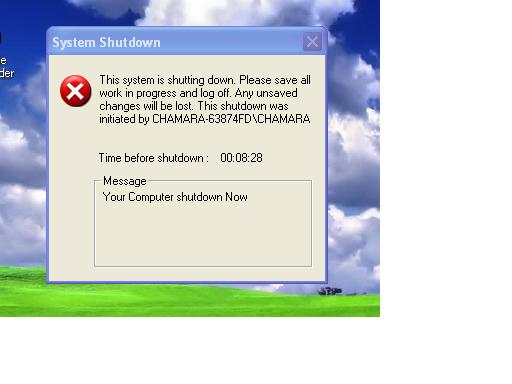
Type – shutdown –s –t 120 –c “comment”
The number(120 in the case) are how many seconds there will be until the computer shutdown. You can type any number you want .If you don’t want a comment in the shutdown box, remove the “-c” and “comment” . However if you want a comment , put your comment where it says “comment”
How to cancel the shutdown
- click “start”
- chose “Run”
- type “cmd”
- click “ok”
- type “shutdown -a” and press Enter
re post නම් සොරිවෙන්න ඔනි.

අද මම කියන්නම්, යහළුවනව බය කරන්න පුළුවන් දේයක්.
Right click the desktop , click “new” and then chose “shoutcut”
Type – shutdown –s –t 120 –c “comment”
The number(120 in the case) are how many seconds there will be until the computer shutdown. You can type any number you want .If you don’t want a comment in the shutdown box, remove the “-c” and “comment” . However if you want a comment , put your comment where it says “comment”
How to cancel the shutdown
- click “start”
- chose “Run”
- type “cmd”
- click “ok”
- type “shutdown -a” and press Enter
re post නම් සොරිවෙන්න ඔනි.


