
Latest ads
-
 ඕනම රටකට සෙට් වෙන CV එකක්
- ErMurazor
- Updated:
-
 Hambantota 7 Acres Beachfront Land For Sell DownSouth , PerPerch Price 420 000
- 1024 Digital
- Updated:
-
 Baseus PI LITE INDOOR CAMERA
- ErMurazor
- Updated:
-
Colombo Hard Disk For Sale
- mazza
- Updated:

---------SOFTWARE 4 ALL--------
- Thread starter sanjeeme
- Start date
You are using an out of date browser. It may not display this or other websites correctly.
You should upgrade or use an alternative browser.
You should upgrade or use an alternative browser.


Magic Camera 4.0.0 | 12 Mb
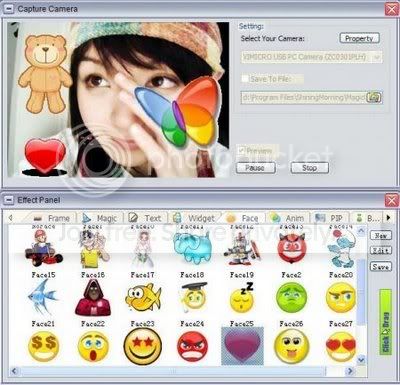
Magic Camera will empower you with all these dreaming magic via simply adding a virtual camera on your computer.
Magic Camera also enables you to share desktop screen with your friends by doing a live screen capture/sending. With this option you can share your documents with your colleagues, show visual demonstration on IM or video chat software, keep your privacy by pretending to be some one else or even do a real-time video forwarding via this virtual camera. . . .
To use it with a webcam already, simply switch this virtual camera to the physical one. By adding lots of funny photo frames and do image overlays to your webcam, Magic Camera makes your video chatting more interesting!
Want to save your video conversations? Use Magic Camera to do it! Start to record your or your friends’ live video to disk and even play back to them in the virtual camera later!
There are still more functions! Magic Camera includes video effect functionality. More than 20 amazing video effect can be added to your real/virtual video.
Start the trial today! We are offering free trials and you’ll see more fun, more flexibility, more security and more magic in your video chat with this simple small software. Start the fun today and enjoy it!
Key Features
* Add a virtual camera to your instant messenger or video chat software.
* Split real webcam into virtual camera for using with multiple programs simultaneously.
* Share your desktop screen or windows with your friends in the messenger by selecting this virtual camera.
* Add lots of funny photo frames and do image overlays to your webcam.
* Record webcams or activity on screen and encode them to video files for later playback in virtual camera. With this, you can save your video conversation.
* Play pre-recorded videos to your friends without even having a physical webcam.
* Add various fantastic video effects to your web camera/video files/photos/screen and show it to your friends.
* Do a live desktop screen streaming by capturing screen as well as sending it out at the same time. With this option, you can send back your friend’s live video like a mirror. Also, using this virtual camera, you can keep your privacy by pretending to be some one else. Even more, freely add magic video effects to the video!
* Slide Show your photo albums in your favorite IM.
* Easily switch video input between your real camera and other virtual sources.
* Check update automatically.
* Easy to use; Simple installation that will have you up and running this powerful virtual camera in minutes.
* Text overlay enabled.
* Easily add widget, face to webcam.
* Picture in Picture.
* Video and Animation overlay;
* Change background of webcam;
* On screen edit by mouse drag;
* Users can add or customize their own effects.

http://rapidshare.com/files/157099655/Magic_Camera_v4.0.0_downarchive.rar
Magic Camera will empower you with all these dreaming magic via simply adding a virtual camera on your computer.
Magic Camera also enables you to share desktop screen with your friends by doing a live screen capture/sending. With this option you can share your documents with your colleagues, show visual demonstration on IM or video chat software, keep your privacy by pretending to be some one else or even do a real-time video forwarding via this virtual camera. . . .
To use it with a webcam already, simply switch this virtual camera to the physical one. By adding lots of funny photo frames and do image overlays to your webcam, Magic Camera makes your video chatting more interesting!
Want to save your video conversations? Use Magic Camera to do it! Start to record your or your friends’ live video to disk and even play back to them in the virtual camera later!
There are still more functions! Magic Camera includes video effect functionality. More than 20 amazing video effect can be added to your real/virtual video.
Start the trial today! We are offering free trials and you’ll see more fun, more flexibility, more security and more magic in your video chat with this simple small software. Start the fun today and enjoy it!
Key Features
* Add a virtual camera to your instant messenger or video chat software.
* Split real webcam into virtual camera for using with multiple programs simultaneously.
* Share your desktop screen or windows with your friends in the messenger by selecting this virtual camera.
* Add lots of funny photo frames and do image overlays to your webcam.
* Record webcams or activity on screen and encode them to video files for later playback in virtual camera. With this, you can save your video conversation.
* Play pre-recorded videos to your friends without even having a physical webcam.
* Add various fantastic video effects to your web camera/video files/photos/screen and show it to your friends.
* Do a live desktop screen streaming by capturing screen as well as sending it out at the same time. With this option, you can send back your friend’s live video like a mirror. Also, using this virtual camera, you can keep your privacy by pretending to be some one else. Even more, freely add magic video effects to the video!
* Slide Show your photo albums in your favorite IM.
* Easily switch video input between your real camera and other virtual sources.
* Check update automatically.
* Easy to use; Simple installation that will have you up and running this powerful virtual camera in minutes.
* Text overlay enabled.
* Easily add widget, face to webcam.
* Picture in Picture.
* Video and Animation overlay;
* Change background of webcam;
* On screen edit by mouse drag;
* Users can add or customize their own effects.

http://rapidshare.com/files/157099655/Magic_Camera_v4.0.0_downarchive.rar

Anime Studio Pro v5.6

efrontier�s Anime Studio Pro 5 is a complete animation program for creating movies, cartoons, anime, or cut animations. Create your own desktop animated shorts in the style of South Park and JibJab, or use Anime Studio Pro 5 to produce full-length animation for film, video, or streaming over the web.
http://rapidshare.com/files/118034058/Smith.Micro.Anime.Studio.Pro.v5.6-SoftStreet.net.part1.rar
http://rapidshare.com/files/118036106/Smith.Micro.Anime.Studio.Pro.v5.6-SoftStreet.net.part2.rar

efrontier�s Anime Studio Pro 5 is a complete animation program for creating movies, cartoons, anime, or cut animations. Create your own desktop animated shorts in the style of South Park and JibJab, or use Anime Studio Pro 5 to produce full-length animation for film, video, or streaming over the web.
http://rapidshare.com/files/118034058/Smith.Micro.Anime.Studio.Pro.v5.6-SoftStreet.net.part1.rar
http://rapidshare.com/files/118036106/Smith.Micro.Anime.Studio.Pro.v5.6-SoftStreet.net.part2.rar
Microsoft.Visual.Studio.Team.System.2008.Database. Edition-ZW

Information:
Code: Select allhttp://www.microsoft.com/en/us/default.aspx
Download:
Code: Select allzvts28db.iso
http://d01.megashares.com/?d01=64bc6bf

Information:
Code: Select allhttp://www.microsoft.com/en/us/default.aspx
Download:
Code: Select allzvts28db.iso
http://d01.megashares.com/?d01=64bc6bf


Techsmith SnagIt 9.0.2

SnagIt, the award-winning screen-capture software. Using SnagIt, you can select and capture anything on your screen, then easily add text, arrows, or effects, and save the capture to a file or share it immediately by e-mail or IM. Capture and share an article, image, or Web page directly from your screen. Or, capture and share any part of any application that runs on your PC. Automatically save in one of 23 file formats, or send to the printer, to your e-mail, or to the clipboard.
Use SnagIt's built-in editors to modify, annotate, and enhance your images and the Catalog Browser to organize your files. Increase your productivity while quickly creating professional presentations and flawless documentation. With powerful new features that allow you to edit previously placed objects, capture embedded links and add interactivity to your captures, SnagIt 8 makes it easier than ever before to capture, edit, and share anything on your screen.
Features of SnagIt:
- SnagIt�s New Design
You�ll notice we�ve incorporated a new look into SnagIt 8, as well as design changes, based on some simple goals. We�ve used icons to take a visual approach to the capture process, making it easier to identify what you want to capture, yet keeping the workflow the same as always. Just select a profile or your favorite capture settings, and click the Capture button. So if you�re a longtime user, rest assured that the familiar capture options are all still there, plus some great new ones to make you even more efficient at performing your daily tasks with SnagIt.
- Smarter Editing of Objects and Text
With SnagIt�s powerful Editor at your fingertips, there�s no need to open another application to add the finishing touches to your captures. SnagIt 8�s Editor has been enhanced to include vector editing, so the callouts, arrows, shapes and text that you place on your capture remain editable. You can reselect any object you�ve previously placed on the capture to delete or edit it anytime. Save time making your images look exactly the way you want them to, the first time. Later, you can come back and modify those images for different audiences, or update them with new information, without going through the hassle of taking additional screen captures.
- Capture Web Pages with Links
Now you can capture a Web page with SnagIt and all of the links remain clickable. Use SnagIt to capture the part of the Web page that has the links you want to keep intact. Then, save the capture in a format that supports embedded links: Web page with image (.mht), Adobe PDF, (.pdf) or Macromedia Flash (.swf). The links will be embedded in the capture and clickable, just as they were on the original Web page. Send the capture by email and simply indicate where to click.
- Add Interactivity to your Captures
With SnagIt�s new hotspot feature, adding interactivity is easy. Capture an image, and then use SnagIt�s hotspot feature to specify parts of the image that, when moused over, will display text or images, or when clicked upon, will open a Web page. Add helpful hints and explanatory illustrations, or even create a functioning prototype of a Web page. Because textual comments only appear when hovered over, the entire image doesn�t end up cluttered with text.
- Save as PDF
Now you can share your captured images in the universally accepted format � PDF. No need to worry whether people can open the images you�ve sent them. The PDF format is perfect for saving and printing scrolling Web pages. You can also go paperless � capture your onscreen or scanned documents, and save them as PDF files.
http://w15.easy-share.com/1701855412.html
MIRROR
http://www.megaupload.com/?d=V0ZDPIZ0

SnagIt, the award-winning screen-capture software. Using SnagIt, you can select and capture anything on your screen, then easily add text, arrows, or effects, and save the capture to a file or share it immediately by e-mail or IM. Capture and share an article, image, or Web page directly from your screen. Or, capture and share any part of any application that runs on your PC. Automatically save in one of 23 file formats, or send to the printer, to your e-mail, or to the clipboard.
Use SnagIt's built-in editors to modify, annotate, and enhance your images and the Catalog Browser to organize your files. Increase your productivity while quickly creating professional presentations and flawless documentation. With powerful new features that allow you to edit previously placed objects, capture embedded links and add interactivity to your captures, SnagIt 8 makes it easier than ever before to capture, edit, and share anything on your screen.
Features of SnagIt:
- SnagIt�s New Design
You�ll notice we�ve incorporated a new look into SnagIt 8, as well as design changes, based on some simple goals. We�ve used icons to take a visual approach to the capture process, making it easier to identify what you want to capture, yet keeping the workflow the same as always. Just select a profile or your favorite capture settings, and click the Capture button. So if you�re a longtime user, rest assured that the familiar capture options are all still there, plus some great new ones to make you even more efficient at performing your daily tasks with SnagIt.
- Smarter Editing of Objects and Text
With SnagIt�s powerful Editor at your fingertips, there�s no need to open another application to add the finishing touches to your captures. SnagIt 8�s Editor has been enhanced to include vector editing, so the callouts, arrows, shapes and text that you place on your capture remain editable. You can reselect any object you�ve previously placed on the capture to delete or edit it anytime. Save time making your images look exactly the way you want them to, the first time. Later, you can come back and modify those images for different audiences, or update them with new information, without going through the hassle of taking additional screen captures.
- Capture Web Pages with Links
Now you can capture a Web page with SnagIt and all of the links remain clickable. Use SnagIt to capture the part of the Web page that has the links you want to keep intact. Then, save the capture in a format that supports embedded links: Web page with image (.mht), Adobe PDF, (.pdf) or Macromedia Flash (.swf). The links will be embedded in the capture and clickable, just as they were on the original Web page. Send the capture by email and simply indicate where to click.
- Add Interactivity to your Captures
With SnagIt�s new hotspot feature, adding interactivity is easy. Capture an image, and then use SnagIt�s hotspot feature to specify parts of the image that, when moused over, will display text or images, or when clicked upon, will open a Web page. Add helpful hints and explanatory illustrations, or even create a functioning prototype of a Web page. Because textual comments only appear when hovered over, the entire image doesn�t end up cluttered with text.
- Save as PDF
Now you can share your captured images in the universally accepted format � PDF. No need to worry whether people can open the images you�ve sent them. The PDF format is perfect for saving and printing scrolling Web pages. You can also go paperless � capture your onscreen or scanned documents, and save them as PDF files.
http://w15.easy-share.com/1701855412.html
MIRROR
http://www.megaupload.com/?d=V0ZDPIZ0
Sony dvd architect pro
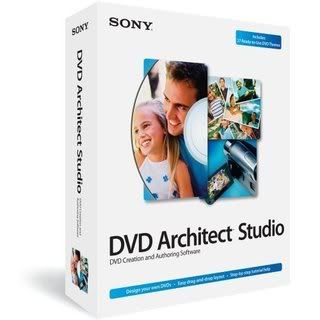
Sony dvd architect pro
Nothing beats DVD Architect software for professional DVD authoring. Its clean, drag-and-drop interface and powerful layout and authoring tools make it easy to develop dynamic menu-based DVDs, movies, picture slideshows, and music compilations. Included with the Vegas+DVD Production Suite, DVD Architect software works seamlessly within the Vegas environment.
http://www.megaupload.com/?d=YPB7QXNF
Sony dvd architect pro
Nothing beats DVD Architect software for professional DVD authoring. Its clean, drag-and-drop interface and powerful layout and authoring tools make it easy to develop dynamic menu-based DVDs, movies, picture slideshows, and music compilations. Included with the Vegas+DVD Production Suite, DVD Architect software works seamlessly within the Vegas environment.
http://www.megaupload.com/?d=YPB7QXNF

ekane....
ko meke password eka
rar eka extrac karanna bane
manappu said:meke pass eka diyanko kollo..tnx..
ko meke password eka
rar eka extrac karanna bane


sanjeeme said: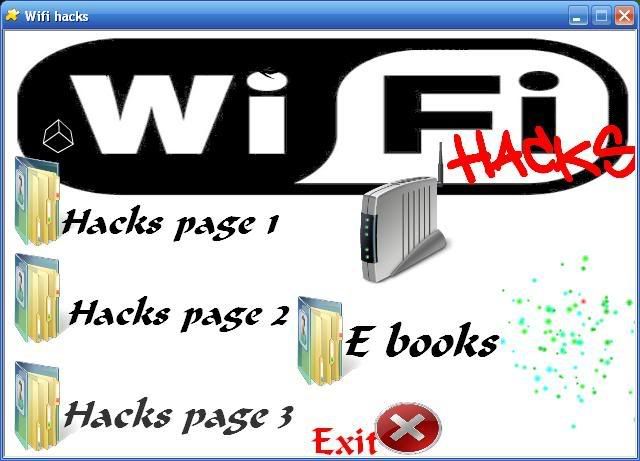
Wifi Hack AIO.
Get on your neighbours internet.
They wont even notice it!
Including everything you need to hack and crack.
Wifi internet connections.
Download
PASWWORD ? ? ? EKA MOKAKDA

DM Downloader!!! very fast downloads!!!

IDM eka gena dannawane, information one naaaaa neda
http://rapidshare.com/files/155403427/IDM_downloader_.rar

IDM eka gena dannawane, information one naaaaa neda
http://rapidshare.com/files/155403427/IDM_downloader_.rar
RAM Booster with crack
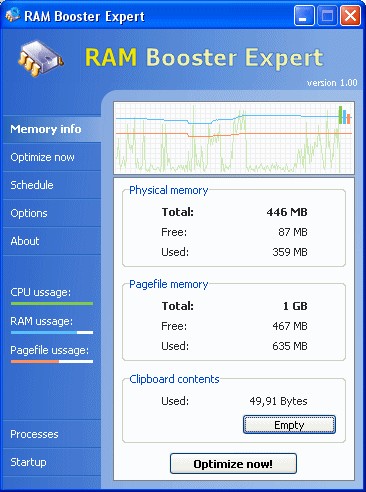
Many software products, including Windows, load a huge amount of libraries in memory, but not all of them are necessary. Our memory optimizer product will find these memory blocks and will unload them to the page file. When some of this data becomes necessary it is loaded back to RAM memory again.
Sometimes when applications close, not the entire allocated memory is released. RAM Booster Expert finds these memory leaks and flushes them, increasing size of free memory. Also RAM Booster Expert make a memory de-fragmentation that reduce the needed time for CPU to find the information.
Immediately after optimization process you can get your computer running a little bit slower, but this only for a couple of seconds.
Here are some key features of "RAM Booster Expert":
· Right from the start, you will be very pleased with the friendly interface of our software.
· Another important feature of the RAM Booster Expert software is the schedule function that helps you automatically run memory optimization processes.
· Also you can manage running processes and startup entries using Process Manager and Startup Manager.
· Another feature, very useful for users, is the multi-language interface!
Download:
http://rapidshare.com/files/5095754/RAM_Booster_with_crack.rar
Password: www.warez-bb.org
RAM Booster Expert is a RAM memory optimizer. It will free up RAM memory and make your system work much faster and stable. It allows you to instantly free up memory when your system slows down. Also it will defragment physical memory and will recover used memory from Windows and other applications. It is an easy and powerful tool for both beginners and experts. Our application integrates also a process and startup manager.
It has a easy to use interface that will display many information about free and used physical memory, free and used page file, CPU usage and clipboard content. You can use the schedule feature to optimize the memory when you are away from the computer.Many software products, including Windows, load a huge amount of libraries in memory, but not all of them are necessary. Our memory optimizer product will find these memory blocks and will unload them to the page file. When some of this data becomes necessary it is loaded back to RAM memory again.
Sometimes when applications close, not the entire allocated memory is released. RAM Booster Expert finds these memory leaks and flushes them, increasing size of free memory. Also RAM Booster Expert make a memory de-fragmentation that reduce the needed time for CPU to find the information.
Immediately after optimization process you can get your computer running a little bit slower, but this only for a couple of seconds.
Here are some key features of "RAM Booster Expert":
· Right from the start, you will be very pleased with the friendly interface of our software.
· Another important feature of the RAM Booster Expert software is the schedule function that helps you automatically run memory optimization processes.
· Also you can manage running processes and startup entries using Process Manager and Startup Manager.
· Another feature, very useful for users, is the multi-language interface!
Download:
http://rapidshare.com/files/5095754/RAM_Booster_with_crack.rar
Password: www.warez-bb.org
Windows Xp Pro Sp3 Final - Gold Cobra

SPECIAL FEATURES:
WINDOWBLINDS v.6.1 ENHANCED PRE-PATCHED (Added Xp Transparent Skin) - (just save license)
ICONPACKAGER v.3.2 (REGISTERED)
CUSTOM GLASS CURSERS AND VISTA SOUNDS BY DEFAULT
WMP11 VISTA CUSTOMIZED SKIN BY DEFAULT
LCLOCK CUSTOMIZED SETTINGS/CUSTOMIZED CALENDAR BY DEFAULT
VISTA CUSTOMIZED ROCKET DOCK
VISTA SIDEBAR CUSTOMIZED GADGETS
CUSTOMIZED PROPERTY BOXES
CUSTOMIZED INSTALLATION/BOOT/LOGON/LOGOFF SCREENS
GOLD THEME (WITH DEFAULT SETTINGS)
BLACK THEME (WITH DEFAULT SETTINGS)
SPECIAL ADDITIONS:
SATA SUPPORT
(DRIVER PACKS)
CHIPSET V.8.03
LAN V.8.052
M.SGE V.8.04
WLAN V.8.03
NETFRAME 2SP1
NETFRAME 3SP1
NETFRAME 3.5
VISUAL C 2005 SP1
VISUAL C 2008
DIRECT 9X RUNTIMES (MARCH 200
KLITE CODEC PACK V.3.9.0
PATCHES:
TcpIp - increased from 10 to 100
UxTheme - patch enabled
Sys.File Protection - disabled
TWEAKS FOR LOOKS AND SPEED:
Explorer-Add ‘Command Prompt’ to folder context menu
Explorer-Disable shortcut arrow
Explorer-Recycle Bin: allow to rename and delete
Explorer-Show Drive Letters in front of Drive Names
Internet Explorer-Set Homepage-www.google.com
Internet Explorer-Set Internet Explorer to accept 10 connects at a time
Performance-Disable Warn on low disk space
Start Menu-Reduce popup delay
Start Menu-Remove Windows Catalog shortcut
Start Menu-Remove Windows Update shortcut
Taskbar-Disable Balloon Tips
Taskbar-Disable Language-Bar
Taskbar-Hide Volume Control Icon in System Tray
Visual Effects-Animate windows when minimizing and maximizing-Disable
Visual Effects-Combo box animation-Disable
Visual Effects-Cursor shadow-Disable
Visual Effects-Display mouse pointer trails-Disable
Visual Effects-Fade out selection-Disable
Visual Effects-Gradient captions in windows-Disable
Visual Effects-Menu animation-Disable
Visual Effects-Menu shadows-Disable
Visual Effects-Show translucent selection rectangle-Enable
Visual Effects-Show window contents while dragging-Enable
Visual Effects-Slide taskbar buttons-Disable
Visual Effects-Smooth edges of screen fonts-ClearType
Visual Effects-Smooth-scroll list boxes-Enable
Visual Effects-Tooltip animation-Disable
Visual Effects-Use a background image for each folder type-Disable
Visual Effects-Use drop shadows for icon labels on the desktop-Enable
ADDED:
Netframe 2 Sp1
Vis.C Redis.2005 Sp1
Vis.C Redis.2008
DirectX 9.0c End-User Runtime
ImageResizer v1.2
WMP11 Vista Customized
BurnCDCC
CabTool v1.8
ClearType v1.1
CPL Bonus v.8.2.2
7-Zip 4.57
7zSplit 0.2.0.740
DAMN NFO Viewer v2.10.0032
CursorsCGlass v1.2
Firefox 2.0.0.14
HashTab v.2
Hunt Virus Utilities (Including HijackThis)
Image Format Cnvtr Shell v.2.0
IZArc 3.81 Build 1550
LClock v.1.62b custom
PowerCmd v.1.9 (registered)
Sysinternals Tools 25.07.2007
AIOVistaAeroCursors v7.07.03
CCleaner2.07.575
Standalone Flash Player (Macromedia)
StylerTB1401
VistaRTMFonts v1.1
VistaSceenSavers v1.1
VistaSoundsReplacement
WindowsSidebarSP3 AlkyXP1.0 (Customized)
WindowBlinds v.6.1 enhanced plus, Xp Transparent Skin (pre-patched - just save license)
IconPackager.v.3.2 (registered)
Klite Codecs v.3.9.0
RocketDock v.1.3.5 (customized)
Unlocker v.1.8.7
uTorrent 1.7.7 (8179) (BLUE) + SBG
WinRAR.v.3.71 (registered)
VistaLoud
SP3UpdPk1.0.9 RepacK
Black Theme (Customized)
Gold Theme (Customized)
IE7
http://rapidshare.com/files/143666834/xp.pro-sp3-final-GoldCobra_Loaded_.part1.rar
http://rapidshare.com/files/143666825/xp.pro-sp3-final-GoldCobra_Loaded_.part2.rar
http://rapidshare.com/files/143666757/xp.pro-sp3-final-GoldCobra_Loaded_.part3.rar
http://rapidshare.com/files/143666648/xp.pro-sp3-final-GoldCobra_Loaded_.part4.rar
Pass: c4links.com

SPECIAL FEATURES:
WINDOWBLINDS v.6.1 ENHANCED PRE-PATCHED (Added Xp Transparent Skin) - (just save license)
ICONPACKAGER v.3.2 (REGISTERED)
CUSTOM GLASS CURSERS AND VISTA SOUNDS BY DEFAULT
WMP11 VISTA CUSTOMIZED SKIN BY DEFAULT
LCLOCK CUSTOMIZED SETTINGS/CUSTOMIZED CALENDAR BY DEFAULT
VISTA CUSTOMIZED ROCKET DOCK
VISTA SIDEBAR CUSTOMIZED GADGETS
CUSTOMIZED PROPERTY BOXES
CUSTOMIZED INSTALLATION/BOOT/LOGON/LOGOFF SCREENS
GOLD THEME (WITH DEFAULT SETTINGS)
BLACK THEME (WITH DEFAULT SETTINGS)
SPECIAL ADDITIONS:
SATA SUPPORT
(DRIVER PACKS)
CHIPSET V.8.03
LAN V.8.052
M.SGE V.8.04
WLAN V.8.03
NETFRAME 2SP1
NETFRAME 3SP1
NETFRAME 3.5
VISUAL C 2005 SP1
VISUAL C 2008
DIRECT 9X RUNTIMES (MARCH 200
KLITE CODEC PACK V.3.9.0
PATCHES:
TcpIp - increased from 10 to 100
UxTheme - patch enabled
Sys.File Protection - disabled
TWEAKS FOR LOOKS AND SPEED:
Explorer-Add ‘Command Prompt’ to folder context menu
Explorer-Disable shortcut arrow
Explorer-Recycle Bin: allow to rename and delete
Explorer-Show Drive Letters in front of Drive Names
Internet Explorer-Set Homepage-www.google.com
Internet Explorer-Set Internet Explorer to accept 10 connects at a time
Performance-Disable Warn on low disk space
Start Menu-Reduce popup delay
Start Menu-Remove Windows Catalog shortcut
Start Menu-Remove Windows Update shortcut
Taskbar-Disable Balloon Tips
Taskbar-Disable Language-Bar
Taskbar-Hide Volume Control Icon in System Tray
Visual Effects-Animate windows when minimizing and maximizing-Disable
Visual Effects-Combo box animation-Disable
Visual Effects-Cursor shadow-Disable
Visual Effects-Display mouse pointer trails-Disable
Visual Effects-Fade out selection-Disable
Visual Effects-Gradient captions in windows-Disable
Visual Effects-Menu animation-Disable
Visual Effects-Menu shadows-Disable
Visual Effects-Show translucent selection rectangle-Enable
Visual Effects-Show window contents while dragging-Enable
Visual Effects-Slide taskbar buttons-Disable
Visual Effects-Smooth edges of screen fonts-ClearType
Visual Effects-Smooth-scroll list boxes-Enable
Visual Effects-Tooltip animation-Disable
Visual Effects-Use a background image for each folder type-Disable
Visual Effects-Use drop shadows for icon labels on the desktop-Enable
ADDED:
Netframe 2 Sp1
Vis.C Redis.2005 Sp1
Vis.C Redis.2008
DirectX 9.0c End-User Runtime
ImageResizer v1.2
WMP11 Vista Customized
BurnCDCC
CabTool v1.8
ClearType v1.1
CPL Bonus v.8.2.2
7-Zip 4.57
7zSplit 0.2.0.740
DAMN NFO Viewer v2.10.0032
CursorsCGlass v1.2
Firefox 2.0.0.14
HashTab v.2
Hunt Virus Utilities (Including HijackThis)
Image Format Cnvtr Shell v.2.0
IZArc 3.81 Build 1550
LClock v.1.62b custom
PowerCmd v.1.9 (registered)
Sysinternals Tools 25.07.2007
AIOVistaAeroCursors v7.07.03
CCleaner2.07.575
Standalone Flash Player (Macromedia)
StylerTB1401
VistaRTMFonts v1.1
VistaSceenSavers v1.1
VistaSoundsReplacement
WindowsSidebarSP3 AlkyXP1.0 (Customized)
WindowBlinds v.6.1 enhanced plus, Xp Transparent Skin (pre-patched - just save license)
IconPackager.v.3.2 (registered)
Klite Codecs v.3.9.0
RocketDock v.1.3.5 (customized)
Unlocker v.1.8.7
uTorrent 1.7.7 (8179) (BLUE) + SBG
WinRAR.v.3.71 (registered)
VistaLoud
SP3UpdPk1.0.9 RepacK
Black Theme (Customized)
Gold Theme (Customized)
IE7
http://rapidshare.com/files/143666834/xp.pro-sp3-final-GoldCobra_Loaded_.part1.rar
http://rapidshare.com/files/143666825/xp.pro-sp3-final-GoldCobra_Loaded_.part2.rar
http://rapidshare.com/files/143666757/xp.pro-sp3-final-GoldCobra_Loaded_.part3.rar
http://rapidshare.com/files/143666648/xp.pro-sp3-final-GoldCobra_Loaded_.part4.rar
Pass: c4links.com
Cowon Jet Audio 7.1.7.4005+VX-FOSI+Skin Plus

JetAudio is integrated multimedia software composed of a single compact rack. Not only does it play various music and video files, but it also has other features such as CD burning, recording, conversion to other file formats, and so on. In addition to these features, you have the ability to create your own Internet broadcasting by using JetCast, which is provided with JetAudio.Play all major file formats and discs, including WAV, MP3, MP3Pro,OGG, WMA, MPG, AVI, WMV, MIDI, RM, and video, and audio CD.Convert among audio file formats, and record analog audio to various formats. The program features Internet broadcasting with JetCast; visualization plug-ins, including Sound2Vision; tag editing for MP3, OGG, and WMA; various sound effects including wide, reverb, and x-bass; multichannel sound output; speed control of audio playback; crossfading for smooth transition between two songs; a skinnable user interface; synchronized lyrics display (karaoke) for MIDI and MP3 files; and subtitles.
Download:
http://rapidshare.com/files/156712560/Cowon.JetAudio.v7.17.Plus.VX.Up.By.Asre_no.Soft.Group.rar

JetAudio is integrated multimedia software composed of a single compact rack. Not only does it play various music and video files, but it also has other features such as CD burning, recording, conversion to other file formats, and so on. In addition to these features, you have the ability to create your own Internet broadcasting by using JetCast, which is provided with JetAudio.Play all major file formats and discs, including WAV, MP3, MP3Pro,OGG, WMA, MPG, AVI, WMV, MIDI, RM, and video, and audio CD.Convert among audio file formats, and record analog audio to various formats. The program features Internet broadcasting with JetCast; visualization plug-ins, including Sound2Vision; tag editing for MP3, OGG, and WMA; various sound effects including wide, reverb, and x-bass; multichannel sound output; speed control of audio playback; crossfading for smooth transition between two songs; a skinnable user interface; synchronized lyrics display (karaoke) for MIDI and MP3 files; and subtitles.
Download:
http://rapidshare.com/files/156712560/Cowon.JetAudio.v7.17.Plus.VX.Up.By.Asre_no.Soft.Group.rar
Typing Master v7.0.1.763 Pro

Double your typing speed to save time
Interactive training with a personal approach
Your Personal Typing Tutor
Meet TypingMaster Pro, the personal touch typing tutor that adapts to your unique needs. The program provides customized exercises and helpful feedback to guide you step by step to professional keyboarding. As a result your typing speed will increase significantly saving you a lot of valuable work time.
Adjusts to Your Progress
At every stage training is adjusted to your personal progress. Weak spots are pinpointed and rapidly eliminated with additional exercises. Thanks to this personal approach you can put your new skills into action after only 3 to 5 hours of training.
The Benefits of Touch Typing
Double your typing speed
Get rid of typos
Save valuable work time
Focus on your text and ideas
Improve your ergonomics
Be confident with computers
Optimal Learning - Better Skills in Less Time
At TypingMaster, we consider your time precious. That's why our team has developed a set of Optimal Learning features to accelerate your learning and save your time.
Optimal Learning features support your learning in many ways. When you see how you are making rapid progress and reaching your goals, you’ll be motivated to keep going. If weak spots are detected, they are eliminated immediately with customised exercises. After the typing course the unique TypingMaster Satellite integrates training into your everyday work.
The bottom line - you will acquire better typing skills in less time.
Optimal Learning Features
Optimized Duration
Exercises Made to Measure
TypingMaster monitors your progress in real time as you do the typing drills. If your typing is accurate and fluent enough, the program lets you complete the drill in a shorter timespan. Similarly, it will provide more practice when you need it.
As a result the duration of each exercise is based on your personal learning needs so you’re likely to save a lot of unnecessary practice. Your overall skill level will also be better as weaknesses are addressed immediately with extended training.
Smart Review
Difficult Keys Eliminated
During training TypingMaster Pro monitors how well you master each key and visualises your progress in a graph. If one or more keys are particularly difficult, you’ll get a recommendation to train them with a fully tailored review exercise.
Additionally, you can review keys of your choice whenever you need. This way difficult keys are improved right away before they start to slow down your learning.
TypingMaster Satellite
Add Further Training to your Daily Work
TypingMaster Satellite is a unique learning assistant that integrates training into your everyday work. You can launch it after the typing course to hone your skills even further.
The Satellite analyzes your typing in other programs and identifies those keys and words that repeatedly cause difficulties. You can then train those difficult areas by completing customised exercises.
In addition the Satellite gathers statistics on your typing speed progress and reminds you to take short breaks to relax your arms.
Bite Size Exercises
Training to Fit Your Schedule
With TypingMaster Pro you can fit training even into the tightest schedule. The flexibility is based on the bite-size exercises that take only a few minutes to complete. Just 10 minutes is enough time for an effective learning session.
http://www.typingmaster.com/
TypingMaster Pro is a professional typing tutor that helps you to double your typing speed. With TypingMaster Pro it takes only a couple of hours to learn the blazing fast touch typing system. As a result you will save hours and hours of time!
Download:
http://rapidshare.com/files/132477369/Typing_Master_Pro_v7.0.1.763.rar

TypingMaster Pro is a professional typing tutor that helps you to double your typing speed. With TypingMaster Pro it takes only a couple of hours to learn the blazing fast touch typing system. As a result you will save hours and hours of time!
Learn the powerful touch typing techniqueDouble your typing speed to save time
Interactive training with a personal approach
Your Personal Typing Tutor
Meet TypingMaster Pro, the personal touch typing tutor that adapts to your unique needs. The program provides customized exercises and helpful feedback to guide you step by step to professional keyboarding. As a result your typing speed will increase significantly saving you a lot of valuable work time.
Adjusts to Your Progress
At every stage training is adjusted to your personal progress. Weak spots are pinpointed and rapidly eliminated with additional exercises. Thanks to this personal approach you can put your new skills into action after only 3 to 5 hours of training.
The Benefits of Touch Typing
Double your typing speed
Get rid of typos
Save valuable work time
Focus on your text and ideas
Improve your ergonomics
Be confident with computers
Optimal Learning - Better Skills in Less Time
At TypingMaster, we consider your time precious. That's why our team has developed a set of Optimal Learning features to accelerate your learning and save your time.
Optimal Learning features support your learning in many ways. When you see how you are making rapid progress and reaching your goals, you’ll be motivated to keep going. If weak spots are detected, they are eliminated immediately with customised exercises. After the typing course the unique TypingMaster Satellite integrates training into your everyday work.
The bottom line - you will acquire better typing skills in less time.
Optimal Learning Features
Optimized Duration
Exercises Made to Measure
TypingMaster monitors your progress in real time as you do the typing drills. If your typing is accurate and fluent enough, the program lets you complete the drill in a shorter timespan. Similarly, it will provide more practice when you need it.
As a result the duration of each exercise is based on your personal learning needs so you’re likely to save a lot of unnecessary practice. Your overall skill level will also be better as weaknesses are addressed immediately with extended training.
Smart Review
Difficult Keys Eliminated
During training TypingMaster Pro monitors how well you master each key and visualises your progress in a graph. If one or more keys are particularly difficult, you’ll get a recommendation to train them with a fully tailored review exercise.
Additionally, you can review keys of your choice whenever you need. This way difficult keys are improved right away before they start to slow down your learning.
TypingMaster Satellite
Add Further Training to your Daily Work
TypingMaster Satellite is a unique learning assistant that integrates training into your everyday work. You can launch it after the typing course to hone your skills even further.
The Satellite analyzes your typing in other programs and identifies those keys and words that repeatedly cause difficulties. You can then train those difficult areas by completing customised exercises.
In addition the Satellite gathers statistics on your typing speed progress and reminds you to take short breaks to relax your arms.
Bite Size Exercises
Training to Fit Your Schedule
With TypingMaster Pro you can fit training even into the tightest schedule. The flexibility is based on the bite-size exercises that take only a few minutes to complete. Just 10 minutes is enough time for an effective learning session.
http://www.typingmaster.com/
TypingMaster Pro is a professional typing tutor that helps you to double your typing speed. With TypingMaster Pro it takes only a couple of hours to learn the blazing fast touch typing system. As a result you will save hours and hours of time!
Download:
http://rapidshare.com/files/132477369/Typing_Master_Pro_v7.0.1.763.rar
Fruity Loops Studio 8.0 (XXL Edition)

Make virtually any sound. FL8 includes 29 virtual synthesizers covering acoustic/synthetic bass, electric guitar and plucked string simulation, sampler tools including piano, general sample playback, and beat-slicing, and a range of synthesis techniques (subtractive, modelling, FM, granular and additive). With FL Studios newest addition, FL Synthmaker - a fully modular environment, you can now create & share your own FL instruments, effects & dashboards without the need to write basic code.
Download:
http://rapidshare.com/files/152206187/wAppz_FruityLoops-Studio8.0.rar

Make virtually any sound. FL8 includes 29 virtual synthesizers covering acoustic/synthetic bass, electric guitar and plucked string simulation, sampler tools including piano, general sample playback, and beat-slicing, and a range of synthesis techniques (subtractive, modelling, FM, granular and additive). With FL Studios newest addition, FL Synthmaker - a fully modular environment, you can now create & share your own FL instruments, effects & dashboards without the need to write basic code.
Download:
http://rapidshare.com/files/152206187/wAppz_FruityLoops-Studio8.0.rar
Similar threads


- Replies
- 10
- Views
- 659


- Replies
- 10
- Views
- 826