


Latest ads
-
 ඕනම රටකට සෙට් වෙන CV එකක්
- ErMurazor
- Updated:
-
 Hambantota 7 Acres Beachfront Land For Sell DownSouth , PerPerch Price 420 000
- 1024 Digital
- Updated:
-
 Baseus PI LITE INDOOR CAMERA
- ErMurazor
- Updated:
-
Colombo Hard Disk For Sale
- mazza
- Updated:
---------SOFTWARE 4 ALL--------
- Thread starter sanjeeme
- Start date
You are using an out of date browser. It may not display this or other websites correctly.
You should upgrade or use an alternative browser.
You should upgrade or use an alternative browser.


SolveigMM Video Splitter 2.1.810.31

SolveigMM Video Splitter being AVI/WMV/ASF/MP3/WMA Splitter is the really powerful video editor to perform video cutting tasks like a movie cut, cut commercials or video repair extremely fast and lossless.The nice looking and intuitive user-friendly interface allows an user to split, cut or trim his movie in few mouse clicks.
Fixes:
- Inaccurate editing of DVD VOB files. End positions of fragments set to be kept in output mismatched with set positions. Up to 10 frames in each fragment could be more than required
- Fixed problem - if to open MPEG-2 with LPCM audio and try to edit that, the Splitter generated error - "Connecting additional trimmer pin with Muxer has been filed. hr = 0x80040207"
- Video screen did not redraw while dragging or maximizing the main window
- Fixed a crash arisen while trimming some AVI files with MP3 audio
- Fixed navigation problem - when you navigate slider cursor between markers by TAB and then try to seek to one frame left/right, a current marker was navigated instead of a slider cursor
- Fixed bug - when one tried to open SSP or XTL project with reference to index file(MLMIX) for MPEG-2 files > 4GB, splitter delivered message - "Source file is not supported or damaged"
- Clip Scr file in SSP or XTL project showed incorrectly (e.g. if it was "C:tempfile.vob" it showed "C:temp.file.vob")
- If there was turned on - "Obey Sample Times" feature - obey_sample_times="1" flag was written twice to XTL or SSP that caused error in attempt to open such XTL or SSP file
- LPCM audio in MPEG-2 wrong detection. The splitter showed Unknown audio type
- Fixed a false alarm of possible File rewriting. If you opened some SSP, and changed an output file name then if it even did not exist the Splitter generated the warning
- Fixed bug. If to open SSP file with set output file that can't be created and start processing, the Splitter fulfilled task but did not create an output. Now it generates an error
Changes:
- To improve usability added *.SSP file filter on Open Media File dialog
- Starting, "Time Calculator" now shows the difference between two nearest markers relatively the slide cursor position
- If opening SSP file the Splitter does not find Clip Scar file (e.g. it was moved to other folder) it asks a user to specify it rather then error deliver
Size: 5.54 MB
http://rapidshare.com/files/159981548/SolveigMM_Video_Splitter_2_1_810_31.rar
or
http://www.megaupload.com/?d=HK85T8BC

SolveigMM Video Splitter being AVI/WMV/ASF/MP3/WMA Splitter is the really powerful video editor to perform video cutting tasks like a movie cut, cut commercials or video repair extremely fast and lossless.The nice looking and intuitive user-friendly interface allows an user to split, cut or trim his movie in few mouse clicks.
Fixes:
- Inaccurate editing of DVD VOB files. End positions of fragments set to be kept in output mismatched with set positions. Up to 10 frames in each fragment could be more than required
- Fixed problem - if to open MPEG-2 with LPCM audio and try to edit that, the Splitter generated error - "Connecting additional trimmer pin with Muxer has been filed. hr = 0x80040207"
- Video screen did not redraw while dragging or maximizing the main window
- Fixed a crash arisen while trimming some AVI files with MP3 audio
- Fixed navigation problem - when you navigate slider cursor between markers by TAB and then try to seek to one frame left/right, a current marker was navigated instead of a slider cursor
- Fixed bug - when one tried to open SSP or XTL project with reference to index file(MLMIX) for MPEG-2 files > 4GB, splitter delivered message - "Source file is not supported or damaged"
- Clip Scr file in SSP or XTL project showed incorrectly (e.g. if it was "C:tempfile.vob" it showed "C:temp.file.vob")
- If there was turned on - "Obey Sample Times" feature - obey_sample_times="1" flag was written twice to XTL or SSP that caused error in attempt to open such XTL or SSP file
- LPCM audio in MPEG-2 wrong detection. The splitter showed Unknown audio type
- Fixed a false alarm of possible File rewriting. If you opened some SSP, and changed an output file name then if it even did not exist the Splitter generated the warning
- Fixed bug. If to open SSP file with set output file that can't be created and start processing, the Splitter fulfilled task but did not create an output. Now it generates an error
Changes:
- To improve usability added *.SSP file filter on Open Media File dialog
- Starting, "Time Calculator" now shows the difference between two nearest markers relatively the slide cursor position
- If opening SSP file the Splitter does not find Clip Scar file (e.g. it was moved to other folder) it asks a user to specify it rather then error deliver
Size: 5.54 MB
http://rapidshare.com/files/159981548/SolveigMM_Video_Splitter_2_1_810_31.rar
or
http://www.megaupload.com/?d=HK85T8BC

System Speedup Wizard 3.1.0

System Speedup Wizard increases computer performance by allocating higher portions of CPU power to active applications and games. It is a revolutionary product which enhances processor ntensive software to run at even faster speeds. Very easy to use, fully compliant with all versions of Microsoft Windows and compatible with most software. With System Speedup Wizard your computer will run faster than ever before. Boost the performance of your PC the easy way remarkably.
Download:
Code:
http://rapidshare.com/files/177812680/S.S.W.3.1.0.rar

System Speedup Wizard increases computer performance by allocating higher portions of CPU power to active applications and games. It is a revolutionary product which enhances processor ntensive software to run at even faster speeds. Very easy to use, fully compliant with all versions of Microsoft Windows and compatible with most software. With System Speedup Wizard your computer will run faster than ever before. Boost the performance of your PC the easy way remarkably.
Download:
Code:
http://rapidshare.com/files/177812680/S.S.W.3.1.0.rar
Super codec pack for media player 11

http://rapidshare.com/files/175832283/ALL_CODECS_FOR_MEDIA_PLAYER_nd.rar

http://rapidshare.com/files/175832283/ALL_CODECS_FOR_MEDIA_PLAYER_nd.rar
XYplorer 7.40.0001

XYplorer 7.40.0001
XYplorer is a multi-tabbed file manager featuring a powerful file search, versatile preview facilities, a highly customizable interface, and an array of unique ways to efficiently automate frequently recurring tasks. XYplorer is a tool rather than a toy, and targets power users and computer professionals who are looking for an Explorer replacement that deserves its name.
Why XYplorer?
XYplorer is a portable file manager. It doesn\'t require any installation, nor does it ever change your system or registry. Ideal for a USB drive.
Here\'s cutting-edge file management using a true multi-tabbed interface. If you like dual pane, you will love multi-tabs!
XYplorer features a high-end file search with tremendous power and truly amazing speed. It fully supports Boolean logic, Regular Expressions, content search, and more...
Reduce your daily routines to simple keystrokes with User-Defined Commands!
Scripting. Advanced solutions for advanced tasks. Learn more...
One-click previews of all important image, audio, video, web, office, and font file formats.
No other file manager offers a favorites panel that\'s nearly as powerful as XYplorer\'s Catalog.
Who else offers an easily configurable New Items menu? Major time saver!
Portable File Associations: Home is where your double-click is!
Customizable Keyboard Shortcuts for more than 300 functions. Have it your way!
XYplorer is continuously enhanced and users are taken seriously. Visit the Forum...
A clean and user-friendly interface makes working with XYplorer easy and intuitive.
XY 7.20 released
XYplorer 7.20 has been released on 09-Jun-2008. Here\'s a quick introduction to the main new features:
Support for editing Unicode filenames. Finally, XYplorer supports inline renaming for filenames containing non-ANSI Unicode characters.
Warp speed through new \"treeless browsing\". Ever since, the Tree shows basically the same path as the Window Title, the Address Bar and the File List: If you change the current path by any of the numerous ways available in XYplorer, the Tree is automatically adjusted to the new location. Even, if you don\'t really need that service... The new toggle \"Auto-Synchronize Tree\" allows you to turn off the Tree temporarily. Here are some of the reasons for doing this:
(1) It offers a uniform maximum browsing speed that\'s totally independent of the nesting depth of the target locations. For example, if you quickly need to check size and version of a particular system file, it is totally pointless to expand the tree down to system32, because all you need is a quick glance at that file in the file list. Or, if you have a script that needs to visit some location -- why should the tree get busy here?
(2) It keeps the Tree in a stable state and position while browsing. For example, this can be valuable when collecting stuff from various locations via drag+drop into a couple of target folders -- no need to scroll the tree anymore: The Tree just sits there and waits.
(3) It makes consequent use of XYplorer\'s many ways of going to a new place: Address Bar, Tabs, Catalog, Favorites, History, Hotlist, Breadcrumb, GoTo, UDCs, Scripts, etc. ... they all work flawlessly without the Tree, and if you just need to go somewhere to work with certain items, you may well be completely uninterested in their position in the file system -- no need for a Tree to show you.
New popular button \"Copy Path/Name\". A new toolbar button for a common task: copying the full path/name of a file item to the clipboard:
The button comes with an extensive context menu (as most of XYplorer\'s toolbar buttons):
New submenu \"Shortcut Target\". The context menu of *.lnk files (aka Shortcuts) now features a special submenu containing three pretty useful commands: Go to Shortcut Target, Copy Shortcut Target Item, and Copy Shortcut Target Name:
Faster startup. Fundamental re-engineering of core components resulted in notably shorter load times: around 0.6 seconds (!) on a typical 2 GHz processor.. Brought to you by DayWarez.com!
Download the Full Version Here with Thousands More!
http://rapidshare.com/files/137467942/XYplorer.v7.40.0001.WinAll.Incl.Keygen-CRD.rar

XYplorer 7.40.0001
XYplorer is a multi-tabbed file manager featuring a powerful file search, versatile preview facilities, a highly customizable interface, and an array of unique ways to efficiently automate frequently recurring tasks. XYplorer is a tool rather than a toy, and targets power users and computer professionals who are looking for an Explorer replacement that deserves its name.
Why XYplorer?
XYplorer is a portable file manager. It doesn\'t require any installation, nor does it ever change your system or registry. Ideal for a USB drive.
Here\'s cutting-edge file management using a true multi-tabbed interface. If you like dual pane, you will love multi-tabs!
XYplorer features a high-end file search with tremendous power and truly amazing speed. It fully supports Boolean logic, Regular Expressions, content search, and more...
Reduce your daily routines to simple keystrokes with User-Defined Commands!
Scripting. Advanced solutions for advanced tasks. Learn more...
One-click previews of all important image, audio, video, web, office, and font file formats.
No other file manager offers a favorites panel that\'s nearly as powerful as XYplorer\'s Catalog.
Who else offers an easily configurable New Items menu? Major time saver!
Portable File Associations: Home is where your double-click is!
Customizable Keyboard Shortcuts for more than 300 functions. Have it your way!
XYplorer is continuously enhanced and users are taken seriously. Visit the Forum...
A clean and user-friendly interface makes working with XYplorer easy and intuitive.
XY 7.20 released
XYplorer 7.20 has been released on 09-Jun-2008. Here\'s a quick introduction to the main new features:
Support for editing Unicode filenames. Finally, XYplorer supports inline renaming for filenames containing non-ANSI Unicode characters.
Warp speed through new \"treeless browsing\". Ever since, the Tree shows basically the same path as the Window Title, the Address Bar and the File List: If you change the current path by any of the numerous ways available in XYplorer, the Tree is automatically adjusted to the new location. Even, if you don\'t really need that service... The new toggle \"Auto-Synchronize Tree\" allows you to turn off the Tree temporarily. Here are some of the reasons for doing this:
(1) It offers a uniform maximum browsing speed that\'s totally independent of the nesting depth of the target locations. For example, if you quickly need to check size and version of a particular system file, it is totally pointless to expand the tree down to system32, because all you need is a quick glance at that file in the file list. Or, if you have a script that needs to visit some location -- why should the tree get busy here?
(2) It keeps the Tree in a stable state and position while browsing. For example, this can be valuable when collecting stuff from various locations via drag+drop into a couple of target folders -- no need to scroll the tree anymore: The Tree just sits there and waits.
(3) It makes consequent use of XYplorer\'s many ways of going to a new place: Address Bar, Tabs, Catalog, Favorites, History, Hotlist, Breadcrumb, GoTo, UDCs, Scripts, etc. ... they all work flawlessly without the Tree, and if you just need to go somewhere to work with certain items, you may well be completely uninterested in their position in the file system -- no need for a Tree to show you.
New popular button \"Copy Path/Name\". A new toolbar button for a common task: copying the full path/name of a file item to the clipboard:
The button comes with an extensive context menu (as most of XYplorer\'s toolbar buttons):
New submenu \"Shortcut Target\". The context menu of *.lnk files (aka Shortcuts) now features a special submenu containing three pretty useful commands: Go to Shortcut Target, Copy Shortcut Target Item, and Copy Shortcut Target Name:
Faster startup. Fundamental re-engineering of core components resulted in notably shorter load times: around 0.6 seconds (!) on a typical 2 GHz processor.. Brought to you by DayWarez.com!
Download the Full Version Here with Thousands More!
http://rapidshare.com/files/137467942/XYplorer.v7.40.0001.WinAll.Incl.Keygen-CRD.rar
Dr.Hardware 2009 9.9.0e

Since 1994 Dr. Hardware is among the most advanced system information programs on the market. This program is made for beginners and professional users, for your desktop computer as well as for your notebook or netbook. Dr. Hardware covers the whole machine and includes not only the common stuff (like processor detection etc.) but also some more sophisticated tests like hardware sensor, ATA/S-ATA/Atapi and network analysis. Also it comes with 7 benchmark tests and provides full support for all 32 and 64 Bit Windows desktop versions: Windows 95, 98, Me, NT4, 2000, 2003, XP and Vista.
Dr. Hardware 2009- Highlights
- Detects and analyses the latest processors, mainboard chipsets, PCI devices and much more.
- Full Windows Vista 64 bit support due to digitally signed kernel mode driver and program files!
- New: Support for Intel Core i7, Xeon 7400/5400/5200/3300/3200/3100, latest Atom, Core 2 Quad, Core 2 Extreme, Core Duo, Core 2 Duo E8xx, Celeron 500, Celeron M processors; AMD Athlon XP, Turion 64 Mobile, Quad Core Opteron/3rd Generation, Embedded Opteron, Sempron(tm) SI, Turion(tm) X2 Ultra Dual-Core Mobile ZM, Turion(tm) X2 Dual-Core Mobile RM, Athlon(tm) X2 Dual-Core QL
- New: Support for Intel chipsets (X58, G41, Q43, Q45 Express, PM45, GM45, GS45, GL40, G35, Mobile 945GSE Express, US15W, UL11L, US15L, Server 3200, 3210, 5100, ICH 10D/DO); nVidia chipsets (9400M, MCP79, nForce 610M, 630M, 630a, 720a, 730a, 750a SLI, 780a SLI, nForce 610i, 620i, 630i, 780i SLI, 790i SLI), AMD chipsets (740G, 780G, 780V, 790GX)
- New: Thermal sensor readings on later Intel and AMD CPUs (preliminary support)
- New: Support for current processor features, Intel Centrino 2, Turbo Memory Controller, Intel Turbo Boost Technology, Intel QuickPath Interconnect (QPI)
- New: (S)ATA analysis: Support for Free Fall Control, Security Feature, RPM, Form Factor, NVCache (Hybrid-HDs), SMART selftest.
- More than just system info: Features Burn-In-test, Rating test, keyboard input test, monitor test screen.
- Several bug fixes and much more
http://rapidshare.com/files/177774886/DRHARDWAR.2009.9.9.0e.g3n.downarchive.rar

Dr.Hardware 2009 9.9.0e | 5.44 MB
Since 1994 Dr. Hardware is among the most advanced system information programs on the market. This program is made for beginners and professional users, for your desktop computer as well as for your notebook or netbook. Dr. Hardware covers the whole machine and includes not only the common stuff (like processor detection etc.) but also some more sophisticated tests like hardware sensor, ATA/S-ATA/Atapi and network analysis. Also it comes with 7 benchmark tests and provides full support for all 32 and 64 Bit Windows desktop versions: Windows 95, 98, Me, NT4, 2000, 2003, XP and Vista.
Dr. Hardware 2009- Highlights
- Detects and analyses the latest processors, mainboard chipsets, PCI devices and much more.
- Full Windows Vista 64 bit support due to digitally signed kernel mode driver and program files!
- New: Support for Intel Core i7, Xeon 7400/5400/5200/3300/3200/3100, latest Atom, Core 2 Quad, Core 2 Extreme, Core Duo, Core 2 Duo E8xx, Celeron 500, Celeron M processors; AMD Athlon XP, Turion 64 Mobile, Quad Core Opteron/3rd Generation, Embedded Opteron, Sempron(tm) SI, Turion(tm) X2 Ultra Dual-Core Mobile ZM, Turion(tm) X2 Dual-Core Mobile RM, Athlon(tm) X2 Dual-Core QL
- New: Support for Intel chipsets (X58, G41, Q43, Q45 Express, PM45, GM45, GS45, GL40, G35, Mobile 945GSE Express, US15W, UL11L, US15L, Server 3200, 3210, 5100, ICH 10D/DO); nVidia chipsets (9400M, MCP79, nForce 610M, 630M, 630a, 720a, 730a, 750a SLI, 780a SLI, nForce 610i, 620i, 630i, 780i SLI, 790i SLI), AMD chipsets (740G, 780G, 780V, 790GX)
- New: Thermal sensor readings on later Intel and AMD CPUs (preliminary support)
- New: Support for current processor features, Intel Centrino 2, Turbo Memory Controller, Intel Turbo Boost Technology, Intel QuickPath Interconnect (QPI)
- New: (S)ATA analysis: Support for Free Fall Control, Security Feature, RPM, Form Factor, NVCache (Hybrid-HDs), SMART selftest.
- More than just system info: Features Burn-In-test, Rating test, keyboard input test, monitor test screen.
- Several bug fixes and much more
http://rapidshare.com/files/177774886/DRHARDWAR.2009.9.9.0e.g3n.downarchive.rar
Electric Rain Swift3D v5.0.0.662

Swift 3D continues to be the premier 3D tool for rich media designers. It's the only 3D software to directly integrate with Adobe Flash® through the Swift 3D File Importer and SmartLayer Technology, and produces unrivaled vector rendering quality and output style options. Swift 3D's toolset and interface allow anyone to quickly create 3D content, while providing a full set of advanced tools to grow into. And with new Papervision3D export, Swift 3D introduces a whole new realm of true 3D possibilities in Flash. Swift 3D is a powerful, easy-to-use 3D solution that delivers high-quality results.
Features:
• The only 3D technology to offer direct integration with Adobe Flash
• Papervision3D Export with built-in mouse interactivity.
• Unrivaled vector rendering quality, speed and output styles.
• Powerful, yet easy-to-use 3D toolset built specifically for Flash designers
• The industry-leading 3D rich media design tool of choice by over 65,000 designers (View Major Customers)
• SmartLayer Technology reduces file size and broadens design possibilities
• Papervision 3D Export with Scripted Mouse Interactivity
• Mesh Morphing Animations
• New User Interface
• 3DS File Export
• Per-Object Render Styles
• User-controlled Flash Optimization
• Apply Transparent Bitmap Textures
http://rapidshare.com/files/176433125/Electric.Rain.Swift3D.v5.0.0.662.g3n.downarchive.rar

Electric Rain Swift3D v5.0.0.662 | 52.16 MB
Swift 3D continues to be the premier 3D tool for rich media designers. It's the only 3D software to directly integrate with Adobe Flash® through the Swift 3D File Importer and SmartLayer Technology, and produces unrivaled vector rendering quality and output style options. Swift 3D's toolset and interface allow anyone to quickly create 3D content, while providing a full set of advanced tools to grow into. And with new Papervision3D export, Swift 3D introduces a whole new realm of true 3D possibilities in Flash. Swift 3D is a powerful, easy-to-use 3D solution that delivers high-quality results.
Features:
• The only 3D technology to offer direct integration with Adobe Flash
• Papervision3D Export with built-in mouse interactivity.
• Unrivaled vector rendering quality, speed and output styles.
• Powerful, yet easy-to-use 3D toolset built specifically for Flash designers
• The industry-leading 3D rich media design tool of choice by over 65,000 designers (View Major Customers)
• SmartLayer Technology reduces file size and broadens design possibilities
• Papervision 3D Export with Scripted Mouse Interactivity
• Mesh Morphing Animations
• New User Interface
• 3DS File Export
• Per-Object Render Styles
• User-controlled Flash Optimization
• Apply Transparent Bitmap Textures
http://rapidshare.com/files/176433125/Electric.Rain.Swift3D.v5.0.0.662.g3n.downarchive.rar

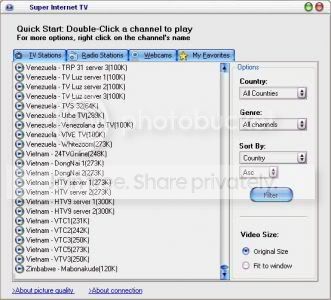
this link doesn't exist anymore need another link pleasesanjeeme said:The Super one Internet TV allows that you should look at 1900 + living channels of the television and to listen to 5000 + in line radio stations of 100 countries. There is no need for a card of the tuner of the TV because all the channels are flown across his Internet connection. For the majority of TV and channels of radio a speed of the modem of 56Kb / s needs from itself, for the stations of the wide band of the TV that you need 300 Kb / century. East software comes with the automatic updates station of TV so it will never be obsolete. If you are interested in languages learning or the alternative programming, this is a good option for you.
Minimal requisites of the system
-350 MHz Intel Pentium II or equivalent processor
-64 MB of RAM (128 MB in Windows XP or later)
-10 MB of available space on disc
-56 Kbps modem
- of 16 bits sound card and loudspeakers
-65,000 - color of video of formed to 800x600 (video)
- Windows XP/Vista/2003/2000/ME/98SE/NT4
- IE 5,0 or later.
- the last version of RealPlayer and Windows Media installed Player.
--Anti-Peeper Key.
DOWNLOAD
http://rapidshare.com/files/95691086/onlinetv72.2008.rar

VISTA ULTIMATE ONLY 4MB.

Code:
http://rapidshare.com/files/173510845/Vista.rar
PASS CODE
PASS CODE::ardan

Code:
http://rapidshare.com/files/173510845/Vista.rar
PASS CODE
PASS CODE::ardan
Cool website icons

Download link :
Code:
http://rapidshare.com/files/177548042/website_icons.rar.html

Download link :
Code:
http://rapidshare.com/files/177548042/website_icons.rar.html
AV Music Morpher Gold v4.0.69

Music Morpher Gold is an all-in-one music editor with the high-quality multitrack editor that helps you mix songs better. The easy-to-use combined voice remover-extractor allows you to quickly create karaoke background music so you can sing along.
http://rapidshare.com/files/1778115...v4.0.69.WinAll.Incl.Keygen.MERRY.XMAS-CRD.rar

Music Morpher Gold is an all-in-one music editor with the high-quality multitrack editor that helps you mix songs better. The easy-to-use combined voice remover-extractor allows you to quickly create karaoke background music so you can sing along.
http://rapidshare.com/files/1778115...v4.0.69.WinAll.Incl.Keygen.MERRY.XMAS-CRD.rar
Pen Drive Data Recovery v3.0

Pen Drive data recovery is a useful and reliable memory stick data recovery utility. It does not write to your damaged or erased memory stick, and it will show you accurate and reliable previews of what is recoverable.It performs best if you have your flash media card installed in a card reader while the evaluation is conducted.
Requirements:
· Pentium-class processor
· Windows 9X/ME/NT/2000/XP
· RAM (128 MB recommended)
· 20 Mb of free space
Code:
http://rapidshare.com/files/177778181/Recovery_Pen_Drive_v3_SO_SA.rar

Pen Drive data recovery is a useful and reliable memory stick data recovery utility. It does not write to your damaged or erased memory stick, and it will show you accurate and reliable previews of what is recoverable.It performs best if you have your flash media card installed in a card reader while the evaluation is conducted.
Requirements:
· Pentium-class processor
· Windows 9X/ME/NT/2000/XP
· RAM (128 MB recommended)
· 20 Mb of free space
Code:
http://rapidshare.com/files/177778181/Recovery_Pen_Drive_v3_SO_SA.rar
onOne Software Genuine Fractals Print Pro 6
onOne Software Genuine Fractals Print Pro 6

Genuine Fractals 6 is the industry standard for resizing images.
* Enlarge an image to any size or resolution you desire
* Maintain fine image detail and eliminate edge halos
* Crop and resize images in one easy step
* The Industry Standard for Image Enlargement
Genuine Fractals 6 Pro is renowned across the photographic and printing industries for its ability to increase image size over 1,000% without the loss of sharpness or detail that you would normally expect. Its patented, fractal based interpolation algorithms work like nothing else and the results speak for themselves. An easy-to-use plug-in for Adobe Photoshop, Lightroom, Genuine Fractals is loaded with resizing features that give you professional results every time. In addition to being able to enlarge images in high-quality, you can also crop and resize images in a single step, resize an entire folder of images with complete control of sizes, resolution, and file formats, and use the new Tiling and Gallery Wrap features to produce stunning prints.
* Better than any other resizing method
Genuine Fractals patented scaling algorithm is fundamentally different from bicubic or other interpolation and resizing methods found within Photoshop or in any other third-party plug-in or standalone application. While other resizing methods sample nearby pixels one-by-one, Genuine Fractals looks for repeating patterns in an image, samples blocks of pixels of various sizes, and patches them together to create a larger version of the original. Sampling and recreating blocks of pixels multiple times in this manner preserves fine details like edges, smooth areas, and textures, resulting in an exceptional quality enlargement
What's New in Genuine Fractals 6 Professional Edition
* Gallery Wrap Feature
When making enlargements for canvas, it is common to wrap a portion of the image around the wooden stretcher bars, creating a gallery wrap. However, when wrapping an image in this way, important detail can be lost near the edges. The new Gallery Wrap feature in Genuine Fractals 6 automatically creates extended margins by reflecting or stretching the areas near the edge of the image allowing you to create a gallery wrap without sacrificing any of the original image.
* Now you can get large format printing from a small format printer, quickly and easily. The new Tiling feature divides an enlargement into smaller pieces, preparing it for printing on a standard-sized printer. Just specify the paper size and overlap option and Genuine Fractals 6 will automatically resize the image and create individual tiles that are ready for printing.
* New in Genuine Fractals 6 is an improved version of the onOne Batch Processing engine. This allows you to resize an entire folder of images to a consistent size and create up to two new versions of an image. You can control the size, resolution, file formats, name and location, color space, and even add a watermark logo.
* Genuine Fractals 6 plugin can now be used inside of Lightroom, in addition to Adobe Photoshop.
* Genuine Fractals 6 now features texture presets for common image scenarios so even a novice user can get improved texture control results easily.
* Any Size, Made Easy
Have you ever tried making an 8x10 print from your digital camera file? You can't get it to fit that 8x10 size - it's either 8x12 or 7x10 - because most digital camera sensors are a different aspect ratio from common paper sizes. This forces you to crop your image to get it to fit a specific paper size, and it can be difficult to determine how to do this and whether to do it before or after you resize the image. Genuine Fractals comes to the rescue with over sixty built-in document size presets that allow you to precisely crop and resize your image in one simple step.
* STN File Format
Another benefit of Genuine Fractals is its ability to compress an image losslessly. By saving your image in the STN file format that comes with Genuine Fractals, you can store your image in half the space it would normally occupy. And when you open this file you can specify the image size in which it will open. So rather than keeping several versions of your image for printing at different sizes, you can keep just one and open it to whatever size you need. It's resolution on demand!
* How Large of an Image Can I Get Using Genuine Fractals?
Mouse-over the mega-pixel numbers at the top of this chart to view relative image sizes achieved with.
Size : 232 MB
Download :
Code:
http://w18.easy-share.com/1702935395.html
http://w18.easy-share.com/1702935396.html
http://w18.easy-share.com/1702935390.html
onOne Software Genuine Fractals Print Pro 6

Genuine Fractals 6 is the industry standard for resizing images.
* Enlarge an image to any size or resolution you desire
* Maintain fine image detail and eliminate edge halos
* Crop and resize images in one easy step
* The Industry Standard for Image Enlargement
Genuine Fractals 6 Pro is renowned across the photographic and printing industries for its ability to increase image size over 1,000% without the loss of sharpness or detail that you would normally expect. Its patented, fractal based interpolation algorithms work like nothing else and the results speak for themselves. An easy-to-use plug-in for Adobe Photoshop, Lightroom, Genuine Fractals is loaded with resizing features that give you professional results every time. In addition to being able to enlarge images in high-quality, you can also crop and resize images in a single step, resize an entire folder of images with complete control of sizes, resolution, and file formats, and use the new Tiling and Gallery Wrap features to produce stunning prints.
* Better than any other resizing method
Genuine Fractals patented scaling algorithm is fundamentally different from bicubic or other interpolation and resizing methods found within Photoshop or in any other third-party plug-in or standalone application. While other resizing methods sample nearby pixels one-by-one, Genuine Fractals looks for repeating patterns in an image, samples blocks of pixels of various sizes, and patches them together to create a larger version of the original. Sampling and recreating blocks of pixels multiple times in this manner preserves fine details like edges, smooth areas, and textures, resulting in an exceptional quality enlargement
What's New in Genuine Fractals 6 Professional Edition
* Gallery Wrap Feature
When making enlargements for canvas, it is common to wrap a portion of the image around the wooden stretcher bars, creating a gallery wrap. However, when wrapping an image in this way, important detail can be lost near the edges. The new Gallery Wrap feature in Genuine Fractals 6 automatically creates extended margins by reflecting or stretching the areas near the edge of the image allowing you to create a gallery wrap without sacrificing any of the original image.
* Now you can get large format printing from a small format printer, quickly and easily. The new Tiling feature divides an enlargement into smaller pieces, preparing it for printing on a standard-sized printer. Just specify the paper size and overlap option and Genuine Fractals 6 will automatically resize the image and create individual tiles that are ready for printing.
* New in Genuine Fractals 6 is an improved version of the onOne Batch Processing engine. This allows you to resize an entire folder of images to a consistent size and create up to two new versions of an image. You can control the size, resolution, file formats, name and location, color space, and even add a watermark logo.
* Genuine Fractals 6 plugin can now be used inside of Lightroom, in addition to Adobe Photoshop.
* Genuine Fractals 6 now features texture presets for common image scenarios so even a novice user can get improved texture control results easily.
* Any Size, Made Easy
Have you ever tried making an 8x10 print from your digital camera file? You can't get it to fit that 8x10 size - it's either 8x12 or 7x10 - because most digital camera sensors are a different aspect ratio from common paper sizes. This forces you to crop your image to get it to fit a specific paper size, and it can be difficult to determine how to do this and whether to do it before or after you resize the image. Genuine Fractals comes to the rescue with over sixty built-in document size presets that allow you to precisely crop and resize your image in one simple step.
* STN File Format
Another benefit of Genuine Fractals is its ability to compress an image losslessly. By saving your image in the STN file format that comes with Genuine Fractals, you can store your image in half the space it would normally occupy. And when you open this file you can specify the image size in which it will open. So rather than keeping several versions of your image for printing at different sizes, you can keep just one and open it to whatever size you need. It's resolution on demand!
* How Large of an Image Can I Get Using Genuine Fractals?
Mouse-over the mega-pixel numbers at the top of this chart to view relative image sizes achieved with.
Size : 232 MB
Download :
Code:
http://w18.easy-share.com/1702935395.html
http://w18.easy-share.com/1702935396.html
http://w18.easy-share.com/1702935390.html
Portable Flashboot 1.4.0.157
Portable Flashboot 1.4.0.157

FlashBoot is a tool that makes USB disks bootable. It was specially designed to work with USB Flash devices. It is used to reformat flash disk (that's optional) and transfer system files to it.
You have many options for your choice:
- convert BartPE bootable CD-ROM to bootable USB disk.
- transfer DOS kernel only (you may get the files from installed Windows 9x, from Windows 9x setup folder, or use built-in FreeDOS).
- convert floppy disk to USB Flash disk (a diskette or an image file may be used).
- convert a bootable CD-ROM to USB Flash disk (again images are supported). There are some technical difficulties with supporting any type of CD-ROM here, see details below. But there should be no troubles with the most real cases. You may convert Knoppix and EBCD, for instance.
- create Windows NT/2000/XP password recovery disk.
- create disk with NT/2000/XP bootloader. It would be useful when you have mistakenly configured it, and boot.ini file was left on unreachable disk (NTFS).
- duplicate USB flash disk. Just creates a copy of existing disk USB flash disk, different sizes of source and destination medias are OK.
Types of convertible CD-ROM's include so-called 1.44-floppy emulation bootable CD-ROM's and no-emulation CD-ROM's based on ISOLinux.
FlashBoot is designed to be compatible with most of the BIOSes. Some of them require USB disk to be partitioned (USB-HDD mode), some of them require superfloppy format (USB-ZIP mode). You may choose disk format type between partitioned disk and superfloppy, when formatting your USB Flash disk with FlashBoot (if you choose to reformat). You may write the output to image file, transfer it to another PC and write it to physical device there (either with FlashBoot or with any other suitable tool, for example, with Linux dd command).
Password: Code:
mechodownload
p
Code:
http://rapidshare.com/files/29561166/flashboot_by_mechodownload.rar
Portable Flashboot 1.4.0.157

FlashBoot is a tool that makes USB disks bootable. It was specially designed to work with USB Flash devices. It is used to reformat flash disk (that's optional) and transfer system files to it.
You have many options for your choice:
- convert BartPE bootable CD-ROM to bootable USB disk.
- transfer DOS kernel only (you may get the files from installed Windows 9x, from Windows 9x setup folder, or use built-in FreeDOS).
- convert floppy disk to USB Flash disk (a diskette or an image file may be used).
- convert a bootable CD-ROM to USB Flash disk (again images are supported). There are some technical difficulties with supporting any type of CD-ROM here, see details below. But there should be no troubles with the most real cases. You may convert Knoppix and EBCD, for instance.
- create Windows NT/2000/XP password recovery disk.
- create disk with NT/2000/XP bootloader. It would be useful when you have mistakenly configured it, and boot.ini file was left on unreachable disk (NTFS).
- duplicate USB flash disk. Just creates a copy of existing disk USB flash disk, different sizes of source and destination medias are OK.
Types of convertible CD-ROM's include so-called 1.44-floppy emulation bootable CD-ROM's and no-emulation CD-ROM's based on ISOLinux.
FlashBoot is designed to be compatible with most of the BIOSes. Some of them require USB disk to be partitioned (USB-HDD mode), some of them require superfloppy format (USB-ZIP mode). You may choose disk format type between partitioned disk and superfloppy, when formatting your USB Flash disk with FlashBoot (if you choose to reformat). You may write the output to image file, transfer it to another PC and write it to physical device there (either with FlashBoot or with any other suitable tool, for example, with Linux dd command).
Password: Code:
mechodownload
p
Code:
http://rapidshare.com/files/29561166/flashboot_by_mechodownload.rar
Need3space 1.4.3

Delete duplicate files
Delete unwanted files, junk files, temporary files
Delete infrequently used, old files
Delete zero-size files and empty folders
Delete system, user Temporary files
Integrated Uninstaller with detailed information about installed applications
Disk space Analyzer to search for the largest folders and files on your computer
Detailed Disk Information
Advanced Recycle Bin Explorer
Need Free Space is a comprehensive set of tools which helps you to control and manage your disk space, while also gathering free space. Need Free Space will help you free up disk space by locating duplicate files, temporary and junk files, obsolete and infrequently used files, search for empty folders and zero-size files.
Features:
Number of options allows you to customize your search. You can exclude some directories from the search (for example, system directories), you can find duplicate files more effectively by excluding from the search small or large files, duplicate files with specified attributes (system, hidden, read-only). To search for temporay and junk files you can also add your own wildcards.
With the Analyze tool you can find out which folders and files are the largest on your drives with only a glance and a few clicks. One of the options of the Analyze tool is to group all files on selected hard drives or folders by the file type, which allows you to see how much space is used by each file type (MP3, AVI, EXE, ZIP, etc.).
The integrated Uninstaller will list for you the applications installed on your computer, system components, system hotfixes and broken uninstall entries. Uninstaller calculates the estimated size (if possible) for installed applications and shows you the total amount of drive space used by installed applications.
Disk Information displays free and used disk space in real time and shows additional information about your hard drives like file system, label, drive type, number of sectors, clusters, minimal file size.
Recycle Bin Explorer - unlike the standart Recycle Bin this tool allows you to view detailed information about files which were moved into Recycle Bin. It lets you restore, move, copy, remove files from the recycle bin, navigate through folders and subfolders. If you have administrator privilegies you can look through all Recycle Bins of the other users on local computer.
Need Free Space will locate unneeded file on any drive (hard disks, external hard drives, CD-ROM, DVD-ROM, Network drives, USB storage devices (USB hard drives), portable hard drives, and memory disks). Files can be deleted directly or sent to the Recycle Bin where they can be later purged using Windows Recycle Bin or extended Recycle Bin Explorer integrated in Need Free Space.
Need Free Space has an optimized search engine, so it uses the small amount of your system's resources while searching for files. Also, at any time, you can send the application to the background mode and change its priority by using context menu of the taskbar icon.
20-May-2008,Need3Space 1.4.3.18 new version has been released
New features:
Disk space indicators shows free space changes.
with crack 1 Mb

Delete duplicate files
Delete unwanted files, junk files, temporary files
Delete infrequently used, old files
Delete zero-size files and empty folders
Delete system, user Temporary files
Integrated Uninstaller with detailed information about installed applications
Disk space Analyzer to search for the largest folders and files on your computer
Detailed Disk Information
Advanced Recycle Bin Explorer
Need Free Space is a comprehensive set of tools which helps you to control and manage your disk space, while also gathering free space. Need Free Space will help you free up disk space by locating duplicate files, temporary and junk files, obsolete and infrequently used files, search for empty folders and zero-size files.
Features:
Number of options allows you to customize your search. You can exclude some directories from the search (for example, system directories), you can find duplicate files more effectively by excluding from the search small or large files, duplicate files with specified attributes (system, hidden, read-only). To search for temporay and junk files you can also add your own wildcards.
With the Analyze tool you can find out which folders and files are the largest on your drives with only a glance and a few clicks. One of the options of the Analyze tool is to group all files on selected hard drives or folders by the file type, which allows you to see how much space is used by each file type (MP3, AVI, EXE, ZIP, etc.).
The integrated Uninstaller will list for you the applications installed on your computer, system components, system hotfixes and broken uninstall entries. Uninstaller calculates the estimated size (if possible) for installed applications and shows you the total amount of drive space used by installed applications.
Disk Information displays free and used disk space in real time and shows additional information about your hard drives like file system, label, drive type, number of sectors, clusters, minimal file size.
Recycle Bin Explorer - unlike the standart Recycle Bin this tool allows you to view detailed information about files which were moved into Recycle Bin. It lets you restore, move, copy, remove files from the recycle bin, navigate through folders and subfolders. If you have administrator privilegies you can look through all Recycle Bins of the other users on local computer.
Need Free Space will locate unneeded file on any drive (hard disks, external hard drives, CD-ROM, DVD-ROM, Network drives, USB storage devices (USB hard drives), portable hard drives, and memory disks). Files can be deleted directly or sent to the Recycle Bin where they can be later purged using Windows Recycle Bin or extended Recycle Bin Explorer integrated in Need Free Space.
Need Free Space has an optimized search engine, so it uses the small amount of your system's resources while searching for files. Also, at any time, you can send the application to the background mode and change its priority by using context menu of the taskbar icon.
20-May-2008,Need3Space 1.4.3.18 new version has been released
New features:
Disk space indicators shows free space changes.
with crack 1 Mb
Not Test Pls scan for Viruses before open
Similar threads


- Replies
- 10
- Views
- 659


- Replies
- 10
- Views
- 830