How to take Screenshots of Movies in Windows Media Player and prevent blank black Screen Captures
How do I capture still images from a movie playing in Microsoft Windows Media Player, Real Player, WinAmp or Apple QuickTime?
Some users try to grab the current video frame by pressing the standard Windows "Print Screen" key (next to F12 key on the QWERTY keyboard). But when the image screenshot from clipboard is pasted into an image editor, the capture is a black blank screen instead of the actual video.
Reason: When the video plays, it is actually displayed on a different surface/layer called overlay that is produced by hardware acceleration. When you take a normal screen capture, you're taking it of the normal surface where the video isn't displayed. That's why it comes out black as it is invisible to the screen capture software.
Here are some common solutions to capture pictures from DVD movies currently playing with Windows Media Player Classic or other video players. It should also work for movies (wmv, mov, avi) embedded in a webpage.
1. Use another media player such as Power DVD, WinDVD or BSPlayer - it takes screenshots of the movie and stores them as jpegs images. Or you could try a video editor like VirtualDub.
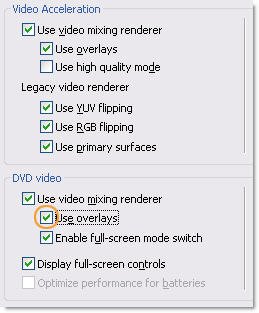
2. Don't use Overlay
1. Open your Window Media Player and click Options on the Tools menu.
2. On the Performance tab, click on the Advanced... button.
3. Uncheck Use overlays from DVD video, click OK and restart the player.

 ඕනම රටකට සෙට් වෙන CV එකක්
 Hambantota 7 Acres Beachfront Land For Sell DownSouth , PerPerch Price 420 000
 Baseus PI LITE INDOOR CAMERA