SOFTWARES 2008-2009

Billl Gates

Well-known member
  • May 4, 2008
    11,573
    82
    48
    39
    Pita KOtte
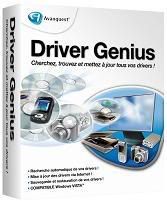
    Driver Genius Professional 2008 [Add All Here] Driver Genius 2007 v7.1.0.622 Professional Edition

    drivergenius_box.jpg


    Overview
    Driver Genius Professional is a professional driver management tool features both driver management and hardware diagnostics. Driver Genius provides such practical functions as driver backup, restoration, update and removal for computer users. If you often reinstall your operating system, you may not forget such painful experiences of searching all around for all kinds of drivers. If unfortunately you have lost your driver CD, the search will be more troublesome and time-consuming.
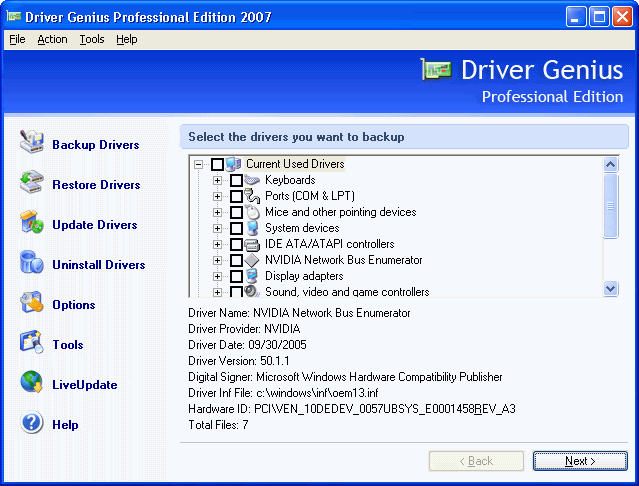
    Driver Genius Professional Edition 2007

    screendrvgeni.gif


    Now with the driver backup function of Driver Genius, you can backup all drivers in your computer before reinstalling, and restore them with the driver restoration function after system reinstallation has been completed. This will dramatically save your time for driver installation during the system installation procedure, and you will no longer worry about where to find a driver. Besides, you can create an automatic installation package for all drivers in your system by Driver Genius. After you have reinstalled your operating system, you can restore all your drivers in just a click by this automatic restoration program. It's really convenient. Driver Genius can automatically find driver for a device that the system can't find a driver for it. It can recognize the name and vendor's information of the device, and directly provide download URL for the required driver. Driver Genius also supports online updates for drivers of existing hardware devices. There are more than 30,000 most recent drivers for such hardware devices as motherboards, video cards, sound cards, network cards, modems, monitors, mice, keyboards, digital cameras, video capture cards, etc. on Driver Genius web site. Besides, there are daily updates for many drivers on our site. Our customers can obtain information for latest drivers by Driver Genius's LiveUpdate program, which can synchronize to the database on our site.


    Why I need Driver Genius?
    Each computer user has more or less dealt with drivers while using computer. Most users are really tired of the tedious procedure of installing so many drivers manually for the system. In case you lost your drivers CD, you have to spend much time searching for the drivers online. If unfortunately even the driver for your modem was lost, you will be at your wits end. Perhaps you are a system administrator responsible for installing drivers for hundreds of computers in your company. If your have to install drivers on each computer manually one after another, it can't be a easy job. You may still be using some old machines. If you can't tell their actual hardware configuration, you may not be able to find out correct drivers. Old drivers may not work properly in new operating systems, so you want to solve the problem by updating to latest drivers. Now you are caught by another problem - you can't find where to download the latest ones. There is another problem, if you changed some hardware devices, drivers for the removed devices may still stay in your system and become garbage files. Garbage files can seriously influence the performance of the operating system. You may want to remove them, but don't know how. Above are problems we may meet concerning drivers. Now we will see how Driver Genius can help you solve these problems like a piece of cake.

    Current Version: 7.1.0.622
    File Size: 10.1 MB
    Operating System: Windows 98/98SE/ME/2000/XP/2003/Vista/XP x64/Server 2003 x64/Vista x64
    Release Date: June 16, 2007

    Serials are working on this date.

    HomePage Info -:
    Code:
    http://www.driver-soft.com/drivergenius.html
    DownLoad -:
    Code:
    http://rapidshare.com/files/37739252/DrivGeni2k7710622Prodition.rar
    Rar Pass -:
    Code:
    4shar1ng
     

    Billl Gates

    Well-known member
  • May 4, 2008
    11,573
    82
    48
    39
    Pita KOtte
    Driver Genius 2007 Professional v7.1.622
    DriverGeniusLogo.jpg


    Information.gif


    Quote:
    Driver Genius Professional Edition For Windows 98/ME/2000/XP/Vista/x 64.

    Backup, restore and update all your drivers in several mouse clicks. Get new driver for your computer now!:
    - Quickly backup device drivers for your computer.
    - Just need one click to restore all drivers.
    - Clone your drivers to an EXE auto-installer. Easy to install the drivers to many machines.
    - Easy to get the most recent drivers for your computer. Keep your drivers up to date.
    - Remove invalid drivers and useless drivers, improve system performance and stability.
    - Device Diagnostics helps you locate a device that is not working properly or efficiently and offers an effective solution.
    - Unlocks many hidden options in the NVIDIA display driver control panel. Including over clocking settings, AGP settings, Fan control, Stereo control, OpenGL 2.0 support, and more.

    Driver Genius Professional is a professional driver management tool features both driver management and hardware diagnostics. Driver Genius provides such practical functions as driver backup, restoration, update and removal for computer users. If you often reinstall your operating system, you may not forget such painful experiences of searching all around for all kinds of drivers. If unfortunately you have lost your driver CD, the search will be more troublesome and time-consuming.

    Driver Genius Professional Edition 2007:
    Now with the driver backup function of Driver Genius, you can backup all drivers in your computer before reinstalling, and restore them with the driver restoration function after system reinstallation has been completed. This will dramatically save your time for driver installation during the system installation procedure, and you will no longer worry about where to find a driver. Besides, you can create an automatic installation package for all drivers in your system by Driver Genius. After you have reinstalled your operating system, you can restore all your drivers in just a click by this automatic restoration program. It's really convenient. Driver Genius can automatically find driver for a device that the system can't find a driver for it. It can recognize the name and vendor's information of the device, and directly provide download URL for the required driver. Driver Genius also supports online updates for drivers of existing hardware devices. There are more than 30,000 most recent drivers for such hardware devices as motherboards, video cards, sound cards, network cards, modems, monitors, mice, keyboards, digital cameras, video capture cards, etc. on Driver Genius web site. Besides, there are daily updates for many drivers on our site. Our customers can obtain information for latest drivers by Driver Genius's LiveUpdate program, which can synchronize to the database on our site.
    Homepage:

    Code:
    http://www.driver-soft.com
    Download-2.gif


    Size(10,4 MB)

    Code:
    http://rapidshare.com/files/56960833/Driver.Genius.2007.Professional.v7.1.622.rar
     

    Billl Gates

    Well-known member
  • May 4, 2008
    11,573
    82
    48
    39
    Pita KOtte
    Adobe Creative Suite 4 Production Premium Original ISO Full
    cs4premmain.jpg


    Adobe Creative Suite 4 Production Premium Original ISO Full 4 DVD + 2 CD | 12GB

    More Screens :

    wol_error.gif
    This image has been resized. Click this bar to view the full image. The original image is sized 1024x1684.
    cs4premfull.jpg


    Plan, create, and deliver anywhere with the intelligent post-production solution.Adobe® Creative Suite® 4 Production Premium software is a must-have solution for creative professionals who need to craft world-class video, audio, and interactive media — on air, online, on device, and invariably on deadline.This is the FINAL Version NOT BETA.The Activation Crack Will Be Uploaded When it's Available & Tested.Into a package enter: InDesign CS4 | Photoshop CS4 Extended | Illustrator CS4 | Acrobat 9 Pro | Flash CS4 Professional Dreamweaver CS4 | Fireworks CS4 | Contribute CS4 | After Effects CS4 | Adobe Premiere Pro CS4| Soundbooth CS4 | Adobe OnLocation CS4 | Encore CS4 | Adobe Bridge CS4 | Adobe Device Central CS4|Dynamic Link | Version Cue CS4...

    Original image(.iso)
    ADOBE CREATIVE SUITE 4 PRODUCTION PREMIUM

    After Effects CS4
    Adobe Premiere Pro CS4
    Photoshop CS4 Extended
    Flash CS4 Professional
    Illustrator CS4
    Soundbooth CS4
    Adobe OnLocation CS4
    Encore CS4
    Adobe Bridge CS4
    Adobe Device Central CS4

    File: ADOBE.CS.4.PRODUCTION.PREMIUM.ISO-DVD1.iso
    Size: 4200267776 bytes

    File: ADOBE.CS.4.PRODUCTION.PREMIUM.ISO-DVD2.iso
    Size: 4278026240 bytes

    File: ADOBE.CS.4.PRODUCTION.PREMIUM.ISO-DVD3.iso
    Size: 4245389312 bytes

    File: ADOBE.CS.4.PRODUCTION.PREMIUM.ISO-DVD4.iso
    Size: 2379816960 bytes

    File: ADOBE.CS.4.PRODUCTION.PREMIUM.ISO-DVD.Content.iso
    Size: 280461312 bytes

    File: ADOBE.CS.4.PRODUCTION.PREMIUM.ISO-DVD.Learning.iso
    Size: 405635072 bytes

    -------------------------------------------------------
    how to block active :
    1. START/RUN, type : CMD, then Enter

    2. in Command Prompt Window,type :
    attrib -R C:\WINDOWS\system32\drivers\etc\hosts
    Read-only attribute of hosts file will be delete.
    3.
    Before you start to install CS4 modify the hosts file:
    %windir%\system32\drivers\etc\hosts
    use Notepad, go to hosts and add :
    127.0.0.1 activate.adobe.com
    127.0.0.1 practivate.adobe.com

    after that, open hosts file (no have extension EX: *.mp3) by notepad, then add 2 lines:

    Use one of the following serial to install:

    922789417487655036014504
    922785673701240979214257
    922789817133722399785773
    922784165077155119475070
    922789421123763659279186
    1328-1401-5683-6490-3924-1653
    1328-1431-5683-6490-3924-1639
    because Adobe knew you're using serial not product,
    you can del cache.db files , then retype key

    -------------------------------------------------------------------------
    -------------------------------------------------------------------------
    Patch,
    file name: ADOBE.CREATIVE.SUITE.CS4.PREMIUM.MKDEV.TEAM.SERIAL .fix.rar
    after extracted, 1 file with names : amtlib.dll,
    copy file to local folder

    INSTALL THE APP

    SERIALS

    1328-1401-5683-6490-3924-1653
    1328-1431-5683-6490-3924-1639

    ADOBE.CREATIVE.SUITE.CS4.PREMIUM-MKDEV.TEAM.SERIAL+fix.NFO
    BACKUP YOUR amtlib.dll / COPY THE FIXED
    WORKS FOR ADOBE.CREATIVE.SUITE.CS4.PREMIUM-
    DELETE cache.db IF YOU WHANT TO PUT ANOTHER SERIAL

    Download Link:

    Code:
    http://rapidshare.com/files/161974135/CSPro_Ellusionist_www.rapidfind.org.rar
    Note: Links Inside The TXT FILE!!!
     

    Billl Gates

    Well-known member
  • May 4, 2008
    11,573
    82
    48
    39
    Pita KOtte
    ACID Music Studio
    ACID Music Studio software is the best way to bring your music to life. Multitrack audio and MIDI recording, pro-level editing tools, studio-quality effects, and over 3,000 ACIDized loops to use in remixes, mash-ups, and original music. Show Me How interactive tutorials provide fast, easy help from within the application.
    34sseaw.jpg


    Code:
    http://rapidshare.com/files/148315420/Sony_ACID_Music_Studio_7.0a.rar
     

    Billl Gates

    Well-known member
  • May 4, 2008
    11,573
    82
    48
    39
    Pita KOtte
    FL Studio 8 XXL A.I.O. plus bonus tools IMAGE REMOVED FOR HOT LINKING FOR MERCH's ON LINE STORE...... :/


    With the long-awaited release on the 8th of this excellent producer of music I bring this excellent All In One with the best for Fruity Loops fully functional and a significant amount of extra resources will make you enjoy the most of this fantastic program.
    [/B]
    The AIO brings:


    FL Studio Producer X-X-L Edition v8.0.0
    FL Studio 8 Patch 1.0
    Includes changes in the entono well as
    6 skins for FL Studio 8
    Change Logo by FLChan
    Different funds pantaya of FLCHAN
    Registration for full version
    Image Line Extras and VSTi `s for 8 FL Studio v.3.0
    Image Line Deckadance v1.20.5
    Image Line DirectWave v1.24
    Image Line JuicePack v1.0
    Image Line Maximus v1.0
    Image Line Poizone v2.02
    Image Line Slayer2 v2.5
    Image Line Sytrus v2.5
    Image Line TOXIC III v1.4.1
    Image Line WASP v2.0
    Packs Bank Techno Sytrus v3.00
    Packs for FPC kit1 v3.00
    Packs for FPC kit1 v3.00
    Packs for FL Keys v3.00
    Packs for VstPlugins FL Studio v3.00
    SimSynth v2.7
    Zero-X BeatSlicer v1.2
    FruityLoop Dreamstation Synth Dxi
    FL Studio 8 Patch 1.0

    Description:

    Important AIO which brings together the best of Fruity Loops along all its versions (packs, Images Lines, etc.) plus the latest version of this music producer; Fruity Loops Studio Producer Edition 8.0.0 X-X-L. An excellent material to any lover of the sound can not miss. Recommended materials.

    Installation Instructions: Do not run the FL Studio 8 without having installed completely pache 1.0, to be full version.

    Information File:

    Name: AIO Fruity Loops Studio 8
    Size: 352 MB
    Language: english
    Support Platform: Windows XP & Windows Vista (FL Studio Producer Edition **** v8.0.0)
    Developer: Ceone?„?
    Format: RAR, With the disk image (. ISO) in the interior ready to burn or emulate.


    Code:
    http://rapidshare.com/files/148321570/AIO_Fruity_Loops_Studio_8_XXL_Tools.part1.rar
    http://rapidshare.com/files/148308235/AIO_Fruity_Loops_Studio_8_XXL_Tools.part2.rar
    http://rapidshare.com/files/148311437/AIO_Fruity_Loops_Studio_8_XXL_Tools.part3.rar
    http://rapidshare.com/files/148312863/AIO_Fruity_Loops_Studio_8_XXL_Tools.part4.rar
     

    Billl Gates

    Well-known member
  • May 4, 2008
    11,573
    82
    48
    39
    Pita KOtte
    live7.gif


    Live 7 Features

    * Multitrack recording up to 32-bit/192kHz
    * Complete nondestructive editing with unlimited undo
    * Powerful and creative MIDI sequencing of software and hardware instruments
    * Real-time time-stretching and warping of AIFF, WAV, Ogg Vorbis, FLAC and MP3 files, for improvisation and instant remixing
    * A comprehensive selection of built-in audio effects, including a host of creative delays, filters, distortions, studio compressors and EQs
    * Built-in software instruments: Simpler for creative sample-based synthesis, Impulse for sampled drums
    * Instrument-, Drum-, Effect Racks for creating and managing complex performance setups, drum kits and multi-effects
    * VST and AU effects and instruments support; automatic plug-in delay compensation
    * REX file support and native sliced audio file creation
    * Video import and export for scoring to picture or warping picture to music
    * Real-time control of parameters with any MIDI controller—just MIDI-map it or choose from a list of popular supported controllers for instant mapping
    * Full ReWire support
    * Single-screen user interface for simple, creativity-focused operation
    * Multicore and multiprocessor support

    Essential Instrument Collection 2

    The boxed version* of Ableton Live 7 includes the Essential Instrument Collection 2, a multi-gigabyte library of meticulously sampled instruments providing a choice selection of acoustic and electric pianos, guitars, bass, drums, orchestral strings, brass, woodwinds and more.

    * Not included with boxed upgrades.

    Also Includes

    * Loops and construction kits: Unnatural Selection by (boxed version only)
    * Printed reference manual in English, Spanish, French, German or Japanese (boxed version only)
    * Extensive built-in step-by-step tutorials
    * Localized software menus, tutorials, and PDF reference manuals available in English, Spanish, French, German and Japanese


    System Requirements

    Mac: Any G4 or faster (Intel Mac recommended), 512 MB RAM (1 GB recommended), Mac OS X 10.3.9 (10.4 or later recommended), QuickTime 6.5 or higher, DVD-ROM drive

    Windows: 1.5 GHz CPU or faster, 512 MB RAM (1 GB recommended), Windows XP or Windows Vista, Windows compatible sound card (ASIO driver support recommended), QuickTime 6.5 or higher, DVD-ROM drive

    Code:
    http://rapidshare.com/files/148318048/Ableton_Live_V7.0.1.rar
     

    Billl Gates

    Well-known member
  • May 4, 2008
    11,573
    82
    48
    39
    Pita KOtte
    Pcdj vj 1.0.6
    pcdjVJ.jpg


    PCDJ VJ is the complete and reliable software package for the entertainer that offers the total live performance. DJ, VJ, and KJ all from one comprehensive interface that’s easy enough to use for the beginner, but with all the features the pros need and want. With our ultra-accurate automatic beat-mixing, your songs will always stay in sync, allowing you to focus on the other aspects of your mix. The seamless loop engine will let you pump out remixes on the fly, whether you’re mixing Video, Audio, or even Karaoke files. With frame accurate cueing and no-latency playback, you have the most realistic feel possible. Choose your method of control: Keyboard & Mouse, any MIDI controller, Time-code, or a HID device such as the PCDJ DAC-3 and now the Denon DN-HC4500!.Mix, Scratch, and Remix - with PCDJ VJ all your performance needs are at your fingertips.


    Code:
    http://rapidshare.com/files/150523770/PCDJ.VJ.v1.0.6-EDGE.rar
     

    Billl Gates

    Well-known member
  • May 4, 2008
    11,573
    82
    48
    39
    Pita KOtte
    Adobe Audition 3
    2wr1ypy.png


    Adobe Audition 3 Features:
    Code:
    Record and mix
    Waveform editing tools

    Quickly mix files together by dragging clips and controlling automatic crossfades with on-clip handles.
    Editing options for grouped clips

    Save time and maintain consistency by grouping clips in Multitrack View, and then trimming and applying fades to them simultaneously.
    VST Plug-In Manager

    Enable and disable VST plug-ins more easily.
    Batch saving of multiple audio files

    Save multiple audio files faster with this new command. Simply specify the file format, location, filename template, and more, and these parameters are applied to each file in the batch.
    Ability to duplicate tracks

    In Multitrack View, you can now duplicate an audio track for use in your mix.
    Improved I/O meter display

    See level meters that are in use for the master track as well as for multiple input devices, and for multiple output devices.

    Mixer
    (+) View larger
    Low-latency mixing engine

    Enjoy rapid response as you record and mix with a powerful low-latency mixing engine.
    ASIO, VST, DirectX, and ReWire support

    Easily integrate Adobe Audition into your workflow thanks to broad support for industry formats and standards, including ASIO, VST, DirectX, and ReWire.
    More than 50 audio effects and DSP tools

    Work with more than 50 real-time audio effects including echo, flange, reverb, and more. Manipulate recordings with digital signal processing (DSP) tools, mastering and analysis tools, and audio restoration features.
    Recordable parameter automation

    Move volume, pan, and effects controls as you listen, and record changes to your mix in real time. Changes appear as editable envelopes in the timeline.
    Hardware controller automation

    Adjust mix and effects parameters using external control devices, and record all your changes in real time.
    Surround Encoder

    Use the Surround Encoder to transform any multitrack mix into a 5.1 surround sound experience. Export the results as an interleaved file that can be used in Adobe Premiere® Pro software.
    Audio mixing sends and inserts

    Get more flexibility when mixing tracks by creating sends to duplicate signals that are routed to different effects. Add a send to create a separate mix for headphones during a recording session.
    Effects chain on all channels, buses, and master

    Add effects to the master channel and hear the results even before mixing down to a single file.
    Real-time input monitoring

    Listen to your audio inputs through the software, including effects applied to the input track. Then modify parameters after recording, if desired.
    Quick punch

    Quickly fix recording errors by punching in corrections on-the-fly as you rerecord: Toggle the record button to punch in your new take only where you want it to replace the old one. Punch in and out as many times as you want.

    Multitrack View
    (+) View larger
    Unlimited number of tracks in Multitrack View

    Record, edit, and mix any number of stereo tracks in Multitrack View.
    Plug-in delay compensation

    Add filters and effects to tracks and buses throughout the signal chain without knocking tracks out of sync.
    MIDI timecode support

    Use Adobe Audition software as a MIDI timecode (SMPTE/MTC) master or slave to synchronize audio playback with computers, video decks, or any hardware device that supports MTC.
    Smooth splined envelopes

    Adjust volume, pan, effects, and more for clips in a multitrack mix. Use splines to alter curves and create gradual transitions; rescale all envelope points to make changes quickly.
    Improved recording performance

    Enjoy faster performance and more economical use of hard-drive space by recording audio sessions directly to a final working file. Once recorded, your files can be saved immediately.
    Up to 80 live inputs

    Record up to 80 live inputs simultaneously in a multitrack session.

    Back to top
    Create and arrange

    Sequencer
    (+) View larger
    VSTi virtual instrument support with MIDI piano roll

    Enjoy support for a wide range of virtual instruments in your music production. Record and edit MIDI in the piano roll editor.
    New effects

    Expand your creative possibilities with new effects, including Convolution Reverb, Analog Delay, Mastering tool, and Tube-modeled Compressor.
    Radius time stretching from iZotope

    Alter tempo without changing pitch, or change pitch without tempo distortion, using the high-quality time-stretch algorithm from industry leader iZotope.
    Guitar Suite effects

    Perfect your sound with analog-modeled guitar effects that can be used with guitars or other instruments.
    XML session format

    If you are a developer, you can take advantage of the ability to import and export sessions as XML to better integrate with your tools.
    Video in Surround Encoder

    View the video as you scrub, keyframe, and edit your surround sound automation in the Surround Encoder. You can more easily match up your audio with the action onscreen, allowing you to perform more precise surround effects and audio placement.
    Default WAV importer

    Set a custom WAV importer as the default for specific actions.
    Default open/save format

    Specify a particular file format to ensure all saved files are consistent.
    Sorting options in Files panel

    In the Files panel, you can sort files by when they were opened or created, or by track number.
    Playlists

    Create playlists in the Playlist window. Try different versions of an arrangement before you commit to the edits. Play back in any order and loop a specified number of times.
    Bitmap import/export for spectral view

    Save the phase histogram as a bitmap, export as a bitmap with phase map, edit in Adobe Photoshop® software, and import back into Adobe Audition.
    Customizable toolbars

    An adaptable workspace allows you to pick which toolbar buttons are displayed in the toolbar.
    Complete audio toolset

    Record, mix, arrange, and edit your audio in one comprehensive, easy-to-use application. Produce high-resolution 24- or 32-bit files with sample rates up to 192kHz for HD- and DVD-quality audio.
    Loop-based soundtrack creation

    Use flexible looping tools to quickly construct high-quality music for songs or soundtracks. Loops automatically match global session tempo and key.
    Audio editing for video

    Use Adobe Audition to edit the soundtracks for videos created in Adobe After Effects® or Adobe Premiere Pro software with the Edit Original and Edit in Adobe Audition features.
    Intuitive user interface

    Enjoy an easy-to-use interface with workspace panels that dock and group for optimal organization, as well as useful phase analysis tools and a powerful Mixer panel.
    Thousands of uncompressed 32-bit music loops

    Arrange your own music with professional results using approximately 5,000 32-bit, performance-based, royalty-free music loops in many styles.
    Clip time stretching

    Stretch effects or dialog to fit a video clip by simply dragging the edge of the clip in Multitrack View.
    Ready-to-use music beds

    Cut to the chase when deadlines loom using 20 royalty-free, ready-to-play music beds in 15- and 30-second lengths.
    Batch processing

    Use the convenient batch processing feature to convert large numbers of files that have different formats, sample rates, and bit depths to one common format, or to apply scripts to multiple files.
    Improved video sync

    Enjoy rock-solid synchronization between your audio and video playback over projects of any length.
    Broader video format support

    Edit soundtracks for video and then export the enhanced video in AVI, MPEG, DV, or WMV format.
    Sample sessions

    Get up to speed quickly by using any of the 20 sample sessions included with Adobe Audition. Modify the sample sessions to create your own music.
    CD extraction

    Digitally extract tracks from audio CDs to your hard drive for project use.
    Favorites

    Build a customized collection of commands, scripts, and effects that are easily accessible via the Favorites menu or assignable keyboard shortcuts.
    Custom workspaces

    Configure workspace panel arrangements for specific tasks and then save them for reuse. Preset arrangements for some tasks, such as multitrack recording and mastering, are included.
    Adobe Bridge

    Browse, organize, and preview files, and then drag and drop what you need from Adobe Bridge. Search by or edit file information (XMP metadata) such as keywords, language, and format.
    Automatic beat detection

    Find and mark beats automatically. This makes new loop file creation a snap and greatly assists DJs and others who need to quickly match beats among multiple files.
    Organizer panels

    Keep project assets at your fingertips using three convenient panels from which you can access currently open audio, MIDI, and video files, effects, and favorites.
    XMP metadata support

    Use XMP metadata to quickly identify, catalog, and find clips across multiple applications. Standard metadata fields are included, and custom metadata input panels can also be created.
    Custom script recording

    Automate repetitive tasks with custom scripts. Most actions can be recorded to an automated script and then applied to a group of files as a batch process, or selected from the Favorites menu.
    MIDI playback

    Insert MIDI files into Adobe Audition multitrack sessions to play them in sync with your audio and video projects.
    CD extraction

    The Extract Audio from CD dialog box has been redesigned to make it easier to use. In addition, you can now configure Adobe Audition to reference an external CD database that provides track titles and other information when ripping an audio CD.

    Back to top
    Edit and master
    Effects Paintbrush tool and Spot Healing Brush tool

    Make a free-form selection in frequency space with the Effects Paintbrush and apply effects in varying degrees to that selection. Smooth over a selected region to automatically repair clicks, pops, and other noises using the Spot Healing Brush.
    Automatic Phase Correction tool

    Audio from analog tape or vinyl may have differences in the timing between the two channels. The Automatic Phase Correction tool calculates and applies the optimal delay to align channels of a stereo waveform.
    Adaptive Noise Reduction tool

    Intelligently remove noise that changes over time, including whines, buzzes, colored noise from fans or airplanes, etc.
    Top/Tail Views

    Zoom into the beginning and end of a file to add fades and gains while keeping the whole file in view.
    Superior performance

    Get superior performance and take advantage of the new multicore processors. The optimized mix engine allows for more tracks and effects on the same machine, offering more variety and faster processing.
    Mastering effect

    Polish sound with the Mastering effect. Control everything from Reverb to Gains or use any of the included presets.
    Marquee pan and phase selections

    Process discrete stereo information such as center-panned vocals in Spectral Pan display or out-of-phase audio in Spectral Phase display.
    Workspace color preferences

    Adapt your workspace to your liking with new preferences that let you change the tint of the Adobe Audition 3 workspace and control the color of graph lines, grids, and hot text.
    Session plug-in format

    Third parties can utilize the Session Format SDK to create exporter plug-ins for their own custom session format.
    Graphic Panner

    Correct frequency-dependent phase differences between channels (phase smearing).
    Modifying automation lane points

    Make a selection in the automation lane, and then move up or down to adjust only the points in the selection. Adjust a range selected in an automation lane with ease.
    Mixing down to a new file

    Enjoy a quick and convenient way to mix down your entire session, selected clips only, or a specified range.
    Spectral play for selected frequencies

    Select an area in the spectral view and play just that area, or play everything but that area.
    Graphic phase shifter

    Adjust the phase of a waveform by adding control points to a graph.
    Edit View on-clip fades and gain control

    Visually adjust volume, fades, and gains for selections or entire files.
    Integrated wave-editing view with Mastering Rack

    Record and edit audio files with fast, accurate tools that are tightly integrated into the Multitrack View. Apply and preview multiple effects simultaneously with the Mastering Rack when working in Edit View.
    Audio restoration tools

    Easily restore recordings from old vinyl; remove microphone pops, hisses, hums, and other audio artifacts; fix clipped audio; and repair recordings with Click/Pop Eliminators, Noise Reduction, and more.
    Spectral Frequency Display tools

    Visually isolate and select sounds in frequency and time, and then clean up, modify, or apply effects to the selected sound using the Spectral Frequency Display. Isolate specific sounds and increase the visibility of lower frequencies.
    Spectral Pan and Phase displays

    Analyze audio with powerful visualization tools including the unique Spectral Pan and Phase displays, which plot pan, phase, and frequency over time.
    Lasso tool in Spectral Frequency Display

    Easily select exactly the area you want during frequency-space editing, using the same familiar Lasso tool found in other Adobe applications.
    Logarithmic Spectral Frequency Display

    Use the logarithmic display option in Spectral Frequency Display to increase the visibility of lower frequencies.
    Spectral color bar and resolution settings

    Isolate a specific frequency range more easily by adjusting the Spectral Frequency Display color bar and resolution display settings.
    Powerful mastering tools

    Add final touches to a mix with the Graphic and Parametric equalizers, and add punch to your audio with the Dynamics Processor, Hard Limiter, and Multiband Compressor.
    Integrated CD burning

    Create reference masters of your compositions by burning gapless audio CDs directly from Adobe Audition.
    Ability to save CD layouts

    Quickly and easily save CD layouts — track lists and accompanying metadata — for convenient reuse.
    Audible scrubbing

    Quickly find the audio you want to edit using two modes of audible scrubbing. Tape-style scrubbing enables you to find hard-to-locate edit points, and shuttle-style scrubbing allows you scan through your audio rapidly.
    Audio analysis tools

    Work with built-in analysis tools in real time, including frequency analysis, phase analysis, and Spectral Frequency Display. Easily see audio characteristics from edit to edit.
    Phase Analysis Histogram View

    Use the histogram mode for an easier-to-read phase analysis view. See the percentage of your audio that is in phase and the overall phase content.
    Analog-modeled Multiband Compressor

    Control dynamics, adjust loudness, and master your mixes with multiband precision. Give bass and drums punch while allowing your vocals to push through the entire mix.
    Pitch correction

    Correct off-pitch performances and create interesting effects using pitch correction effects. Use the automatic mode for quick results or the manual mode for precise control.
    Vocal/instrumental extraction

    Reduce or boost the vocal or instrumental portions of a track by isolating audio based on pan position or phase. Use this feature for powerful editing or to create a cappella or karaoke-ready tracks.
    Broadcast Wave support

    Work with third-party hardware and software systems that use the BWF time stamp field. During import, automatically insert the clip into your session at its time stamp location.
    Group RMS normalization

    Convert multiple audio files to the same overall loudness. Each file is analyzed for average volume, peak volume, and frequency.
    Preroll and postroll playback options

    Perform edits and apply effects with the benefit of hearing your modifications in context with adjacent audio as you make your changes.
    High-quality sample rate conversions

    Use transparent sample rate conversions with customizable dither settings to get great-sounding results whether converting material to 44.1kHz, 48kHz, or 96kHz for CD, video, or DVD.
    Improved editing performance

    Experience improved performance while applying effects like Reverb and Time Stretch, and when displaying clips for editing in Spectral Frequency Display.
    Support for more than 20 file formats

    Work with files from a wide array of sources and deliver them in the audio format you need. More than 20 file formats and variations are supported, including Windows® PCM (WAV), OGG, AIFF, MP3, and WMA.
    Delete Silence feature

    Detect and remove silence between words or other sounds — ideal for cleaning up voice prompts and speeding up narratives without affecting foreground audio.
    Ogg Vorbis format support

    Import and export Ogg Vorbis (OGG) audio files.
    Cart chunk editing

    Open, edit, and save cart chunk metadata to your WAV files. Cart chunk data is used by many radio automation systems to catalog and organize audio files.


    Code:
    http://rapidshare.com/files/150529681/Adobe_Audition_V3.part1.rar
    http://rapidshare.com/files/150532586/Adobe_Audition_V3.part2.rar
    http://rapidshare.com/files/150533652/Adobe_Audition_V3.part3.rar
     

    Billl Gates

    Well-known member
  • May 4, 2008
    11,573
    82
    48
    39
    Pita KOtte
    Big Fish Audio - The Rhythm Station (Wav Samples)
    498208.jpg


    Live hip-hop and jazz drums!

    Check out the Big Fish Audio Rhythm Station Sample Library with over 400 live drum and percussion loops when you need a new drummer. This sample library brings some fresh, original grooves you haven't heard before. These well-played grooves range from 64 to 134 bpm and feature tight, dry and funky sets, scratchy beats and processed kits. With an emphasis on raw and natural sounding drums, these kits are perfect for RnB, Jazz, Hip-Hop, African, Latin, Brazilian, Reggae, World Beat and more. With a clean, live, original acoustic sound, you won't find a set with these grooves anywhere else. The real acoustic feel you're looking for is in The Rhythm Station.

    THESE ARE IN WAV FORMAT ONLY!


    Code:
    http://rapidshare.com/files/150536514/BFA_-_TRS.part1.rar
    http://rapidshare.com/files/150539379/BFA_-_TRS.part2.rar
    http://rapidshare.com/files/150539442/BFA_-_TRS.part3.rar
     

    Billl Gates

    Well-known member
  • May 4, 2008
    11,573
    82
    48
    39
    Pita KOtte
    Sony Sound Forge Audio Studio 9.0
    sony_soundforge_9.jpg


    Code:
    Precision, Stability, Ease, and Speed
    The Sound Forge 9 professional digital audio production suite includes everything you need to quickly get from raw audio to finished master. Use this suite to create and edit stereo and multichannel audio files with speed and precision. Efficiently analyze, record and edit audio, digitize and restore old recordings, model acoustic environments, design sound for multimedia, and master replication-ready CDs.

    Sound Forge 9 - mp3 editor - wave editor - audio recording software
    Includes Tools for Sound Design and Mastering
    In addition to Sound Forge 9 software, this comprehensive audio production suite includes CD Architect 5 software for designing, mastering and burning Red Book audio CDs, Noise Reduction 2 plug-ins to fix common audio problems such as tape hiss, camera hum, clicks, and pops, and the Mastering Effects Bundle powered by iZotope™, a collection of four professional audio plug-ins.

    Stereo and Multichannel Recording
    Sound Forge 9 software has a complete set of tools for recording audio. Record straight into your sound card or use the Record Timer to begin and end a session at a specific time and date. Alternatively, you can start recording when a certain audio threshold is reached with Threshold Record Triggering. You can also now record and edit multichannel audio files as easily as stereo files. More About Recording and Playback

    Precise Audio Editing
    Edit stereo and native multichannel audio files down to the sample level in real time. Use familiar Windows commands to cut, copy, paste, mix, and crossfade audio. Drag and drop to edit between channels, and work on one file while processing others in the background. More About Editing and Workflow

    Pristine Sound Quality
    Sound Forge software supports full resolution 24-bit and 32-bit/64-bit float 192 kHz files for the ultimate in audio fidelity. Capture the subtle overtones and nuances of instruments, vocals, and effect changes. More General Features

    Powerful Effects Processing
    Apply over 40 professional studio effects and processes including Normalize, EQ, Delay, Chorus, Volume, Dynamics, Noise Gate, Pitch Shift, Flange, and Vibrato. Chain multiple effects together and apply them to selections or entire files using the Plug-in Chainer. Sound Forge 9 software also supports DirectX and VST effects, including parameter automation, to expand the number of effects you can apply to audio and increase your mastering flexibility. More About Tools and Effects

    Audio-for-Video
    Sound Forge 9 software supports multiple video formats including AVI, WMV, and MPEG-1 and MPEG-2. Synchronize audio and video frame by frame. Import Flash (SWF) files* to visually synchronize your audio to your project. Sound Forge 9 software includes MPEG-2 templates for writing HDV-compliant files at both 720p and 1080i resolutions. Also included are templates for encoding WMV 720p and 1080p.

    *ActionScripting, motion video, and audio not supported

    Dolby Digital AC-3 export
    Use Sound Forge 9 software to export multichannel files in surround AC-3 format using the included Dolby Digital AC-3 plug-in. More About Import and Export

    Code:
    http://rapidshare.com/files/150525205/Sony_Sound_Forge_Audio_Studio_9.0b_build_146.rar
     

    Billl Gates

    Well-known member
  • May 4, 2008
    11,573
    82
    48
    39
    Pita KOtte
    FL Studio Bible & Shortcut Keys
    jitcrunchaspx1xb.jpg


    Genre: Software & Hardware Guides
    PDF: 521 pages

    Description:
    The FL Studio 8 Bible will guide you through all the (often hidden) features and gems of FL Studio

    Synopsis:

    The FL Studio 8 Bible (Perfect Binding) will guide you through all the (often hidden) features and gems of FL Studio : 518 pages, 155 notes, 58 tips, a 22 page glossary, interview with Gol, a section on the power users and a selection of the often completely insane emails we got over the last 10 years.

    ALSO INCLUDED BY ME IS KEYBOARD SHORTCUTS FOR FLSTUDIO

    Code:
    http://rapidshare.com/files/150522383/Fl_Studio_Bible_and_Keyboard_Shortcuts.rar
     

    Billl Gates

    Well-known member
  • May 4, 2008
    11,573
    82
    48
    39
    Pita KOtte
    Extreme Sample Converter Extreme Sample Converter
    ExtremeSampleConverterv353.jpg


    Code:
    What is Extreme Sample Converter ?

    Extreme Sample Converter is a multifunctional audio program, browser, player, and program editor with advanced conversion between different sample formats.


    Main Features:

    AUTOLOOPING:

    - automatically searching of loop.

    - two modes available (short and long loop).

    - possibility to adjust of loop search algorithm.

    FX RACK (feature of VSTi Converter and HARDWARE Converter tools):

    - VST and DX plug-ins supported.

    - we can process each recorded channel left and right separately with different plug-ins.

    - we can use it for chaining different effects and create new modified recorded sounds.

    - it can be used for signal monitoring when sample recording.

    - plug-in delay latency compensation supported so for plug-ins with its delay it is automatically calculated to correct position.

    - together with ASIO support we can play with VSTi instruments in real-time or process audio signals with additional effects when recording.

    HARDWARE CONVERTER (SAMPLING OF YOUR HARDWARE):

    - sampling hardware instruments.

    - working with ASIO and MIDI.

    - possibility of using several midi channels at the same time to record more that one instrument simultaneously.

    - audio latency compensation.

    - midi latency adjusting parameter (trimming to correct sample start).

    - patch normalize option, you don't have to care about input gain's just start record and software automatically gain samples.

    - sample normalize, each sample will be gained to possible highest volume.

    - ASIO Monitoring, by clicking on mapping you can listen sounds

    - with MONIT. SPLIT (split monitoring) button switched to on you and moving a splits you can hear sounds related to its velocity.

    - built-in silence detection algorithms allows you to find a correct start and end of recorded samples

    - resuming it is possible to record a samples first, send to an external audio editor for editing and then convert finally to destination format

    VSTi CONVERTER:

    - converting virtual synth to different formats.

    - support for plug-ins without their own gui.

    - choosing a patch or bank also possible.

    DUAL VIEW (WORKING ON TWO MONITORS):

    - you can split converter into two functional windows. Thanks to this you can easily work on two monitors.

    EXTERNAL AUDIO EDITOR SUPPORT:

    - you can send samples to an external audio editor and convert them into another format.

    - software takes all changes from audio editor (trimming, resampling, filtering whatever you did) and then you can save these new samples into destination format.

    X-FADE PERFECT LOOPING:

    - now it is possible to set accurate and perfect looping in sample material.

    - stereo samples can be tuned together so you can set a different loop in the left and right channels and then use XFade.


    PROFESSIONAL LOOP EDITOR:

    - with this option, the program becomes an excellent audio editor, allowing free looping while creating new loops.

    - editing of the loop is possible separately for the left and right channels whereby very interesting and unique effects can be produced. Not all formats accept this kind of loop editing. e.g. SampleTank and, in general, GigaSampler/Studio don't accept these loops.

    - loops can be shown even in sizes above 1:1, making it easy to analyze and locate the best point for starting and ending of the loop, and finding the best phase.

    - during displacement of the loop, crackling in the sample playback is not heard, a problem which might otherwise be found disturbing. The program changes the beginning and the end loop points to assure the continuity of playback of the sample.


    REAL-TIME AUDITIONING VIA MIDI KEYBOARD:

    - you can listen and play sounds before you will make a final conversion by using new module DirectX Synthesizer,

    - this works with all audio cards and it only requires DirectX 8.0 or higher, The low latency let's you play sounds in live (16-bit/44.1kHz quality and 64 voices supported).

    - also it's possible to hear the result after patch editing in QEdit tool.

    - Sound Blaster card users can use the second way of auditioning by using Sound Blaster Synthesizer. It immediately connects ExSC with the wavetable synthesizer of the card. After choosing patch, it will be loaded to the synthesizer of the card and you can immediately audition ex. EMU, Akai CD before conversion. If any patch is edited, it is possible to hear how it sounds. Also, it's possible, to hear final sounds like Soundfonts. In such cases the conversion to SoundFont format is executed on the fly.

    PARAMETER EDITOR - QEDITOR:

    - editor allows you to edit many parameters: AHDSR envelopes, Filters, LFO's and other. It is now possible to improve or modify the desired timbre.

    - the editor checks for the proper range of parameters to ensure compatibility with specific formats.

    - working with the editor is extremely quick and makes it possible to edit parameter (eg. Filter, Cutoff ) for selected parts of the keyboard, and of chosen dynamic ranges without having to arduously toy with layers and zones as with other editors.

    VIRTUAL DISKS:

    - this tool allows copies to be made of media like ZIP, MO or CD to one image file on the disk as well as reproducing the data from one media to another depending on their size.

    - hardware sampler users can make copies of ZIP or MO on CD. The CD's can then be used instead of slower ZIP or MO drives.

    - the virtual disk (the image) is stored in compatible format with Nero or ISO9660 used by the most CD recorders.

    - supported image formats: Nero, ISO, BIN, IMG.

    CONVERTING AND READING SOUNDS (FILES) IN DIFFERENT FORMATS:

    - thanks to my complicated algorithms and sound conversion techniques, I can bravely say this program will make it easy to convert samples to another format with the most exact translation.

    - close attention was given to the most important parameters of the program having effect on the final sound. There are different types of envelope curves, filters and complex modulators.

    - special attention was given to the method of transfer from dimensions of GigaSampler into SoundFont layers and vice versa.

    PROGRAM STRUCTURE BROWSER AND VIEWER:

    - by taking advantage of the program's intuitive presentation, the most important information about the sample structure ( ie. layers, zones, etc.) can be obtained. Also, the sample and it's components are presented in a clear manner.

    - if you look through programs on an Akai CD, you can see how these parameters looked originally.

    - the program reads only those parts of data which are required to be seen. It's a very fast method for browsing very large banks of GM or Akai data.

    SOUND FILES BROWSER:

    - this version supports not only basic audio formats as WAV or AIFF, but also compressed files in the Ogg Vorbis high-end technology. Decompression of the files is incredibly fast.

    - audio file is kept in RAM memory. The playback of the file, as well as visualization, is done without disturbance from the disk system.

    - the program uses a modern floating-point format ( IEEE 32-bit and 64-bit), making it possible to playback even on standard 16-bit multimedia sound cards.

    - in the case of audio files, ExSC also will display and playback loops. Such options are surely not found on non-media players, so I assume that ExSC can possibly be used as a professional file player.

    - you can choose between different standards (MME or DirectSound). Of course with DirectSound you can use low latency and between selection of the samples there are no clicks.

    FILE SEARCHING:

    - retrieving files in the chosen format was not forgotten.

    - it's possible to search for files in any directory, disk or CD. With this tool, nested directories on the disk can be scanned.

    - batch conversions are possible, finding all files on your disk, mark them all, or select and convert them into another format.


    Code:
    http://rapidshare.com/files/150521567/Extreme_Sample_Converter_V3.5.3.rar
     

    Billl Gates

    Well-known member
  • May 4, 2008
    11,573
    82
    48
    39
    Pita KOtte
    IK Multimedia T-RackS Deluxe VST RTAS v3.0 - BEAT
    1226639871_t-racks3.jpg

    The new T-RackS 3 raises the bar again in high-end DAW
    mastering and mixing, with a suite of 9 analog modeled and
    digital Dynamics/EQ processors, an audio quality that is
    unmatched in software, and scores of new and unique features.


    Modular High-End Mastering/Mixing Suite of Dynamics and EQ
    processors, including:


    - 9 processors comprised of 3 new analog and vintage
    emulations (including models based on the Fairchild 670 and
    the Pultec EQP-1A), 2 new digital processors as well the 4
    classic, award-winning T-RackS processors


    - New configurable mastering/mixing chain – run up to 12
    parallel/series processors


    - New complete built-in metering section with Peak, Perceived
    Loudness, Phase, and RMS meters, plus a Spectrum analyzer
    with Peak, RMS and Averaging indicators


    - New standalone and plug-in versions available in the same
    package for use in all the most popular native DAWs


    - New high-fidelity oversampling with crystal clear
    transparency, for high quality audio processing throughout
    the entire signal path


    - New SCC™ technology coupled with IK’s unique DSM™ technology
    provides the most realistic software emulation of vintage
    gear to date


    - Extremely easy to use, with style-based presets, full chain
    visualization, one-click single module or chain bypass,
    “compare” function, multiple audio processing in standalone
    mode and much more

    T-RackS 3 has all the tools you need to create superb,
    tube-toned or digital-tuned, mixes and masters. Its rich, warm
    sound combines new tube-modeled and state-of-the-art digital
    processors on top of its classic top-notch analog classics. A
    new modular chain gives you full control and easy
    navigation/compare features. A new complete metering section
    keeps all the most important variables of your sound under
    control. A truly superior mastering and mixing system that
    will put a polish on your tracks you may have never thought
    possible. All this, while adding the beautiful warmth and
    space of the tube devices it emulates. No other plug-in offers
    this kind of dedicated environment for such an important task,
    and nothing sounds like T-RackS 3.

    Code:
    http://rapidshare.com/files/1668775...ckS.Deluxe.VST.RTAS.v3.0.incl.KeyGen-BEAT.rar
     

    Billl Gates

    Well-known member
  • May 4, 2008
    11,573
    82
    48
    39
    Pita KOtte