Sony Ericsson Android වැඩකාරයෝ :D :P

BusyBox Pro
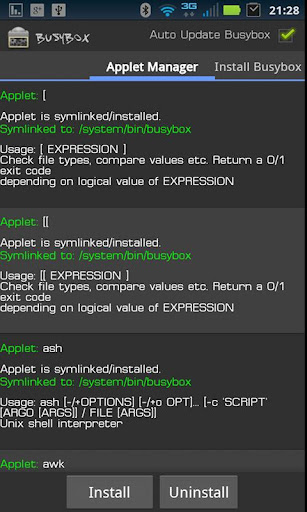
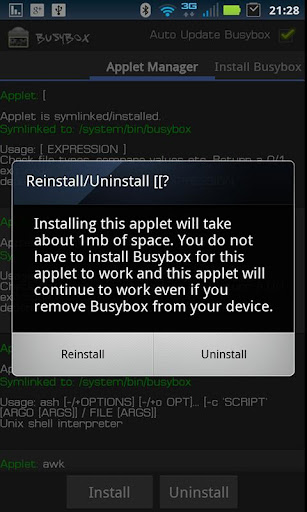
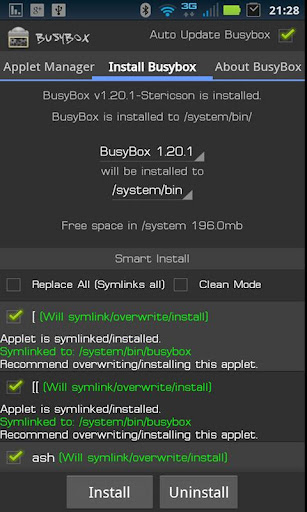
Overview: Pro version contains no ads or nag screens, uninstall feature, custom tune feature, the ability to hand pick the applets you want, safety check for missing applets on start, and better overall support. The pro version will receive more frequent updates than the free version will.
Requirements: Android 1.6 and up
P3s6mAjcxvNyqJTMiVoQGbrNdZ0MzByZoA8Yth0QROSFixGuQ6kiZ5M6Rwc5Pb-2xA
K7TAPQXHkwjthcTuCVlkTZPM24Wcs-Fgxxqhjwn7iiUydXfI5AxTkxPLhmJPw3dmvOo


I5Rg18_JEuuym4mMsQ5U0brR5lQLKMyy7Ip2mSalLZ0YjGULUqYtT7MQTZc2N1l7hw
IR3PjKQCCpmNPbaib2HuV3aB49_UAVTJW0y393hu1Jo09ALKRxtHQwTL-3hWYgWy6A


Root required for this application!

The fastest, most trusted, and most popular BusyBox installer and uninstaller!

Over 2.3 million installs and almost 10,000 5 Star reviews!

Mentioned in the new XDA-Developers book "XDA Developers' Android Hacker's Toolkit: The Complete Guide to Rooting, ROMs and Theming"

Winner of best Utility Software award for Android via Handster.

This is the ONLY Installer on the market that will allow you to remove Busybox (If supported on your phone), the only open sourced installer, and the only installer that is ad free and requires no internet permission!

A must have for any rooted phone! Almost EVERY rooted applications needs BusyBox to perform their magic, if you have a rooted phone then you need BusyBox.


This installer has the smallest Busybox binaries available, right around 700kb unlike the other installers which are over a meg. Also this installer does not require you to download anything extra like other installers do and thus works much faster.

Please note I did not write BusyBox! I wrote this installer, cross compiled BusyBox for Android. Please see the about menu option for more details or here: BusyBox.net

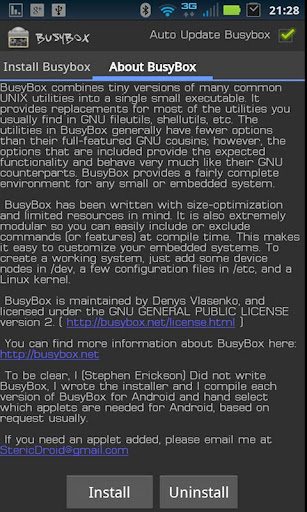
BusyBox is a software application that provides many standard Unix tools, much like the larger (but more capable) GNU Core Utilities. BusyBox is designed to be a small executable for use with the Linux kernel, which makes it ideal for use with embedded devices. It has been self-dubbed "The Swiss Army Knife of Embedded Linux".

This version includes 1.20.1, 1.20.0, 1.19.4, 1.19.3, and 1.19.2 no need to have more than that because it takes up space on your phone and each newer version will still contain the older features, unless I forgot to compile them in.

Leave this installed if you always want to get the latest version of busybox!


What's in this version:
v8.4
Sped up the initial checks for smart install.
Updated Busybox to inlcude applet "readlink" as per request.
Update Busybox to support -z flag for tar as per request.
Fixed concurrent modification exception.


buyz.gif


freedownload1.gif


chirichiri.jpg


HD Games Collection Part 3


most popular PowerVR GPU phone's:

+ Samsung Hummingbird S5PC110

- GPU Power VR SGX 540:
/ Google Nexus S - WVGA
/ Meizu M9 - 960x640
/ Samsung Galaxy S i9000 - WVGA
/ Samsung Galaxy S Captive - WVGA
/ Samsung Galaxy S Fascinate - WVGA
/ Samsung Galaxy S Infuse 4G - WVGA
/ Samsung Galaxy S Vibrant - WVGA


+ Texas Instrument OMAP 34x0/36x0:
- GPU Power VR SGX 530/535:
/ LG Optimus Black / Lg Optimus White - WVGA
/ Motorola CHARM - QVGA
/ Motorola CLIQ 2 - FWVGA
/ Motorola DEFY - FWVGA
/ Motorola DEFY+ - FWVGA
/ Motorola Droid 2 / Motorola Milestone 2 - FWVGA
/ Motorola Droid Pro - HVGA
/ Motorola Droid X - FWVGA
/ Motorola Flipout - QVGA
/ Motorola Flipside - HVGA
/ Motorola Milestone / Motorola Droid - FWVGA
/ Motorola XT720 - FWVGA
/ Motorola XT800w - FWVGA
/ Samsung Galaxy S SL i9003 - FWVGA


+ Texas Instrument OMAP 44x0:
- GPU Power VR SGX 540:
/ Google Nexus Prime / Samsung Galaxy Nexus - 720p
/ LG Optimus 3D / LG AT&T Thrill 4G - WVGA
/ LG Optimus 3D Cube - WVGA
/ LG Optimus 3D Max - WVGA
/ LG Prada 3.0 - WVGA
/ Motorola Atrix 2 - qHD
/ Motorola Droid 3 / Motorola Milestone 3 - qHD
/ Motorola Droid 4 - qHD
/ Motorola Droid RAZR / Motorola Droid RAZR MAXX - qHD
/ Samsung Galaxy S2 i9100G - WVGA


If you want to use the SD files and not download over wifi, then in 70% of the cases you must first install (restore if your using Titanium Backup) the APK, don't start the game, and then copy SD files to location and after that start the game. If your not doing it in this order your game may delete the SD files from the specific location.

Titanium Backup game files


Password: zs0mby

************************************************** *************

guerrillabob.jpg

Guerrilla Bob


SD Files: Android/Data
Extracted SD file size: 7 MB

heroofsparta.jpg

Hero Of Sparta HD


SD Files: Gameloft/Games
Extracted SD file size: 76 MB

avataryp.jpg

James Cameron's Avatar HD


SD Files: Gameloft/Games
Extracted SD file size: 161 MB

g7tx7.jpg

Let's Golf 3 HD


SD Files: Gameloft/Games
Extracted SD file size: 793 MB

nflah.jpg

Madden NFL 12


SD Files: Put folder on Sdcard
Extracted SD file size: 239 MB

meiqd.jpg

Mass Effect Infiltrator v1.0.30 NEW OFFLINE VERSION WORKING 100%
1..........2


SD Files: Android/Data
Extracted SD file size: 440 MB
If you get stuck at EA logo, use the APK from Link 2. The first time you start the game, start with wifi on, for file verification, after the first start you can start the game with data on or off. First install the APK, but don't open it, then copy SD files to Android/Data, and after that start the game.

miniub.jpg

Mini Motor Racing v1.0.1 UPDATED


SD Files: Put folder in Android folder
Extracted SD file size: 113 MB

sandstorm.jpg

Modern Combat: Sandstorm HD


SD Files: Gameloft/Games
Extracted SD file size: 153 MB
When you start the game you have to wait about a minute and a half so that the game loads (this game was not made for gingerbread, that's why you have to wait so much, but the game works great).

moderncombat2i.jpg

Modern Combat 2: Black Pegasus HD


SD Files: Gameloft/Games
Extracted SD file size: 438 MB

moderncombat3.jpg

Modern Combat 3: Fallen Nation HD


SD Files: Android/Data
Extracted SD file size: 1.37 GB

nbagd.jpg

NBA Jam


SD Files: Android/Data
Extracted SD file size: 260 MB

nfshp.jpg

Need For Speed: Hot Pursuit v1.0.60 (SGS)


Need For Speed: Hot Pursuit v1.0.61


SD Files: Android/Data
Extracted SD file size: 402 MB

nfsshifti.jpg

Need For Speed: Shift


SD Files: Android/Data
Extracted SD file size: 82 MB


Continue.....


තොත්ත බබා

Well-known member
  • Jul 21, 2011
    7,118
    9,407
    113
    චිරි චිරි වැස්ස;12871541 said:
    උඔට කවුරුහරි කිවුවද Neo එකට ICS දාපුවම Sinhala එනව කියල :eek: :eek: :oo:

    Neo එකක් නෙමේ බබෝ අර්ක් එකක් , මම හිතුවෙ සිංහල යුනිකෝඩ් ICS වල ඩිෆෝල්ට් ෆීච එකක් කියල .. එහෙම නෙමේද ? එහෙම නෙමේ නන් කොහොමද සිංහල යුනිකෝඩ් දාගන්නෙ රූට් නොකර ? :sorry::sorry::sorry: :baffled::baffled:
     
    තොත්ත බබා;12871712 said:
    Neo එකක් නෙමේ බබෝ අර්ක් එකක් , මම හිතුවෙ සිංහල යුනිකෝඩ් ICS වල ඩිෆෝල්ට් ෆීච එකක් කියල .. එහෙම නෙමේද ? එහෙම නෙමේ නන් කොහොමද සිංහල යුනිකෝඩ් දාගන්නෙ රූට් නොකර ? :sorry::sorry::sorry: :baffled::baffled:


    ආර්ක් හරි බාක් හරි කමක් නෑ බං,, :rofl: ඒත් එහෙම එන්නෙ නෑ,, :no: එහෙම එනව ඒ Galaxy වලට,, :yes: ඒ හින්ද උඔට ඕක වෙනම තම කරගන්න වෙන්නෙ.. :yes:

    Root කරල නැති හින්ද පහල තියන App එක Use කරපන්

     
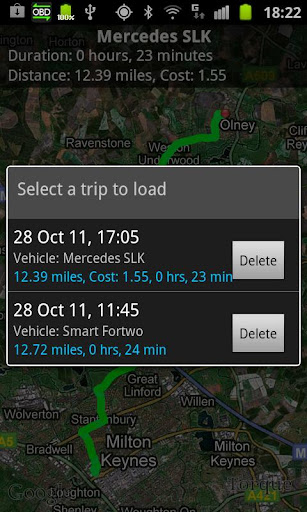
    Torque Pro (OBD2 & Car)

    Requirements: for all Android versions, supports App2SD
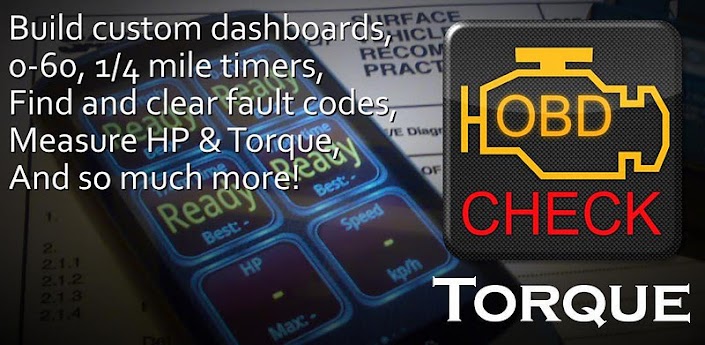
    Overview: See what your car is doing in realtime, get fault codes, car performance, sensor data and more!
    ixvMM__7udJBKdr52Y6JQZtL2PXdJpQM9UiB-ust4C7xxQtdvHJmvj7h-OX33UjzGw=w705


    uhLsPMZ5BIQwSrtC0BAkNxwTNmWQX4t-oZdvbmWAb5hG4Q7oi69-jA492Q8ZK8gieA


    ChGbx07afRgEWYjLBLX3etnogzZyM_YE5Man8Q-3x52VLwBxlg3v5eNw0AMF5oPtIw
    IElU7AcmrAvI8yDW1YEPVrDfxuizWKSLkUtWyIDaZScE2jwlDvxyKG2z2PD5yu1jEg
    cRIYvWimJPcTcVvlpR47XskhrAtLQwZKKUeZEYqbdhe1tI91F8EsFceLcLJFGNTx1J3x


    w7VRn1Mi-jIE1CxjQUADpvbylag34xSzvMeMGwqzYXAr4sVndiZhIredfufvXoRRu_yu
    Hkd4cH3xiiCGXddoS27UAB_lTLO2FwYFPz35j7ZA96TMi8y3kC3c-5kVNZwyLNYrZ5k
    gbyACckmx2FB8wzK-7__8nX91y2I7lEH2-PDp4p4Pgegnuex5Bqx4q1fJbGt5A-Cigg


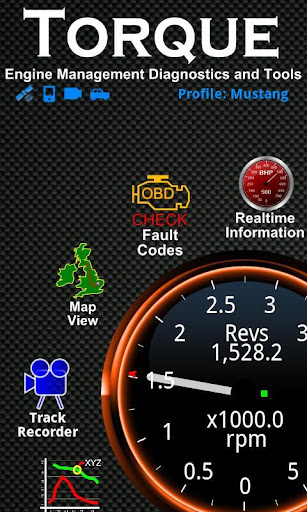
    Torque is a vehicle / car performance / diagnostics tool that uses an OBD II Bluetooth adapter to connect to your OBD2 engine management / ECU.

    It can use the GPS to provide tracker logs with engine logging so you can see what you were doing at any point in time

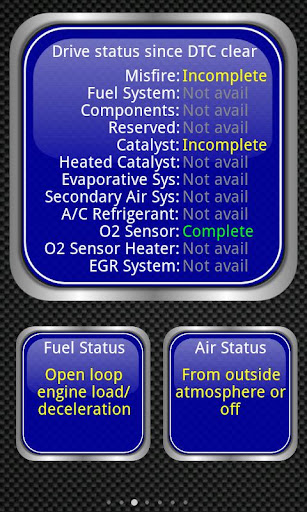
    It can also show and reset a DTC / fault code like a scantool.

    It also has:


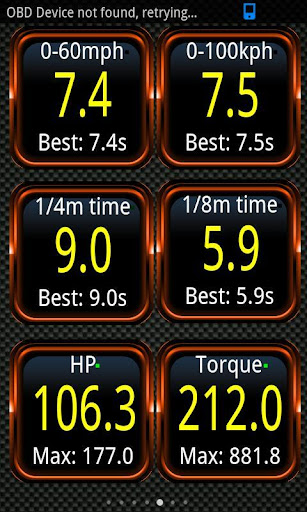
    * Dyno / Dynomometer and Horsepower/HP & Torque
    * 0-60 timings - more accurate than just using plain old GPS - see how fast your car is (or truck )
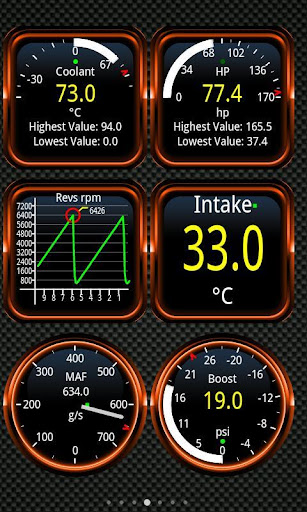
    * Customisable dashboards
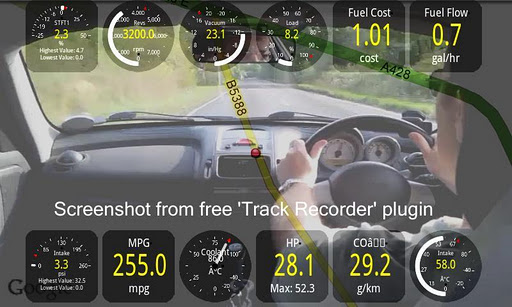
    * Video your journey using the Track Recorder plugin with onscreen OBD data overlay - a black box for you car/truck!
    * Send GPS tagged tweets directly to twitter (for example if you are going on a roadtrip)
    * Massive fault code database for allowing lookup of fault codes from many different manufacturers
    * Theme support (choose from different themes to change the look of your dashboard)
    * Send logging information to web or email CSV/KML for analysis via excel / openoffice
    * Heads up display / HUD mode for night time driving
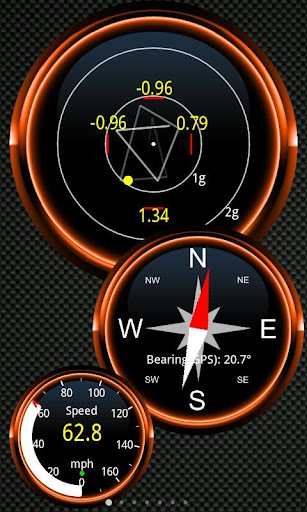
    * GPS Speedometer/Tracking and realtime web upload capability - see what you were doing and your engine, at a point in time
    * Turbo boost feature for vehicles that support MAP sensors
    * Alarms and warnings (for example if your coolant temperature goes over 120C whilst driving) with voice/speech overlay
    * AIDL API for connecting third party apps, A simple Telnet interface for developers to talk to the adapter, and an OBD scanner.
    * Works on tablet devices like the Motorola Xoom, Dell Streak, and Samsung Galaxy Tab

    What's in this version:
    * Tip: Turn on 'Faster Communication' in the OBD settings for faster read speeds!
    * Option to start app on device reboot
    * Import / Export dashboard layouts
    * Remembers trip information when phone call is taken
    * Ability to specifiy custom init string for ELM327
    * Prius PID fixes
    * If your phone goes slow when Torque quits then you have bugged bluetooth drivers - enable the 'Hang fix for HTC/Samsung' in the settings (set it to 'Yes') to work around the issue

    Note:
    Show maps


    buyz.gif


    freedownload1.gif


    chirichiri.jpg


    PrinterShare Mobile Print Premium

    Requirements: Android 1.5+
    Overview: Print documents (DOC, DOCX, XLS, XSLX, PPT, PPTX, PDF, TXT) from your smartphone's SD card and from Google Docs. Also print email from Gmail, photos from the SD card, contacts, agendas, SMS or MMS, call logs, and even web pages directly from your device to a printer right next to you or anywhere in the world.
    1CdAXHRa6n_ayKBrGAHLHanhtTXvZ3C9sHYurQ_1P3j9e3jk--AqVr265NxEx_A57Ec=w705


    fANRU8dcLKNL9kCyXdoppUVvuQiAp_OWQsmYkjH2jADVjg6yiKybH8i0auu-k2k1XqE
    0_O_YZq9kVhV1KGUZEZ242zt8bpmpLy2JgfAarZ_Dpoxf0gDoLfwnOXyXue1UFcjcMQ


    aNCaIOabTNikHZ-cDTTjbsmgKsaaenPrgX5bbbJ6W7z5WZhJUN9xn6_H0hyXwHTqGQ
    IdK3NKTrhVwKuNghK8FPwhSgQgmvK3OH36YQoyVJS2VPs4b_snvqYOImrdJnIgn75ork


    Premium Features
    Please note: This is the premium, unlocked version of PrinterShare Mobile Print. All the premium features are available, and no key is required.

    Premium Features: nearby direct printing via Wi-Fi or Bluetooth without PC; nearby printing to PC or Mac shared printers; unlimited remote printing. You do not have to buy pages or have a subscription on the receiving computer (Mac or PC).

    Nearby Printing: you can print to WiFi printers shared on your Local Area Network from your Android phone without having to install PrinterShare computer software. You don't need to log in or sign up with the system for Nearby Printing. A wide variety of printers are supported.

    Remote Printing over the Internet: make sure you've installed the PrinterShare software on the computer connected to the printer, just like when you print from computer to computer using PrinterShare, then just log in to your free account with your smartphone and find and select the printer you want to print to. In addition, from your mobile device you may look for printers shared by others, select one, and print on it.

    What's new in version 7.5.0
    added support of few new HP printers (include HP OfficeJet 150 Mobile)
    added support of Android devices based on MIPS arch
    bugs fixed


    buyz.gif


    freedownload1.gif


    chirichiri.jpg

     
    RealVNC VNC Viewer

    BFsZUx43oKzVGSojOeD1FmhTsNtUAMJB_PTpBprrc0UQHsrPwtcdEEPyLSbtKoc-SSw=w705

    umMZs7ZHgISHaD4aFMYcLTShqlYv-MS7wwS3M0-S4_W7-7AQoAAhu5bxEHv-9gmzFBQ
    ICvRTOdwKrv-Uqlh4q7LNZXkL5e5Ulic5HqswGZ6ZtoGWMD79aLVRbscrhTv4i63pAu2


    oo_I2AXF7bchSgJ3Rd8v67D13G6Kdw634fq7lLukXF-zABlJSBatSt0HwQSj5qMY9gA
    xXyO8CCLEa92dDMAoL9_9HRKXzhSTdK9y0gX3hEAjkidMy-4t8w--dZKKq3lqHSNp0s


    VNC Viewer is from RealVNC, the inventors of VNC. It can connect to any Mac OS X computer, and to any Window, Linux, or UNIX computer running VNC-compatible Server technology. RealVNC recommends VNC Enterprise Edition for robust, secure, and high-performance connections, and for its unrivalled flexibility. For more information, see

    ===Summary===

    1. Download VNC Viewer from the චිරි චිරි Market. :rofl: :P

    2. If the computer you want to control is running Mac OS X 10.4 or later, enable Apple Remote Desktop/Remote Management (see below for more information). If not, install and start a
    VNC-compatible Server.

    3. If you are connecting over the Internet (for example, via 3G), configure firewalls and routers protecting the computer to allow and forward network communications to it. Start with http://www.realvnc.com/products/android/1.0 for more information. If you are connecting over a Wi-Fi-enabled private network such as a LAN or VPN, you should be able to connect without further configuration.

    4. Find out the network address of the computer. If you are connecting over the Internet, this will probably be that of a router. You will also need a port number if the VNC-compatible Server is listening on a port other than the default for VNC, 5900 (note this is not necessary for Apple Remote Desktop/Remote Management).

    5. Start VNC Viewer, identify the computer you want to control, and connect!


    ===Features===


    * Interact with your computer as though sitting in front of it.
    * Give connections user-friendly names, and see desktop previews.
    * Pinch to zoom in to a specific area, or out to see the whole picture.
    * Easy navigation, scrolling, dragging, and selection using standard touch, tap, and drag gestures.
    * Mouse button mode for precise control over mouse button and scrolling operations.
    * Easy text entry using on-screen keyboard with preview.
    * Important non-character keyboard keys (function, modifier, and so on) available on a scrolling key bar.
    * Automatic performance optimization.
    * Support for screen resolutions up to 5120 by 2400 pixels (though the actual resolution is limited only by the memory of your device).
    Users connecting to VNC Enterprise Edition also enjoy the following significant benefits:
    * Connections encrypted using 128-bit AES technology.
    * Authentication credentials protected by 2048-bit RSA public keys.
    * System authentication to connect using computer log on credentials.
    * Enhanced performance.
    * Support for non-US keyboards.
    * Transfer text between applications on your computer and device.
    VNC Enterprise Edition is available for a wide range of Mac OS X, Window, Linux, and UNIX computer operating systems. For more information, visit http://www.realvnc.com/products/enterprise.
    ===Connectivity===
    VNC Viewer can establish connections to:
    * VNC Free Edition (version 4.1).
    * Mac OS X 10.4 or later with built-in Apple Remote Desktop/Remote Management enabled. To do this, turn on the 'VNC viewers may control screen with password' option, and set a password. Note this does not apply to PowerPC Macs running 10.4 (Tiger); install VNC-compatible Server technology instead.
    * AMX touch panels.
    * Third-party VNC-compatible Servers.
    VNC Viewer can establish secure (authenticated and encrypted) connections to:
    * VNC Enterprise Edition (version 4.x).
    * VNC Personal Edition (version 4.x).

    What's in this version:
    - Support for Intel-based devices.


    buyz.gif


    freedownload1.gif


    chirichiri.jpg