


Attention for those who didn't read until bottom , the Patch works only if the AV is installed as Default in C:/Program Files/Kaspersky


Are you using a 'pirate' copy of KAV ? Are you tired of changing the license up to 3 times a month ? Don't stress yourself , Here's my solution :
Use this :
This is the ultimate tool for KAV 7 and KIS 7 and new *
 section with features even on v. 8 . Version 8 as Internet Security kis 8.0.0.357
************************************************************
Note ! the image shows Beta but this is FINAL release , believe me
KIS v8.0.0.357:

You will find inside the archive the Installation Kit & The Magical Key that doesn't get Blacklisted
Enjoy :
P.S:
& For Kaspersky Antivirus v.8.0.0.357 :
License valid until 18- January-2011
************************************************************
For KIS & KAV version 7.x:
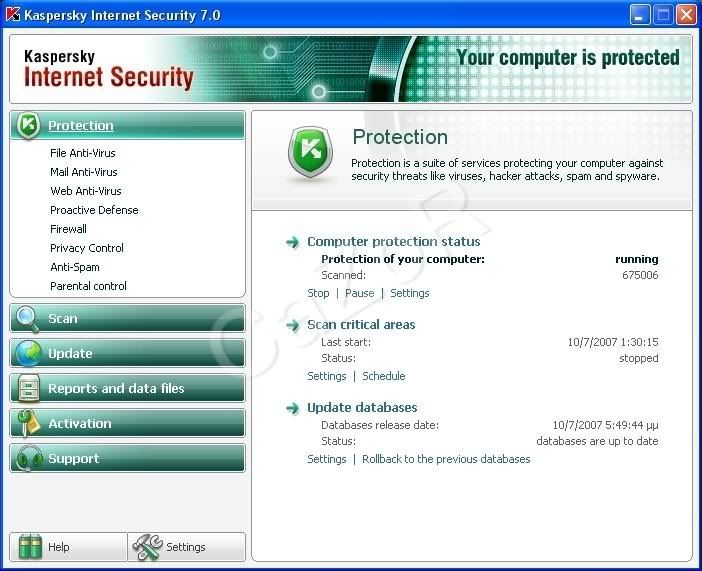
It uses advanced methods to avoid getting blacklisted and so on ...
1. After installing KAV/KIS on your PC , do not activate , use "Activate Later" option .

2. Reboot to complete installation , again "Activate Later"

3. Deactivate all Proactive defense options from the AV like this :

4. In the folder you will find two patches , the one recommended for installing is "Kaspe.. Sollution" because the other one is slightly 99.8% stable not 100% , but is the same patch version so use whatever you like . (do not open the patch yet , so do not worry , cause it will work )
5. Run your PC into Safe Mode with Networking Options :
There are two ways to get in Safe Mode
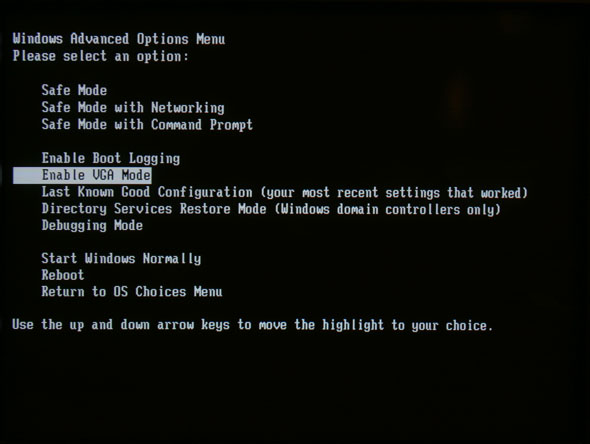
a) when booting up windows , press F8 right after the POST screen .
choose Safe Mode with Networking option .
b) Use the RUN from Start Menu .
go to Start -> RUN -> type : msconfig , hit ENTER ,
go to Boot.ini tab , select Safe Boot , check the Network option bellow and close the dialog box , hit Restart after this operation .
When asked what User to Log in , click on the Default SYSTEM Administrator , NOT your account or your Guest account , YOUR DEfault Administrator Account , the one from the System , ussually Located in the first ROW .

It is very important because the fact that this way the Patch has acces to the System so it will smoothly update . If your account is password protected (The admin acc. , type password when asked)


6. Wait until you reach (get inside) in Safe Mode , you will see that screen (black) with Safe Mode in corners

hit Yes in that box .
7. Double click the "Kas.. Sollution" patch . NOTE! You will have to wait a bit until it shows on the desktop because in Safe Mode , VGA resources are poor .
If the Patch isn't starting in maximum 2.5 minutes , press Ctrl+Alt+Del and simply wait . If even this method isn't working , Run the second patch and close the first one . But I advice you to wait cause it will work .
8. After starting the patch , you will see some buttons , that may be pressed depending on your version of the AV (KAV or KIS) . Read the following very carefully
9. You will see this screen :

Press 'key remover' button first ,
After that 'Clean' Button
After that press !! Depending on your version "Patch KAV" or "Patch KIS (intenet security)" .
Probably you won't have time to see anything on the screen because it's very fast
10. Now press the "Key KAV+KIS" , and press "Install" , just like there .
After finishing , you may hit "Exit" .
11. Go again to RUN -> msconfig -> Boot.ini and deactivate the safe mode , uncheck the safe Boot , so the OS can start in normal boot .

12. After reboot , you will be asked to Activate , hit "Apply Existing License" and Use one of the ones from the folder I supplied I have included Keygen also for KAV version .

13. After Activation , you will have to Update the AV to have the latest protection services activated , and after that You may enable Proactive Defense again .

14. Happy Non-Blacklisting Protection , you can fully update and no worries about Blacklisting again , [the secret method I cannot tell you so don't ask ]
15. Updated successfully with a key that has already been blacklisted :


Now you are protected against any type of malware
The End

You can also get from here a LEGAL 180 Day (6months) key
Keys Updated - 06 June 2008


Are you using a 'pirate' copy of KAV ? Are you tired of changing the license up to 3 times a month ? Don't stress yourself , Here's my solution :
Use this :
This is the ultimate tool for KAV 7 and KIS 7 and new *

************************************************************
Note ! the image shows Beta but this is FINAL release , believe me
KIS v8.0.0.357:

You will find inside the archive the Installation Kit & The Magical Key that doesn't get Blacklisted
Enjoy :
P.S:
INSTALL THAT AS AN ACTIVATION CODE
Code:
http://rapidshare.com/files/125641747/GetMarriedWithAV.rar& For Kaspersky Antivirus v.8.0.0.357 :
Code:
http://rapidshare.com/files/125661250/GetMarriedAtNaV.rar************************************************************
For KIS & KAV version 7.x:
It uses advanced methods to avoid getting blacklisted and so on ...
DownloadYou will be able to use a key even if it is already blacklisted so , you better listen carefully
Code:
http://rapidshare.com/files/118067302/N0KaiBlk_zZzCocaColaFw.rar
2. Reboot to complete installation , again "Activate Later"

3. Deactivate all Proactive defense options from the AV like this :

4. In the folder you will find two patches , the one recommended for installing is "Kaspe.. Sollution" because the other one is slightly 99.8% stable not 100% , but is the same patch version so use whatever you like . (do not open the patch yet , so do not worry , cause it will work )
5. Run your PC into Safe Mode with Networking Options :
There are two ways to get in Safe Mode
a) when booting up windows , press F8 right after the POST screen .
choose Safe Mode with Networking option .
b) Use the RUN from Start Menu .
go to Start -> RUN -> type : msconfig , hit ENTER ,
go to Boot.ini tab , select Safe Boot , check the Network option bellow and close the dialog box , hit Restart after this operation .
When asked what User to Log in , click on the Default SYSTEM Administrator , NOT your account or your Guest account , YOUR DEfault Administrator Account , the one from the System , ussually Located in the first ROW .

It is very important because the fact that this way the Patch has acces to the System so it will smoothly update . If your account is password protected (The admin acc. , type password when asked)


6. Wait until you reach (get inside) in Safe Mode , you will see that screen (black) with Safe Mode in corners

hit Yes in that box .
7. Double click the "Kas.. Sollution" patch . NOTE! You will have to wait a bit until it shows on the desktop because in Safe Mode , VGA resources are poor .
If the Patch isn't starting in maximum 2.5 minutes , press Ctrl+Alt+Del and simply wait . If even this method isn't working , Run the second patch and close the first one . But I advice you to wait cause it will work .
8. After starting the patch , you will see some buttons , that may be pressed depending on your version of the AV (KAV or KIS) . Read the following very carefully
9. You will see this screen :

Press 'key remover' button first ,
After that 'Clean' Button
After that press !! Depending on your version "Patch KAV" or "Patch KIS (intenet security)" .
Probably you won't have time to see anything on the screen because it's very fast
10. Now press the "Key KAV+KIS" , and press "Install" , just like there .
After finishing , you may hit "Exit" .
11. Go again to RUN -> msconfig -> Boot.ini and deactivate the safe mode , uncheck the safe Boot , so the OS can start in normal boot .

12. After reboot , you will be asked to Activate , hit "Apply Existing License" and Use one of the ones from the folder I supplied I have included Keygen also for KAV version .

13. After Activation , you will have to Update the AV to have the latest protection services activated , and after that You may enable Proactive Defense again .

14. Happy Non-Blacklisting Protection , you can fully update and no worries about Blacklisting again , [the secret method I cannot tell you so don't ask ]
15. Updated successfully with a key that has already been blacklisted :


Now you are protected against any type of malware
The End

You can also get from here a LEGAL 180 Day (6months) key
Code:
http://www.kaspersky.com/de/20814_72814_329.html
Code:
http://rapidshare.com/files/120795155/TheAbsoluteKeyToSuccess.rar


 patta
patta 


