
Latest ads
-
 Plan your Crypto & Forex entries before you take the trade
- romeshnonis
- Updated:
-
 RHCSA, RHCE, AWS, Docker, Kubernetes Training
- Sanjeewani95
- Updated:
-
 🛡️ Kaspersky Antivirus – 1 Year / 1 Device | Rs. 2,300 | Only 9 Left
- KSPathirana
- Updated:
-
Professional CCTV Installation Service
- Techguy231
- Updated:
-
I'll research & write an article - Rs. 2000 onwards
- Blogerwiki
- Updated:
You are using an out of date browser. It may not display this or other websites correctly.
You should upgrade or use an alternative browser.
You should upgrade or use an alternative browser.

machn add remove progarm ekn ayn wenna nadda ?
ehnam aya ubuntu xp wala idla install karla uninstall karpan
ehmath hari giya nattam
mama nam danna naha machn
ehnam aya ubuntu xp wala idla install karla uninstall karpan
ehmath hari giya nattam
mama nam danna naha machn
Dude! if you want help, give proper details! What OS is on the Primary partition ? if its windows on the primary partiton then use Fixmbr from the Windows setup and fix the mbr so that only windows will boot up. After you boot in to windows, just format the partition that has ubuntu.Shameer said:dual boot
This way you can keep your windows and remove the ubuntu.

Shameer said:ow loku ayya
ubuntu partition eka format karanna oyaata hakiyavak thiyanavanum eeta passe xp cd eka daala boot sector ekak aluthin add kalahama hariyai samaharavita.
kosandpol said:Dude! if you want help, give proper details! What OS is on the Primary partition ? if its windows on the primary partiton then use Fixmbr from the Windows setup and fix the mbr so that only windows will boot up. After you boot in to windows, just format the partition that has ubuntu.
This way you can keep your windows and remove the ubuntu.
ow eeka hari. Fixmbr and fixboot kiyana commands deken puluvan godak deeval karanna oya vagee avasthavaladi. Master Boot Record eka ho Boot Sector eka repair or rewrite karanna puluvanne eevalin
kosandpol said:Dude! if you want help, give proper details! What OS is on the Primary partition ? if its windows on the primary partiton then use Fixmbr from the Windows setup and fix the mbr so that only windows will boot up. After you boot in to windows, just format the partition that has ubuntu.
This way you can keep your windows and remove the ubuntu.
machn fixmbr karanne komada??
mage windows thami!
dan mata oni boot weddi XP witharak pennanna
fixmbr eken puluwan wei
komada eka karanne??

then boot into Windows and remove ubuntu from add/remove programsShameer said:DAN MATA FORMAT KARANNA WEIDA?
mama install inside windows kare :S
?????????
add/remove progamme walin ubuntu ayin karannea ba. eka karanna wennea xp install karana gaman partition teka delete karala aluthin xp dannea oni. nath dual boot nam xp walata log wela partiotion magic install karala ext3 or ext2 patition formate remove karannea xp wala set karannea boot menu eka xp walata wetharak ethakota hari.. habai monwa karannath data backup karannea weai
install karala thiyannea pc eka ubuntu wetharanam data backup nathnam hodama dea thamai xp or vista cd ekeain boot karala xp or vista new install ekk arannea ntfs partition format ekata.. any help [email protected] sometime chat eka innawa..
install karala thiyannea pc eka ubuntu wetharanam data backup nathnam hodama dea thamai xp or vista cd ekeain boot karala xp or vista new install ekk arannea ntfs partition format ekata.. any help [email protected] sometime chat eka innawa..

oyage XP dala nam Partition magic 8.0 hari eevage Partition manager ekkakin maka ganna puluwan naththam partition eka delete karala danna Fdisk valin (98)
ai ubuntu makuwe?????? I get rid of XP, and i'm well using xubuntu...
What is the matter with you..
ai ubuntu makuwe?????? I get rid of XP, and i'm well using xubuntu...
What is the matter with you..
Shameer said:machn fixmbr karanne komada??
mage windows thami!
dan mata oni boot weddi XP witharak pennanna
fixmbr eken puluwan wei
komada eka karanne??
fixmbr kiyanne Windows XP Recovery Console command ekak.
XP bootable cd ekakin setup eka atharathura eeka kohoma da run karanne kiyala meeke daala athi.
http://support.microsoft.com/kb/314058
gayanasa123 said:add/remove progamme walin ubuntu ayin karannea ba. eka karanna wennea xp install karana gaman partition teka delete karala aluthin xp dannea oni. nath dual boot nam xp walata log wela partiotion magic install karala ext3 or ext2 patition formate remove karannea xp wala set karannea boot menu eka xp walata wetharak ethakota hari.. habai monwa karannath data backup karannea weai
install karala thiyannea pc eka ubuntu wetharanam data backup nathnam hodama dea thamai xp or vista cd ekeain boot karala xp or vista new install ekk arannea ntfs partition format ekata.. any help [email protected] sometime chat eka innawa..
machn! you are true! i cant uninstall ubuntu!
i deleted it from registry and deleted the folder
itself!
the only problem is
a menu comes in the boot
gayan kalhara said:
pls come on skype
Malinga said:fixmbr kiyanne Windows XP Recovery Console command ekak.
XP bootable cd ekakin setup eka atharathura eeka kohoma da run karanne kiyala meeke daala athi.
http://support.microsoft.com/kb/314058
thnx machn im duin
then just use the fixmbr from the windows recovery console and fix the mbrShameer said:cant remove machn!
i deleted it from registry
deleted the folder
only prob is
when loading i must wait 20 secs extra to load xp
Keep in mind that playing around with the boot record can make your PC unbootable ifyou dont know what you're doing.
So READ AND UNDERSTAND the instructions before trying it out!! You have been warned!
This shows how to get in to the recovery console :
http://www.geocities.com/kilian0072002/recconsole1.html
This shows how to use the fixmbr,fixboot and bootcfg:
http://chara.epfl.ch/~fsalvi/Windows/ntfs_recovery/recconsole2.html
Once again, read and understand what is needed to be done. Dont come back and whine if you hose your PC by not understanding what you're doing.

Shameer said:cant remove machn!
i deleted it from registry
deleted the folder
only prob is
when loading i must wait 20 secs extra to load xp
menna wisaduma
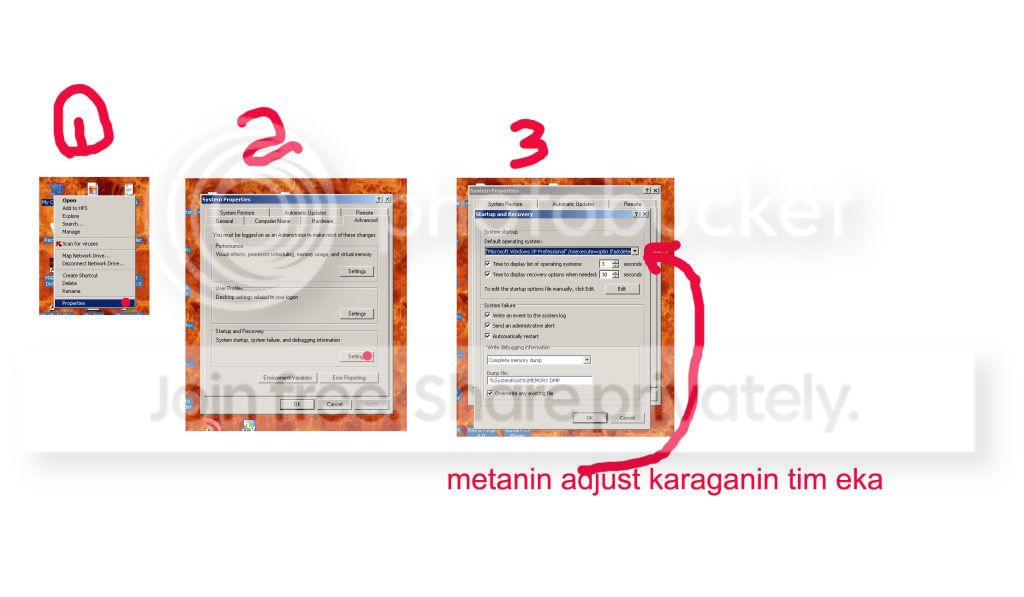
kat4ever said:menna wisaduma
appa! thnx macho
meka thami mata oni une
ubata thaggak denna watinawa

menna thagga

kosandpol said:then just use the fixmbr from the windows recovery console and fix the mbr
Keep in mind that playing around with the boot record can make your PC unbootable ifyou dont know what you're doing.
So READ AND UNDERSTAND the instructions before trying it out!! You have been warned!
This shows how to get in to the recovery console :
http://www.geocities.com/kilian0072002/recconsole1.html
This shows how to use the fixmbr,fixboot and bootcfg:
http://chara.epfl.ch/~fsalvi/Windows/ntfs_recovery/recconsole2.html
Once again, read and understand what is needed to be done. Dont come back and whine if you hose your PC by not understanding what you're doing.
thank you to taking the time for helping me
i got the solution
http://www.elakiri.com/forum/showpost.php?p=3248902&postcount=38


