USB Installers for Windows 7 / Windows 8

justin92

Member
Jun 21, 2012
32
0
0
a2f10689cac444ee733107de36c0bc78.jpg


USB Installers for Windows 7 / Windows 8 | 12.54MB

Iso to USB drive Installers for Windows 7 , windows 8 and Ubuntu

c81361b2753c7e39a34ac9f59305a88b.jpg


Universal-USB-Installer
Windows7-USB-DVD-tool
Your Universal Multiboot Installer
xboot.exe
7zip

5a29991dbbba4e5d429afabad30c3ff4.jpg


cbed5658cb7278134d846712b507845e.jpeg


DOWNLOAD:
Code:
http://rapidgator.net/file/24503886/Usb.Installers.Windows7.rar.html
 

BarakOsama

Well-known member
  • May 20, 2009
    10,674
    1
    2,468
    113
    Okata oya eka eka app ona naa..;)
    Microsoft ekenma tool eka deela thiyenava okata..:cool:

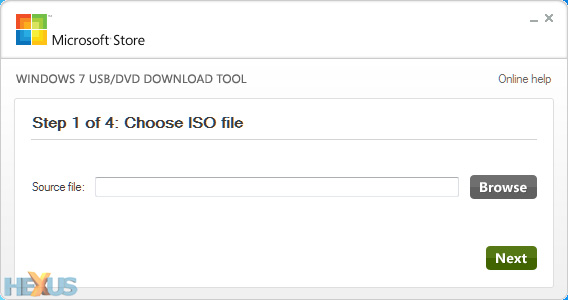
    1. Install and run Microsoft's Windows 7 USB tool. In the subsequent window (pictured below),
    browse to the 32-bit or 64-bit Windows 8 disk image file you've already downloaded and hit next.


    win8usb-1.jpg


    2.
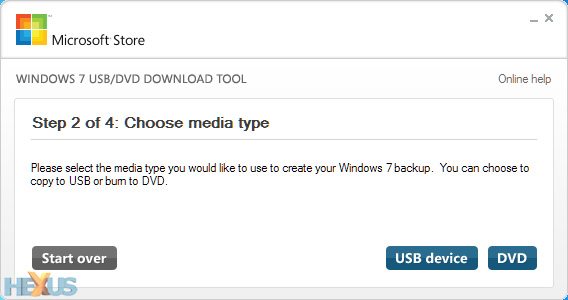
    With your USB stick plugged in (remember, it'll need to be at least 4GB in size for a 64-bit install),
    choose USB device as your media type.


    win8usb-2.jpg


    3.
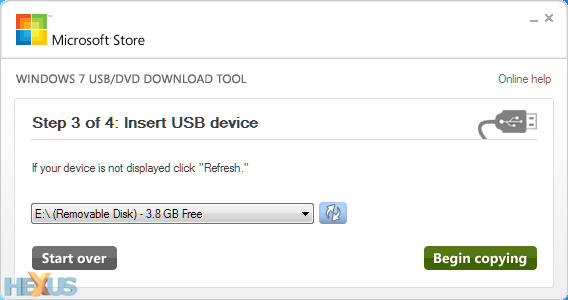
    Select the correct removable device from the drop-down menu, then click begin copying.

    win8usb-3.jpg


    4.
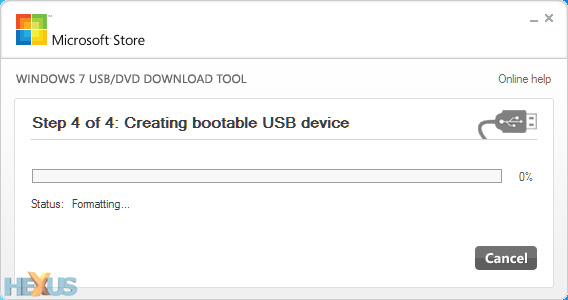
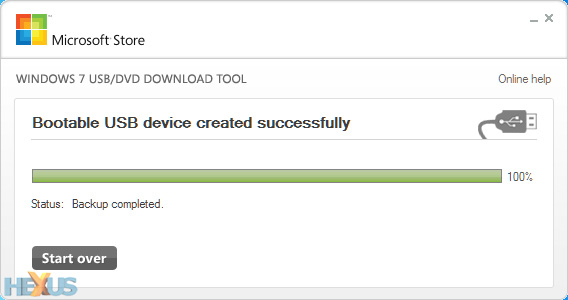
    Sit back, relax, and make a cuppa while the USB tool formats your pen drive,
    makes it bootable, and copies over all of the Windows 8 files.


    win8usb-4.jpg


    5.
    Once the process is complete, the USB drive can be used to boot a PC and run the Windows 8 setup process.

    win8usb-5.jpg


    That's all there is to it. You'll save yourself a blank DVD,
    the Windows 8 setup process should be quicker from flash-based media,
    and it's of course a must on netbooks or laptops without an optical drive. :cool:
     
    Last edited: