
Latest ads
-
 ඔයාගෙ Assignment හෝ Thesis එක හරියට හදාගමු
- ErMurazor
- Updated:
-
BlackWall V2ray servers
- hu KANNA
- Updated:
-
 Peppa Pig Family Plush Toy Set – 5 Characters
- anil1961
- Updated:
-
Express VPN PC - 1 Year Rs. 600.00
- Sanathbh
- Updated:
-
Capcut Pro 7 Days Team Plan - Rs. 3️⃣0️⃣0️⃣
- Sanathbh
- Updated:
You are using an out of date browser. It may not display this or other websites correctly.
You should upgrade or use an alternative browser.
You should upgrade or use an alternative browser.

NoteZilla: Portable
NoteZilla is an elegant Sticky Notes Software for Windows. Just as we use paper sticky notes (eg. 3M Post-It® Notes), NoteZilla lets you create virtual sticky notes on your Windows Desktop and organize them in to folders.
The most attractive capability of NoteZilla is that it lets you stick notes to websites, documents, programs or any window.
Save Time: Desktop sticky notes are the best way to quickly write down what's on your mind. With no effort you can create and manage them without changing your current flow of activities.
Stay Neat: Organize sticky notes inside folders to avoid clutter on your Windows Desktop.
Stress Less: Attach a sticky note to any document, website, program or window. Great advantage!
Add Convenience: Treat sticky notes as tasks, reminders or memos. NoteZilla presents an easy and intuitive way of doing this.
Get Amazed: Finding a note quickly is as important as writing a note. NoteZilla lets you locate the right sticky note instantly.
Feel Pleasant: These computer sticky notes look awesome on your Windows desktop. Sticky Notes are skinnable and they can appear transparent too.
Add Mobility: Synchronize sticky notes with MS-Outlook. Transfer your notes to any PDA Handheld/Mobile device via MS-Outlook. You can also sync notes directly with a Palm OS device.
Get Lighter: NoteZilla intelligently manages your PC memory and resources. It is a small program (< 4 MB).

Download
No need to install just unrar and use.
NoteZilla is an elegant Sticky Notes Software for Windows. Just as we use paper sticky notes (eg. 3M Post-It® Notes), NoteZilla lets you create virtual sticky notes on your Windows Desktop and organize them in to folders.
The most attractive capability of NoteZilla is that it lets you stick notes to websites, documents, programs or any window.
Save Time: Desktop sticky notes are the best way to quickly write down what's on your mind. With no effort you can create and manage them without changing your current flow of activities.
Stay Neat: Organize sticky notes inside folders to avoid clutter on your Windows Desktop.
Stress Less: Attach a sticky note to any document, website, program or window. Great advantage!
Add Convenience: Treat sticky notes as tasks, reminders or memos. NoteZilla presents an easy and intuitive way of doing this.
Get Amazed: Finding a note quickly is as important as writing a note. NoteZilla lets you locate the right sticky note instantly.
Feel Pleasant: These computer sticky notes look awesome on your Windows desktop. Sticky Notes are skinnable and they can appear transparent too.
Add Mobility: Synchronize sticky notes with MS-Outlook. Transfer your notes to any PDA Handheld/Mobile device via MS-Outlook. You can also sync notes directly with a Palm OS device.
Get Lighter: NoteZilla intelligently manages your PC memory and resources. It is a small program (< 4 MB).

Download
No need to install just unrar and use.
WTM CD PROTECT
PROTECT YOUR CDS - GET WTM CD PROTECT
CD Copy Protection Software
Worried about piracy? Need a good software copy protection measure? It is highly essential to protect your data today. You need your work to be saved and protected against accidental deletion and corruption. If you are looking for easy to use, simple and effective CD protection then look no further. Allow WTM CD Protect to handle this for you.
With the WTM software, you will find answers to all your problems related to CD copy protection, video CD protection, data CD protection, and music CD protection amongst others, to make your work easy to access and at the same time, well protected against copying and duplication.
When we say copy protection, we mean that there will be no illegal and fraudulent copying of the data contained in the CD. Although there are copyright laws in existence today, this is a much-needed requirement. CD duplication and piracy is a rampant business and you are well within your rights to ask for video protection, CD copy protection, data protection, copy protection for important and sensitive data. It goes without saying that unauthorized copying can cause untold harm to the business in question or even to your personal information.
WHY WTM?
Why not WTM? WTM CD Protect will give you the required protection against illegal copies. You will have copy protection for you music, videos, and most importantly, for your sensitive and confidential business data. Here you get a protection system that is strong, easy to use and very effective against tampering of any kind.
Advantages of WTM CD PROTECT
Ease of use: The WTM CD Protect software has a user-friendly interface that requires no expert technical know-how for operation. It is extremely easy to navigate and use.
Flexibility: The protection system is flexible enough for you to tailor it as per your needs. You can customize the software based on your exact requirements.
Secure: The CD Protection software is thoroughly tested to give you the highest level of security for your records.
WTM CD Protect is a powerful multilevel protection solution targeted at providing professional protection. It requires no extra cost in terms of time, effort and maintenance.
WTM has CD protect programs to suit every need.
Did you know that a CD protect software operates keeping in mind direct coding on a CD-ROM? Once the CD has been given this protection, trying to read the CD will result in the CD master giving unreadable sector messages and the copying process will be stopped. Copy protection will not allow copying to a blank CD.
Opt for WTM CD Protect for all your protection needs. If you are not already convinced, we have a test version for you available absolutely FREE. Try it out.
Download
PROTECT YOUR CDS - GET WTM CD PROTECT
CD Copy Protection Software
Worried about piracy? Need a good software copy protection measure? It is highly essential to protect your data today. You need your work to be saved and protected against accidental deletion and corruption. If you are looking for easy to use, simple and effective CD protection then look no further. Allow WTM CD Protect to handle this for you.
With the WTM software, you will find answers to all your problems related to CD copy protection, video CD protection, data CD protection, and music CD protection amongst others, to make your work easy to access and at the same time, well protected against copying and duplication.
When we say copy protection, we mean that there will be no illegal and fraudulent copying of the data contained in the CD. Although there are copyright laws in existence today, this is a much-needed requirement. CD duplication and piracy is a rampant business and you are well within your rights to ask for video protection, CD copy protection, data protection, copy protection for important and sensitive data. It goes without saying that unauthorized copying can cause untold harm to the business in question or even to your personal information.
WHY WTM?
Why not WTM? WTM CD Protect will give you the required protection against illegal copies. You will have copy protection for you music, videos, and most importantly, for your sensitive and confidential business data. Here you get a protection system that is strong, easy to use and very effective against tampering of any kind.
Advantages of WTM CD PROTECT
Ease of use: The WTM CD Protect software has a user-friendly interface that requires no expert technical know-how for operation. It is extremely easy to navigate and use.
Flexibility: The protection system is flexible enough for you to tailor it as per your needs. You can customize the software based on your exact requirements.
Secure: The CD Protection software is thoroughly tested to give you the highest level of security for your records.
WTM CD Protect is a powerful multilevel protection solution targeted at providing professional protection. It requires no extra cost in terms of time, effort and maintenance.
WTM has CD protect programs to suit every need.
Did you know that a CD protect software operates keeping in mind direct coding on a CD-ROM? Once the CD has been given this protection, trying to read the CD will result in the CD master giving unreadable sector messages and the copying process will be stopped. Copy protection will not allow copying to a blank CD.
Opt for WTM CD Protect for all your protection needs. If you are not already convinced, we have a test version for you available absolutely FREE. Try it out.
Download
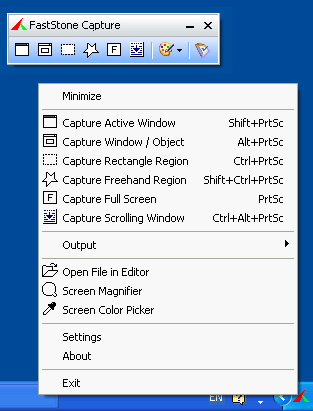
FastStone Capture (Portable) is a powerful, flexible and intuitive screen-capture utility. It allows you to capture anything on the screen including windows, objects, full screen, rectangle regions, freehand-selected regions and scrolling windows/web pages. It has innovative features such as a floating Capture Panel, hotkeys, resizing, cropping, text annotation, printing, e-mailing, screen magnifier and many more.
Unrar and apply any name/code
Download
Unrar and apply any name/code
Download
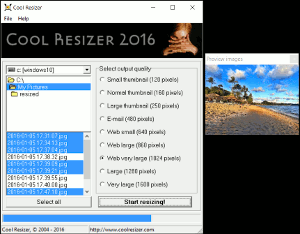
Cool Resizer (Portable)is a perfect tool for resizing (downsizing) your pictures and photos from digital cameras. It is very easy to use and can resize many image at once. All you have to do is select from one of predefined sizes (small thumbnail, large thumbnail, e-mail, small web, large web, verly large web, large) and the program will save all the resized images to a subfolder. All the most popular graphic formats are supported so you won't need other expensive programs.
Download
Download
Animated GIF Producer(Portable) is a quick and remarkably easy-to-use tool for creating various animations, buttons and banners that will make your website shine. You no longer need to spend money on complex video processing platforms that will take you a couple of days to learn how to make a simple GIF animation. With Animated GIF Producer, there’s no complexity and GIFs can be created in a few minutes.
Creating a GIF animation is a breeze. You can do it by blending together images, captured video snapshots and multipage files. To make your animation look and behave the way you want, you can customize a multitude of settings, including frame position, size, and delay among many other parameters. You can also apply special effects make a transition from one image to another coherent and smooth.
Animated GIF Producer features an intuitive interface where all options can be easily located when you need them. You can add, process images, organize them into a sequence and configure the desired animation output settings from one place with a point-and-click simplicity. The program allows you to import images directly from clipboard. Added to this is an inbuilt snapshot capture facility to take snapshots from videos. A GIF-to-AVI export capability is also available.
Key features:
* Support for AVI, DAT, MPG, MPE, MPEG video formats;
* A built-in snapshot capture facility;
* Support for BMP, JPEG, TIF, GIF, PNG, ICO, PCX, CUR, Adobe PhotoShop PSD and Windows Metafiles image formats;
* Import frames from other GIF;
* Resize frames (stretch);
* Multiple animation output settings;
* Define GIF-files global parameters: screen size, background color;
* Define offset and delay for each separate image;
* Set forward and backward images order;
* Apply transition effects for images;
* Import image from clipboard;
* Duplicate images;
* Reordering images;
* Save images of GIF-file as a set of common graphic formats;
* Export an AVI file;
* Process the images and execute effects (for the current image or all images at once): crop, resample, rotate and flip images horizontally or vertically;
* Edit a selected image in an external image editor.

Download
Creating a GIF animation is a breeze. You can do it by blending together images, captured video snapshots and multipage files. To make your animation look and behave the way you want, you can customize a multitude of settings, including frame position, size, and delay among many other parameters. You can also apply special effects make a transition from one image to another coherent and smooth.
Animated GIF Producer features an intuitive interface where all options can be easily located when you need them. You can add, process images, organize them into a sequence and configure the desired animation output settings from one place with a point-and-click simplicity. The program allows you to import images directly from clipboard. Added to this is an inbuilt snapshot capture facility to take snapshots from videos. A GIF-to-AVI export capability is also available.
Key features:
* Support for AVI, DAT, MPG, MPE, MPEG video formats;
* A built-in snapshot capture facility;
* Support for BMP, JPEG, TIF, GIF, PNG, ICO, PCX, CUR, Adobe PhotoShop PSD and Windows Metafiles image formats;
* Import frames from other GIF;
* Resize frames (stretch);
* Multiple animation output settings;
* Define GIF-files global parameters: screen size, background color;
* Define offset and delay for each separate image;
* Set forward and backward images order;
* Apply transition effects for images;
* Import image from clipboard;
* Duplicate images;
* Reordering images;
* Save images of GIF-file as a set of common graphic formats;
* Export an AVI file;
* Process the images and execute effects (for the current image or all images at once): crop, resample, rotate and flip images horizontally or vertically;
* Edit a selected image in an external image editor.

Download

Duplicate File Remover - (Portable)easily find and remove duplicate files wasting hard disk space
Duplicate File Remover is a powerful tool to locate file duplicates on your computer (dedupe). It scans the computer and lists duplicate files based on Byte for Byte Comparison, which ensures 100% accuracy. It can find duplicates of any files: text, binary, music, video or images. For multimedia files (MP3, OGG/Vorbis, WMA), the contents of the following tags can also be analyzed: "Artist", "Album", "Title" and "Comment". The file Summary property can also be searched: title, subject, category, and author. Duplicate files can be deleted, hard-linked, moved, or copied. The list of duplicate files can be sorted, exported to an HTML report, and acted upon
You may not realize how many duplicate files you have on your computer, after numerous downloads from the Internet, or scattered over your home or corporate network. Duplicate files are in most cases redundant and unnecessary, so keeping them is merely a waste of hard disk space. Your hard drives may be full of extra copies of documents, MP3s, photos and videos waiting to be removed. Duplicate File Remover will help you reclaim valuable disk space and improve data efficiency.
Note: Using Duplicate File Remover is safe and risk-free. The software can log everything in a text report, and no actions will be performed on your precious data without your knowledge.

Download
Duplicate File Remover is a powerful tool to locate file duplicates on your computer (dedupe). It scans the computer and lists duplicate files based on Byte for Byte Comparison, which ensures 100% accuracy. It can find duplicates of any files: text, binary, music, video or images. For multimedia files (MP3, OGG/Vorbis, WMA), the contents of the following tags can also be analyzed: "Artist", "Album", "Title" and "Comment". The file Summary property can also be searched: title, subject, category, and author. Duplicate files can be deleted, hard-linked, moved, or copied. The list of duplicate files can be sorted, exported to an HTML report, and acted upon
You may not realize how many duplicate files you have on your computer, after numerous downloads from the Internet, or scattered over your home or corporate network. Duplicate files are in most cases redundant and unnecessary, so keeping them is merely a waste of hard disk space. Your hard drives may be full of extra copies of documents, MP3s, photos and videos waiting to be removed. Duplicate File Remover will help you reclaim valuable disk space and improve data efficiency.
Note: Using Duplicate File Remover is safe and risk-free. The software can log everything in a text report, and no actions will be performed on your precious data without your knowledge.

Download

Pen Drive / Memory Stick Data Recovery Software (Data Doctor Recovery - Pen Drive)
Pen drive data recovery software is safe, easy, Non-Destructive and Read-only Data retrieval software utility. It is used to restore lost, deleted, formatted or corrupted files and folders from damaged, logically crashed memory stick safely and easily.
Software also includes support for compact flash memory card multimedia card SD (secure digital) card removable smart drive media flash card memory etc. Software recovers files and folders, music, pictures, video, digital image, photo, images data, file, directory and other crucial data from your removable storage media lost due to accidental deletion, format, corruption, Virus attack, damaged file system etc.
Features:
* Data recovery from accidentally formatted removable media and deleted files/ folders.
* Recovers Data even if ‘DRIVE NOT FORMATTED’ message is displayed by your Computer while accessing USB pen drive in My Computer.
* Data recovery even if USB device Volume is not recognized by the system because file system is not detected.
* Support all type of usb drives and memory sticks (in all capacities e.g. 64MB 128MB 256MB 512MB 1GB 2GB 4GB 8GB and even higher capacity drives).
* Data recovery support to all major brands including Transcend, Kingston, Jet flash, Sony, Apacer, Sandisk, Lexar, Ritek Ridata, Supermedia etc.
* Data Retrieval Support for both type of formatting and deletion either by Microsoft Windows or Apple Macintosh OSX.
* Retrieve and Restore corrupted files and folders damaged due to human error or any Virus Generated Data Loss.
* Easiest Data retrieval software to restore lost data, recover formatted or damaged files even before you fix and repair your corrupted storage device.
Download
Pen drive data recovery software is safe, easy, Non-Destructive and Read-only Data retrieval software utility. It is used to restore lost, deleted, formatted or corrupted files and folders from damaged, logically crashed memory stick safely and easily.
Software also includes support for compact flash memory card multimedia card SD (secure digital) card removable smart drive media flash card memory etc. Software recovers files and folders, music, pictures, video, digital image, photo, images data, file, directory and other crucial data from your removable storage media lost due to accidental deletion, format, corruption, Virus attack, damaged file system etc.
Features:
* Data recovery from accidentally formatted removable media and deleted files/ folders.
* Recovers Data even if ‘DRIVE NOT FORMATTED’ message is displayed by your Computer while accessing USB pen drive in My Computer.
* Data recovery even if USB device Volume is not recognized by the system because file system is not detected.
* Support all type of usb drives and memory sticks (in all capacities e.g. 64MB 128MB 256MB 512MB 1GB 2GB 4GB 8GB and even higher capacity drives).
* Data recovery support to all major brands including Transcend, Kingston, Jet flash, Sony, Apacer, Sandisk, Lexar, Ritek Ridata, Supermedia etc.
* Data Retrieval Support for both type of formatting and deletion either by Microsoft Windows or Apple Macintosh OSX.
* Retrieve and Restore corrupted files and folders damaged due to human error or any Virus Generated Data Loss.
* Easiest Data retrieval software to restore lost data, recover formatted or damaged files even before you fix and repair your corrupted storage device.
Download

Flash Memory Toolkit
Product Information
Info
The Info function shows various interesting information such as detailed device capacity, file system, operating system and USB configuration.
Error Scan
A fast but reliable function to check the integrity of the device by performing a read or write surface scan.
Eraser
The memory device can be completely erased (wiped) or it can be erased quickly.
File Recovery
Quickly and effectively recover files which were lost after a format, hardware failure or an accidental deletion. Many file types are supported.
Backup/restore
In only a few minutes you can make a full backup of your memory device.
Low-level benchmark
Measure the read and write performance.
File benchmark
Measure how long it will take to read or write files of various lengths to the device.
http://www.flashmemorytoolkit.com/animation.gif
Download
Product Information
Info
The Info function shows various interesting information such as detailed device capacity, file system, operating system and USB configuration.
Error Scan
A fast but reliable function to check the integrity of the device by performing a read or write surface scan.
Eraser
The memory device can be completely erased (wiped) or it can be erased quickly.
File Recovery
Quickly and effectively recover files which were lost after a format, hardware failure or an accidental deletion. Many file types are supported.
Backup/restore
In only a few minutes you can make a full backup of your memory device.
Low-level benchmark
Measure the read and write performance.
File benchmark
Measure how long it will take to read or write files of various lengths to the device.
http://www.flashmemorytoolkit.com/animation.gif
Download
Ominiquiti lathe

“Works great with Palm OS . . . the most user friendly video conversion software we’ve seen.” PalmAddicts July 20, 2005
“To be honest, I had given up on video transfer because it simply wasn't worth the trouble . . . then I bought Lathe [Version 1.5]
and the whole thing became really simple. These guys have really opened the video world up. Highly Recommended.” PalmAddicts, January 3, 2006
“ . . . refreshingly easy to use. . . “ Engadget, June 14, 2005
Lathe was developed with two primary objectives: Superior Ease of Use and Superior Efficiency. Both Objectives have been successfully achieved making Lathe, we believe, the unquestioned champ for video conversion for your portable media device.
Lathe’s performance with the Sony PSP is particularly noteworthy. As anyone who has tried to copy a video file to a PSP knows, it is not an easy process. With Lathe, it is.
Lathe takes your existing video files, optimizes it for stellar playback on the PSP, allows you to select an identifying thumbnail that will appear on the PSP video menu and automatically loads it to your PSP. If you know about the burdensome file naming convention currently required by PSP, you’ll be delighted to know that Lathe bypasses it completely. If you don’t know what that means, consider yourself lucky – with Lathe you don’t need to.
Lathe will be continuously upgraded on 3 fronts: codec support, device support and new features.
Registered users of Lathe will get the full benefit of all of these developments and will be notified immediately when upgrades and enhancements become available. This is important because there is no automatic update feature in Lathe – we need to know who you are to make sure we get you the current upgrades and plug ins.
Finally, your purchase of Lathe supports continued development of Lathe as well as Omniquiti’s efforts to bring you high quality, original, DRM-free video productions developed specifically for portable devices and portable viewing.
***Sorry Mac users, PC only for now.


Download

“Works great with Palm OS . . . the most user friendly video conversion software we’ve seen.” PalmAddicts July 20, 2005
“To be honest, I had given up on video transfer because it simply wasn't worth the trouble . . . then I bought Lathe [Version 1.5]
and the whole thing became really simple. These guys have really opened the video world up. Highly Recommended.” PalmAddicts, January 3, 2006
“ . . . refreshingly easy to use. . . “ Engadget, June 14, 2005
Lathe was developed with two primary objectives: Superior Ease of Use and Superior Efficiency. Both Objectives have been successfully achieved making Lathe, we believe, the unquestioned champ for video conversion for your portable media device.
Lathe’s performance with the Sony PSP is particularly noteworthy. As anyone who has tried to copy a video file to a PSP knows, it is not an easy process. With Lathe, it is.
Lathe takes your existing video files, optimizes it for stellar playback on the PSP, allows you to select an identifying thumbnail that will appear on the PSP video menu and automatically loads it to your PSP. If you know about the burdensome file naming convention currently required by PSP, you’ll be delighted to know that Lathe bypasses it completely. If you don’t know what that means, consider yourself lucky – with Lathe you don’t need to.
Lathe will be continuously upgraded on 3 fronts: codec support, device support and new features.
Registered users of Lathe will get the full benefit of all of these developments and will be notified immediately when upgrades and enhancements become available. This is important because there is no automatic update feature in Lathe – we need to know who you are to make sure we get you the current upgrades and plug ins.
Finally, your purchase of Lathe supports continued development of Lathe as well as Omniquiti’s efforts to bring you high quality, original, DRM-free video productions developed specifically for portable devices and portable viewing.
***Sorry Mac users, PC only for now.


Download
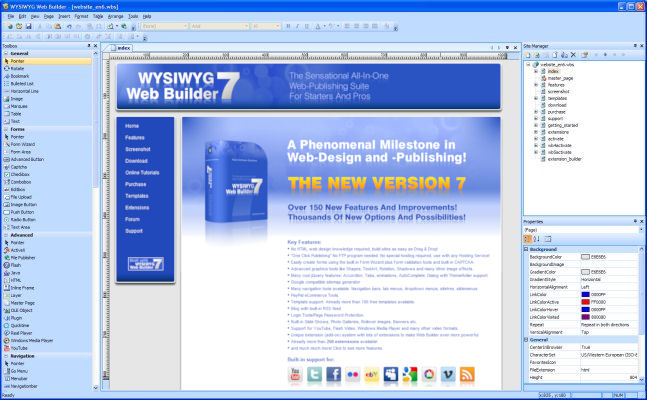
WYSIWYG Web Builder
features:
• No HTML knowledge needed!
• Drag and drop objects from the toolbox on the page: Text, Lines, Images, Marquees and Tables.
• Site Management. Easily add, edit, clone and structure your web pages from a single file.
• Customizable menus, toolbars, keyboard accelerators, dockable windows, tabs, autohide windows.
• Form layout object to create forms, including actions, hidden fields etc.
• Supports Form fields: Editbox, TextArea, Checkbox, Radiobutton, Combobox and Button.
• Rich text support: text object can contain different fonts, colors, links and sizes.
• Option to add custom HTML for each object (Before Tag, Inside Tag, After Tag).
• Custom HTML object to insert your own HTML or Javascripts.
• ActiveX, JAVA, Flash, Windows Media player, Quicktime, Real Audio and other Plug-In support.
• Publish your entire web site, a single page or a group of pages (to local drive or a web server) .
• Build-in Photo Gallery maker, with lots of cool features like picture frames!
• Build-in Banner maker.
• Rollover images.
• Bulleted Lists: Circle, Disc, Square, Numeric (1, 2, 3), Alpha (a, b, c) , Roman (I, II, III) and custom images.
• Image maps.
• Customize scrollbar colors for Microsoft Internet Explorer.
• Navigation bars.
• Ready-to-use Javascripts.
• Template support. Already more than 100 templates available!
• Support for Cascading Style Sheet positioning (layered layout).
• Insert Symbols (special characters).
• Verify links tool.
• Rotating Image component (useful for Ad Banners).
• Support for third-party add-ons, using the Web Builder Component Developers Kit.
• Import existing HTML pages.
• Hyperlink Style Sheet, to customize the colors/formatting of hyperlinks.
• Show optional rulers.
• Page transitions in Page Properties.
• Inline Frame component (IFRAME).
• Go menu: easily create a drop-down navigation menus.
• Menubar: powerful menu script that can mimic complex menus found in popular GUI applications.
• Shape object (Rectangle, Round rect, Ellipse, Diamond, Hexagon, Octagon, Parallelogram, Triangle,
Trapezoid, Arrows, Flag, Flower, Heart, Signs, Stars, Talk Bubbles and much more!).
• Embedded OLE component.
• Embedded page object. This allows you to re-use objects from other pages (master page concept)
Download
features:
• No HTML knowledge needed!
• Drag and drop objects from the toolbox on the page: Text, Lines, Images, Marquees and Tables.
• Site Management. Easily add, edit, clone and structure your web pages from a single file.
• Customizable menus, toolbars, keyboard accelerators, dockable windows, tabs, autohide windows.
• Form layout object to create forms, including actions, hidden fields etc.
• Supports Form fields: Editbox, TextArea, Checkbox, Radiobutton, Combobox and Button.
• Rich text support: text object can contain different fonts, colors, links and sizes.
• Option to add custom HTML for each object (Before Tag, Inside Tag, After Tag).
• Custom HTML object to insert your own HTML or Javascripts.
• ActiveX, JAVA, Flash, Windows Media player, Quicktime, Real Audio and other Plug-In support.
• Publish your entire web site, a single page or a group of pages (to local drive or a web server) .
• Build-in Photo Gallery maker, with lots of cool features like picture frames!
• Build-in Banner maker.
• Rollover images.
• Bulleted Lists: Circle, Disc, Square, Numeric (1, 2, 3), Alpha (a, b, c) , Roman (I, II, III) and custom images.
• Image maps.
• Customize scrollbar colors for Microsoft Internet Explorer.
• Navigation bars.
• Ready-to-use Javascripts.
• Template support. Already more than 100 templates available!
• Support for Cascading Style Sheet positioning (layered layout).
• Insert Symbols (special characters).
• Verify links tool.
• Rotating Image component (useful for Ad Banners).
• Support for third-party add-ons, using the Web Builder Component Developers Kit.
• Import existing HTML pages.
• Hyperlink Style Sheet, to customize the colors/formatting of hyperlinks.
• Show optional rulers.
• Page transitions in Page Properties.
• Inline Frame component (IFRAME).
• Go menu: easily create a drop-down navigation menus.
• Menubar: powerful menu script that can mimic complex menus found in popular GUI applications.
• Shape object (Rectangle, Round rect, Ellipse, Diamond, Hexagon, Octagon, Parallelogram, Triangle,
Trapezoid, Arrows, Flag, Flower, Heart, Signs, Stars, Talk Bubbles and much more!).
• Embedded OLE component.
• Embedded page object. This allows you to re-use objects from other pages (master page concept)
Download
AusLogics BoostSpeed Portable
the ideal solution to keep your PC running faster, cleaner and error-free. This powerful optimization suite will boost Internet connections, tweak Windows to its peak performance, clean registry and block annoying ads. It's a great way to keep your computer clean and optimized.

DownLoad
the ideal solution to keep your PC running faster, cleaner and error-free. This powerful optimization suite will boost Internet connections, tweak Windows to its peak performance, clean registry and block annoying ads. It's a great way to keep your computer clean and optimized.

DownLoad
ULTIMATEDEFRAG
Defrag and Optimize Your Hard Drive - Any Way You Want! And Achieve Hard Drive Performance Over 300% Faster Than Manufacturers Quoted Average Drive Performance.
If you run complex games, simulations and applications or if you simply use your computer for everyday regular use, UltimateDefrag significantly reduces the effect of the main performance bottleneck of your PC, your hard drive. It gives you the capability to place your files and applications in the position on your hard drive that will give you the best performance possible.
Ordinary defraggers are a dime a dozen. UltimateDefrag is NOT just a defragger. It's a totally unique piece of software that is both a defragger AND a file placement optimizer.
UltimateDefrag is the ultimate defragger and File Placement Optimizer. Defragging hard drives helps to restore your hard drive performance. File placement optimizing on the other hand, boosts your theoretical hard drive file access performance by up to 300% of manufacturers quoted averages (typical performance increase you'll experience is between 25 and 100%) by placing the files you want performance from onto the faster performing (outer tracks) areas of your hard drive. With UltimateDefrag - you can specify which individual files, programs or games you want the best performance from. The "Archive" function places all of your unused files out of the way and onto the slower performing areas of your hard drive.
UltimateDefrag is the world's most powerful defragger in terms of the file placement flexibility it gives you for defragging and strategically placing files on your hard drive - right down to the individual file level.

Download
Defrag and Optimize Your Hard Drive - Any Way You Want! And Achieve Hard Drive Performance Over 300% Faster Than Manufacturers Quoted Average Drive Performance.
If you run complex games, simulations and applications or if you simply use your computer for everyday regular use, UltimateDefrag significantly reduces the effect of the main performance bottleneck of your PC, your hard drive. It gives you the capability to place your files and applications in the position on your hard drive that will give you the best performance possible.
Ordinary defraggers are a dime a dozen. UltimateDefrag is NOT just a defragger. It's a totally unique piece of software that is both a defragger AND a file placement optimizer.
UltimateDefrag is the ultimate defragger and File Placement Optimizer. Defragging hard drives helps to restore your hard drive performance. File placement optimizing on the other hand, boosts your theoretical hard drive file access performance by up to 300% of manufacturers quoted averages (typical performance increase you'll experience is between 25 and 100%) by placing the files you want performance from onto the faster performing (outer tracks) areas of your hard drive. With UltimateDefrag - you can specify which individual files, programs or games you want the best performance from. The "Archive" function places all of your unused files out of the way and onto the slower performing areas of your hard drive.
UltimateDefrag is the world's most powerful defragger in terms of the file placement flexibility it gives you for defragging and strategically placing files on your hard drive - right down to the individual file level.

Download
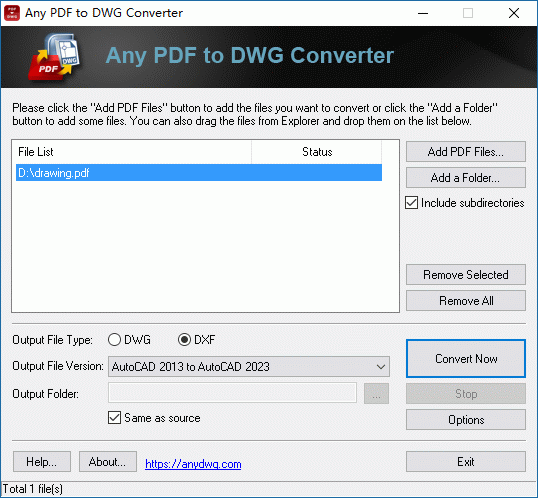
PDF to DXF Converter
It is a powerful windows program that will help you convert your PDF files to usable and editable DXF files quickly and easily, so you can recover the entities in PDF to corresponding DWG entities easily.
Key Features
* Convert PDF to DXF format.
* Stand-alone program - AutoCAD NOT required.
* Batch convert all pages in each PDF file.
* Restores the layers in PDF.
* Supports all PDF entity types, including polylines, polygons, text and etc.
* Extract embedded raster images from PDF files.
* Convert thousands of PDF files to DXF files in one easy step.
* High quality, high performance, and simple to use.
Download
It is a powerful windows program that will help you convert your PDF files to usable and editable DXF files quickly and easily, so you can recover the entities in PDF to corresponding DWG entities easily.
Key Features
* Convert PDF to DXF format.
* Stand-alone program - AutoCAD NOT required.
* Batch convert all pages in each PDF file.
* Restores the layers in PDF.
* Supports all PDF entity types, including polylines, polygons, text and etc.
* Extract embedded raster images from PDF files.
* Convert thousands of PDF files to DXF files in one easy step.
* High quality, high performance, and simple to use.
Download
PDF Password Recovery ( pdf decrypt ) portable
The PDF Password Recovery can be used to decrypt protected Adobe Acrobat PDF files, which have "owner" password set, preventing the file from editing(changing), printing, selecting text and graphics(and copying them into the Clipboard), or adding/changing annotations and form fields. Pdf decrypt is being done instantly. Decrypted file can be opened in any PDF viewer(e.g. Adobe Acrobat Reader)without any restrictions -- i.e. with edit/copy/print functions enabled. All versions of Adobe Acrobat are supported.
The standard security provided by PDF consists of two different methods and two different passwords. A PDF document may be protected by password for opening ('user' password) and the document may also specify operations that should be restricted even when the document is decrypted: printing; copying text and graphics out of the document; modifying the document; and adding or modifying text notes and AcroForm fields (using 'owner' password).
Features
* Easy to use.
* Does NOT need Adobe Acrobat software.
* Set the document title, subject, author, keywords, creator to the decrypted PDF file(s).
* The rate of decryption is very fast.
* Supports PDF1.6 protocol (Acrobat 7.x).
* Removing restrictions on printing, editing, copying.
* Supports Adobe Standard 40-bit Encryption and Adobe Advanced 128-bit Encryption.
* Supports AES encryption.
* Supports metadata.
* Supports command line operation (for manual use or inclusion in scripts).
* Batch operation on many files from command line and windows version.

Download
The PDF Password Recovery can be used to decrypt protected Adobe Acrobat PDF files, which have "owner" password set, preventing the file from editing(changing), printing, selecting text and graphics(and copying them into the Clipboard), or adding/changing annotations and form fields. Pdf decrypt is being done instantly. Decrypted file can be opened in any PDF viewer(e.g. Adobe Acrobat Reader)without any restrictions -- i.e. with edit/copy/print functions enabled. All versions of Adobe Acrobat are supported.
The standard security provided by PDF consists of two different methods and two different passwords. A PDF document may be protected by password for opening ('user' password) and the document may also specify operations that should be restricted even when the document is decrypted: printing; copying text and graphics out of the document; modifying the document; and adding or modifying text notes and AcroForm fields (using 'owner' password).
Features
* Easy to use.
* Does NOT need Adobe Acrobat software.
* Set the document title, subject, author, keywords, creator to the decrypted PDF file(s).
* The rate of decryption is very fast.
* Supports PDF1.6 protocol (Acrobat 7.x).
* Removing restrictions on printing, editing, copying.
* Supports Adobe Standard 40-bit Encryption and Adobe Advanced 128-bit Encryption.
* Supports AES encryption.
* Supports metadata.
* Supports command line operation (for manual use or inclusion in scripts).
* Batch operation on many files from command line and windows version.

Download
ObjectRescue Pro
Platforms:
WinNT 4.xWinXPWindows2000Windows2003Windows Vista Starter
info
Digital ObjectRescue Professional recovers lost data from a whole host of multimedia devices - from digital cameras, audio recorders, MP3 & WMA players to PC, PDAs and mobile phones. The program supports Hard Drives, CompactFlash cards (type I/II), IBM Microdrives, SmartMedia cards, MultiMedia cards (MMCs), Secure Digital (SD) cards, Memory Sticks and any other storage devices, with the addition of a wide-range file format support: DOC, XLS, ZIP, RAR, JPEG, AVI, MOV, MP3, WMA, WAV, etc.
Object Rescue - your digital rescue team. File recovery tools. ObjectRescue Pro features innovative recovery algorithms and contains advanced data recovery capabilities that allow you to search various file types including music files, images, video, documents, mail or just about anything. As you know, modern digital devices allow files to be erased and the space on the media reused. So sometimes your data gets erased or crippled, either by physical damage to the media (e.g. a flash card crash), or because someone clicked the wrong button. Through momentary carelessness, valuable files can be lost in an instant. The media can also be bulk-erased or formatted, removing everything from the storage media. Of course you don't want to lose your priceless data. And there it is our ObjectRescue Pro is here to easily, quickly and absolutely reliably reconstruct the missing files.
features
- Recovers deleted and corrupted files
- Recovers data from formatted media
- Recovers data from corrupted media
- Supports all formats of multimedia, archive and document files *
- Supports all formats of media used by digital devices
- Works with all digital devices and card readers
- Easy to use, intuitive wizard-driven interface
- Supports all Windows versions, including Windows® 95/98/ME and Windows® NT/2000/XP/2003
- and many more!


Download
Platforms:
WinNT 4.xWinXPWindows2000Windows2003Windows Vista Starter
info
Digital ObjectRescue Professional recovers lost data from a whole host of multimedia devices - from digital cameras, audio recorders, MP3 & WMA players to PC, PDAs and mobile phones. The program supports Hard Drives, CompactFlash cards (type I/II), IBM Microdrives, SmartMedia cards, MultiMedia cards (MMCs), Secure Digital (SD) cards, Memory Sticks and any other storage devices, with the addition of a wide-range file format support: DOC, XLS, ZIP, RAR, JPEG, AVI, MOV, MP3, WMA, WAV, etc.
Object Rescue - your digital rescue team. File recovery tools. ObjectRescue Pro features innovative recovery algorithms and contains advanced data recovery capabilities that allow you to search various file types including music files, images, video, documents, mail or just about anything. As you know, modern digital devices allow files to be erased and the space on the media reused. So sometimes your data gets erased or crippled, either by physical damage to the media (e.g. a flash card crash), or because someone clicked the wrong button. Through momentary carelessness, valuable files can be lost in an instant. The media can also be bulk-erased or formatted, removing everything from the storage media. Of course you don't want to lose your priceless data. And there it is our ObjectRescue Pro is here to easily, quickly and absolutely reliably reconstruct the missing files.
features
- Recovers deleted and corrupted files
- Recovers data from formatted media
- Recovers data from corrupted media
- Supports all formats of multimedia, archive and document files *
- Supports all formats of media used by digital devices
- Works with all digital devices and card readers
- Easy to use, intuitive wizard-driven interface
- Supports all Windows versions, including Windows® 95/98/ME and Windows® NT/2000/XP/2003
- and many more!


Download
Similar threads


- Replies
- 0
- Views
- 213

- Replies
- 21
- Views
- 644

