VIRUS... zepto?

jude.bandara

Member
Dec 8, 2007
29
2
3
8d2f7f1e78.jpg


8d304f0671.jpg


මේක අවොත් PC එකේ data ගැන හිත හදාගනිල්ලා. RIP. යාලුවෙක්ගෙ office PC එකට ඇවිල්ලා:shocked:. උ බාගෙට මැරිලා වගේ බන්:lol: ඔව් ඔව් මගේ නෙමෙයි යාලුවෙක්ගෙ PC එකට:angry:

වැඩ්ඩේක් ඉන්නවානම් personal file recover කරගෙන virus එක අයින් කරන විදිහ කියහන්කෝ? අන්න වැඩකාරයා.:yes:

හැමිනෙන virus එකක්නේ බන් මේක.
පුළුවන් මහත්මයෙක් ඉන්නවනම් එළකිරි වාසීන්ගේ ප්‍රයෝජනය පිණිස zepto නුලක් අරිනු මැනවි.
අතිශය ප්‍රයෝජනවත්.:cool:
 
Last edited:

Sri_Sampath

Well-known member
  • Jan 26, 2010
    14,701
    12,737
    113
    How to remove Zepto ransomware?
    Zepto removal is a complicated process, and you should NOT try to delete its components on your own. Even qualified malware researchers find it hard to eliminate this piece of malware, so we advise you to choose a reliable malware removal tool (for instance, Reimage or Malwarebytes Anti Malware) that was designed by advanced malware researchers and can help you eliminate Zepto virus automatically. There is no doubt that this hideous infection will try to stop you from doing that, so please carry out these instructions to run an anti-malware program.

    To recover your files after Zepto hijack, use back up. If you haven't saved extra copies of your important files, you can try using ShadowExplorer to recover your encrypted files with .zepto extension:

    Download Shadow Explorer (http://shadowexplorer.com/);
    Follow a ShadowExplorer Setup Wizard and install this application on your computer;
    Launch the program and go thru the drop down menu on the top left corner to select the disk of your encrypted data. Check what folders are there;
    Right-click on the folder you want to restore and select “Export”. You can also select where you want it to be stored.
     

    Sri_Sampath

    Well-known member
  • Jan 26, 2010
    14,701
    12,737
    113
    Manual Zepto Removal Guide
    Method 1. Remove Zepto using Safe Mode with Networking
    Step 1: Reboot your computer to Safe Mode with Networking
    Windows 7 / Vista / XP
    Click Start → Shutdown → Restart → OK.
    When your computer becomes active, start pressing F8 multiple times until you see the Advanced Boot Options window.
    Select Safe Mode with Networking from the list


    picture1.png


    Windows 10 / Windows 8
    Press the Power button at the Windows login screen. Now press and hold Shift, which is on your keyboard, and click Restart..
    Now select Troubleshoot → Advanced options → Startup Settings and finally press Restart.
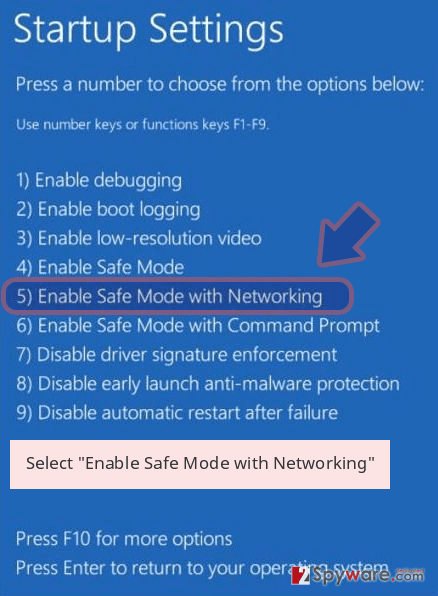
    Once your computer becomes active, select Enable Safe Mode with Networking in Startup Settings window.

    picture2.png


    Step 2: Remove Zepto
    Log in to your infected account and start the browser. Download Reimage or other legitimate anti-spyware program. Update it before a full system scan and remove malicious files that belong to your ransomware and complete Zepto removal.

    If your ransomware is blocking Safe Mode with Networking, try further method.


    Method 2. Remove Zepto using System Restore

    Step 1: Reboot your computer to Safe Mode with Command Prompt
    Windows 7 / Vista / XP
    Click Start → Shutdown → Restart → OK.
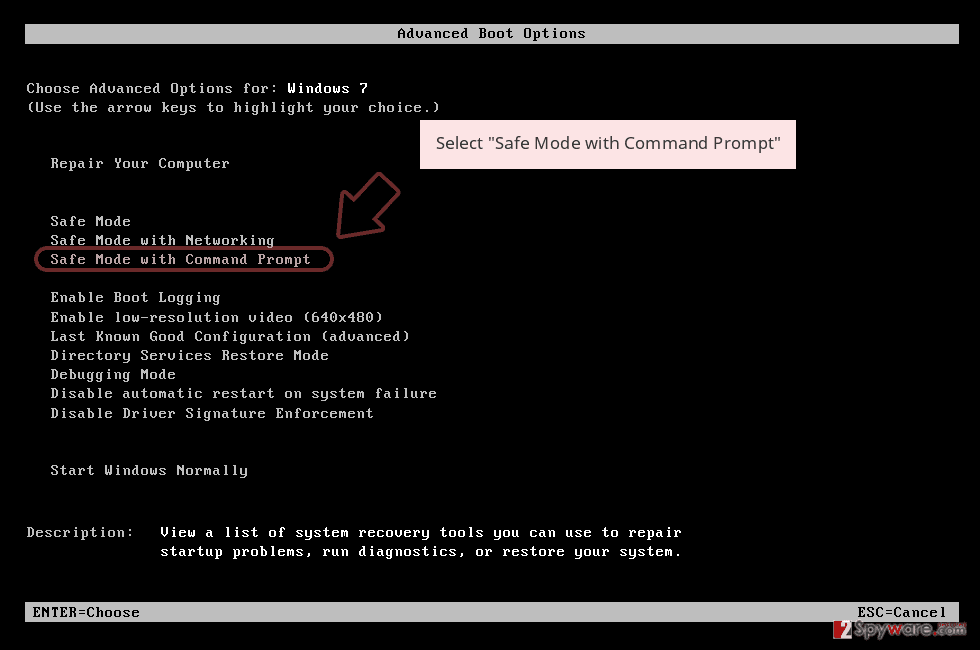
    When your computer becomes active, start pressing F8 multiple times until you see the Advanced Boot Options window.
    Select Command Prompt from the list

    picture3.png


    Windows 10 / Windows 8
    Press the Power button at the Windows login screen. Now press and hold Shift, which is on your keyboard, and click Restart..
    Now select Troubleshoot → Advanced options → Startup Settings and finally press Restart.
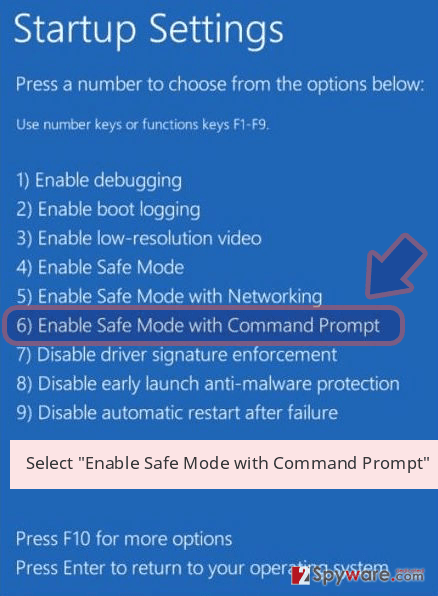
    Once your computer becomes active, select Enable Safe Mode with Command Prompt in Startup Settings window.
    picture4.png

    Step 2: Restore your system files and settings
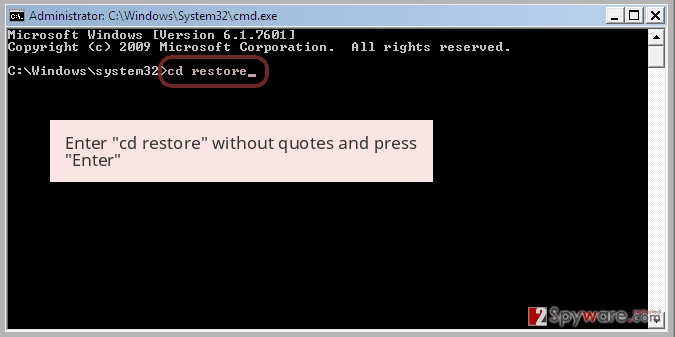
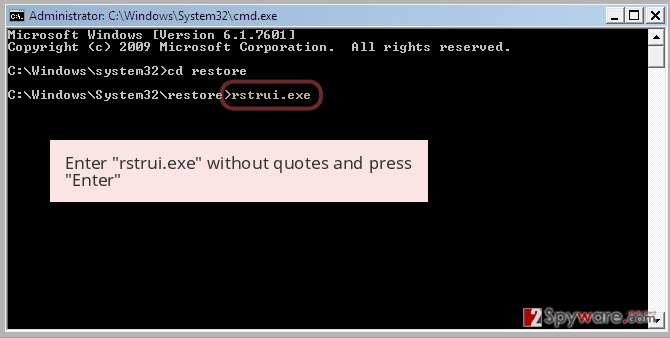
    Once the Command Prompt window shows up, enter cd restore and click Enter.

    picture5.png

    Now type rstrui.exe and press Enter again..
    picture6.png

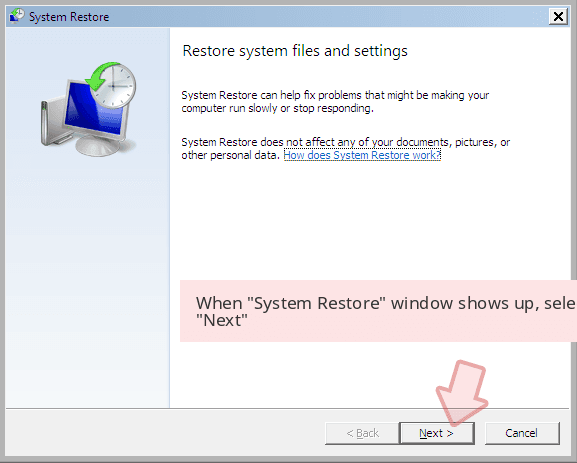
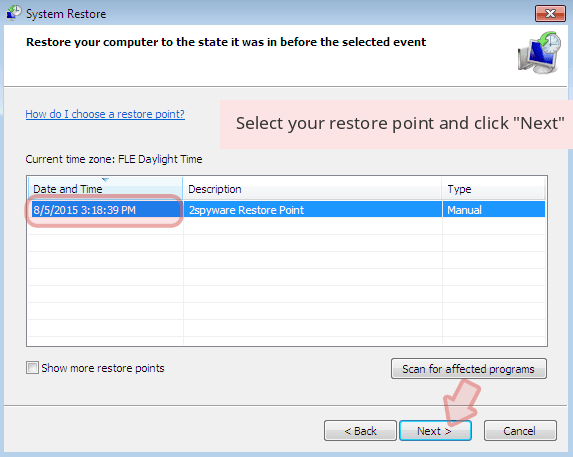
    When a new window shows up, click Next and select your restore point that is prior the infiltration of Zepto. After doing that, click Next.

    picture7.png

    picture8.png


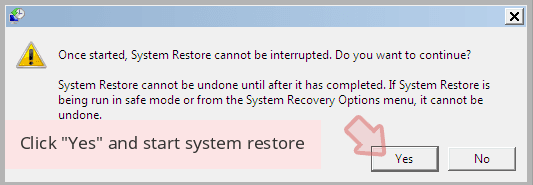
    Now click Yes to start system restore.

    picture9.png


    ඉස්සුවා දැම්ම :P:P:rofl:
     
    Last edited:

    jude.bandara

    Member
    Dec 8, 2007
    29
    2
    3
    Manual Zepto Removal Guide
    Method 1. Remove Zepto using Safe Mode with Networking
    Step 1: Reboot your computer to Safe Mode with Networking
    Windows 7 / Vista / XP
    Click Start → Shutdown → Restart → OK.
    When your computer becomes active, start pressing F8 multiple times until you see the Advanced Boot Options window.
    Select Safe Mode with Networking from the list

    Thanks for sharing machan...
    බඩු ශුවර්ද? කලින් කරලා තියෙනවද බන්? දන්න ගොඩක් උන් කිව්වේ, backup නැත්නම් හිත හදාගනින් කියලා. data recover කරගන්න chance එක අඩුයි කියලා. virus ඒකනම් අයින් කරන්න පුළුවන්ලු.
     

    jude.bandara

    Member
    Dec 8, 2007
    29
    2
    3
    * 360 total Security Eka Dapan http://filehippo.com/download_360_total_security_free_antivirus/

    * Oka danna kalin Anith virus guard okkoma makapan :D

    * Oka install Karata passe okema enawa Bit Defender Engine ekai Avira engine ekai e dekama click karala Download karaganin

    * Ita Passe Fully Pc scan ekak Dala Balapan ... Oya Virus Guard Eka Triple Engine Ekak Nisa Samahara Vita Oya Virus Eka Kelathu karai.

    :D:yes::yes::D:yes::yes::D:yes::yes::D:yes::yes::D

    එතකොට encrypt වෙලා තියෙන data?:confused:
     
    May 7, 2016
    12,338
    1,004
    0
    තොප්පිගල
    පට්ට වයිරස් එකක්
    වයිරස් කිව්වට ransomware එකක්,
    මුල් කලේ ආපු ඒවා virus guard වලින් ඇල්ලුවා ඒවා හානිය අඩුයි

    දැන් වර්ෂන් 3.0/4. වගේ තියෙන්නේ,
    අවුරුද්දට සේරයක් උන් එකේ අඩුපාඩු හැදුව,

    දැන් එන අලුත් එක මැෂින් එකට ආපු ගමන් කරන්නේ restore point ටික මකල දාන එක.
    ඊට පස්සේ file encrypt කරන්න ගන්නවා,
    excel,word,txt සහ තව ඒ වගේ file format ටක් ගාලා එකට අහුවෙනවා.
    වයිරස් එක අයින් කරන්න හරි ලේසි,
    ඒ වුනත් අර file ටික decrypt කරගන්න බැහැ.
    restore point නැති හින්ද file ටික recover කරගන්නත විදියක් නැහැ.

    මුලින් පොඩි ගානකින් පටන්ගන්නේ පස්සේ දවස ගානේ දෙගුණයක් වෙනවා.
    ransom එක.

    ගොඩක්ම mail වලින් එනවා.
    එන mail එන්නෙත් කෙනෙක්ට සැකයක් හිතෙන්නේ නැති වෙන්න,

    පුලුවන්නම් මැෂින් එකට හොඳ රිකවරි සොෆ්ට් එකක් දල පරණ file ගන්න බලන්න.
    එකත් sure නැ හැබැයි.
     

    Voltage

    Well-known member
  • Feb 6, 2012
    21,723
    1
    15,120
    113
    අනිත් උන්ට දැනගන්නත් එක්ක කියමු බලන්න ඕක කොහොමද ඔය කොම්පියුටර් එකට ආවේ කියල
     

    jude.bandara

    Member
    Dec 8, 2007
    29
    2
    3
    අනිත් උන්ට දැනගන්නත් එක්ක කියමු බලන්න ඕක කොහොමද ඔය කොම්පියුටර් එකට ආවේ කියල

    ඌට මතක නැලු බන්. google කියන්නේ නම් email එකකින් තමයිලු එන්න chance එක වැඩියෙන් තියෙන්නේ කියලා. සමහර විට වැල site එකකින් වෙන්නත් පුළුවන්. ඒ උනාට ඌ ඒ ඔෆීස් ලැප් එකෙන් ඕනනේ නැති ගුබ්බයම් වලට රින්ගන්නෙත් නැ කිවුවා බන්. :confused:
     

    yohanssc

    Well-known member
  • Jul 27, 2012
    708
    144
    63
    wadipura enne mail walin. oka thamai aluthima apu ransomware eka. oka decrypt karanna thama widiyak hoyagena na. mulinma oka spread wena eka nawaththanna. Share location walin thamai oka rata watema yanne.
    Bitdefender Anti-ransomware & MalwareByte Anti-ransomware oya 2ken ekak danna. Malwarebytelage Anti malware 1ka dala scan karanna. :)
    Eset nam allanawa oya Zepto virus eka. bt spread unama nam sorry thamai.. :(