


තත්පර 3 තියෙනව 10 තියෙනව
ආයෙ මිනිත්තුවක් තියෙන්නෙ.. මේව අපිට වෙනස් කරගන්ඩ පුලුවන්
උඹලත් ඕනෙනං කරගනිල්ල
Steps:
Launch VLC. Click "Tools" in the top menu bar, then click "Preferences" to open VLC's preferences section.
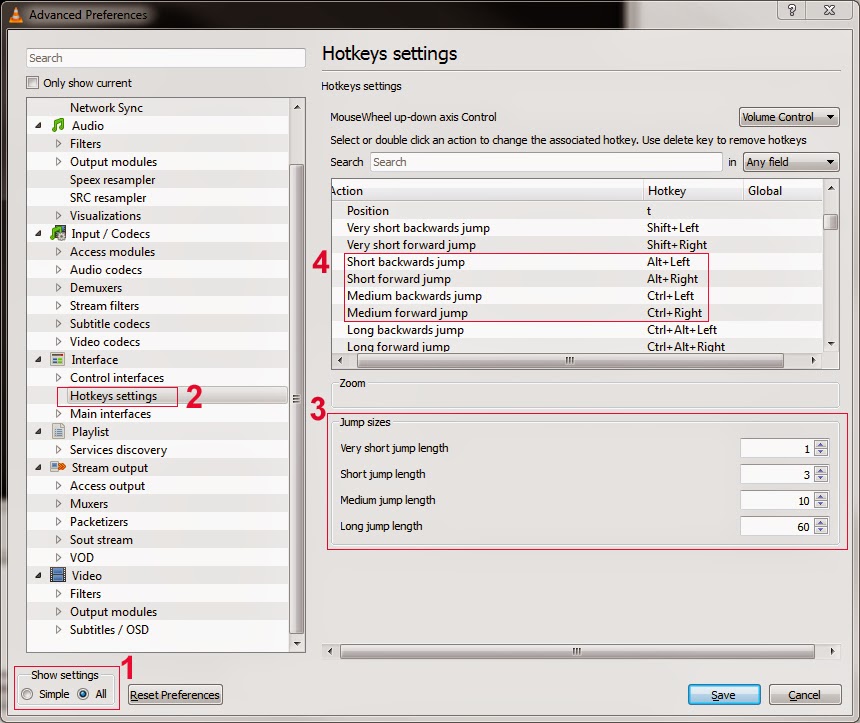
Click the radio button next to "All" in the lower left-hand corner to display VLC's "Advanced settings" section. Click the arrow next to "Interfaces" in the left-hand column, and then click "Hotkeys settings."
Click the text box next to the jump size you want to change in the "Jump sizes" section. Type the length of time, in seconds, that you want to set as the skip length. Repeat the process for all of the skip lengths that you want to change.
Click "Save" to apply the new skip times, and close the "Preferences" window.
ආයෙ මිනිත්තුවක් තියෙන්නෙ.. මේව අපිට වෙනස් කරගන්ඩ පුලුවන්
උඹලත් ඕනෙනං කරගනිල්ල
Steps:
Launch VLC. Click "Tools" in the top menu bar, then click "Preferences" to open VLC's preferences section.
Click the radio button next to "All" in the lower left-hand corner to display VLC's "Advanced settings" section. Click the arrow next to "Interfaces" in the left-hand column, and then click "Hotkeys settings."
Click the text box next to the jump size you want to change in the "Jump sizes" section. Type the length of time, in seconds, that you want to set as the skip length. Repeat the process for all of the skip lengths that you want to change.
Click "Save" to apply the new skip times, and close the "Preferences" window.


