Watermark Master 2.2.14.0

silverbullet

Member
Jul 6, 2008
927
0
0
Watermark Master 2.2.14.0


Watermark-Master.jpg


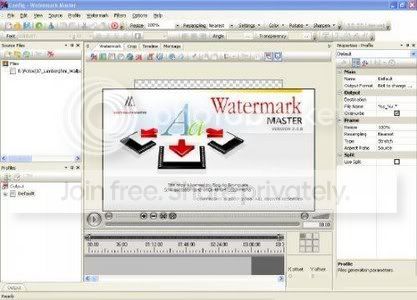
This program is primarily meant for people who need to protect video or graphics files from illegal copying by putting a watermark (text or graphic information) over an image. Simple text, image file, animated GIF or video file can be used as watermark here. Besides, Watermark Master provides ability to apply a great number of various effects to a watermark, including dynamic effects. A dynamic effect implies variation of the watermark in time, for example, smooth appearance or disappearance of the watermark, movement of the watermark, etc.

Text
For a text one can preset all basic attributes (font, color, size, etc) as well as rotation angle, transparency, stroke color and width. Starting from version 1.1, a text can be filled with gradient or pattern. A text may include dynamic variables: name, extension, duration, size, date, frame width and height of an original or produced file.
Simple text, contents of a text file or SRT file can be the source of a text watermark. When it is necessary to process a great number of files and add a text watermark to each of them, it is convenient to make a text file the source and assign its every next line to be a watermark for the next generated file.
When using a SRT file as the source, the text is displayed for the time period that is specified within the file. You can use either existing SRT files or made by your own ones to create custom subtitles.

Image
An image can be resized and rotated arbitrary. Also for images one can fix transparency level and transparent color.

Animated GIF
An animated GIF can be resized and rotated arbitrary. Transparency level, single or infinite repetition also can be assigned.

Video clip
A video clip can be resized and rotated arbitrary. Transparency level, single or infinite repetition also can be assigned. The audio stream of the added video clip can be superimposed over the original file's one, and it's volume level can be preset as well.

Rectangle/Ellipse
For a rectangle/ellipse one can preset dimensions, color, transparency level, border color and border width. Besides, a rectangle/ellipse can be stretched along the full frame width or height of a processed file. Starting from version 1.1 it is possible to set corner radius for a rectangle.

Display time can be assigned to any kind of watermark, which makes possible adding watermarks to a movie's fragment rather than a whole movie.

The beginning and ending of watermark drawing can be protracted for preset time, which produces effect of smooth appearance and disappearance.

Position of watermark is specified relative to a number of predetermined points, which makes possible to display watermark in the same frame area regardless of frame dimensions.

Watermark Master allows to add any quantity watermarks at once. Starting from version 1.1, Watermark Master includes a number of effects that can be applied to watermarks:

Dynamic effects
Watermark Master enables to apply one or more dynamic effects to a watemark. A dynamic effect implies variation of the watermark in time. One of the simplest examples is smooth appearance or disappearance of a watermark.
The following dynamic effects are available in Watermark Master 1.2:

Fade - produces an effect of smooth appearance and disappearance of a watermark. In contrast to the previous versions of the program, now this effect can be applied to any interval of the watermark display time.

Motion - enables to move a watermark from one point to another with a preset speed. Applying to a watermark a few effects of the same kind, one can make the watermark follow as much composite trajectory as he likes.

Key point - provides ability to preset a time period during which the watermark will look different relative to its initial appearance. This makes possible to create watermarks that blink with different colors, vary in size, etc.

Parameter - allows to select any available parameter of the watermark and continuously vary its value with a preset speed for a preset time period. For example, with this effect you can make the watermark smoothly contract to the size of a spot and expand back to its original size, gradually change its drop shadow color or stroke width, etc.

All the aforesaid effects can be used both separately and together, which enables to produce a great number of visual effects


Download:
http://rapidshare.com/files/239964117/Watermark_Master_v2.2.14.0_sam05_ND.rar
 

coolgayathra

Member
Jan 18, 2009
35,418
61
0
....Sri lanka..Land of brave lions...
silverbullet said:
Watermark Master 2.2.14.0


Watermark-Master.jpg


This program is primarily meant for people who need to protect video or graphics files from illegal copying by putting a watermark (text or graphic information) over an image. Simple text, image file, animated GIF or video file can be used as watermark here. Besides, Watermark Master provides ability to apply a great number of various effects to a watermark, including dynamic effects. A dynamic effect implies variation of the watermark in time, for example, smooth appearance or disappearance of the watermark, movement of the watermark, etc.

Text
For a text one can preset all basic attributes (font, color, size, etc) as well as rotation angle, transparency, stroke color and width. Starting from version 1.1, a text can be filled with gradient or pattern. A text may include dynamic variables: name, extension, duration, size, date, frame width and height of an original or produced file.
Simple text, contents of a text file or SRT file can be the source of a text watermark. When it is necessary to process a great number of files and add a text watermark to each of them, it is convenient to make a text file the source and assign its every next line to be a watermark for the next generated file.
When using a SRT file as the source, the text is displayed for the time period that is specified within the file. You can use either existing SRT files or made by your own ones to create custom subtitles.

Image
An image can be resized and rotated arbitrary. Also for images one can fix transparency level and transparent color.

Animated GIF
An animated GIF can be resized and rotated arbitrary. Transparency level, single or infinite repetition also can be assigned.

Video clip
A video clip can be resized and rotated arbitrary. Transparency level, single or infinite repetition also can be assigned. The audio stream of the added video clip can be superimposed over the original file's one, and it's volume level can be preset as well.

Rectangle/Ellipse
For a rectangle/ellipse one can preset dimensions, color, transparency level, border color and border width. Besides, a rectangle/ellipse can be stretched along the full frame width or height of a processed file. Starting from version 1.1 it is possible to set corner radius for a rectangle.

Display time can be assigned to any kind of watermark, which makes possible adding watermarks to a movie's fragment rather than a whole movie.

The beginning and ending of watermark drawing can be protracted for preset time, which produces effect of smooth appearance and disappearance.

Position of watermark is specified relative to a number of predetermined points, which makes possible to display watermark in the same frame area regardless of frame dimensions.

Watermark Master allows to add any quantity watermarks at once. Starting from version 1.1, Watermark Master includes a number of effects that can be applied to watermarks:

Dynamic effects
Watermark Master enables to apply one or more dynamic effects to a watemark. A dynamic effect implies variation of the watermark in time. One of the simplest examples is smooth appearance or disappearance of a watermark.
The following dynamic effects are available in Watermark Master 1.2:

Fade - produces an effect of smooth appearance and disappearance of a watermark. In contrast to the previous versions of the program, now this effect can be applied to any interval of the watermark display time.

Motion - enables to move a watermark from one point to another with a preset speed. Applying to a watermark a few effects of the same kind, one can make the watermark follow as much composite trajectory as he likes.

Key point - provides ability to preset a time period during which the watermark will look different relative to its initial appearance. This makes possible to create watermarks that blink with different colors, vary in size, etc.

Parameter - allows to select any available parameter of the watermark and continuously vary its value with a preset speed for a preset time period. For example, with this effect you can make the watermark smoothly contract to the size of a spot and expand back to its original size, gradually change its drop shadow color or stroke width, etc.

All the aforesaid effects can be used both separately and together, which enables to produce a great number of visual effects


Download:
http://rapidshare.com/files/239964117/Watermark_Master_v2.2.14.0_sam05_ND.rar

elazzzzzzzzz