


Latest ads
-
 ඕනම රටකට සෙට් වෙන CV එකක්
- ErMurazor
- Updated:
-
 Hambantota 7 Acres Beachfront Land For Sell DownSouth , PerPerch Price 420 000
- 1024 Digital
- Updated:
-
 Baseus PI LITE INDOOR CAMERA
- ErMurazor
- Updated:
-
Colombo Hard Disk For Sale
- mazza
- Updated:
###### What Do You Feel About Windows Seven ? ######
- Thread starter TLS
- Start date
You are using an out of date browser. It may not display this or other websites correctly.
You should upgrade or use an alternative browser.
You should upgrade or use an alternative browser.




Here's the answer to your problem.
Here's the answer to your problem.
Windows 7 Little Tweaker 1.1
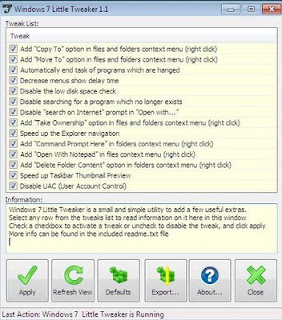 Windows 7 Little Tweaker is a small and simple to use utility that let you easily activate a few useful extras for Microsoft's new OS, Windows 7 Ultimate.
Windows 7 Little Tweaker is a Windows 7 only portable application and will not run on any other Windows versions.
Windows 7 Little Tweaker must run as Administrator, and with UAC disabled.
This is a 32bit application, and will not run for now on a 64bit OS.
Available tweaks:
Download Version 1.1 (single file no install + readme.txt) 493kb:

Yeap! ඒත් Move to.. සහ Copy to.. options දෙක නැති එක නම් හරි පාඩුයි.
Here's the answer to your problem.
Windows 7 Little Tweaker 1.1
 Windows 7 Little Tweaker is a small and simple to use utility that let you easily activate a few useful extras for Microsoft's new OS, Windows 7 Ultimate.
Windows 7 Little Tweaker is a Windows 7 only portable application and will not run on any other Windows versions.
Windows 7 Little Tweaker must run as Administrator, and with UAC disabled.
This is a 32bit application, and will not run for now on a 64bit OS.
Available tweaks:
- Add "Copy To" option in files and folders context menu, so that you can easily copy them to other locations
- Add "Move To" option in files and folders context menu, so that you can easily move them to other locations
- Set Windows to automatically end task of programs which are either hanged or taking longer time than expected to exit
- Decrease menus show delay time, it'll show the sub-menus fast when you select their parent menu
- Disable the low disk space check so that you don't get the annoying low disk space notification in system tray
- Set Windows to not waste time in searching for a program which no longer exists in your system when you try to open its shortcut
- Disable "search on Internet" prompt in "Open with" window so that it directly opens the program list
- Add "Take Ownership" option in files and folders context menu so that you can easily take ownership of files and folders in case you want to replace them for customization purpose
- Speed up the Explorer navigation by disabling network printers and network scheduled tasks
- Add "Command Prompt Here" option on folders context menu (right click) for a quick command prompt opening at the selected folder
- Adds "Open With Notepad" option on files context menu (right click) for a quick viewing of files content
- Adds "Delete Folder Content" option on folders context menu (right click) to quick delete only the content of a folder without accessing the folder
- Speeds up taskbar thumbnail preview by reducing the mouse hover time delay
- Disables (Turn Off) Annoying UAC (User Account Control) and suppress UAC consent prompt dialog
Download Version 1.1 (single file no install + readme.txt) 493kb:


Here's the answer to your problem.
Windows 7 Little Tweaker 1.1
Thanks! It's working!!
But wonder why they didn't add it to Seven.

164 Gadget for Windows 7

164 Gadget for Windows 7
164 Gadget for Windows 7. Gadgets are miniature applications that display one or the other information, as well as simplifying certain tasks. Here are collected the various players, minigames, gadgets to view the exchange rate, katirovok stocks, weather, loading of system resources, monitoring traffic, gadgets, the most popular search engines, e-mail clients and gadgets for sending SMS and more.
To install simply copy the folder with the gadgets in the "Program Files - Windows Sidebar", agree to merge folders and get 8 pages of gadgets to almost any taste and color.
Operating system: Windows 7
License: Freeware
Size: 53.23 MB
Download Links
Hotfile | Uploading

164 Gadget for Windows 7. Gadgets are miniature applications that display one or the other information, as well as simplifying certain tasks. Here are collected the various players, minigames, gadgets to view the exchange rate, katirovok stocks, weather, loading of system resources, monitoring traffic, gadgets, the most popular search engines, e-mail clients and gadgets for sending SMS and more.
To install simply copy the folder with the gadgets in the "Program Files - Windows Sidebar", agree to merge folders and get 8 pages of gadgets to almost any taste and color.
Operating system: Windows 7
License: Freeware
Size: 53.23 MB
Hotfile | Uploading
Thanks! It's working!!
But wonder why they didn't add it to Seven.
I Got It.

Similar threads


- Replies
- 18
- Views
- 406


