
Latest ads
-
Web hosting for your business
- avishka777
- Updated:
-
GOOGLE AI PRO - 18 Month - Rs.500.00
- Sanathbh
- Updated:
-
 📸 SIGMA 85mm F1.4 DG HSM | Art — Nikon Mount
- romeshnonis
- Updated:
-
Singapore V2Ray VPN for Tunneling
- hu KANNA
- Updated:
-
 Plan your Crypto & Forex entries before you take the trade
- romeshnonis
- Updated:
WINDOWS 7 UPDATES HELPPPPPPPP!!!!!!!!!!!!!!!!!
- Thread starter akila663
- Start date
You are using an out of date browser. It may not display this or other websites correctly.
You should upgrade or use an alternative browser.
You should upgrade or use an alternative browser.


උඹ කියන එක පොඩ්ඩක් තෙරුම් ගන්න අමාරුයි මචං...උඹේ වින්ඩොස් ජෙනුවින් වින්ඩොස් ද? නැත්තම් ඔය ඇක්ටිවෙටර් එකක් දලා ඇකටිව් කරපු එකක්ද? එවාගේ එව අපඩේ කරන බැ බං....!!
Pissu da ban Activator ekak tamaei Habaei Updates tika okkoma mama Download kara gatta
ek etiyenawa eka Key file ekak ek ainstall karapuwahama window screen eka Black wenawa (eka wenne windos OS eka genuine nemei kiyala
ee update eka Hide karala Update dunnahama Hari eke enne KB xxxxxx kiyala ek esetup name eka anna exe ek atamaei one
Pissu da ban Activator ekak tamaei Habaei Updates tika okkoma mama Download kara gatta
ek etiyenawa eka Key file ekak ek ainstall karapuwahama window screen eka Black wenawa (eka wenne windos OS eka genuine nemei kiyala
ee update eka Hide karala Update dunnahama Hari eke enne KB xxxxxx kiyala ek esetup name eka anna exe ek atamaei one
මට ඔය සින් කොන් එක වැඩිය මිටර් නැහැ


මචංලා වින්ඩෝස් 7 අප්ඩේට් වල කී ෆයිල් එක (ඒ කිව්වෙ කී වැලිඩේශන් එක ට කලු වෙන වින්ඩෝස් එක ජෙනුව්න් නොවෙයි කියල මැසේජ් එක එන ෆයිල් එක ) වින්ඩෝස් තිරය කලු කරන ෆයිල් එක මොකක් ද
දන්න කෙනෙක් කියන්නකෝ
Method 1 – Activate Windows Dialog
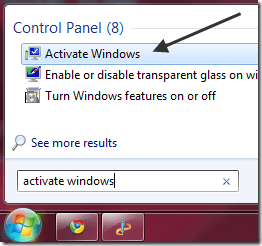
The first way to validate that Windows 7 is genuine is to click on Start, then type in activate windows in the search box.
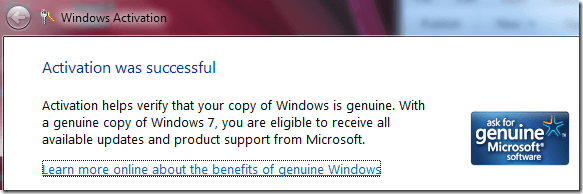
If your copy of Windows 7 is activated and genuine, you will ge t a message that says “Activation was successful” and you will see the Microsoft Genuine software logo on the right hand side.
Method 2 – Validate Online
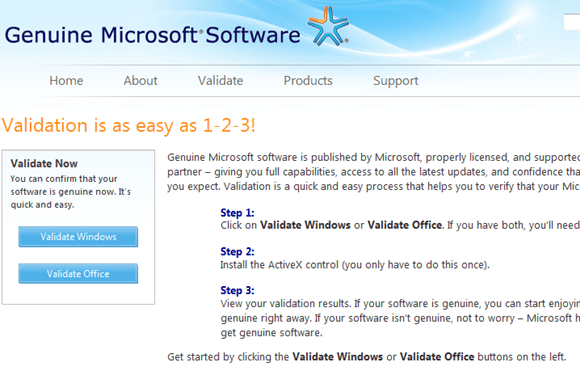
The second way to determine if you have a valid copy of Windows 7 is to use the validation tool on the Microsoft website.
If you ever tried to download updates from Microsoft, you’ve probably noticed that sometimes your copy of Windows has to be validated before it allows you to start the download.
Well, you can use that tool independently of downloading an update by going to the following address:
http://www.microsoft.com/genuine/validate/
Then click on the Validate link at the top. Make sure that you visit the site while in Internet Explorer, otherwise it will ask you do download a small program onto your computer in order to validate.
Method 3 – Control Panel
The third way to check for genuine Windows 7 is to go to the Control Panel. Click on Start, then Control Panel, then click on System and Security, and finally click on System.
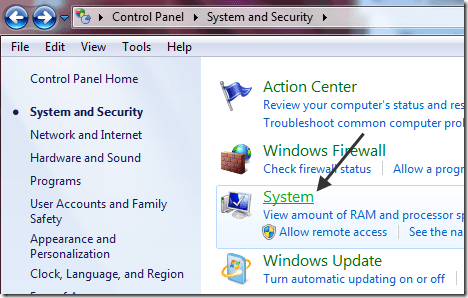
Then scroll all the way down to the bottom and you should see a section called Windows activation, which says “Windows is activated” and gives you the Product ID. It also includes the genuine Microsoft software logo.
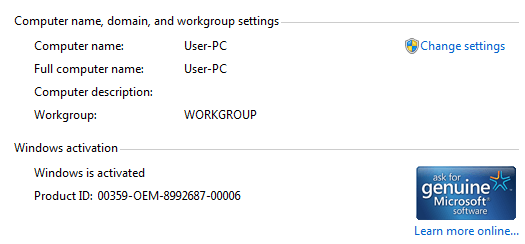
So, in conclusion, if you have bought a copy of Windows 7 from a shady local computer dealer or off eBay for a reduced price, you may want to check and make sure the product key is actually valid and not counterfeit!
Last edited:
Method 1 – Activate Windows Dialog
The first way to validate that Windows 7 is genuine is to click on Start, then type in activate windows in the search box.
If your copy of Windows 7 is activated and genuine, you will ge t a message that says “Activation was successful” and you will see the Microsoft Genuine software logo on the right hand side.
Method 2 – Validate Online
The second way to determine if you have a valid copy of Windows 7 is to use the validation tool on the Microsoft website.
If you ever tried to download updates from Microsoft, you’ve probably noticed that sometimes your copy of Windows has to be validated before it allows you to start the download.
Well, you can use that tool independently of downloading an update by going to the following address:
http://www.microsoft.com/genuine/validate/
Then click on the Validate link at the top. Make sure that you visit the site while in Internet Explorer, otherwise it will ask you do download a small program onto your computer in order to validate.
Method 3 – Control Panel
The third way to check for genuine Windows 7 is to go to the Control Panel. Click on Start, then Control Panel, then click on System and Security, and finally click on System.
Then scroll all the way down to the bottom and you should see a section called Windows activation, which says “Windows is activated” and gives you the Product ID. It also includes the genuine Microsoft software logo.
So, in conclusion, if you have bought a copy of Windows 7 from a shady local computer dealer or off eBay for a reduced price, you may want to check and make sure the product key is actually valid and not counterfeit!
AYYIO AYYIO MEEKE INNE LADARUWO DA MAMA KEY FILE EKEE WORD EKA DEELATH KIYANNA WIDIYAK NAA NE
OYA DAALA TIYENA EK ANAM MATATH KARAGANNA PULUWAN

MAMA SINHALEN MA DAALA AHUWE TERUMGANNA PULUWAN NISAEI
MAMA AHUWE KEY ACTIVE KARAGANNA NEMEI NE BAN

MAMA AHUWE WINDOWS UPDATE KARANAKOTA EKEE EKA FILE EKAK (SECURITY FILE EKAK UP DATE KARAHAMA APE WINDOWS EKE SCREEN EKA KALU KARANAWA - EHEMA KARALA YATIN DAANAWA MESSAGE EKAK - YOUR OS IS NOT A GENUINE KIYALA - MEEK AWENNE WINDOWS UPDATE KARADDI SECURITY KEY EKAK UPDATE WELAA EKA INSTALLL KAROTH - MAMA AHANNE ANNA EE SECURITY EXE SETUP EKA NAME KARALA TIYENA EKA MOKADA KIYALA E SETUP EKA KB XXXXXX KIYALA ANTIMATA NUMBERS ENA FILE EKAK)
MAMA AHANNE ANNA E EXE EKA MOKADDA KIYALA / EKA HIDE KARALA WINDOWS UPDATE KARAHAMA WINDOS SXREEN EKA BLACK WENNE NA
ANNA E KAEI MATA DANA GANNA ONEE


AYYIO AYYIO MEEKE INNE LADARUWO DA MAMA KEY FILE EKEE WORD EKA DEELATH KIYANNA WIDIYAK NAA NE
OYA DAALA TIYENA EK ANAM MATATH KARAGANNA PULUWAN
MAMA SINHALEN MA DAALA AHUWE TERUMGANNA PULUWAN NISAEI
MAMA AHUWE KEY ACTIVE KARAGANNA NEMEI NE BAN
MAMA AHUWE WINDOWS UPDATE KARANAKOTA EKEE EKA FILE EKAK (SECURITY FILE EKAK UP DATE KARAHAMA APE WINDOWS EKE SCREEN EKA KALU KARANAWA - EHEMA KARALA YATIN DAANAWA MESSAGE EKAK - YOUR OS IS NOT A GENUINE KIYALA - MEEK AWENNE WINDOWS UPDATE KARADDI SECURITY KEY EKAK UPDATE WELAA EKA INSTALLL KAROTH - MAMA AHANNE ANNA EE SECURITY EXE SETUP EKA NAME KARALA TIYENA EKA MOKADA KIYALA E SETUP EKA KB XXXXXX KIYALA ANTIMATA NUMBERS ENA FILE EKAK)
MAMA AHANNE ANNA E EXE EKA MOKADDA KIYALA / EKA HIDE KARALA WINDOWS UPDATE KARAHAMA WINDOS SXREEN EKA BLACK WENNE NA
ANNA E KAEI MATA DANA GANNA ONEE
මේකද අහන්නේ
Microsoft Download Center
The following files are available for download from the Microsoft Download Center:
Update for Windows 7 for x86-based systems (KB971033)
DownloadDownload the Update for Windows 7 for x86-based systems package now.
Update for Windows 7 for x64-based Systems (KB971033)
DownloadDownload the Update for Windows 7 for x64-based Systems (KB971033) package now.
For more information about how to download Microsoft support files, click the following article number to view the article in the Microsoft Knowledge Base:
119591 How to obtain Microsoft support files from online services
Microsoft scanned this file for viruses. Microsoft used the most current virus-detection software that was available on the date that the file was posted. The file is stored on security-enhanced servers that help prevent any unauthorized changes to the file.
Note Installing this update does not affect the functionality of your operating system.
More information about this update
This update for Windows Activation Technologies helps detect validation errors and activation exploits. This update also detects any tampering attempts made to important Windows 7 system files.

Similar threads

- Replies
- 40
- Views
- 2K


- Replies
- 65
- Views
- 3K
