


Is your files are hidden and can't show due to Virus attack
so here is da solution
1. Go to Registry Editor ( type regedit on run )
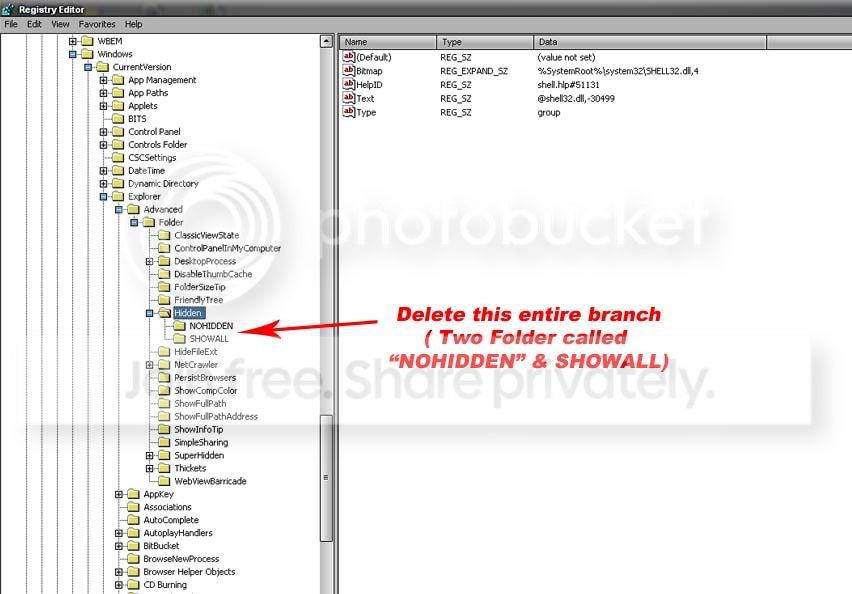
2. Then Just go to - HKEY_LOCAL_MACHINE\SOFTWARE\Microsoft\Windows\Curr entVersion\Explorer\Advanced\Folder\Hidden
3. Delete this entire branch*** & import the registery file.
Download this and import to your registry http://www.elakiri.com/forum/downloads.php?do=file&id=1948
Enjoy now your problem is solve
so here is da solution
1. Go to Registry Editor ( type regedit on run )
2. Then Just go to - HKEY_LOCAL_MACHINE\SOFTWARE\Microsoft\Windows\Curr entVersion\Explorer\Advanced\Folder\Hidden
3. Delete this entire branch*** & import the registery file.
Download this and import to your registry http://www.elakiri.com/forum/downloads.php?do=file&id=1948
Enjoy now your problem is solve


