
Latest ads
-
 ඕනම රටකට සෙට් වෙන CV එකක්
- ErMurazor
- Updated:
-
 Hambantota 7 Acres Beachfront Land For Sell DownSouth , PerPerch Price 420 000
- 1024 Digital
- Updated:
-
 Baseus PI LITE INDOOR CAMERA
- ErMurazor
- Updated:
-
Colombo Hard Disk For Sale
- mazza
- Updated:
-
 land for sale
- justasking
- Updated:
You are using an out of date browser. It may not display this or other websites correctly.
You should upgrade or use an alternative browser.
You should upgrade or use an alternative browser.


Yes, I have. You need to create a Microsoft Account selecting the country as USA, then need to select a billing address in the USA for this account. (Remember to select a state where sales tax is not available, you can use Google to find the state and Google maps to find an address, Microsoft does not cross check the address). Now you need to connect your paypal account as the billing method because cards issued in Sri Lanka are not accepted since Xbox service is not available in Sri Lanka. Now log in to Xbox using this new account and purchase Xbox game pass ultimate (17 USD) or Xbox game pass( 11 USD). I use 11 USD Game pass since I dont play online with others.


Many thanks bro..tried this method but seems like I need my PayPal addressed in USA as wellYes, I have. You need to create a Microsoft Account selecting the country as USA, then need to select a billing address in the USA for this account. (Remember to select a state where sales tax is not available, you can use Google to find the state and Google maps to find an address, Microsoft does not cross check the address). Now you need to connect your paypal account as the billing method because cards issued in Sri Lanka are not accepted since Xbox service is not available in Sri Lanka. Now log in to Xbox using this new account and purchase Xbox game pass ultimate (17 USD) or Xbox game pass( 11 USD). I use 11 USD Game pass since I dont play online with others.

Reference nathda
DATE: 04/2026
BIN: 41546444050xxxxx
IP: INDIA
No need, my paypal address is my home address in Sri lanka, only thing is you need to have is 'USA address' as your default billing address in the Microsoft accountMany thanks bro..tried this method but seems like I need my PayPal addressed in USA as well
Will try broNo need, my paypal address is my home address in Sri lanka, only thing is you need to have is 'USA address' as your default billing address in the Microsoft account
Didnt work bro. Still getting The region in which your payment option was issued and your Store region need to match.Many thanks bro..tried this method but seems like I need my PayPal addressed in USA as well
------ Post added on Oct 12, 2023 at 1:50 PM
Create a new Microsoft account with a new email address in Microsoft US site. when you create the account select the country as US (when you do this change your PC regional settings also to US ). Now create an address. See the attachment, I used state Delaware since it does not have sales tax and picked a random address by checking google maps. you need to add a phone no, to that I added my Dialog mobile in case if they sent any OTP.Will try bro
Didnt work bro. Still getting The region in which your payment option was issued and your Store region need to match.
------ Post added on Oct 12, 2023 at 1:50 PM
Better to keep this account only for Xbox, dont use it send to emails. One time I tried to send some images by using share option in phone and for some reason Microsoft banned that account and I coud not even log in. Then I went to paypal and remove the connection to that MS account and created a new account so I lost all my saved games. Fortunately I did not have to download games again since I have setup my Xbox series S as home console. see this video as well
Attachments
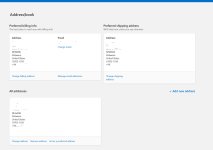
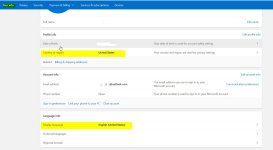
Create a new Microsoft account with a new email address in Microsoft US site. when you create the account select the country as US (when you do this change your PC regional settings also to US ). Now create an address. See the attachment, I used state Delaware since it does not have sales tax and picked a random address by checking google maps. you need to add a phone no, to that I added my Dialog mobile in case if they sent any OTP.
Better to keep this account only for Xbox, dont use it send to emails. One time I tried to send some images by using share option in phone and for some reason Microsoft banned that account and I coud not even log in. Then I went to paypal and remove the connection to that MS account and created a new account so I lost all my saved games. Fortunately I did not have to download games again since I have setup my Xbox series S as home console. see this video as well
Sorry for my late response bro. Finally got activated. Bought a gift code from Ebay Uk and redeemed through microsoft account. Had to change the VPN to UK prior doing it.
Similar threads


- Replies
- 0
- Views
- 347


- Replies
- 6
- Views
- 273
