ElaKiri Apple Club

DJnet

Well-known member
  • Apr 27, 2007
    4,563
    516
    113
    අන්තර්ජංජාලය
    applelogo.png

    ElaKiri Apple Club


    ඔන්න එහෙනම් මං අලුත් වැඩක් පටන් ගත්ත.

    ඔයාල පාවිච්චි කරන්නෙ Apple product එකක්ද? එහෙනම් මෙතෙන්ට සෙට් වෙන්න. :cool::cool:

    Apple Jailbreaks, Tweaks, Apps, Games, අරව මේවා ඔක්කොම මෙතන share කරන්න.

    ඔයාල පාවිච්චි කරන Apple Product එකත් කියලම යන්න... ;)


    මං use කරන එකම Apple Product එක තමා මේ... :D


    Apple iPad 2 [WiFi only]


    ipad2-wifi.jpg


    • Like
    Reactions: Evildoer

    ||~R_girl~||

    Member
    Mar 21, 2008
    34,536
    460
    0
    apple Ipod touch
    apple macbook pro
    apple iphone

    last but not least
    'apple' apple
    and
    smirnoff apple
     
    Last edited:

    nadman

    Well-known member
  • Nov 29, 2006
    3,814
    538
    113
    Humm got a old 3gs.not a massive apple fan though.
    btw ny1 know of any gd apps?
     

    Mr.Thor

    Well-known member
  • Sep 26, 2011
    5,376
    3,764
    113
    Colombo
    Hmm need to buy Mac Book ... To develop some iphone Applications... Any suggestions for a mac book??...

    Tried ebay but can't afford a risk... :no::no::no:

    Developed some android applications back... If needed send me a pm.. :rofl::rofl:
     

    3.5G

    Well-known member
  • Jan 4, 2009
    1,653
    162
    63
    404 - Not Found
    MBP, iPod Touch,iPad 2 Wifi and an iPhone 4 !

    and I develop inhouse apps 4 apple ! thts my job

    btw I dont hate android nor windows !

    I still run boot camp Win7
     

    DJnet

    Well-known member
  • Apr 27, 2007
    4,563
    516
    113
    අන්තර්ජංජාලය
    Jailbreaking iOS 5.0 [Tethered only]

    Things to remember:

    • This will not work with iPad 2, nor the iPhone 4S.
    • This is a tethered jailbreak, meaning that it will require you to connect the phone to a computer running Redsn0w whenever you power up the phone.
    • As has been the case before, by pursuing the tethered route, if and when an untethered jailbreak does surface, the chances are you’ll have to restore in order to utilize it.
    With that out of the way, let’s get started!


    Step 1: Download and install the new iTunes 10.5 on your Windows PC or Mac. Connect your iOS device with your computer and make sure you make a backup of everything.


    Step 2: Now upgrade your iOS device to the final version of iOS 5 using iTunes 10.5 on your Windows PC or Mac. Download links for final version of iOS 5 can be found here.


    Step 3: Download the new Redsn0w 0.9.9b5 for Mac or Windows.


    Screen-Shot-2011-10-13-at-8.05.39-AM.png


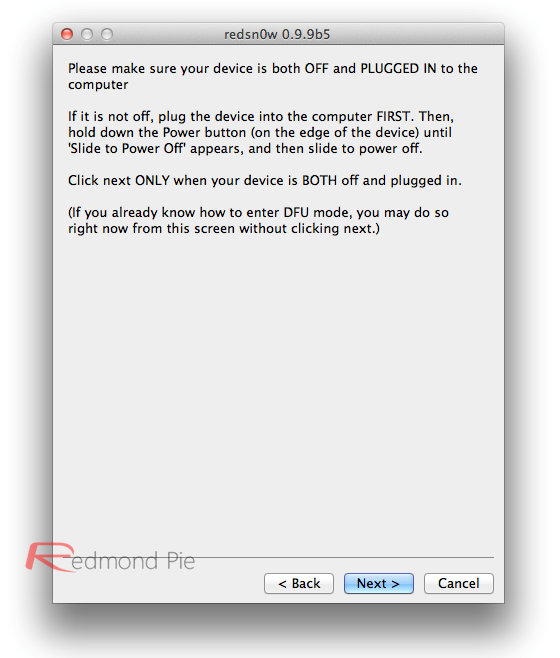
    Step 4: Click on the “Jailbreak” option, select “Install Cydia” and follow the onscreen instructions to enter DFU mode. Once you’re in DFU mode, Redsn0w will perform the jailbreak (without having to have you select the IPSW file manually! YES, the new Redsn0w can fetch all the required files automatically from Apple’s servers).

    Screen-Shot-2011-10-13-at-8.06.03-AM.png


    Booting into Tethered-Jailbreak Mode:
    Step 4:
    Once you’ve installed Cydia, you will need to boot the device into a tethered jailbroken state. Go into DFU mode, and then in “Extras”, opt for “Just Boot”. Redsn0w will subsequently boot your device as tethered. Note: Due to the nature of this jailbreak, you will have to repeat this booting sequence every time you wish to reboot your device.

    Screen-Shot-2011-10-13-at-8.05.49-AM.png


    මෙන්න Video එක..


    SOURCE - Redmond Pie