

ඇයි බං මෙහෙම වෙන්නෙ..? Apps ලෝඩ් වෙන්නෑ එකක්වත්..

Windows දාපු ගමන්ම හොඳට වැඩ කලා.. පැය දෙක තුනක් ගියාට පස්සෙ වැඩ නොකර ගියා එක පාරම..


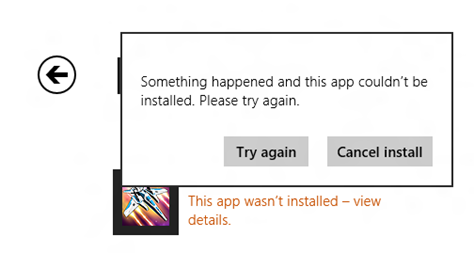
please try again
crack ekakda pute use karanne?mama win8 dala aith win 7 da gaththa ban

Bump 1kak thamai bro

උඹ windows update කලාද?
bump
ඔවු මචං.. ඊයෙ රෑත් අප්ඩේට් කලා.. වින්ඩෝව්ස් දැම්මෙ පෙරේදද කොහෙද.. එදා නම් ඔක්කොම එලකිරි සේ වැඩ කලා..


එහෙනම් සමහරවිට crack එක මාට්ටු ඇති.
මගේ තියෙන්නෙත් crack එකක් තමා, ඒත් store එක හොඳට වැඩ.
මං update disable කරලා තියෙන්නේ.
meka bala link
ane pin athi mahathek mata hoda windows 8 ekaka denna
windows 7 idan 8ta panina perum puragena puragena puragena hitiyath pirenne na ne
මොකක්ද උඹ දාපු ක්රැක් එක..? එවපන්කො ලින්කුව..

ගොඩක් අයට App Store එකෙන් App ඩවුන්ලෝඩ් කරන්න බැරි
1-Windows Firewall is disabled
එහෙනමනම් Firewall ඔන් කරලා මුලින්ම පොඩි ට්රයි එකක් දෙන්න කස්ටිය

2-Incorrect Date and Time
මෙන්න මේකත් එක හේතුවක්, කස්ටියම වින්ඩෝස් සර්වර් එක්ක Time sync කරලත් බලන්න
3 Licensing on Windows Store is not synced
වින්ඩෝස් ඇක්ටිවේට් වෙලා තිබුනත් සමහර වෙලාවට ඒ Key එක App Store එකට sync වෙලා නැතිනම් කරන්න තියෙන්න මේක තමා
- Go to Windows Store
- Press Windows Key + C
- Open Settings
- Select App Updates
- Sync Licenses
- reboot the system and try to download
Reboot in Selective Startup mode
කොම් 1 ඔන් වෙනකොට ලොඩ් වෙන සමහර ඇප්ලිකේශන් නිසා වෙන්න්ත් පුලුවන්
- To reboot the system in Selective Startup
- On Desktop press Windows key + R. This opens the run window
- Type in MSCONFIG and press Enter
- Under General tab uncheck on “Load Startup items”
- Under Services tab check on “Hide all Microsoft services” and click on Disable all
- Now reboot the system and try to install it again
System File Check
මෙන්න මේකත් කරල බලමු එහෙනම් වැඩි මහන්සියක් නැති නිසා
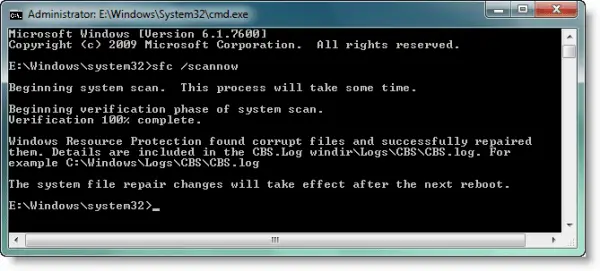
- open command prompt (Run As Admin)
- type sfc /scannow
- hit Enter
Windows 8 Apps Troubleshooter
මෙන්න මෙක නම් බිල් ගේට්ස් මාමා හදපු එකක්, ඔන්න ඔහේ එකත් බලමු

Apps Troubleshooter
මේක ඩවුන් කරලා රන් කරන්න
Repair Windows 8 Apps
ඇප් ඉන්ස්ට්ල් වෙලා තිබුනත් මෙන්න මේ වගේ පෙන්නවාද

This app can’t openමෙන්න මෙහෙම කිවොත්
- click on the Go to the Store link
- see a message This app needs to be repaired
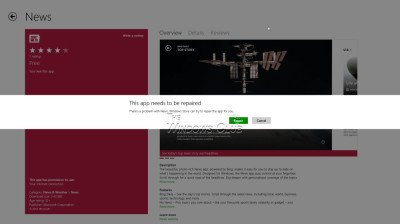
- Clicki on Repair

machan simply restore karapan anthimata hodata weda karai kiyala hithena dawasata
mekath karala balpn ban


