VIRUS... zepto?

AcAciA

Well-known member
  • Aug 8, 2010
    1,034
    137
    63
    GAmPAha.......
    wadipura enne mail walin. oka thamai aluthima apu ransomware eka. oka decrypt karanna thama widiyak hoyagena na. mulinma oka spread wena eka nawaththanna. Share location walin thamai oka rata watema yanne.
    Bitdefender Anti-ransomware & MalwareByte Anti-ransomware oya 2ken ekak danna. Malwarebytelage Anti malware 1ka dala scan karanna. :)
    Eset nam allanawa oya Zepto virus eka. bt spread unama nam sorry thamai.. :(

    Eset hodaida bn ..mage tiyenne ESET:rofl::rofl:
     

    jude.bandara

    Member
    Dec 8, 2007
    29
    2
    3
    Normal virus gard walin oka allanne nedda bn? Mm kiyanne pc ekata download weddima.

    කියන විදිහටනම් නැ වගේ. උගෙත් virus guard තියේදී තමයි ඇවිල්ලා තියෙන්නේ. අන්තිමේදී හිත හදාගෙන format කරන්න කිව්වා. 355GB data lose.:P

    what to do? කරන්න තියෙන ගොඩක් සෙල්ලම් දැම්මා data recover කරගන්න නම් බැරි උනා.
    එකයි කරන්න ඉතුරු වෙලා තිබුනේ. උන් දීලා තියෙන ලින්ක් එකට ගිහිල්ලා ගෙවලා encrypt password එක ගන්න එක. එක කොහොමටවත් කරලා වැඩක් නැ. බඩු ශුවර්ද දන්නේ නැනේ.:oo:
    අන්තිමට ඌට dataයි සල්ලි දෙකම නැතිවෙන වැඩක් එක.
     

    jude.bandara

    Member
    Dec 8, 2007
    29
    2
    3
    Podi Silva - පොඩි සිල්වා;20527024 said:
    ට හිකේ සිඩ්හලයෝ
    මේ මොකද්ද

    ආවොත් හිත හදා ගනින්. මට හිතෙන විදිහට විසදුමක් එනකන් ඉතින් හොදම විසදුම genuine software use කරන ගමන් updated තියාගන්න එකයි, cloud base data තියාගන්න එකයි.
     
    ආවොත් හිත හදා ගනින්. මට හිතෙන විදිහට විසදුමක් එනකන් ඉතින් හොදම විසදුම genuine software use කරන ගමන් updated තියාගන්න එකයි, cloud base data තියාගන්න එකයි.

    කොහොමද බන් ආවෙ ඕක
    නිකන් පෙන් එකක් ගැහුවහමත් එනව ද
     

    RottenCOLT

    Well-known member
  • Oct 9, 2011
    27,374
    16,165
    113
    wtf meke 3 weni page ekata giyahama mehema enawane. :sorry: mata owa therenneth naha ban.
    igeqkw.png


    bump :rofl:
     

    qtel

    Well-known member
  • Apr 17, 2011
    1,119
    111
    63
    OUT OF HOME
    Manual Zepto Removal Guide
    Method 1. Remove Zepto using Safe Mode with Networking
    Step 1: Reboot your computer to Safe Mode with Networking
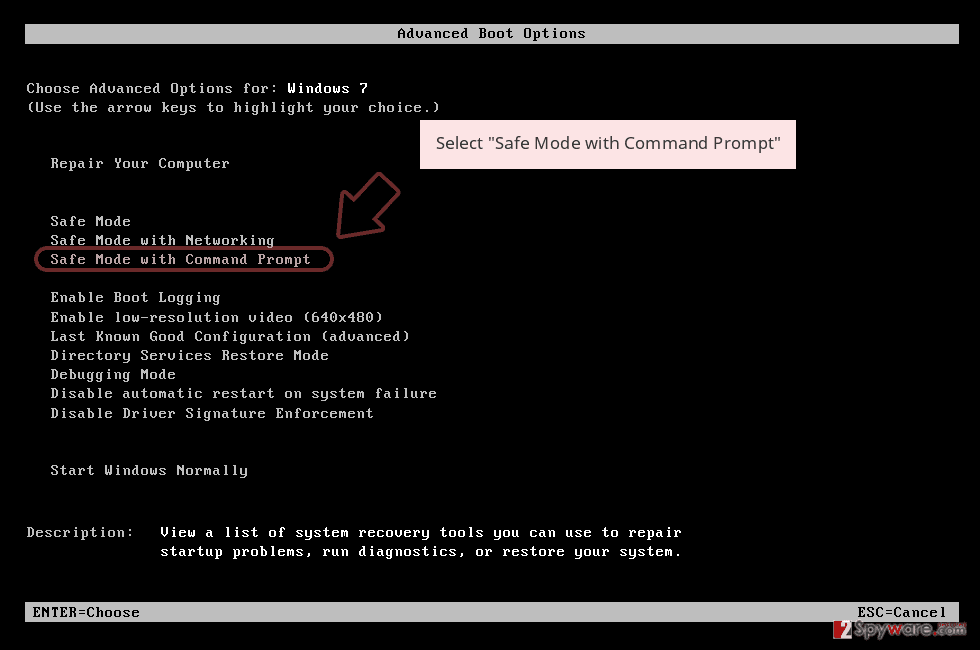
    Windows 7 / Vista / XP
    Click Start → Shutdown → Restart → OK.
    When your computer becomes active, start pressing F8 multiple times until you see the Advanced Boot Options window.
    Select Safe Mode with Networking from the list


    picture1.png


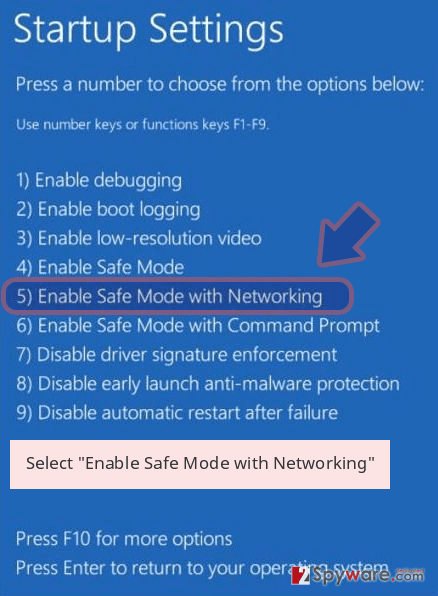
    Windows 10 / Windows 8
    Press the Power button at the Windows login screen. Now press and hold Shift, which is on your keyboard, and click Restart..
    Now select Troubleshoot → Advanced options → Startup Settings and finally press Restart.
    Once your computer becomes active, select Enable Safe Mode with Networking in Startup Settings window.

    picture2.png


    Step 2: Remove Zepto
    Log in to your infected account and start the browser. Download Reimage or other legitimate anti-spyware program. Update it before a full system scan and remove malicious files that belong to your ransomware and complete Zepto removal.

    If your ransomware is blocking Safe Mode with Networking, try further method.


    Method 2. Remove Zepto using System Restore

    Step 1: Reboot your computer to Safe Mode with Command Prompt
    Windows 7 / Vista / XP
    Click Start → Shutdown → Restart → OK.
    When your computer becomes active, start pressing F8 multiple times until you see the Advanced Boot Options window.
    Select Command Prompt from the list

    picture3.png


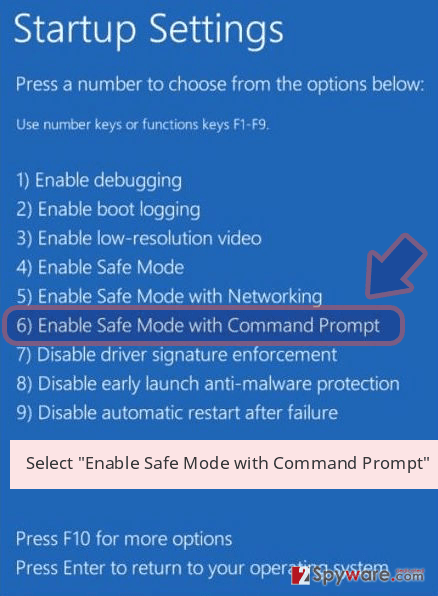
    Windows 10 / Windows 8
    Press the Power button at the Windows login screen. Now press and hold Shift, which is on your keyboard, and click Restart..
    Now select Troubleshoot → Advanced options → Startup Settings and finally press Restart.
    Once your computer becomes active, select Enable Safe Mode with Command Prompt in Startup Settings window.
    picture4.png

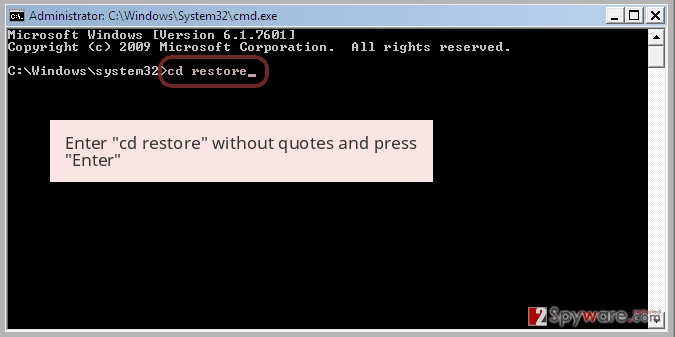
    Step 2: Restore your system files and settings
    Once the Command Prompt window shows up, enter cd restore and click Enter.

    picture5.png

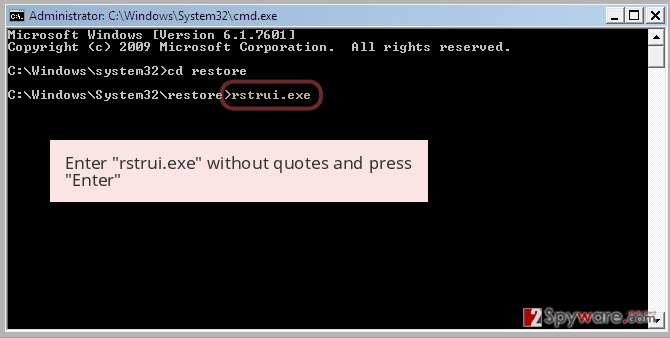
    Now type rstrui.exe and press Enter again..
    picture6.png

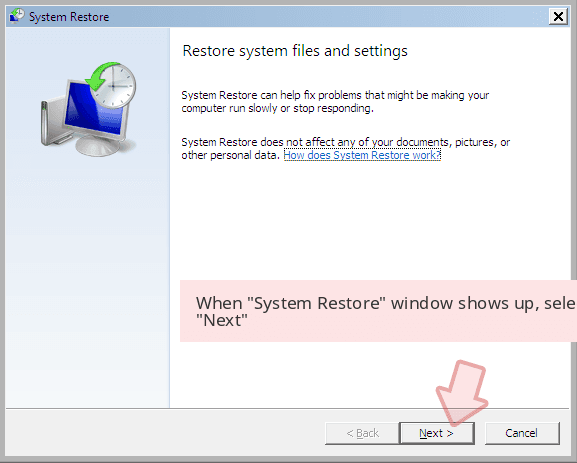
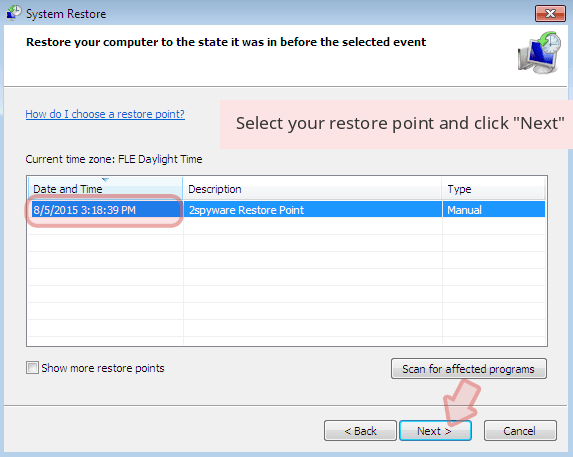
    When a new window shows up, click Next and select your restore point that is prior the infiltration of Zepto. After doing that, click Next.

    picture7.png

    picture8.png


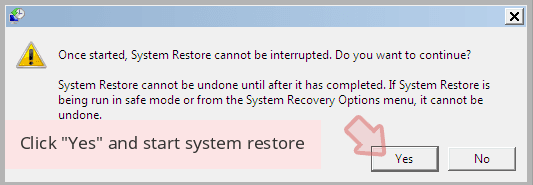
    Now click Yes to start system restore.

    picture9.png


    ඉස්සුවා දැම්ම :P:P:rofl:

    ඕක හරියන්නේ බන් ස්ය්ස්ටම් රිස්ටෝර් එක තිබ්බොත් .ගොඩක් වෙලාවට එකටත් බඩු බනිස් තමා .
    රන්සම්වෙයාර් උබේ ෆයිල් ඔක්කොම එන්ච්රිප්ට් කරලා සල්ලි ඉල්ලන්නව .දැනට නම් ෆෝමැට් කරන එක තමා තියෙන්නේ ඕව ආවොත් :sorry:
     
    May 10, 2016
    45
    5
    0
    Panadura
    දැන් ඉතින් වෙන කුමක් කරන්නද ? format කරනු මිස .. recover කරන්න ලේසි නෑ machao. අපේ office එකටත් ඕකම ආවා . ලේසි නෑ . ගොඩක්ම effect වෙන්නේ mails වලින්. ඔය ransomware එකේ විවිධ versions තියෙනවා. මේ linkඑකේ තියෙන decrypt tools වලින් try කරලා බලන්න. එක පාරක් මට decrypt කරගන්න පුළුවන් උනා .

    http://support.kaspersky.com/viruses/utility