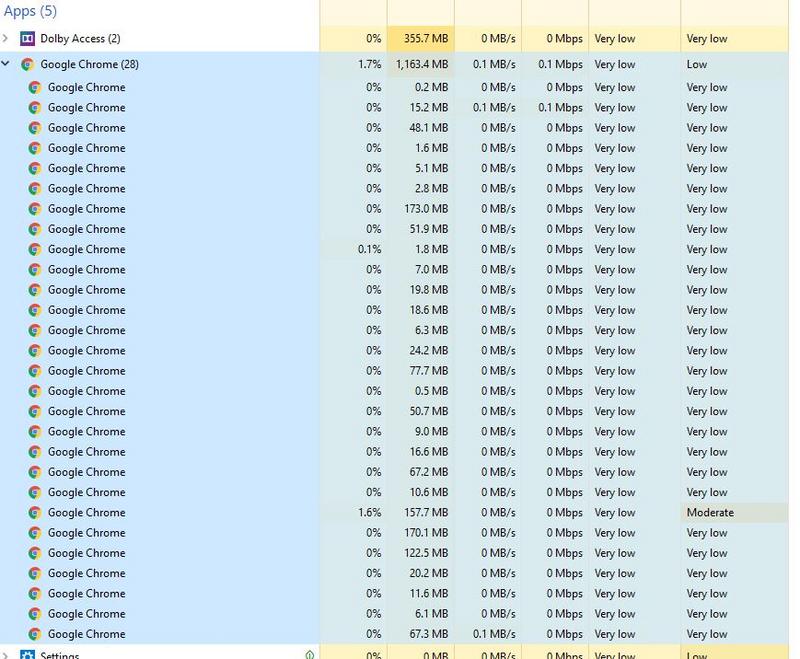
Chrome Ram Usage

miyuru4u

Well-known member
  • Jan 18, 2007
    31,894
    10,489
    113
    In the eyes of my girl
    chrome.jpg


    machanla mage chrome eke mara usage ekak thiyenawa me wage
    mekata mama mokada karane
    ubalaget ehemada
    tabs 5 wage open wela athi one nam
     

    ELShock

    Well-known member
  • Jan 30, 2017
    682
    367
    83
    oya normal bn oita wada anthai samahra welawata :lol:
    wadakata nathi extensions ehema ain karapn tkk aduwei
     

    Vaharai

    Member
    Feb 23, 2019
    865
    83
    0
    same machan no deference sometimes
    but for me chrome is more easy to use than forefox
    Config eke thiyana settings ehema poddak wenas karala balanna.
    Habayi loku wenasak nam ganna puluwan wena ekak naha.
    RAM eka free thiyanakota browser eken use karanawa.
     

    Dr.Amdan

    Well-known member
  • Sep 26, 2015
    26,412
    1
    28,508
    113
    ක්‍රෝම් හොඳයි තව.ෆයිර් ෆොක්ස් තමයි හිර වෙන්නේ මගේ ලැපේ.
     

    HAneo

    Well-known member
  • Jan 30, 2007
    12,970
    29,168
    113
    Homagama
    chrome.jpg


    machanla mage chrome eke mara usage ekak thiyenawa me wage
    mekata mama mokada karane
    ubalaget ehemada
    tabs 5 wage open wela athi one nam

    oka bohoma normal deyak ne ban. uba open karan inna tab gana baluwama.
    mage dan 3.45 Gb Chrome ekata.

    uba eka tab ekaka video digatama baluwama eke cache ekak hadenawa. e wage tab close karala ayi wena ekakin open karagena balapan
     

    dagayaa

    Well-known member
  • Sep 7, 2010
    4,045
    727
    113
    https://www.howtogeek.com/124218/why-does-chrome-have-so-many-open-processes/

    Quote
    Google Chrome takes advantage of these properties and puts web apps and plug-ins in separate processes from the browser itself. This means that a rendering engine crash in one web app won’t affect the browser or other web apps. It means the OS can run web apps in parallel to increase their responsiveness, and it means the browser itself won’t lock up if a particular web app or plug-in stops responding. It also means we can run the rendering engine processes in a restrictive sandbox that helps limit the damage if an exploit does occur.

    Basically, each tab has one process unless the tabs are from the same domain. The renderer has a process for itself. Each plug-in will have one and so will each extension that is active.
     

    imhotep

    Well-known member
  • Mar 29, 2017
    14,849
    8
    35,419
    113
    This is normal. Chrome and Firefox use what's known as Isolation - and store every tab, plugin, and extension in a different RAM process. This prevents one process from overwriting another. Also gives better stability - if one tab crashes the whole browser does not go down completely.

    There are a few ways to have some control.
    If you type in the address bar
    chrome://flags
    You will see the experimental features.
    Switch automatic tab discarding to Enabled -
    This automatically discards background tabs from your system memory when it is low. The tabs remain in place, but won’t load or display content until you click on them.
    Another flag that works in conjunction with this is the
    “Show Saved Copy Button.”
    The Show Saved Copy Button will appear after the browser discards a tab, asking if you want to reload a recent version of the page from the browser cache.

    Also there are other free utilities like "The Great Suspender", "OneTab", "Tab Wrangler" that allows you to gain more control. Cannot write everything here please do some reading.