¯¯\_/¯¯_EK_CRACKS_&_SERIAL_REQUEST _HERE¯¯\_/¯¯

dilrasan

Well-known member
  • Oct 30, 2007
    42,743
    1
    4,826
    113
    40
    හත් ඉලව්වෙ!
    TΞΞNSTAR™ said:
    shot.jpg


    shot2.jpg


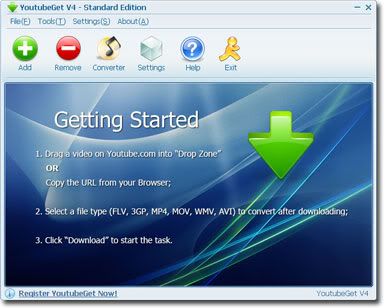
    YoutubeGet is an all-in-one software designed to make quick and easy work to download Youtube videos and convert them. Offering a multitude of methods to acquire the video, this application has all the power you need while still remaining small and easy to use. After downloading videos it will auto convert FLV files to MP4, 3GP, AVI, WMV, MOV etc. Soon, you can see youtube videos on your MP4 or Cell phone.
    YoutubeGet Benefits & Features

    Download Youtube Videos to Cell Phone
    YoutubeGet will auto convert Youtube Videos to 3GP Cell Phone Format, then you can see all youtube videos on your Cell Phone!

    Download Youtube Videos to iPod
    You can download youtube videos and save them as iPod MOV or MP4 format, and play them anywhere!

    Download Youtube Videos to PSP
    After playing games on your PSP, would you like to see some cool videos? YoutubeGet will download youtube videos and save them as PSP format!

    Download Youtube Videos and Burn to a CD/DVD
    Download youtube videos and save as AVI or WMV. It is much easier to burn these funny videos to a CD/DVD by this two formats.

    Clipboard Monitor Helps You to Download Youtube Videos Much Easier
    YoutubeGet monitors your Clipboard all the time. when you are copying a Youtube Video URL, immediately the Add New Download window will auto pop up.

    FLV Converter (Free in YoutubeGet V4 Suite)
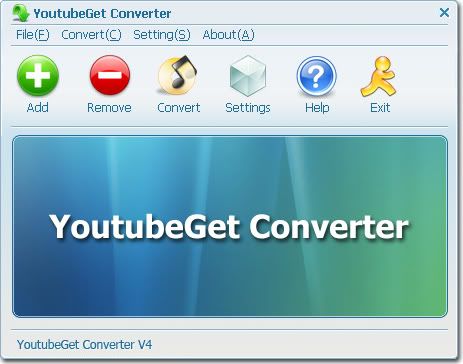
    You can convert your local FLV files to AVI, WMV, MOV, 3GP, MP4 etc by YoutubeGet FLV Converter for FREE! You Save $29.95 !

    Youtube Browser
    Search Youtube Videos and Preview them before downloading. When you want to download them you just one-click on Download Now Button.

    Working with XP & Vista


    Download:

    http://rapidshare.com/files/120158806/YoutubeGet_4.4.rar


    password: www.thehotzone.org

    Aa Elakiri...Thanx Kiwwa..​
     

    Pura Pagal

    Member
    May 2, 2008
    1,233
    29
    0
    TΞΞNSTAR™ said:


    Check this Out Bro

    Well here is the the full answer to all our prayers. How to install the programs and latest patch 2008.34.
    1. Get ISO CORE.bin from Tam torrent - if you dont understand this tough.
    2. Go to Smartdraw this link and get full patch http://www.smartdraw.com/support/updates.htm USE ALERNATE LINK for FULL PATCH .
    3.Mount ISO Image , Deamon or Magic ISO or whatever
    4.Do not start install
    5.Open Mounted Image in Explorer - open CORE directory, fire up keygen.exe
    6.Turn sound off if like me it drives you bonkers
    7. Now there are four fields Name , ID , then one starting with SD and last just a load of hex data. The SD field is the Serial for Install. The last field is the activation ID based off of the ID field which is YOUR system ID that will be displayed first time your fire up smartdraw. SO now you know.
    8. Now follow exactly these steps
    DISCONNECT FROM THE INTERNET
    9. Leave Keygen running all the time untill you have completed all steps
    10.Type in a new name in Keygen , this will give new serial number (do this every time you try an install)
    11.Start SD Install , use new SD 21 …. Serial
    12. After install SD will start and you will see dialog asking for activation and here you will see your system ID (ignore at this moment DO NOT ACTIVATE) so cancel and close SD.
    13.Install Full Patch
    14.SD will start again and ask for activation ID. Copy and paste System ID from the dialog into the Keygen ID field
    15. Copy and paste last field in ket gen into Activation field in SD and hit enter.
    16. Voila full working copy 2008.34
    17. Finally go to Control Panel and open Scheduled tasks and delete the SD task there.
    18. Make sure SD NEVER communicates on the Internet. Use file wall to block all communications.

    Happy drawling


    SOURCE

    http://rapidshare.com/files/69506190/HATRED.RAR PROPERED CRACK!!!

    Let me go through all these steps. Once complete, will get back to you
     

    Pura Pagal

    Member
    May 2, 2008
    1,233
    29
    0
    TΞΞNSTAR™ said:
    Hope it would work!!

    Well, well, well... I was also hoping this would work and wouldn't be bothering you anymore for this particular software ONLY

    But... There are problems...

    I started from step 2, i.e. Go to SmartDraw this link...
    • The full patch (sd2008_full_patch) is NOT an ISO Image but .exe file, therefore, step 3 to 18 eveporated
    • Full patch version is 2008.37.0.0 and NOT 2008.34
    I am sure you will come up with a solution for this as well. Please be aware I will keep on bugging till a solution is obtained
     

    TΞΞNSTAR™

    Member
    Mar 19, 2008
    15,866
    42
    0
    StuCk In My AnGelZ HeArT!!!
    Pura Pagal said:
    Well, well, well... I was also hoping this would work and wouldn't be bothering you anymore for this particular software ONLY

    But... There are problems...

    I started from step 2, i.e. Go to SmartDraw this link...
    • The full patch (sd2008_full_patch) is NOT an ISO Image but .exe file, therefore, step 3 to 18 eveporated
    • Full patch version is 2008.37.0.0 and NOT 2008.34
    I am sure you will come up with a solution for this as well. Please be aware I will keep on bugging till a solution is obtained

    Ill Try To Find a Proper Solution for this in the morning bro!!
     

    Clerk_Kent

    Well-known member
  • Jan 17, 2008
    25,206
    65
    48
    Mama den machine eka restart karanawa...
    mama eddi Mass Effect game eke serial eka hoyala thiyanna one harida:rofl::D:D
     

    007-Bond

    Member
    Jun 5, 2008
    2,439
    10
    0
    ishrocks said:
    aa machoo mata nero aluthma version eka one full edition ekak..:rofl::rofl:

    Nero 8.3.2.1 Ultra Edition +Keygen [RS]
    e1axl5.jpg


    Nero 8 Ultra Edition, the newest version of the world’s best-selling multimedia suite, brings the digital world to your PC. Now it’s easy to organize and manage all your multimedia files, as well as create and edit new digital content. Nero’s sleek design and user-friendly tools make completing projects fun and enjoyable.
    • NEW User-friendly and intuitive interface-(Nero StartSmart)
    • NEW One-click Rip, Burn and Copy functions
    • NEW Easy export and share to YouTube™, MySpace® and My Nero
    • High Definition format support
    • Stream to Xbox 360™ and PlayStation® 3
    • Backup files to CDs, DVDs, HD DVDs, and Blu-ray Discs
    • Optimized for Windows Vista®
    70kooy.jpg
    Nero StartSmart makes creating projects fun and simple
    Nero StartSmart 8 – One-Click Project LauncherNero StartSmart, the project launcher for Nero 8 Ultra Edition, lets you directly access features and perform one-click functions. The intuitive interface makes creating and managing digital projects easy and enjoyable. Optimized for use with Windows Vista®, Nero StartSmart even has an integrated newsfeed system.

    9u2r7n.jpg
    Nero 8 Ultra Edition is the solution for your multimedia projects
    Nero Vision 5 – Video Editing and AuthoringNero 8 Ultra Edition has the tools to help you handle all your multimedia projects. Whether you plan to create a music mix with MP3 files, edit vacation videos, touch up digital photos, make a slide show, or convert content to play on a mobile device, your results will be professional and dynamic.

    295ua0l.jpg
    Nero 8 Ultra Edition takes home entertainment around the house
    Nero Home 3 – Media Management SystemOrganize and manage all your multimedia files with Nero’s home media center. Nero 8 Ultra Edition lets you use your Xbox 360™ or PlayStation® 3 to stream High Definition video content and surround sound audio files to enjoy in the comfort of any room in your house.

    oa8x3a.jpg
    Nero 8 Ultra Edition offers increased data security
    SecurDisc Viewer – View SecurDisc protected filesNo more worries over losing data! Nero 8 Ultra Edition has back up features that let you rest easy knowing your data is safe in case of a complete system crash or a damaged disc. Recover your data quickly and easily and create discs that are password protected. SecurDisc technology gives you peace of mind.

    -----Features-----

    Create and Edit

    Video
    Your last vacation, your brother’s wedding, your daughter’s graduation – do you record every memorable moment on video? Now get more from your camcorder recordings. With Nero 8 Ultra Edition you can easily edit High Definition content in AVCHD format with professional results. Insert chapters and menus, and even enhance videos and slide shows with background music. Enjoy your favorite TV shows without interruption simply by editing out the commercial breaks.

    Audio
    Are you a music lover and want to keep your favorite songs close at hand? Convert your music collection to MP3 format and experience listening pleasure at home and on the go. Impress your friends at your next party by mixing and editing your favorite songs with professional effects and tools. With Nero 8 Ultra Edition, you get crystal-clear audio for your video files and up to 7.1 surround sound.

    Photo
    Do you have hundreds or even thousands of digital photos saved on your hard drive? Give your pictures a touch-up with tools that let you make improvements, add visual effects, and much more. Surprise your kids by presenting a family slide show on your television set! No more searching through tons of files for the images you want. With Nero 8 Ultra Edition, it’s easy to organize your photos!

    Convert and Share

    High Definition
    Do you have High Definition video content but no blue laser burner? Convert HD content easily into AVCHD format, and compress content without losing quality. Your HD content can then be burned to a normal DVD and played on a Blu-ray Disc player or PlayStation® 3 for the ultimate blue laser experience.

    Video Conversion
    Want to bring your video content along with you? With Nero 8 Ultra Edition, you can simply convert DVD content to play back on an iPod® or PSP™. Use the world’s fastest MPEG-4 encoder to compress DVD content while maintaining optimal quality, then burn to a CD or save to a USB stick, Flash memory, or an SD card.

    Music
    Nero 8 Ultra Edition offers unlimited MP3 support. Convert your audio files to MP3, the world’s most popular audio format, and enjoy your favorite songs at home or on the go.

    Internet
    Share the latest news of your life with friends right over the Internet! Post your best videos and photos with easy upload to online communities like My Nero, YouTube™ and MySpace®

    Home Entertainment

    Media Center
    Turn your living room into a real media center and experience home entertainment like never before! Stream live TV to an Xbox 360™ or PlayStation® 3. Connect your game consoles to a TV and enjoy your favorite shows in any room in the house!

    Television
    Don’t miss another episode of your favorite series! Use your PC to record all your favorite shows. The EPG support in Nero 8 Ultra Edition makes selecting and recording broadcasts easy! Even if the phone rings while you’re watching TV, with the Time Shift feature you can take your phone call, and then resume watching your show exactly where you left off!

    Music Streaming
    No more wasted time changing CDs at your next party. With Nero 8 Ultra Edition, you can create playlists and stream music from your PC to your stereo for uninterrupted tunes all night long!

    Rip and Burn

    Rip and Burn
    Born2Burn™? Rip audio CDs and non-copy-protected DVDs quickly and easily with the world’s leading burning engine. Burn audio files or data to CD, DVD, Blu-ray Disc, or HD DVD. Want to burn movies to DVD? With DVD-R Dual Layer and DVD+R Double Layer support, you’ll get more data on a disc than ever before!

    Nero DiscCopy Gadget
    The Nero DiscCopy Gadget is optimized for use with Windows Vista® and lets you copy a disc with just one click from the Vista® Sidebar!

    SecurDisc Technology
    With Nero 8 Ultra Edition and a SecurDisc-compatible drive, you can burn CDs and DVDs with password protection against unauthorized access, or add a digital signature to ensure that your sensitive data remains unchanged. SecurDisc increases the readability of data even on damaged discs, and also lets you know when a disc is nearing decay, so you have time to save the data to another disc. The SecurDisc Copy Protection feature prevents unauthorized duplication of confidential PDF documents.

    Back Up

    Data Protection
    No more worries over lost data! With SecurDisc technology, you can back up files, drives, and entire systems to internal or external hard drives. For maximum protection, create a bootable CD to recover an entire system after a crash. Need to access your data even when you’re on a business trip? Create backups over the Internet to an FTP server and access important data from anywhere you go! Plan automatic backups to regularly secure your data and receive e-mails confirming your backup.

    SecurDisc
    With the SecurDisc technology within Nero 8 Ultra Edition, you can ensure increased readability of your data even on a damaged disc. In addition, the early warning system in SecurDisc examines CDs and DVDs to determine if an aging disc is in danger of decay, so you have time to back up the data on another disc.

    -----Included Applications-----
    • Nero StartSmart 8 One-Click Project Launcher
    • Nero BackItUp 3 Complete Backup Solution
    • Nero Burning ROM 8 Expert CD and DVD Burning
    • Nero BurnRights Easily Deployable Burning Rights
    • Nero ControlCenter Simplified Customization and Configuration
    • Nero CoverDesigner 3 CD and DVD Label Design
    • Nero DiscSpeed 4 Improve Optical Drive Performance
    • Nero DriveSpeed 3 Complete Optical Drive Control
    • Nero Express 8 Easy Interface CD and DVD Burning
    • Nero Home 3 Media Management System
    • Nero ImageDrive 3 Virtual Drive Setup
    • InCD 5 Packet Writing Solution
    • Nero InfoTool 5 Drive and Disc Analysis
    • Nero MediaHome 3 UPnPTM Streaming Solution
    • Nero Photoshow Express 5
    • Nero PhotoSnap Photo Editing
    • Nero PhotoSnap Viewer Photo Viewing
    • Nero Recode 2 The World’s Fastest Video Converter
    • Nero RescueAgent Improved File Recovery
    • Nero Scout Database Technology
    • SecurDisc Viewer View SecurDisc protected files
    • Nero ShowTime 4 DVD and Multimedia Player
    • Nero SoundTrax 3 Professional Audio Mixing
    • Nero Vision 5 Video Editing and Authoring
    • Nero WaveEditor 4 Audio Editing and Recording

    Download-4.png


    Code:
    http://rapidshare.com/files/127601358/Nero-8.3.2.1_eng_f.u.l.l.part1.rar
    http://rapidshare.com/files/127607724/Nero-8.3.2.1_eng_f.u.l.l.part2.rar

    Password-4.png


    Code:
    www.undergroundteam.org
     

    TΞΞNSTAR™

    Member
    Mar 19, 2008
    15,866
    42
    0
    StuCk In My AnGelZ HeArT!!!
    ishrocks said:
    aa machoo mata nero aluthma version eka one full edition ekak..:rofl::rofl:

    Nero 8 Ultra Edition 8.3.2.1
    sgiwro.jpg


    Using Nero 8 Ultra Edition you can now create and edit, convert and share, rip and burn, backup and protect your digital media, all from one easy-to-use interface!

    New and Improved Features
    · New easy-to-use and intuitive NeroStartSmart
    · One-click import and share to/from online communities
    · Playback on AVCHD and Blu-ray (BD-AV) video
    · Backup files to CDs, DVDs, HD DVDs and Blu-Ray discs
    · Convert DVD files to play on your iPod or PSP and other portable devices
    · Optimized for Windows Vista

    Create and Edit
    Nero 8 gives you freedom when it comes to creating and editing your audio, video, and photo files. Edit vacation videos in High Definition (HD), create dynamic slide shows from family photos, and make a cool MP3 mix to take on the go. With a broad range of professional tools, innovative features, and cutting-edge technology, Nero 8 helps you get the most out of your audio, video, and photo files.

    Convert and Share
    With Nero 8 you can format DVD content to view on an iPod or PSP, enjoy blue laser content without a blue laser burner, and import and share your favorite photos and videos with one click to and from online communities like My Nero, YouTube, and MySpace. Nero 8 makes it easy to live today’s digital life!

    Home Entertainment
    Experience the finest in home entertainment. With Nero 8 you can stream your multimedia data to an Xbox 360 or a PlayStation 3 to enjoy in every room in the house. Use your PC to record your favorite TV shows, and use the time-shifting feature so you never miss another episode!

    Rip and Burn
    With Nero Burning ROM 8, the world’s most powerful burning application, you can rip your non-copy-protected CDs and DVDs and burn data and audio files to CD, DVD, Blu-ray Disc, and HD DVD. With the integrated SecurDisc technology, you can create password-protected discs or a digital signature to ensure the authenticity of your documents.

    Backup
    No more worrying about losing important files! Integrated SecurDisc technology and the advanced backup features in Nero 8 give you peace of mind knowing your data is safe if your system crashes or a disc gets damaged. User-friendly wizards make it fast and easy to back up, restore, and verify your data, and customizable automation features allow you to ensure backups happen on time.

    Requirements:

    · DVD ROM drive is required for installation
    · Microsoft Windows 2000 (Service Pack 4 or later); Windows XP SP1 Windows 2003 Server SP1; Windows XP Media Center Edition, Microsoft Windows Vista Home/Business/Ultimate
    · Microsoft Windows XP Professional x64 Edition (all applications except InCD, InCD Reader, Nero Scout and Nero ImageDrive work in the x86 emulator that allows 32-bit Windows applications to run)
    · Microsoft Windows VISTA x64 (all applications except InCD, InCD Reader, Nero Scout and Nero ImageDrive work in the x86 emulator that allows 32-bit Windows applications to run). Gadgets are not available under VISTA x64
    · Installation of the latest WHQL certified device drivers are strongly recommended
    · 1GHz Intel Pentium III processor, AMD Sempron 2200+ or equivalent
    · DirectX 9.0c installation is required
    · Internet Explorer 6.0 or later
    · Min 256MB RAM (For Windows Vista min 512MB RAM)
    · 1.5 GB disc space for a typical installation of all components
    · Up to 9 GB available hard disc space for DVD images and temporary DVD files
    · Graphics card with at least 32 MB video memory and minimum resolution of 800 x 600 pixels and 16-bit color settings. 24-bit or 32-bit true color is recommended
    · CD or DVD recordable or rewritable device
    · Internet connection required for registration, free online activation of full DVD, MPEG-2, MPEG-4 and AVC functionality, product updates, and other features such as photo sharing.
    · Usage of DSL-1000 or faster is recommended for video services. Internet connection charges are at user’s expense

    Additional Requirements
    · 16-bit Microsoft Windows compatible sound device and speakers
    · Installation of latest WHQL certified device drivers recommended
    · Blu-ray Disc / HD DVD recordable or rewritable device for Blu-ray Disc / HD DVD functionality
    · HD DVD playback requires purchase of an additional plug-in
    · Blue Laser reading/writing device for Blu-ray Disc / HD DVD support
    · Up to 25/50 GB hard disc space for Blu-ray Disc / HD DVD disc images
    · Nero Mobile not compatible on all mobile devices
    · TV tuner or video recording card for analog or digital recording, time-shifting and any TV functionality.
    · UPnP capable equipment for streaming with Nero MediaHome server
    · LightScribe and Labelflash compatible recorder and media SecurDisc compatible recorder.


    Code:
    http://rapidshare.com/files/116249218/N.8.3.2.1.UE.Full_lak.part1.rar
    http://rapidshare.com/files/116249107/N.8.3.2.1.UE.Full_lak.part2.rar
    [Crack..Serial..Patch]
    Code:
    http://rapidshare.com/files/116247928/N.8.3.2.1.UE.Reg_lak.rar