බාගෙට හරි මැච් වෙන සෙල්ස්

AnuradhaRa

Well-known member
  • බාගෙට හරි මැච් වෙන සෙල්ස්

    ටිකක් හරි මැච් වෙන සෙල් හයිලයිට්කරන ක්‍රමයක් නැද්ද ?
    උදා - වයිට්වෝකර් ද සිල්වා සහ වයිට්වෝකර් සෙල් දෙක
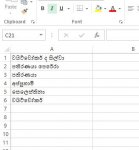

    Capture.JPG
     

    Sanju malli

    Well-known member
  • Mar 11, 2012
    527
    400
    63
    40
    Colombo
    machan, mama eaka widiyak kiyannam. thawath lesi krama thibunoth ape aya kiyala dei.

    50gsqt.png


    Select text
    Conditional Formatting
    New Rule
    Select format only cell that contains option
    Select Specific Text Option
    Enter the Specific Text
    Specify the Cell fill color Eg: Green

    After that, You can filter specific color by filter option
    then it will filter the specific text

    :yes: :yes: :yes:
     

    AnuradhaRa

    Well-known member
  • machan, mama eaka widiyak kiyannam. thawath lesi krama thibunoth ape aya kiyala dei.

    Select text
    Conditional Formatting
    New Rule
    Select format only cell that contains option
    Select Specific Text Option
    Enter the Specific Text
    Specify the Cell fill color Eg: Green

    After that, You can filter specific color by filter option
    then it will filter the specific text

    :yes: :yes: :yes:

    එතකොට මචං හැම නමක්ම ටයිප් කර කර ඉන්ඩ වෙනවනෙ..
     

    AnuradhaRa

    Well-known member
  • Eakata nam option eakak hitha ganna be machan. poddak idapan try eakak dela balannam

    ෆෝමියුල එකක් දාන්ඩ වෙයි නේද..
    partially matched cells කියල සර්ච් කරල බැලුවම තියෙනව වගයක්, ඒත් හොඳ එකක් හිතාගන්ඩ බෑ..
     

    AnuradhaRa

    Well-known member
  • ubata mokak krnnda bn?

    නම් වගයක් තියෙනව. එකම කෙනා නම ආයෙත් ලියල තියෙනව. හැබැයි කලින් විදියට නෙමේ. ඒ හින්ද සෙල් දෙක 100%ක් සමාන වෙන්නෙත් නෑ. එතකොට ටිකක් හරි මැච් වෙන සෙල් ටික හොයාගත්තොත් චෙක් කරල බලන්ඩ පුලුවන් නේ..
     

    Leb

    Well-known member
  • Jun 11, 2007
    603
    245
    63
    Use VLOOKUP, one of the lookup and reference functions, when you need to find things in a table or a range by row. For example, look up a price of an automotive part by the part number.

    In its simplest form, the VLOOKUP function says:

    =VLOOKUP(Value you want to look up, range where you want to lookup the value, the column number in the range containing the return value,

    Exact Match or Approximate Match – indicated as 0/FALSE or 1/TRUE).
     
    Last edited:
    • Like
    Reactions: AnuradhaRa

    AnuradhaRa

    Well-known member
  • Use VLOOKUP, one of the lookup and reference functions, when you need to find things in a table or a range by row. For example, look up a price of an automotive part by the part number.

    In its simplest form, the VLOOKUP function says:

    =VLOOKUP(Value you want to look up, range where you want to lookup the value, the column number in the range containing the return value,

    Exact Match or Approximate Match – indicated as 0/FALSE or 1/TRUE).

    ගොඩාාක් ස්තූතියි +19 ;)