≡ Elakiri S60 ZONE ≡

anuja

Member
Feb 3, 2007
6,175
9
0
36
Malabe
Jayanga said:
If i do this..................can i install KMS to my phone ?

:yes: :yes:

register in the above site. its in chineese, but reading above post will make it easier to understand. after some time u can use that site to sign any of ur apps.
 

tckrockz

Member
Sep 24, 2006
26,754
13
0
Video: Nokoshop - Accelerometer Painting through Motion Control

2441935683_8054c85111_o.png

The developer himself just kindly informed me about another interesting accelerometer application with a totally new concept.
Developed by Luis Fuigerido, the application is the very first piece of software which uses the built in acceleromter of phones like the N95 or N95 8GB to paint with motion input.
As you can see in the video, you can move the cursor by changing the angle your phone is held in. To paint, you must hold the center key. All the places where the cursor is located will shine in the colour you have chosen.
Yes, you can even select between different colours by using the keyboard. But not only a different colour is possible, also the brush size and opacity can manually be selcted.

Video:

I don’t think drawing with this kind is not that easy, but it looks really like fun.
The developer thinks about adding a brush editor, masked drawing, different type of tools (brush, brush effects) and even layers!
Although the application is still in early development, the motion painting concept is a great idea and looks already in this early state very nice.
You may have noticed that I called the application “Nokoshop”, but that’s not the final application’s name, just a thought of the developer.
Luis didn’t publish the application yet, but I hope he will soon do so.
icon_wink.gif
Of course I will inform you about a possible download link, if I have one.
Possibly related posts:
 

mudithmanu

Member
Apr 17, 2008
11
0
1
The best ever

here it is for your N series guys now your phone is protected (tested in N73)

pg31fw1.jpg

pg-1_160.jpg


Symbian Guru Phone Guardian v1.00 S60v3 SymbianOS9.1

it took soooo many days to find this soft
and i finaly found it. So please share this with all.

just send a massage to your phone
eg: " :l:CODE "
your phone will be locked

to unlock
eg: " :u:CODE "

if the sim is changed a SMS will be send to first given number.
Thieves think twise.....
It's a must have in Sri Lanka......
:D:D:D:D:D
have fun
Mudith


Jayanga

Well-known member
  • Sep 9, 2006
    3,296
    42
    48
    Chronosphere
    NOKIA N73

    NOKIA N73

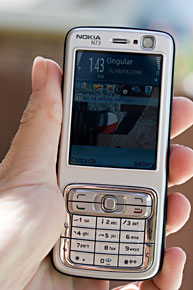
    You know something is up when you receive a powerful smartphone and you don't rip open the box to make a phone call or try out an Excel spreadsheet. Instead you slide open the camera lens cover and madly take photos of anything remotely attractive or interesting. That's the Nokia N73: a camera that just happens to have a smartphone attached. If great photos aren't your thing, Nokia offers a wide variety of Symbian OS S60 phones with lesser cameras and other strong points such as the Nokia E61's QWERTY keyboard and the Nokia N91's 4 gig hard drive for MP3s aplenty. If quality photos are important, the N73 and its bulkier sibling the N93 (which lacks the 850MHz band used by Cingular in the US) are Nokia's top offerings. The Nokia N80 has a 3MP camera that's quite good (once you adjust to the shutter lag), and you'd likely be pretty impressed if you saw the photos it takes. That is, until you see the N73's photos. The N73 has a 3.2 megapixel camera and adds a Carl Zeiss autofocus lens which makes for sharper photos.
    Nokia_N73_inhand.jpg
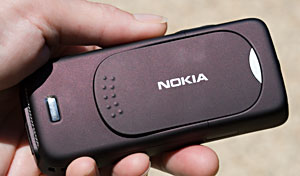
    The N73 is one of Nokia's newest S60 3rd Edition phones and was released at the end of July 2006. It's shipping in Asia and in parts of Europe but is not sold in the US by any carrier. However it is sold by Nokia flagship stores, the Nokia USA web site and by importers unlocked for use with any GSM carrier. We picked up ours from phonesource-usa.com and received the Hong Kong version of the phone in two days. Should you pick up an Asian model, have no fear: it's a bilingual phone so you can set it to English (unless you prefer Simplified Chinese). On the number pad, the numbers 1 through 5 each have one Chinese stroke, but these aren't distracting. The phone does support predictive text in English as well. The Nokia is available in three color combinations: silver gray / deep plum (which we received), frost white / metallic red and frost white / mocha. The plum and mocha colors are complex, looking nearly dark gray to black with metallic highlights in darker locations but turning much more vibrant under direct light.
    Nokia_N73_plum.jpg

    Features at a Glance

    The Nokia N73 is a quad band GSM world phone which will work anywhere GSM service is available. It has EDGE and UMTS 3G on the 2100MHz band (for Europe, not the US), Bluetooth 2.0 + EDR, 240 x 320 QVGA display, miniSD card slot, full PIM applications with easy syncing to Outlook (and the Mac with little trouble), MS Office document viewers, MP3 player, FM radio, stereo output, email client and a full HTML web browser.

    In the Box

    Nokia includes their stereo Pop-Port headset, world charger (prong adapter for US required), USB sync cable (CA-53), software CD with PC Suite and LifeBlog for Windows, a thick manual (even if the phone is an overseas model, Nokia always includes an English manual along with a manual in the localized language), Lithium Ion battery and (possibly) a 2 Gig miniSD card (Nokia doesn't list this in their specs but one came in our box).

    Design and Ergonomics

    The N73 is one of Nokia's more normal looking smartphones. It has a straightforward candy bar design and an absolutely standard keypad. It looks more at home with recent MS Smartphones like the T-Mobile SDA and Cingular 2125 than the Nokia N80, N91 or N93. Like the SDA and 2125, a large QVGA display dominates the front face, and while the phone may lack the sexy looks of the N80 or the stainless steel machismo of the N91, the display itself is so eye-catching it gives the entire phone a turn to the stunning. Since normalcy abounds, the phone has a standard keypad with roomy blue backlit keys, a perfectly conformist 5 way joystick that's surrounded by the usual smartphone cluster of 2 softkeys and the call send and end keys. The application launcher, pencil, clear and multimedia applications launcher keys wrap around the keypad in the bright silver surround. All are easy to access and we're thankful the ever-important application launcher wasn't relegated to a side location as with the Nokia N91.
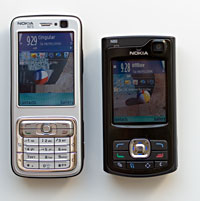
    Nokia_N80_N73.jpg

    The Nokia N73 and N80

    N73_treo_6682_a990_N80.jpg

    Size comparison: Treo 700p, Nokia 6682, Nokia N73, Nokia N80 and Samsung a990.

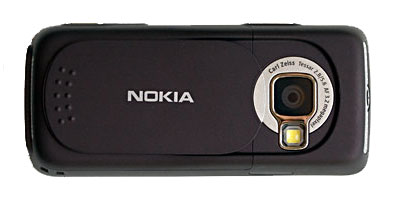
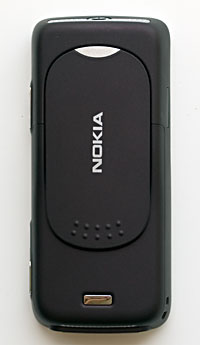
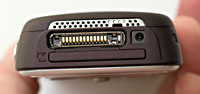
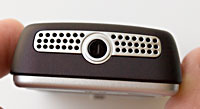
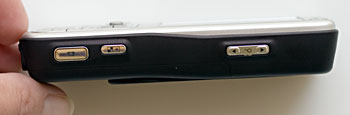
    Like most other phones (but unlike most Nokias) the N73 has a volume rocker for both speaker sound and in-call volume on the right side (easy controlled by your right thumb when holding the phone in the right hand during a call), and this rocker does double-duty as the zoom control for the camera. The IR window is all by itself on the phone's left side, and stereo speakers under a post-modern looking metal grille are located at the top and bottom edges of the phone. The charger port (the smaller style one found on recent Nokia phones and the Nokia 770) is at the bottom as is the Pop-Port multifunction port (used for USB syncing and headsets). Turn the phone on its side and it becomes a camera, and in fact looks like a point-and-shoot. Slide the rear lens cover to expose the lens and LED flash and the camera application opens automatically. The slider stays firmly in place and lays against the phone's back in an interesting manner to accommodate the sloping lines of the phone. Slide the lens cover shut and the camera application exits automatically. There's a dedicated Gallery button beside the shutter button which allows you to quickly move through your photos in full-screen landscape mode
    Nokia_N73_landscape.jpg
    Nokia_N73_back.jpg


    [
    Nokia_N73_bottom.jpg
    Nokia_N73_top.jpg
    Nokia_N73_side.jpg

    Above the display you'll find the secondary VGA camera used for self-portraits and video conferencing in 3G service areas, the light sensor which automatically adjusts display brightness and the earpiece. the miniSD slot is located on the bottom edge parallel to the Pop-Port connector and the card is hot-swappable. As you'd expect, the battery lives under a door on the phone's back and the SIM card is under the battery. The phone feels and looks very well made, perhaps a bit more so than the N80 (which is indeed well made but looks and feels like the plastic it is). The N73 is mid-to-large sized by feature phone standards and small by smartphone standards. It's smaller than the Treo 700p and 700w, Nokia 7610, Nokia 6682 and all Windows Mobile Pocket PC phones on the market and is similar in size to the Cingular 2125 and T-Mobile SDA MS Smartphones.

    Phone Features, Data and Reception

    The Nokia N73 has top notch reception, and is among the strongest RF phones. We tested it both on Cingular's 850MHz network and T-Mobile's 1900MHz network in the US. Both incoming and outgoing voice are clear with no distortion, static or other unpleasant audio artifacts. Call recipients commented on how good we sounded, and incoming volume through the earpiece is good, though not deafening. Clarity and volume are excellent through the included Pop-Port stereo headset and is a perfect match for loud places (as is the speakerphone). Like other S60 3rd Edition Nokia phones, the N73 comes with Nokia's voice command software which offers speaker independent speech recognition and dialing (though it does claim to fine tune to your voice over time). As with other S60 3rd Edition phones, it works OK, though its accuracy doesn't compare to Voice Signal software or MS VoiceCommand on Windows Mobile. However, it's definitely better than the N80, which was at best 50-50 for us. In addition the N73 has speed dialing and support for call waiting, conference calls and caller photo ID.

    Even in the US where we must rely on EDGE, the N73 is a fast phone for data, getting 150K on average using Cingular's MEdiaNet service. For those of you in Europe or those who visit there, the phone has 3G (WCDMA UMTS) on the 2100MHz band (in the US we use the 850 and 1900MHz bands for both voice and data, including 3G). The phone will automatically switch between GSM and UMTS networks where applicable and can fall back to good old slow GPRS if neither EDGE or UMTS are available.
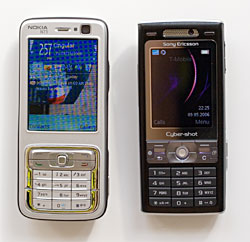
    SE_K800i_N73.jpg

    The N73 and Sony Ericsson K800i

    (Please note: The messaging and email applications on the N73, N80, N91 and N93 are identical, so you'll notice great similarity in these sections of our review). The Messaging application supports POP3 and IMAP email as well as SMS and MMS messages. If you leave the Messaging application running, it will automatically check for new mail and notify you (it retrieves headers only until you tell it to download the full message) and it does not support push email (consider the Nokia 9300 or Nokia E61 if you need push email, particularly BlackBerry Connect). In addition Nokia includes an IM client, but it's not for AIM or MSN out of the box- you'll need IM support from your carrier (this doesn't exist in the US) or use a service like yamigo.com. Alternatively, download Agile Messenger and install it for turnkey IM support on MSN, AIM, Yahoo and ICQ.

    Nokia's new web browser which uses Safari technology is the real star among included Internet applications. This browser, found on all S60 3rd Edition devices simply beats the pants off of other PDA and smartphone browsers including Blazer on Palm OS and Internet Explorer Mobile on Windows Mobile 5. It even beats the full version of Opera (not Opera Mini which is a more minimalist browser). It's fast, renders faithfully in desktop layout mode and very quickly in one column optimized view. The browser handles tables, JavaScript and even dHTML well and it supports multiple windows. It has a page overview mode which shows you the entire web page with an inset box you can move the joystick to zoom to the normal view of that part of the page. For those who've used Thunderhawk, the concept is similar. The browser even has an RSS feed reader! The phone also has a WAP browser (the Services icon). This is the one the phone uses when opening URLs in emails.

    (PART 2 >>>>)
     
    Last edited:

    Jayanga

    Well-known member
  • Sep 9, 2006
    3,296
    42
    48
    Chronosphere
    NOKIA N73 (PART 2)

    Display, Sound and Multimedia

    The display really hits the sweet spot in its combination of size, resolution and color depth. Though lower resolution than the N80 (352 x 416 pixels), the Nokia N73's 2.4" 240 x 320 QVGA display is larger (the N80 measures only 2.1" diagonally) and that's just the right fit to make photos look stunning and keep video sharp yet easy on the eyes. This and the N93 with its identical display, are my favorite S60 displays. While the N80's display is a bit sharper (given the higher resolution and smaller screen size it should be), it's a bit too small to show off small image and video details as well as the N73. Both do an equally excellent job of rendering readable and clear text. The N73 display is brighter than the N80's (it has a larger battery, so it can afford the added brightness) and has more contrast, which most folks find pleasing. In fact photos sometimes look better on the phone's screen than a PC's screen thanks to the added contrast. The N73's non-smartphone 3MP autofocus competition, the Sony Ericsson K800i, has a bit more contrast, but given the N73's already very high contrast, it might look good, but can be misleading when viewing photos taken with the camera. The N73 takes display contrast as far it should go without distorting or "misrepresenting" camera images.

    The display has phenomenal color depth and is capable of displaying 262K colors (18 bit color). Like other recent S60 Nokia phones, the N73 has a light sensor which adjusts display brightness relative to ambient lighting (there's a slider so you can tweak but never completely override the display brightness setting).

    Stereo sound is increasingly popular in high end feature phones, and the N73 has jumped on the bandwagon, adding 3D sound effects for ringtones as well. Once you turn 3D sound on, you can set the sound trajectory (circular, zigzag, fly-by, meander or random) , set the trajectory speed, enable the Doppler effect and set reverb (off, living room, cave, railway station, forest, duct). And yes, you really can hear the difference between most of these settings. Sound out when watching videos or listening to music is good through the stereo speakers, and is quite loud. But tiny phone speakers can't compete with a decent set of headphones for quality music playback. To that end, the N73 comes with a stereo earbud headset with integrated mic, call send /end button and volume slider (Nokia HS-23). This headset also acts as the antenna for the phone's FM radio. We were pleasantly surprised by the Nokia's sound quality when listening to MP3s: music is clear, highs aren't shrill and bass is full. It won't send you running for your iPod. Nokia sells an optional Pop-Port to 3.5mm stereo headphone jack should you prefer to use your own high quality set of cans. You won't be able to use headphones for a phone call (even if they have an integrated mic) and they can act as the FM radio's antenna, though we found Nokia's own headset gave better FM reception.

    The music player supports MP3, AAC, eAAC, eAAC+ and WMA files and has OMA 2.0 DRM. So you can listen to copy protected content using that standard and non-copy protected iTunes music (the tunes you've burned from CDs). The player has an equalizer, playlists and the usual playback controls. Battery life when listening to music with the screen dimmed is excellent: we played tunes for 5 hours over headphones and had more than 50% battery remaining. The FM radio doesn't offer the same reception as a dedicated radio but it does a good job of picking up even weaker stations on manual tuning and strong stations on automatic tuning. You can set your favorite stations as pre-sets and sound quality is surprisingly good. When using a Nokia Pop-Port headset, music playback will automatically pause and audio will switch to voice when a call comes in. It will resume playback when you hang up.

    The large, colorful and bright display is perfect for viewing videos on the go. The phone can play 3GP, MPEG4 and RealPlayer format files and it handled our QVGA 500k/bps video, AAC stereo test video with aplomb.

    Camera

    Clearly the camera is the focus of this phone. The 3.2 megapixel camera uses a CMOS sensor (as do other camera phones and even some dedicated cameras and digital SLRs like Canon's). Though the Nokia N80 also has a 3MP camera, the N73's Carl Zeiss autofocus lens helps it pull clearly ahead with sharper, more colorful and detailed photos. Autofocus also makes depth of field shots possible, for example in portrait mode your subject is in focus while the background is pleasingly blurred (though we couldn't get a pronounced depth of field shot with the N73).

    It even does better in low light situations with considerably less noise than the N80, though Nokia isn't leading the pack in low light capabilities overall. At its best, you really can't tell the difference between the N73 and a dedicated 3MP camera. In challenging situations (low light, extemely bright light) it looks better than any other camera phone except the Nokia N93 and Sony Ericsson K790 / K800i which are on par. With good balanced indoor or outdoor lighting, the camera can take amazing pictures. it's well suited to most any outdoor picture (sunny or cloudy) and well lit interior shots such as offices and malls. Dark interiors raise noise levels and you'll notice the phone's attempts to smooth out the noise, though it's still capable of taking some really lovely outdoor shots at dusk (see the Hooters sign photo; and no we don't endorse Hooters ;) ). The flash helps at close range but an LED flash can only do so much (and more powerful flashes eat batteries fast). See the photo of Sammy the cat, taken indoors with very poor lighting and flash to get an idea what the camera can do in dim locations.
    Nokia_N73_lens.jpg

    Like all autofocus lens camera phones on the market (there aren't many), the N73 focuses when you press the shutter half way down and on-screen indicators turn from red to green when focus is achieved. This takes about 1 second and then you can press the shutter button all the way down (or press it all the way down to start and wait for the camera to focus before it shoots). Unlike the N80, there is no shutter lag and the image is taken when you hear the shutter sound. However, each manages to take a shot in about the same amount of time (wait 1 to 2 seconds for the N80's shutter to trip or wait a second or two for the N73 to focus then take the shot). This means that the N73 isn't an action photographer's dream— a fast moving subject might have passed the ideal point by the time the N73 captures it. The camera has sequence mode to help: it will take several shots in a row so one of them might capture the perfect moment of action.

    The camera's ergonomics and on-screen active menus are perfect for the serious shutterbug. Slide open the active lens cover to launch the camera application and rotate the screen to landscape orientation. The shutter button falls naturally to the top right and the zoom rocker is on the left top so you feel like you're using a camera rather than a phone. The on-screen active menus quickly and intuitively take you to settings to switch between photo and video mode, change scene type (auto, user defined, macro, portrait, landscape, sports and night with default at auto), flash mode (on, off, auto or red-eye reduction), self timer, switch between single shot and sequence, EV settings, white balance, color tone and ISO. In short, a photographer's dream. Compared to the 3MP autofocus Samsung a990 on Verizon, this camera is a dream to use, and the settings are even easier to manage than the solid N80's. Image quality beats the competition and gives the Sony Ericsson K790i / K800i a run for its money (though the SE may win by a very modest margin, especially in low light thanks to its Xenon flash).

    Video quality is also excellent by camera phone standards. The N73 can take videos at a maximum 352 x 288 resolution with audio at 15fps in MPEG4 format (high quality). It can also take "normal" and MMS sized video in 3GP format. Video is sharper thanks to the autofocus lens and colors are well represented with little of the typical camera phone's blockiness and only moderate noise (less than moderate by camera phone standards). Digital zoom will introduce some blockiness, so use it only when you must if you want the best quality. The camera has a video stabilization feature which does reduce handheld jerkiness but as with the N80, also gives the image a bit of an over-smoothed look. Audio and video are in sync in all quality settings and audio is clear and loud. The camcorder is definitely good enough to capture and save those special moments when a dedicated camcorder isn't handy. While the N73's camcorder can't beat the VGA camcorder in the N93, it's very good and beats the Sony Ericsson K790 / K800i.

    Software and Syncing

    Nokia's software bundle is very similar across S60 v3 phones, so you'll notice similarity between our reviews in this section. Since it's s smartphone, you can add 3rd party software made for S60 3rd Edition. Though 3rd Edition is still new and the software selection isn't yet broad, but thankfully Nokia includes most everything you need such as strong PIM applications, Quickoffice to read MS Word, Excel and PowerPoint files (you can purchase a version that both reads and writes these files if need be), media players, image editors, a world clock, and more. S60 PIM applications are excellent. Contacts has support for pretty much every field found in MS Outlook and groups, while the calendar has alarms, repeat events, day, week and month views. S60 also has notes and Tasks both of which sync to MS Outlook. For fun, the phone comes with Nokia's LifeBlog which helps organize your photos and videos chronologically, like a diary or blog. You can add comments, delete photos that you don't want and sync them to LifeBlog on Windows (sadly there's no Mac version of this cool desktop application). Flickr support is built-in and works well, so you can add photos to your Flickr page no matter where you are. Speeds over EDGE are usable and I uploaded 500k images in 20 seconds each. Visit Flickr's alternative upload methods web page to get your LifeBlog/ Nokia phone login and password (it's not the same as your regular Flickr login and password).

    The N73 comes with a software CD containing PC Suite 8.6 and LifeBlog 2. Always check for the latest versions of those applications, which you can download for free from Nokia's web site. PC Suite is an impressive one-stop application these days, and it far surpasses MS ActiveSync for Windows Mobile and even Palm Desktop. You'll use it to sync your Calendar, Contacts, Notes and Tasks to and from Outlook, browse the phone, send multimedia files, use the phone as a wireless modem and more. It supports connection over the included CA-53 USB 2.0 cable and Bluetooth. The phone supports four different USB modes: Media Player, PC Suite, Data Transfer (the phone acts as a mass storage device like a USB drive) and PictBridge for printing to PictBridge enabled printers over USB.

    Mac users: Apple hasn't yet updated iSync to add the most recent Nokia S60 phones but you can download the free mactomster iSync plugin for iSync 2.3 on Mac OS 10.7.4 here (iSync 2.2 on OS X 10.4.6 also available). The fellow who wrote the plugin is German so the instructions won't be easy on English speakers. Here's the quick version: put the plugin folder in /applications/iSync.app/Contents/PlugIns/ApplePhoneConduit.syncdevice/Contents/Plugins. You'll need to right click on iSync (or option click) and select "Show Package Contents" to navigate to the directories listed. The plugin supports the N80, N73, E61 and quite a few other devices. If that all sounds too overwhelming, there are pay-for plugins too. But really, it's easy and I've had no problem syncing the N73, N80 and E61 to my Mac for Contacts, Calendar and Tasks.

    Bluetooth

    The N73 has Bluetooth 2.0 + EDR which is a real treat when transferring files to another computer with 2.0 + EDR (Enhanced Data Rate). When transferring files to a Mac PowerBook and the Sony Vaio UX180P micro PC, both with 2.0 + EDR, transfer speeds were 2x faster than the Nokia N80 (90KB/s vs 45KB/s) and other Bluetooth 1.2 phones. DUN (dial up networking) also benefits and Bluetooth is no longer the bottleneck when using the phone as a wireless modem for data connections. The N73 supports most every common protocol except A2DP (for Bluetooth stereo headphones). It has the headset, handsfree, FTP, object push, HID (primarily for keyboards), basic printing profile and SIM access profile (used primarily so your car's handsfree kit can download phone numbers stored on the SIM card). Nokia phones generally play well with most Bluetooth headsets on the market, and the N73 is no exception; we got good range, volume and clarity with the Bluetooth headsets and car kits we tested including popular offerings from Plantronics, Cardo and Motorola.

    Battery Life

    A large-screened phone with Bluetooth, high speed data capabilities, a 3 megapixel camera with flash and video playback capabilities faces challenges in the battery life department. Even more so when it's a smartphone with a faster CPU, multitasking and a good deal of memory. Happily, Nokia put a large capacity battery in the N73, their 1100 mAh BBP-6M Lithium Ion battery. Our phone easily made 3 days on a charge with high to moderate use: playing videos for 30 minutes, listening to MP3s for 45 minutes, surfing the web over EDGE for 45 minutes, using the PIM apps and Quickoffice several times per day, checking email manually 8 times per day, taking lots of photos and talking for 20 minutes (all figures are per day). If you're in the US or in an area with no UMTS service, save battery power by changing the phone's setting to GSM only (rather than automatic switching between networks). If you are in a UMTS area, we hear that 3G reduces battery life by a bit, so you might expect 10% less runtime. Nokia estimates talk time at 3.75 hours on GSM networks with over 6 days of standby and that seems a bit cautious as ours did a bit better.

    Conclusion

    If you're a smartphone user and love to take photos, this phone is a godsend! No more deciding between a useful business phone and one that's fun to use and can take simply wonderful photos. The N73 has one of the best cameras of any phone on the market, with only Nokia's own N93 and the Sony Ericsson K790 / K800i competing. If you don't need smartphone features, then the Sony Ericsson offers serious competition but it can't compete with the Nokia on syncing, powerful PIM applications, Office viewers, PDF viewer and 3rd party software. The phone has excellent reception and call quality with fast data rates over EDGE and good ergonomics (though the straightforward design might seem boring it does make for an easy to use phone). Bluetooth is fast which is a plus when transferring those big photos and videos. The screen is gorgeous! Battery life is good and the smartphone is responsive in all tasks.

    Pro: Powerful smartphone, best in class 3.2MP autofocus camera, fantastic display, easy to use, great software bundle, Bluetooth 2.0 + EDR, secondary VGA camera with video conferencing is handy for 3G markets, compact by smartphone standards, well built, miniSD expansion slot.

    Con: No WiFi. Look to the Nokia N80 if you need that.

    Specs:

    Display: 262K color (18 bit) color LCD. Screen size diagonally: 2.4". Resolution: 240 x 320 (QVGA).

    Battery: 1100 mAh (BP-6M) Lithium Ion rechargeable. Battery is user replaceable. Claimed talk time 3.75 hours on GSM networks and 6.16 days standby (slightly lower on UMTS).

    Performance: Undisclosed CPU (likely in the 220MHz ARM compatible range). 42 megs of flash memory available for storage. 20.5 megs of free RAM available to run programs just after booting.

    Size: 4.33 x 1.93 x .74 inches (110 x 49 x 19 mm). Weight: 4.09 ounces (116 g).

    Phone:GSM quad band world phone (850/900/1800/1900MHz bands) with EDGE (class B, multislot class 11) and UMTS (3G) on the 2100MHz band.

    Camera: 3.2 megapixel CMOS sensor camera with Carl Zeiss autofocus lens and LED flash. 2048 x 1536 pixel maximum photo resolution with lower resolutions available as well, up to 20x digital zoom, mechanical shutter with 1/1000~2s shutter speed, f2.8/5.6 aperture, macro mode focuses as close as 10 cm (4 inches), 5 white balance settings including auto. Scene settings: automatic, user defined, close-up, portrait, landscape, sport and night. Tone settings: normal, sepia, B&W, vivid, negative. Brightness sensitivity: auto, high, medium and low. Flash modes: auto, off, on, red-eye reduction. Video resolution up to 352 x 288 (CIF) at 15 fps in MPEG4 format, also takes lower resolutions in 3GP format for MMS. Up to 34x digital zoom for video at CIF and 8x at QCIF resolution. Scene modes: auto, night, close-up, snow/beach, cine, old film. Secondary VGA camera supports two-way video conferencing.

    Audio: Built in stereo speakers with 3D sound, mic and Pop-Port jack. Stereo earbud headset (Nokia HS-23) with mic and volume control included. Voice Recorder, RealPlayer, Music player and FM radio. Pop-Port to 3.5mm stereo jack adapter sold separately. Supports vibrating rings and alarms. Music player supports MP3, AAC, eAAC, eAAC+ and WMA files with OMA 1.0 and 2.0 DRM support.

    Networking: Integrated Bluetooth 2.0 +EDR. Supported profiles: headset, handsfree, object push, basic printing, synchronization, HID, DUN, FTP, SIM access.

    Software: Symbian OS 9.1 with S60 3rd Edition. Java MIDP 2.0, CLDC 1.1 with support for over-the-air downloads of Java apps. Quickoffice MS Office document viewer, PDF viewer, web browser, WAP browser, Messaging client (SMS, MMS, POP3 and IMAP email), Nokia PTT (Push To Talk), PIM applications (contacts, calendar, tasks, notes), voice recorder, Gallery, Converter, Calculator, File Manager, RealPlayer, FM Visual Radio, Flash Lite, Anti-Virus, Profiles, Speed Dial, Voice Command, memory card utility, theme manager, application manager, Transfer (transfer contacts, calendar and some phone settings to or from another S40 or S60 phone), Activation Keys (manages DRM on multimedia files), Music Player, Clock, XpressPrint (print via Bluetooth, or USB cable to a PictBridge compatible printer).

    Expansion: 1 miniSD (Secure Digital) slot.
     
    Last edited:

    Jayanga

    Well-known member
  • Sep 9, 2006
    3,296
    42
    48
    Chronosphere
    NOKA N95 8GB (N95-4)

    Nokia N95 8GB US Edition N95-4

    As Yogi Berra said, it's deja vu all over again. . . for the 4th time. The Nokia N95 8 gig US edition (known fondly by it's model number, N95-4 by S60 lovers) is indeed the 4th version of Nokia's extremely popular flagship phone. To be fair, there have been two worldwide models, the N95-1 and N95-2, and two US models that mirror these (the N95-3 and now the N95-4). The N95-4 is actually just the N95-2 (N95 8 gig) with US rather than Eurasian 3G bands. The N95 US edition (N95-3) was more than a remake of the original N95 with US 3G, it boasted several improvements that Europeans didn't see until the N95-2 8 gig was released. Follow all that? Hope so.
    n95_4.jpg

    What does all this mean? If you're outside the US, the N95 8 gig (N95-2 being the more logical choice) has significant hardware improvements over the original N95-1, having a larger battery, more memory and a slightly larger display. If you're a US buyer, the N95-3 offered these improvements (except the larger display), so the choice is harder and the difference comes down to two things: storage and newer firmware. The N95-3 (like the original N95-1) has a microSD card slot for storage and the 8 gig model has (surprise) 8 gigs of flash storage built in but no microSD card slot. Though Nokia specs the N95-1 and N95-3 as supporting up to 2 gig microSD cards, we've used a variety of SDHC cards in higher capacities with no problems so you can in fact have an "8 gig N95" just by inserting an 8 gig SDHC microSD card.

    Since the first release of the N95-1 and N95-2, there have been firmware improvements to the camera, GPS, and updated software (N-Gage support, Flash Lite 3, demand paging memory management). Any N95 model variant owner can enjoy these via a firmware update using Nokia's updater in Windows, except N95-3 owners. Nokia has yet to release a major firmware upgrade for the N95-3, so the N95-4 is the only way to get these improvements in a US 3G model right now. We assume Nokia will release a serious firmware upgrade for the N95-3 (it's been months since the N95-1 got a major firmware revamp). Currently, the N95-4 has the latest, greatest firmware since it's the new kid on the block and you'll enjoy all these improvements out of the box. For those who are new to Nokia and S60, firmware updates are free downloads and are quite easy to install.

    Like the US N95-3, the Nokia N95-4 comes with a US warranty from Nokia, so there's no need to send it overseas for repair should it need work.

    Features at a Glance

    The N95 is a well-known commodity, having first released in April 2007, so we won't do a detailed re-review here. But for those new to the N95, we'll give a run-down of the N95-4's many features. The N95-4 is an unlocked quad band GSM world phone that will work anywhere GSM service is available (and will accept any GSM carrier's SIM). It supports the 850/1900MHz US 3G and 3.5G bands (UMTS and HSDPA) but not the 2100MHz 3G band used in Europe and Asia (the original N95 and the N-95-2 have only the 2100MHz band). The phone has a 5 megapixel camera with Carl Zeiss autofocus lens and an LED flash. The N95 family leads all phones (with the possible exception of the Nokia N82) with its imaging capabilities which also include shooting incredibly good VGA video at 30fps.

    The smartphone runs Symbian S60 3.1 (3rd Edition feature pack 1), and can sync to Mac and Windows computers. Windows syncing software is on the companion CD and you can download an iSync plugin for the Mac from Nokia's web site here (be sure to download the N95 8 gig version of the plugin and not the N95 plugin). S60 3rd Edition offers full PIM applications (contacts, calendar, tasks and notes), as well as email and one of the best full HTML web browsers on a mobile phone (the iPhone is the only one that can compete).

    The N95 8 gig has a music player, FM radio with RDS, video player and a streaming Internet player that handles Nokia's free programming (Sony Pictures trailers, Reuters News, RocketBoom, YouTube mobile and more). Slide the display up to reveal a numeric keypad, and slide it down to reveal the multimedia playback controls.

    The smartphone comes only in black and has a soft touch finish. It has a 3.5mm stereo headset jack and a stereo headset is included in the box. Alternatively, you can use your favorite headphones for music playback. You must use a headset or headphones to use the FM radio since it uses the headset as an antenna. The N95-4 weighs 8 grams (.28 ounces) more than the N95-1 and N95-3.
    n95_back.jpg

    The N95 also features WiFi 802.11b/g, Bluetooth 2.0 +EDR with Bluetooth stereo A2DP and an internal GPS with aGPS support. It comes with Nokia Maps software with nearly world-wide map coverage and our review unit had the latest 2.0 beta maps which adds some very cool features (maps 2.0 beta is a free download from Nokia's web site for N95 owners and the N95-4 currently ships with the older Maps 1.2). The QVGA 240 x 320 16 million color display measures 2.8 inches, and it's got an light sensor with automatic brightness control. The N95-4's display isn't as deeply inset as the N95-3's, though it's not flush with the casing either. The display is very bright and sharp, though it's a tiny bit less bright than the N95-3's display and has slightly reduced outdoor visibility.

    In the Box

    The Nokia comes with a mini USB to USB sync cable, compact world travel charger with US prongs (AC-5U), Lithium Ion rechargeable battery BP-6F, a remote with detachable 3.5mm earbud stereo headphones (the remote controls music playback and has a mic), 3.5mm to AV cables (RCA connectors for video, left and right audio), a software CD with PC Suite, thick printed manual and a getting started guide.
    back_open.jpg
    n95_open.jpg

    Phone Features and Data

    All Nokia N95 models are quad band GSM world phones supporting the 850/900/1800/1900MHz bands. The US versions (N95-3 and N95-4) are unlocked for use with any GSM carrier. The biggie here is US 3G support, which is useful for AT&T customers (there's EDGE for non-3G carriers and regions). Other than US 3G, there is no difference between the N95-2 that came out a few months ago for the European/Asian market and the N95-4. The UMTS/HSDPA radio works on the US 850/1900MHz bands and has an indicator for UMTS under the signal strength bars ("3G") and one for HSDPA ("3.5G"). When not connected for data, the phone merely shows "3G", but it changes to "3.5G" when a data connection is active. It does not have the 2100MHz 3G band used in Europe.
    iphone_n95.jpg

    The iPhone and the N95 8 gig.​

    Data speeds on AT&T's HSDPA network were very good in our tests, with an average download speed of 700k on DSL Reports mobile speed test. Nokia's best-in-the-business web browser downloads and renders web pages more quickly than Windows Mobile's IE and Palm's web browser, with greater desktop fidelity. It's topped only by the iPhone's web browser, which also uses Safari technology. For web browsing, HSDPA isn't as fast as WiFi 802.11g, but it is hugely faster than EDGE. Nokia includes their usual email client, unchanged from the original N95 that handles POP3 and IMAP email. Nokia offers Mail for Exchange as a free download for those who wish to use the N95 with an MS Exchange server. There is no BlackBerry Connect software for the N95.

    As with most Nokia S60 phones, call quality is excellent, and the phone sounds very good with a wide variety of Bluetooth headsets. We did find the N95-4 a tad quieter than our N95-3 through the built-in earpiece, and it's not loud enough for rowdy venues like ball games or busy malls (turn on the excellent speakerphone or use a headset to overcome this).

    Camera

    One of the N95's top features is its 5 megapixel camera with Carl Zeiss autofocus lens. Indeed, the camera takes excellent shots, and even low light shots are decent, despite the LED flash, though there is noticeable noise in indoor shots. Since the N95 8 gig US model has the latest firmware, the camera is faster to launch and save high resolution images. The N95 family of phones are among the best, if not the best camera phones on the market. The images are better than the 3MP point-and-shoot cameras of old, though still not as good as today's 5MP dedicated camera. They're good enough for high quality printing at 4x6 and 5x7 resolution, and well-lit photos even make for decent 8x10 prints. The camera offers a wealth of settings, which you can read about in detail in our N95-1 review. Maximum photo resolution is 2592 x 1944 and these images range from 1 to 1.5 megs. The N95-4 tends to oversharpen images, just as do other N95 variants.

    Video is still simply superb, and this is where the N95 beats the pants off of the Sony Ericsson K850i 5MP camera phone. The N95 family can shoot video in VGA resolution at 30fps-- considerably better than most youtube video and it looks great when played back on a computer.
    lens.jpg

    GPS and Maps 2.0
    The N95 family of devices have come a long way in the past year when it comes to GPS performance thanks to a series of firmware and software upgrades. The latest software, Maps 2.0 is the fastest yet at getting a GPS fix (generally within 30 seconds for a cold fix outdoors and under 10 seconds for a warm fix) and routing has significantly improved. While our friends in Europe generally got good navigation advice, those of us in the US often took the long way home. Happily, the N95-4 (and N95-3 when fitted with the Maps 2.0 update downloadable from Nokia) get logical and expedient routing. Maps gives you maps, routing and POIs (points of interest) for free but you must pay for turn-by-turn navigation which includes spoken directions. The fees are $12.69/month, $98.78/year or the bargain-priced 3 years for $112.89. If you switch phones, you'll need to contact Nokia to activate the service on your new phone. The male voice is the clearest we've heard on a mobile GPS and the stereo speakers are loud enough to be heard in a noisy pickup or sports car.

    New for 2.0 is walking mode and traffic. Walking routes are optimized for-- you guessed it, walking and as such it won't send you on highways or worry about one-way streets.

    8 Gigs Good?

    Sure it's both cool and useful to have 8 gigs of flash storage built into a smartphone. This actually formats to just under 7.5 gigs and shows up as "Mass Storage", "E" drive. There's approximately 100 megs of traditional storage as well, and that's where you want to install programs since many apps run slowly from Mass Storage. At maximum high quality TV resolution, the N95 8 gig can shoot and store an hour of video, or alternatively quite a large library of MP3s and photos taken with the camera. The drawback is the missing expansion slot. If you have 3 gigs of music on the phone, you'll only have room for 35 or 40 minutes of HQ video. If you shoot tons of photos, there's even less space for video. With the N95-3 I can bring along an extra 4 or 8 gig card on a trip when I know I want to shoot lots of video-- at 30 fps VGA, it's hard to resist using the N95 as a high quality trip camcorder. If I'm taking a long flight, I can carry an extra card loaded with enough tunes to last me round trip and some saved YouTube or other video to pass the time. You get the point-- there's a loss of flexibility once storage is fixed. But not everyone needs more than 8 gigs, so you be the judge.
    n95_side.jpg

    Transfer over USB 2.0 isn't super-fast, but then neither is transferring lots of songs and images to and from a card reader. Bluetooth works fine and is similar in speed to other N95 phones when using a computer that has Bluetooth 2.0 +EDR.

    Battery Life

    The 1200 mAh battery managed to get us through a day of fairly heavy use. This included a half hour of navigation using the GPS, checking email every 30 minutes, surfing the web over HSDPA, using WiFi to download software (15 megs worth, 30 minutes spend perusing and downloading), talking for 30 minutes via Bluetooth headset, taking 20 photos, shooting 10 minutes of high quality video, and playing music over the wired headset for an hour. The N95-4 outlasts the N95-3 by just a bit, though they have the same battery and hardware-- this is likely due to the efficiencies of demand paging (only the parts of application that are needed at the moment are copied from ROM to RAM). In general, the N95 8 gig is a phone you'll charge nightly with moderate to heavy use. With light use it can go 3 days on a charge.

    Conclusion

    As ever, Nokia's flagship phone is a top pick, even though the N95 family is now 1 year old. Nokia keeps tweaking a good thing and the new kid on the block N95-4 model is still rife with cutting edge technology. When the N95 models first came out prices were approaching $1,000 for import models and the US version sold for near $750. Now that prices have settled down, you can get the N95-4 model with a US warranty and no cell contract for $580 to $625 from US online retailers which makes it even easier to recommend. It averages $100 more than the N95-3, for those who are price conscious (and the list price difference is even greater).

    If you own the N95-3 is it worth it to move to the N95-4? If you're suffering phone boredom, perhaps. The larger display is nice-- it's amazing how 0.2 inches can make a difference. Getting the latest firmware now if you've been impatiently waiting for an update for your -3 is a perk. But overall, the N95-4 makes more sense if you're new to the N95 or have a non-US model and want US HSDPA.

    Specs:

    Display and Graphics: 16 million color TFT color LCD. Screen size diagonally: 2.8 ". Resolution: 240 x 320, supports both portrait and landscape modes. 3D graphics accelerator hardware.

    Battery: Nokia BL-6F Lithium Ion rechargeable. Battery is user replaceable. 1200 mA. Claimed GSM talk time: 5 hours (3G talk time will be shorter). Claimed standby: 11.6 days.

    Performance: Texas Instruments OMAP ARM 11 processor running at 332 MHz. 128 MB built-in RAM and 256 megs flash ROM. 8 gigs of flash storage (appears as the "E" drive") that formats to approx. 7.4 gigs. Approximately 80 to 90 megs free RAM at boot to run programs.

    Size: 99 x 53 x 21mm (3.9 x 2.09 x .83 inches). Weight: 128 grams (4.55 ounces).

    GPS: Internal GPS. Comes with Nokia Maps software (works worldwide). Mapping and location info is free, turn-by-turn voice navigation requires a fee.

    Phone: GSM quad band 850/900/1800/1900 MHz unlocked world phone. Has GPRS, EDGE and US 3G/3.5G UMTS and HSDPA on the 850/1900MHz bands.

    Camera: 5 MP with digital zoom, CMOS sensor and LED flash. Carl Zeiss autofocus lens.
    Photo: 2592 x 1944 pixels max resolution with several smaller sizes available including MMS-friendly. Images are saved in JPEG format with EXIF data. Focus range: 10cm to infinity (10-50 cm in macro mode). 20x digital zoom (6x in 5MP mode). Mechanical shutter, speeds from 1/3s to 1/1000. Has several scene settings including auto, center weight metering, adjustable EV, sharpening, color balance.
    Video: VGA 640 x 480 max resolution at 30fps and AAC audio. Zoom up to 10x. H.263, MPEG-4 format and 3GP for MMS.
    Secondary front-facing video conferencing camera: 240 x 320 and 176 x 144 pixel resolutions, video frame rate 15 fps, 2x digital zoom, H.263 format (no US Carrier supports the video conferencing feature).

    Audio: Built in stereo speakers, mic and 3.5mm standard stereo headphone jack. Voice recorder, music and video players included. Music player supports MP3/AAC/AAC+/eAAC+/WMA/M4A formats and OMA DRM 2.0 and WMDRM. Stereo FM radio included (use earbuds or headphones as the antenna). Includes RCA out cable to plug the N95 into a TV.

    Networking: Integrated WiFi 802.11b/g and Bluetooth 2.0 +EDR. Bluetooth profiles: A2DP, AVRCP, BIP, BPP, DUN, FTP, GAVDP, GOEP, HFP, HSP, OPP, SAP.

    Software: Symbian OS 9.2 with S60 3.1. Java MIDP 2.0.

    Expansion Slot: None.

    Place of Manufacture: South Korea. Nokia RM-421, firmware 1.2.011.
     

    Jayanga

    Well-known member
  • Sep 9, 2006
    3,296
    42
    48
    Chronosphere
    mudithmanu said:
    here it is for your N series guys now your phone is protected (tested in N73)

    pg31fw1.jpg

    pg-1_160.jpg


    Symbian Guru Phone Guardian v1.00 S60v3 SymbianOS9.1

    it took soooo many days to find this soft
    and i finaly found it. So please share this with all.

    just send a massage to your phone
    eg: " :l:CODE "
    your phone will be locked

    to unlock
    eg: " :u:CODE "

    if the sim is changed a SMS will be send to first given number.
    Thieves think twise.....
    It's a must have in Sri Lanka......
    :D:D:D:D:D
    have fun
    Mudith

    Meka demo ekak ne 5 days only. Key eka thiyenawa da ? :(
     

    mizt

    Member
    Feb 29, 2008
    413
    0
    0
    WeSt SiDe >>NA<<
    FIRST OF ALL YOU NEED HACKED phone 9.X
    1.unrar pack there you will find 101F8763.txt and Startup.mp3
    2.put 101F8763 to С:/private/10202be9/101F8763.txt (maybe you will need to create new folder 10202be9)
    3.put Startup.mp3 to E:\\Sounds\\Simple\\Startup.mp3
    4.that's all now turn off you phone and turn on
    Excited.gif
    you will have new start-up sound. you may edit Startup.mp3 file but remember it must not be longer than 10 sec !!!

    tested on my N73

    if it doesn't work on you phone ,you may change manually
    1.go to Z:/private/10202be9/ and copy 101F8763.txt
    2.put it С:/private/10202be9/101F8763.txt
    3.edit 101F8763.txt
    you will find there
    [Main] remember only change Z:\\Data\\Startup_tone.aac to E:\\Sounds\\Simple\\Startup.mp3
    0x1 int 1 0 cap_rd=alwayspass cap_wr=alwaysfail
    0x2 int 6 0 cap_rd=alwayspass cap_wr=alwaysfail
    0x3 string "Z:\\Data\\Startup_tone.aac" 0 cap_rd=alwayspass cap_wr=alwaysfail and so on
    4.put Startup.mp3 to E:\\Sounds\\Simple\\Startup.mp3

    additional info

    not only mp3 can be used, you may use acc format too !!!!!
     
    Last edited: