


prompt 262ක් තියෙනව category 3කින් (Styles/Camera/Materials)
https://github.com/intelligencedev/PromptForge
දැනුමක් නැති අයට..
මේ project එක run කරගන්න නම්
Windows
1. python install කරගන්න ඕනෙ.
Latest (Not recommended - dependency errors එනව එපා වෙන්නම)
Python 3.14.2 - Dec. 5, 2025
Download using the Python install manager.
python වලින් ලොකු වැඩ ගන්නෙ නැත්නම් 3.10 තමා හොදම.
Python 3.10.10 - Feb. 8, 2023
Note that Python 3.10.10 cannot be used on Windows 7 or earlier.
install කරද්දි මතකඇතුව Add python to path කියන තැන ✔ කරන්න
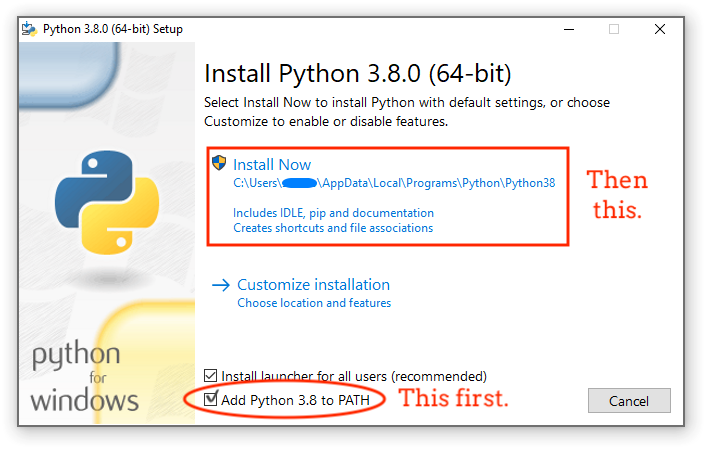
2. git install කරගන්න ඕනෙ. latest version install කරගන්න
https://git-scm.com/install/windows
3. git repository එක clone කරගන්න.
කැමති location එකක folder එකක් හදල folder එක ඇතුලෙ address bar එකේ cmd කියල type කරල enter කරන්න. එතකොට ඒ folder location එකෙන් cmd එක open වෙනව.
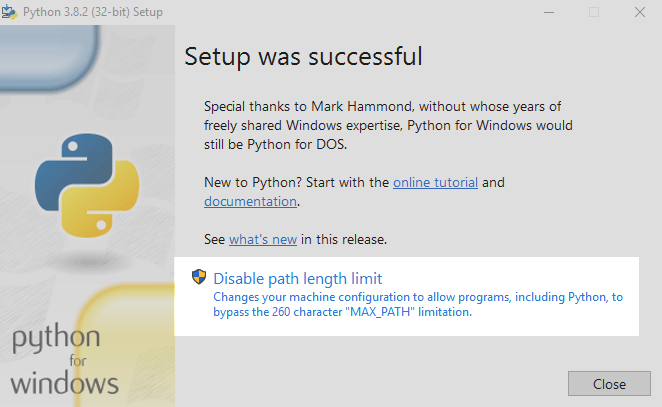
path එක ගොඩක් දිග වෙන විදියට ගොඩක් folders ඇතුලෙ අලුත් folder එක හදන්න එපා.
4. cmd එකේ මේ code run කරන්න
git clone https://github.com/intelligencedev/PromptForge.git
cd PromptForge
start.bat
5. Then open your browser and go to: http://localhost:5000
එහෙන් මෙහෙන් සෙට් වෙන prompts උනත් මේකෙ save කරගන්න පුලුවන්. images manually තමා save කරන්න ඕනෙ. tag name එකෙන් image එක rename කරල මේ location එකට copy කරගන්න.
PromptForge
└── images/ # Prompt preview images
 keywords ටිකක් අල්ලගන්න පුලුවන්. ඒක තමයි මේකෙ තියෙන වැදගත්කම prompt engineering කියල එකක් නෑ. ඒව ඔය කෝස් කාරයොයි රීච් ගන්න උනුයි කරන මගඩි. මේක හරියට communication එකක් වගේ දෙයක්. ඇත්තටම මනුස්සයෙක් ඔයාගෙ design එක කරනව කියල හිතන්න. එයාට අපි design එක කරගන්න අපිට ඕන දේ කියන්න ඕනෙනෙ. මෙතන වෙන්නෙත් ඒකම තමා. දැන් ai models ගොඩක් දියුණු නිසා පොඩි එකෙක්ට කියනව වගේ කියන්න ඕනෙ නෑ. මෙතන පොඩි tricky part එකක් තියෙනව ඒ ඔයා use කරන model එක සමහර වචන, images නොදැන ඉන්න පුලුවන්, training dataset එකේ ඒ වචන ඒ නැත්නම් අපි කොච්චර දැගලුවත් output එක එන්නෙ නෑ. හේතුව මොඩල් එක දන්නෙ නෑ. Chinese models use කරද්දි training කරල තියෙන්නෙ චීන භාශාවෙන් නිසා පාවිච්චි කරද්දි පොඩි පොඩි ගැටලු එන්න පුලුවන්. ඒකට චයිනීස්ම prompt එකට දාපුවාම හරියනව. ඔයාගේ හිතේ තියෙන දේ පුලුවන් විදියට කියන්න. gpt. gemini වගේ use කරද්දි codes, articles, letters ලියන්න පාවිච්චි කරද්දි මුලින්ම requirement gather කරගන්න කියන්න. ඊලගට හිතේ තියෙන ටික කියල දාන්න. ඊට පස්සෙ ඒටිකෙන් system prompt එකක් හදන්න කියන්න. ඒකෙ අඩුපාඩු ඔක්කොම හදාගෙන අලුත් chat head එකක ඔය prompt එක කොපි කරන්න. single shot එකෙන් results එනව.
⚠ සියලු images අන්තර්ජාලයෙන් උපුටාගෙන ඇත.
ස්තූතියි


 Z-Image-Turbo eka atha gaga inne me tike. melo deyak therune ne mulin. dannam shape comfy ekath dagane test karana gaman. ekata meka maru


