.::AmaZing Software Collection::.

fazaal24

Member
Nov 10, 2006
33,026
18
0
Carbon Canyon Dehiwala
DANEWMEN said:
MACHAN,

did u find???
yah i posted it in pg 27..anywayz here it is..try and c;)

capturemastwj7.jpg


MadCap Capture™ - Screen Captures Made Easy
MadCap Capture lets you easily capture anything that displays on your computer screen as an editable image. This product was designed specifically with the documentation specialist in mind. With Capture, it's just three steps to the perfect image:

1. Capture– Capture any part of your screen as an image, including the full screen, the active window, or a customized region.

2. Edit– Modify the image as needed, including cropping and resizing, as well as adding callouts, text, and effects.

3. Save– Save the image as the appropriate file type, and easily incorporate it into a Flare Help project.
capturescreenshotbi9.jpg

more info @http://www.madcapsoftware.com/products/utilities/capture/home.aspx
Download: | Rapidshare |
__________________
 

fazaal24

Member
Nov 10, 2006
33,026
18
0
Carbon Canyon Dehiwala
2006131971387599084_rs_770.jpg


Xilisoft Video Editor v1.0.18.1012 | 10.31 MB

Xilisoft Video Editor is one of the best video editing software which contains the functions of Video Joiner, Video Splitter and Video Cutter. With the video editing software, you can join multiple video files together, split one file to several segments, select and cut your favorite segments super easily and fast, with excellent quality. >> As a Video Joiner, the Video Editor provides an easy and complete way to join and combine multiple video formats to one file. The video editing software supports so comprehensive video formats including AVI, MPEG, MP4, WMV, 3GP, H.264/MPEG-4 AVC, H.264/PSP AVC, MOV, and ASF etc. >> As a Video Splitter, the Video Editor supports splitting one video file to several segments manually or automatically like magic. If you prefer to split a movie automatically, you could specify the video edit software to split it by time, size or split averagely. >> As a Video Cutter, the Video Editor can assist you to select your favorite segments in one file, and cut out the segments you dislike to meet your needs of perfecting your movies and videos.


Main Functions:

As a Video Joiner - The video editing software helps you add multiple videos even these videos are in different formats, then join and combine them to one file like magic.
As a Video Splitter - The video editing software splits one video file to several segments manually or automatically by time, size, or splits into even clips.
As a Video Cutter - The video editing software assists you to gain your favorite segments of a video, and cut out the others you don?¡¥t need.

Key Features:

> When using Join function, you can add many kinds of video formats at one time, and the output file should be one of the input formats. For example, you add four files with different formats AVI, MPEG, 3GP, WMV in the software, and then you are able to join these files to one file whose format should be one of the original four formats;
> When joining all your files, you are allowed to set video size, frame rate to get the perfect effect;
> When joining files, it allows you to set the resize method. The output videos could be in letterbox, pan and scan, or full screen;
> Video Splitter supports splitting manually and automatically. And if you prefer to split automatically, you can specify it to split by time or size, or split into even clips;
> When using Video Cutter function, you can set the beginning point and ending point super accurately;
> Xilisoft Video Editor supports preview. You can preview both the original and output files;
> The video edit software offers low priority encoding in background mode. You are able to customize your encoding to get the best performance;
> AfterDone action is provided in the magic video edit software. You can designate the status after all your tasks are finished: do nothing, shut down automatically, keep dormancy status, stand by, or end the program;
> You may choose your favorite skin to ensure your satisfaction with selecting skins;
> Xilisoft Video Editor fully supports Intel Pentium D Dual-Core Processor and AMD Athlon™ 64 X 2 Dual-Core Processor;
> The software is multilingual version.

Formats Supported:

*.avi (xvid mpeg4 divx msmpeg4 msmpeg4v1 msmpeg4v2 mpeg1video mpeg2video wmv1 wmv2 h263p rawvideo rv10 dvvideo huffyuv ljpeg mjpeg svq1 zlib h263)
*.mpg *.mpeg (mpeg1 mpeg2)
*.dat (mpeg1)
*.vob (mpeg2)
*.mp4 (mpeg4 h264)
*.divx (divx)
*.mov
*.qt (mpeg4)
*.h264 (h264)
*.3gp (h263 mpeg4)
*.3g2 (h263 mpeg4)
*.wmv (mv1x wmv2x wmv3x)
*.asf (msmpeg4)

System Requirements:
Microsoft Windows 2000, Windows XP Service Pack 2, Windows Vista?(certified for 32-bit editions)
750MHz Intel Pentium processor or better; AMD CPU (Multiple processors and Hyper-Threading support included)
256MB of RAM or more
50MB free space required during installation

Code:
 

fazaal24

Member
Nov 10, 2006
33,026
18
0
Carbon Canyon Dehiwala
2001228840563452110_rs_315.jpg


Coolcolor Text Generator is a utility which allows you create some colorful text for your web pages, Blogs and Topics. Coolcolor Text Generator is a tool which allows you generate some colorful text for your web pages, Blogs, MSN Spaces and Topics. You only need to enter your text in Coolcolor Text Generator and choose your favorite color style, it will generate HTML or BBCodes for your text.


Features:
- Rainbow style, Gradual color style, Random color style.
- Support HTML and BBCodes output.

System Requirements:
Windows 98/ME/2000/2003/NT/XP
Code:
 

fazaal24

Member
Nov 10, 2006
33,026
18
0
Carbon Canyon Dehiwala
XilisoftYouTubeVideoConverter1087.jpg


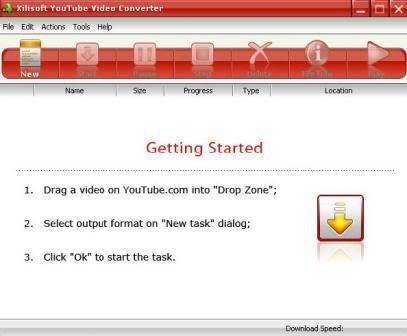
Xilisoft YouTube Video Converter
is the most powerful YouTube converter software to download video from YouTube.com and convert YouTube videos to other formats. With Xilisoft YouTube Video Converter “downloading + converting” one-step solution, you could easily download and convert YouTube videos to play on your iPod, PSP, Zune, 3GP mobile phone, Apple TV, iPhone etc.

You could use Xilisoft YouTube Video Converter to just download FLV videos from YouTube.com to your computer. Or you are able to one-step download and convert FLV files on YouTube to other videos formats, sudh as AVI, MPEG, MP4, WMV, 3GP, H.264/MPEG-4 AVC, H.264/PSP AVC, MOV, RM, ASF, FLV, SWF, etc. And the independent player of the YouTube Converter will amuse you by playing your favorite videos.

Download:
Code:
http://rapidshare.com/files/63114804/XiliYTVidCon1.0.87.rar
 

fazaal24

Member
Nov 10, 2006
33,026
18
0
Carbon Canyon Dehiwala
TechSmithCamtasiaStudio.jpg


Camtasia Studio 5.1.0.0 | 31.7 mb

Camtasia Studio is a complete solution for recording, editing and publishing rich screen video presentations. With support for a variety of video standards, you can ensure your content delivery now and in the future. Camtasia Studio is the complete professional solution for recording, editing and sharing high-quality screen video on the Web, CD-ROM and portable media players, including iPod.
Camtasia Studio 5.1 helps you keep pace in a mobile world by making it easy to publish videos and MP3 files for iPod and other portable media players. Now your marketing message, screencast, lecture, or just-in-time training video can reach your audience practically anywhere – on the bus, in a coffee shop, or while they’re jogging. Camtasia Studio videos are simply designed to share.

* Record Anything
Easily create training, demonstrations, presentations, online courses... the possibilities are endless. Connect with your audience by including screen recordings, audio, voice narration, PowerPoint, Picture-in-Picture and webcam video.

* Edit and Enhance
Edit and enhance your video with callouts, titles, credits, zooming, panning, quizzes and additional audio tracks. Camtasia Studio's extensive editing options are at your fingertips.

* Share
Publish in Flash, QuickTime and a variety of video formats, then share on the Web, CD or DVD. You can use the Production Wizard to assist you in choosing the best format and settings for sharing with your audience, or you can have complete control over audio and video codecs and quality, frame rate, color depth, and inclusion or exclusion of special effects.
Code: