


Latest ads
-
 ඕනම රටකට සෙට් වෙන CV එකක්
- ErMurazor
- Updated:
-
 Hambantota 7 Acres Beachfront Land For Sell DownSouth , PerPerch Price 420 000
- 1024 Digital
- Updated:
-
 Baseus PI LITE INDOOR CAMERA
- ErMurazor
- Updated:
-
Colombo Hard Disk For Sale
- mazza
- Updated:
You are using an out of date browser. It may not display this or other websites correctly.
You should upgrade or use an alternative browser.
You should upgrade or use an alternative browser.


අපේ ඇන්ඩ්රොයිඩ් ෆොන් පාවිච්චි කරන අයට වැදගත් වෙයි. දිගට ම කරගෙන යන්න. ස්තූතියි දායක වෙන හැමට ම.

මට හෙල්ප් නැ නේ...

Asphalt 7

Overview: Drive 60 different cars from the world’s most prestigious manufacturers, like Ferrari, Lamborghini and Aston Martin, including the legendary DeLorean.
RACE ACROSS THE GLOBE
Gear up to race on 15 tracks set in real cities around the world, including brand new tracks in Hawaii, Paris, London, Miami and Rio.
APK DOWNLOAD
DATA DOWNLOAD

මචන්, මේකේ data ටික copy කරලා app එක start කලාම මෙහෙම error එකක් එනවනේ. පුලුවන්නම් help එකක් දියන්.
fon model : Xperia S

Last edited:

ubata mona android da banthanx kattiyata.. mat android walata bassa... mata nam full holman
android walata virus guard ekak dannama onada?
anit 4n wala wage android ewaye profiles nadda?
someone pls answer..
virus guard dannma ona na ban kamtina dapan
awata apps thiynwa natnam pulwan silent da ganna

මෙන්න අපේ කොල්ලොන්ගෙ වැඩක්...පොඩ්ඩක් බලපල්ලා හොඳද කියලා...
Drive MODE Pro

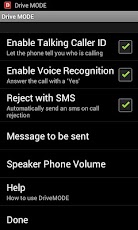
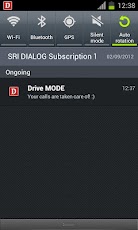
Description
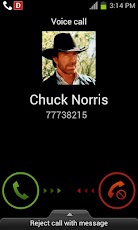
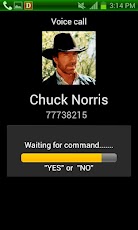
Drive MODE announces who is calling & lets you answer/reject calls on loudspeaker mode by saying Yes or No. Drive MODE features fast, accurate offline voice processing.
How Drive MODE works :
· Once you receive a call, Drive MODE will tell you who is calling (Talking Caller ID).
· If you want to answer the call, simply say "Yes" after the beep, and you will be automatically put on loudspeaker.
· If you don't want to answer the call, simply say "No" after the beep, and the ringer will be muted, and a rejection message sent to the caller (optional).
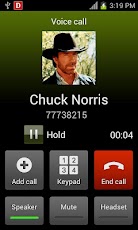
· You may also manually answer anytime and have the call automatically put on loudspeaker (Full control).
Features:
- Super fast response
- Compatible with almost any voice
- Offline voice processing (No need of an internet connection)
- Compatible with headsets and Bluetooth kits.
- Very low battery usage.
Additional Details :
Tried and tested on Samsung Galaxy S2. It should work fine on other android phones.
TTS (Text to Speach) - TTS is needed to use the Talking Caller ID feature, which allows the app to tell you aloud who is calling. If your phone does not have TTS installed, you will be provided with a link to download TTS upon installation of the app.
Once Drive MODE is enabled, you can wait for the funky stuff to happen! In the meantime you can always answer your calls by sliding (the conventional way). The good news is, the call will automatically be in loudspeaker mode as long as Drive MODE is on. You will not have to go through the trouble of looking for that stupid loudspeaker button ever again!
You have 3 main features under Settings:
Enable Talking Caller ID - Once this option is enabled, the phone will shout out who is calling. You don’t need to look at who is calling.
Enable Voice Recognition - Once this option is enabled, the phone will wait for your voice command after 5 seconds (for a period of 5 seconds) on receiving a call. If you say "Yes," the call will be taken. If you say "No," the call will be put on silent mode. You will still have the option of answering the call by sliding after answering "No".
Reject with message - Once this option is enabled, a preset (editable) message will be sent to the caller if you do not answer the call. The message will be directly sent if you say "No" or if you wait for the caller to cut the call.
*** If your phone doesn’t support the above advanced features, simply disable all 3 features and enjoy auto loudspeaker mode upon accepting calls. This option will work on any Android phone!
No hands, no touch, no police, just voice!
Drive Safe, Drive Smart!
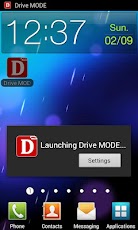
Simply tap on Drive MODE before entering your vehicle and your calls are taken care of!
Tap again to deactivate Drive MODE!
Free Trial

Pro Version

සුපිරි වැඩක් මචන්.... ආඩම්බරයි අපේ කොල්ලෝ ගැන....!
ubata mona android da ban
virus guard dannma ona na ban kamtina dapan
awata apps thiynwa natnam pulwan silent da ganna
pala sutto...
 dan apit android thama....
 habai symbian meeta wada ela ban mata...
uba virus guard ekak use karanawada normally?
hoda task manager ekak hoyala diyanko kollo.....
mama virus gurad ekak use karanna na ban owa ram ekakanwa hoo galapala sutto...
uba virus guard ekak use karanawada normally?
hoda task manager ekak hoyala diyanko kollo.....
menna task manger ekak

https://play.google.com/store/apps/details?id=mobi.infolife.taskmanager
uba gatta 4n eka mokda ban
Last edited:


Requirements: Android v2.1+
Overview: GO Power Master is a professional tool to help you save the power of the battery

The previous version may have a battery consumption problem. We have fixed it now. Please update to the latest version.
New features:
1. Decreased the power consumption
2. Eliminated the annoying pop-up window
3. Crashing when open the consumption detail interface
GO Power Master is a professional management tool represented by GO Dev team to help you monitor and save the power of your battery.
Characteristics:
1. Functional module management:
GO Power Master will decrease the power loss by managing the network, the radio, the brightness and other power consumed modules of your mobile phone
2. Running applications monitoring:
GO Power Master will help you to find out the most power consumed applications by precisely monitoring and analyzing the power consuming of every running application.
3. Smart power saving:
GO Power Master will smartly switch to the saving mode when the power is low or the time you set is reached.
4. Time statistics
GO Power Master will precisely calculate the time statistics for endurance, calls, video, audio, network and standby of your battery.
5. One-Touch Optimization helps you to lighten the load of your battery easily.
6. Modes help you to use the battery selectively and wisely.
7. The GO Power Master widgets provide you the way to handle the power quickly without opening the application.
8. More widgets, more functionalities with GO Launcher EX.
How to add the GO Power Master widgets?
-Long press the home screen, select “Widget” and select “GO Power Master (4*1)”. Make sure there’re enough spaces in your home screen.
-If you have already installed GOLauncher EX, you can use the cool GO Power Master GOWidgets with more functions and more effects.
Copyright © 2004-2012 3G.cn All Rights Reserved.
Recent changes:
1. (New) Support controlling toggles in status bar.
2. (Fixed) Switch mode by time does not work in 0:00.
3. (Improvement) Charging mode helps you manage your charging record more efficiently.
4. (Fixed) If you have installed the beta version from our blog, please uninstall GO Power Master and reinstall it. The beta version may disable the function of charging history.
Less description »
Latest version: 3.0 (, supports App2SD)
Note: all premium features enabled.
This app has NO advertisement


mama virus gurad ekak use karanna na ban owa ram ekakanwa hoo gala
menna task manger ekak
https://play.google.com/store/apps/details?id=mobi.infolife.taskmanager
uba gatta 4n eka mokda ban
ela ela... thanx wewa macha.....

mm gathe Xperia P ban...
Titanium Backup Pro v5.7.2
Extremely powerful tool. Backup All apps, Market links, remove bloatware & Mre! Updated: November 20, 2012
Current Version 5.7.2
Requires Android 1.0+ ROOT
Category: Tools
Titanium Backup is the most powerful backup tool on Android, and then some. You can backup, restore, freeze (with Pro) your apps + data + Market links. This includes all protected apps & system apps, plus external data on your SD card. You can do 0-click batch & scheduled backups. Backups will operate without closing any apps (with Titanium Backup Pro). You can move any app (or app data) to/from the SD card. You can browse any app’s data and even query the Market to see detailed information about the app.
Titanium Backup Pro Features
Whats New in Titanium Backup Pro v5.7.2


Extremely powerful tool. Backup All apps, Market links, remove bloatware & Mre! Updated: November 20, 2012
Current Version 5.7.2
Requires Android 1.0+ ROOT
Category: Tools
Titanium Backup is the most powerful backup tool on Android, and then some. You can backup, restore, freeze (with Pro) your apps + data + Market links. This includes all protected apps & system apps, plus external data on your SD card. You can do 0-click batch & scheduled backups. Backups will operate without closing any apps (with Titanium Backup Pro). You can move any app (or app data) to/from the SD card. You can browse any app’s data and even query the Market to see detailed information about the app.
Titanium Backup Pro Features
- Multiple backups app
- 0-click batch restore
- Backup/restore SMS,MMS,calls,bookmarks,Wi-Fi AP as XML
- Multi-user support for some apps! (eg: games)
- Batch verification
- Backup apps without closing them!
- Restore individual apps+data from non-root ADB backups!
- Restore individual apps+data from CWM backups!
- Restore individual apps+data from TWRP backups!
- Hypershell speed
- Migrate system data across different ROMs
- Market Doctor (relink apps to Market)
- “Destroy all Market links” feature
- Apps freezer (incl. batch support)
- Market “auto updating” manager
- Convert user apps system apps
- Encryption
- Unlimited schedules
- Sync to/from Dropbox (manual/scheduled)
- Sync to/from Box (manual/scheduled)
- Sync to/from Google Drive (manual/scheduled)
- Load/Save a Filter and use it in Widgets/Schedules
- Change the device’s Android ID, restore it from a backup or after a factory reset
- Protect backup against deletion
- Send backup (to e-mail/cloud) and import it in 1 click
- Backup→Verify→Un-install an app in one shot
- Freeze/defrost/launch apps in a single click
- CSV export any app DB (e-mail or Google Docs)
- Brand the app with your name
- Bloatware Melter (experimental)
- Convert app data to/from faster WAL DB format
- Dalvik cache cleaner
- Integrate system app updates into ROM
- Move apps into ROM
- Integrate Dalvik cache system elements into ROM
Whats New in Titanium Backup Pro v5.7.2
- Titanium Backup Pro Added support for extracting apps+data from split (> 1.5 GB) TWRP backups.
- Fixed a bug that caused the app list to appear as empty, if corrupted file names were present in the backup folder.
- Titanium Backup Pro Fixed incorrect error message when attempting to use “Extract from ADB backup” without a file picker installed.
- Minor UI improvements.
- Updated translations.

ahh ela welcome android familyela ela... thanx wewa macha.....
mm gathe Xperia P ban...
ahh ela welcome android family
elazzz.... thama huru na ban mata meka...
oka lasi ban tikak 4n eka use karpan monda dala thiyanna ICS da?
oka lasi ban tikak 4n eka use karpan monda dala thiyanna ICS da?
ow macha ICS..
ane manda ban....kalin symbian use kale. dan full holman..
 tikak oba oba iddi hariyay...
uba uba idla toch eka kada ganna epa yakooow macha ICS..
ane manda ban....kalin symbian use kale. dan full holman..

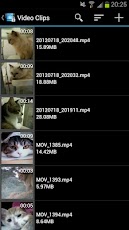
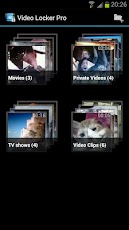
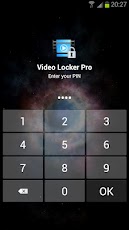
Video Locker - Hide videos
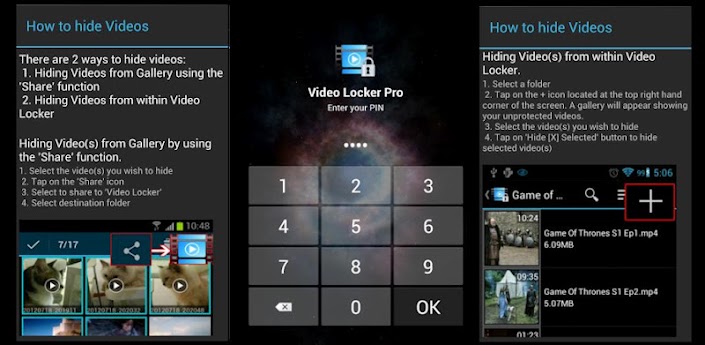
Hide videos securely and conveniently in Video Locker! - The ultimate hidden gallery app for hiding videos on Android.
Sensitive videos from your Android video gallery can be kept safely locked away in a secure Video Locker accessible only via a secret PIN code.
Key features of Video Locker include:
1)Encryption - hidden videos are not only moved to a secret location on your phone but are also encrypted using advanced 128 bit AES encryption. This means that even if someone manage to steal your SD card and copy the hidden video files, they will still be unable to view the locked videos.
2)Removed from recent app list - Video Locker App will not appear in 'recent apps' list
3)Lock on sleep - If you forgot to exit Video Locker, the app will lockout as soon as your device goes into sleep mode.
4)Folder level locking - lock individual hidden video albums. This allows you to show only 1 hidden video album without exposing the others.
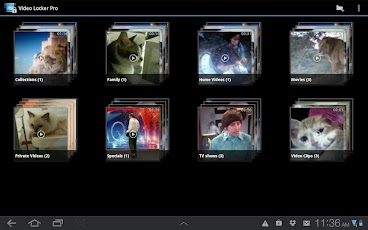
5)Tablet optimized - Video Locker's UI has been designed with tablets in mind as well so as to provide the ultimate viewing pleasure on both Android smart phones and tablets
6)PIN recovery - With the optional PIN recovery feature, you won't lose your precious video files even if you forgot your PIN code. The app will email the PIN to you in the event you forgot Video Locker's PIN code.
7)User friendly operation - Easily hide videos via default gallery or from within Video Locker itself.
8)Fast bulk hide - Keep safe dozens of videos in seconds!
9)Un-hide videos easily - Un-hide videos just as easily as hiding them and you can decide where the un-hidden videos go.
Premium features:
1)Stealth Mode - Hide the app itself! Video Locker App will disappear from the app drawer as if it never exist on your phone. Access to your private video vault can only be achieved by dialing the secret PIN code or via an innocent looking calculator widget.
2)Ad-free viewing experience
Download Video Locker now!
Video Locker is brought to you by Handy Apps.
Connect with us on Facebook at: https://www.facebook.com/HandyAppsInc
Kw: hide videos, hide gallery, lock videos, video locker, video lock, hide gallery, lock gallery, hidden videos, hidden gallery, gallery lock, private gallery, video hider, video hide, gallery locker, video locker, hide it pro, video vault, video safe, private videos, private video gallery, hide movies, private movies, movie locker, hidden movies, secret movies, hide movie, hide movie clips, hide video clips, movie vault
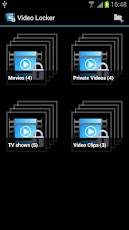
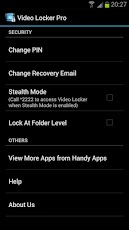
GOOGLE PLAY
DOWNLOAD PRO
Hide videos securely and conveniently in Video Locker! - The ultimate hidden gallery app for hiding videos on Android.
Sensitive videos from your Android video gallery can be kept safely locked away in a secure Video Locker accessible only via a secret PIN code.
Key features of Video Locker include:
1)Encryption - hidden videos are not only moved to a secret location on your phone but are also encrypted using advanced 128 bit AES encryption. This means that even if someone manage to steal your SD card and copy the hidden video files, they will still be unable to view the locked videos.
2)Removed from recent app list - Video Locker App will not appear in 'recent apps' list
3)Lock on sleep - If you forgot to exit Video Locker, the app will lockout as soon as your device goes into sleep mode.
4)Folder level locking - lock individual hidden video albums. This allows you to show only 1 hidden video album without exposing the others.
5)Tablet optimized - Video Locker's UI has been designed with tablets in mind as well so as to provide the ultimate viewing pleasure on both Android smart phones and tablets
6)PIN recovery - With the optional PIN recovery feature, you won't lose your precious video files even if you forgot your PIN code. The app will email the PIN to you in the event you forgot Video Locker's PIN code.
7)User friendly operation - Easily hide videos via default gallery or from within Video Locker itself.
8)Fast bulk hide - Keep safe dozens of videos in seconds!
9)Un-hide videos easily - Un-hide videos just as easily as hiding them and you can decide where the un-hidden videos go.
Premium features:
1)Stealth Mode - Hide the app itself! Video Locker App will disappear from the app drawer as if it never exist on your phone. Access to your private video vault can only be achieved by dialing the secret PIN code or via an innocent looking calculator widget.
2)Ad-free viewing experience
Download Video Locker now!
Video Locker is brought to you by Handy Apps.
Connect with us on Facebook at: https://www.facebook.com/HandyAppsInc
Kw: hide videos, hide gallery, lock videos, video locker, video lock, hide gallery, lock gallery, hidden videos, hidden gallery, gallery lock, private gallery, video hider, video hide, gallery locker, video locker, hide it pro, video vault, video safe, private videos, private video gallery, hide movies, private movies, movie locker, hidden movies, secret movies, hide movie, hide movie clips, hide video clips, movie vault
GOOGLE PLAY
DOWNLOAD PRO


Requirements: Android 4.0+
Overview: ASTRO File Manager has over 13 million downloads on the Android Market and allows you to easily manage all of your files on your phone or tablet. Pictures, music, documents, videos... ASTRO is in most Top Ten Android App lists and has been recommended in books like Amazing Android Apps. DOWNLOAD NOW and join the ASTRO family.
Features include:
file management, file and/or app backup, Image and text viewers, networking, MSB, Bluetooth, SFTP, Zip Tar, downloader, thumbnails, search files, application manager, task manager, attachments and more…
Please visit our website for a Quick Start Guide, FAQ's and Documentation. http://www.metago.net/astro-users.php. Get In-App Support by clicking Menu in ASTRO, then More and Help.
The ad free version, ASTRO File Mng Pro is available on the left (see More from developer)
ASTRO currently supports 9 languages including: English, French, Spanish, Italian, German, Japanese, Korean, Traditional Chinese and Simplified Chinese.
What's in this version:
* NEW: Facebook Photo integration
* NEW: New Picture Gallery
* NEW: Image Viewer enhancements including rotate picture
* SkyDrive, Google Drive, Dropbox support
* Added Text Editor into v4
* Expect Box.com integration in December
- Side swipe right to get to Clouds, Network Locations or Saved Searches fast
- Side swipe left to get to Tools, Settings and Help
- Search files by type regardless of location from Home Screen Searches tab
Similar threads

- Replies
- 1
- Views
- 216


- Replies
- 4
- Views
- 268


- Replies
- 14
- Views
- 844

