
Latest ads
-
 ඕනම රටකට සෙට් වෙන CV එකක්
- ErMurazor
- Updated:
-
 Hambantota 7 Acres Beachfront Land For Sell DownSouth , PerPerch Price 420 000
- 1024 Digital
- Updated:
-
 Baseus PI LITE INDOOR CAMERA
- ErMurazor
- Updated:
-
Colombo Hard Disk For Sale
- mazza
- Updated:

You are using an out of date browser. It may not display this or other websites correctly.
You should upgrade or use an alternative browser.
You should upgrade or use an alternative browser.


amilajohn said:Do u have a ZIP password removal software? (long password remove or recover karanna puluwan) If u have pls put the links........
Advanced ZIP Password Recovery 3.54
Advanced ZIP Password Recovery is a program to recover lost or forgotten passwords to ZIP archives (compressed files) created in programs like WinZip, PKZip etc.
Advanced ZIP Password Recovery is a great program for forgetful people.
http://rapidshare.com/files/41175614/Advanced_ZIP_Password_Recovery_3.54.rar
elixir8732 said:MAchn Can u giv Internet Download Manager LAtest full version..???plz machn ..
tnx a lot
Internet Download Manager [IDM] 5.12 Build 10 Retail + Patch
 by 007-Bond

What is new in Version 5.12 Build 10 release?
• Enhanced confirmation dialogs to delete downloads from IDM list of downloads. Now its possible to delete files from hard disk as well.
• Made a workaround for download problems on mediafire.com site
• Fixed a bug with capturing ftp links in Firefox 3.0
• Added support for Firefox 4.0a
• Version 5.12 build 10 includes all latest bug fixes
Website:
Code: Select allhttp://www.internetdownloadmanager.com/
Internet Download Manager (IDM) is a tool to increase download speeds by up to 5 times, resume and schedule
downloads. Comprehensive error recovery and resume capability will restart broken or interrupted downloads due to lost
connections, network problems, computer shutdowns, or unexpected power outages. Simple graphic user interface makes IDM user
friendly and easy to use. Internet Download Manager has a smart download logic accelerator that features intelligent dynamic
file segmentation and safe multipart downloading technology to accelerate your downloads. Unlike other download managers and
accelerators Internet Download Manager segments downloaded files dynamically during download process and reuses available
connections without additional connect and login stages to achieve best acceleration performance.
Internet Download Manager supports proxy servers, ftp and http protocols, firewalls, redirects, cookies, authorization, MP3
audio and MPEG video content processing. IDM integrates seamlessly into Microsoft Internet Explorer, Netscape, MSN Explorer,
AOL, Opera, Mozilla, Mozilla Firefox, Mozilla Firebird, Avant Browser, MyIE2, and all other popular browsers to automatically
handle your downloads. You can also drag and drop files, or use Internet Download Manager from command line. Internet
Download Manager can dial your modem at the set time, download the files you want, then hang up or even shut down your
computer when it's done.
downloads. Comprehensive error recovery and resume capability will restart broken or interrupted downloads due to lost
connections, network problems, computer shutdowns, or unexpected power outages. Simple graphic user interface makes IDM user
friendly and easy to use. Internet Download Manager has a smart download logic accelerator that features intelligent dynamic
file segmentation and safe multipart downloading technology to accelerate your downloads. Unlike other download managers and
accelerators Internet Download Manager segments downloaded files dynamically during download process and reuses available
connections without additional connect and login stages to achieve best acceleration performance.
Internet Download Manager supports proxy servers, ftp and http protocols, firewalls, redirects, cookies, authorization, MP3
audio and MPEG video content processing. IDM integrates seamlessly into Microsoft Internet Explorer, Netscape, MSN Explorer,
AOL, Opera, Mozilla, Mozilla Firefox, Mozilla Firebird, Avant Browser, MyIE2, and all other popular browsers to automatically
handle your downloads. You can also drag and drop files, or use Internet Download Manager from command line. Internet
Download Manager can dial your modem at the set time, download the files you want, then hang up or even shut down your
computer when it's done.

Added full support for Windows Vista, YouTube, Google Video, MySpaceTV, IE7 and Firefox 2
Main Features
* All popular browsers and applications are supported
* Easy downloading with one click
* Download Speed Acceleration
* Download Resume
* YouTube grabber
* Simple installation wizard
* Drag and Drop
* Automatic Antivirus checking
* Advanced Browser Integration
* Built-in Scheduler
* IDM includes web site spider and grabber
* IDM supports many types of proxy servers
* IDM supports main authentication protocols
* Download All feature
* Customizable Interface
* Download Categories
* Quick Update Feature
* Download limits
* IDM is multilingual.

Code: Select allhttp://rapidshare.com/files/112870466/Internet.Download.Manager.IDM.5.12.Build10.Incl.Patch.Winall.rar
Internet Download Manager v5.12 Build 10 Portable
Code: Select allhttp://rapidshare.com/files/112947453/Internet.Download.Manager.IDM.5.12.Build10.Portable.Winall.rar
[LinkCheckerBOT Checke


Anee Combation Hoyala Diyankooooooooooooooo
http://www.elakiri.com/forum/showthread.php?t=72871&page=28&highlight=combation
http://www.elakiri.com/forum/showthread.php?t=72871&page=28&highlight=combation

How to convert MKV to MPG (VCD,SVCD or DVD)buddhika19 said:machan MKV files MPG wage format 1ka kata convert karaganna puluwan SW 1k tiyenawada?
This guide is to Convert OGM Anime to SVCD with permanent subtitle. Well i'm really not a professional in video editing so dont expect too much or any technical in this guide.I created it by searching many sites that had any sort of info on SVCD creating and by putting a little of all the methods I found I came up with a quick and easy way(that worked for me
 ) to convert OGM into SVCD. Let me just say that i give most of credit to this guide to all the people that give there time to give helpful info on SVCD.
 Tools needed:
- VirtualDubMod
- dBpowerAMP Music Converter
- Gordian Knot
- TMPGEnc Plus
- Nero 6
Latest version:
1.5.10.2 b2542 (Feb 24, 2006)
Author site and mirror download site:
Download from authors tool site - 1.59MB
Download from mirror download - 1.59MB
Download old versions
Other info:
Download VirtualDubMod Surround 1.6.0.0 with Aud-X mp3 5.1 encoder here.
Tool section(s):
Video Editors (Basic), Video Editors (WMV/AVI), Virtualdub tools, Video Encoders, Video Encoders (AVI/WMV), Video De/Multiplexers
Alert me! when this software has been updated.
Report this tool(dead link/new version out)
On my PC i use K-Lite Codec Pack and for VirtualDubMod, you need the TextSub filter(can be found in the vsfilter.dll...we will see this later).
Lets get started...
1- Open you OGM file in VRDubMod and go into Stream >> Stream List.

2- In the new window you should see something like this:

Select the first Audio Stream and press on Demux and save it as .ogg . Then select the Text Stream and press on Demux and save it as .srt.

3- Now select all the .ogg files, right-click and choose Convert To(Must have Audio codecs installed to convert http://www.dbpoweramp.com/codec-central.htm ). Choose MP2 (Must have Audio codecs installed to convert http://www.dbpoweramp.com/codec-central.htm )or MP3 and follow below:


Make sure you choose MP2 and not Bwf MP2 if you decide to use that codec. Frequency should be 44100Hz and bitrate can vary(i choose 256 for MP2 and 160 for MP3)
Note: You can repeat step 1 and 2 for all your OGM files and then select them all to convert them all at the same time.
4- Once that is done, Open your OGM file in VRDubMod again.Now go into Streams >> Stream list and select each stream and press on Disable. Then press on Add and add the mp3 that corresponds to your file. When your done it should look like this:

5- Now close that by pressing OK. Go into Video and select Direct Stream Copy. Then go into File and choose save as. This process shouldn't take long.
6- Open Gordian Knob and under the Bitrate Tab press on Open at the bottom to open your AVI. Since this guide is for anime, you can usually fit 2 episodes on a 80min CD in the Total Rate area make sure you have 700 in the 1 CD= box and click on half CD button so your Total File Size is 350MB. Make sure the selcted Codec is DivX 5. Now look at the Video(100%). Under Average Bitrate take down that number because you'll need it for later.
In all it should look like this:
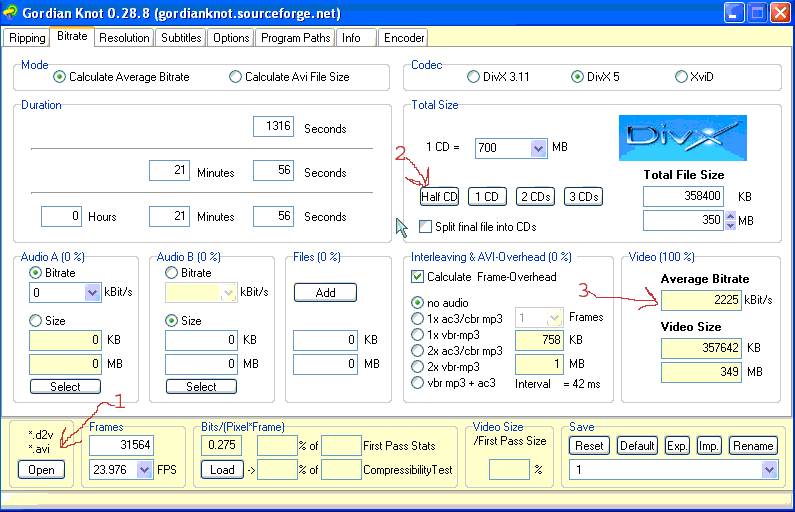
7- Open your AVI in VRDubMod and go to Video and select Full Processing Mode. Still in Video select Filters. Now you must add the TextSub Filter, but since it aint there by default, you have to go get it. You need to make sure that you have VobSub installed(comes in K-lite Codec Pack or just go download it). In the Filter screen, click on Add, then click on Load. Change the file type to DLL and go find the vsfilter.dll in C:\Windows\system32 and open it. Now in your list of filters you should see TextSub. Click on it and go get your .srt file that you Demux in step 2.
8- Now that thats done you go back under Video and select Compression. In the list, choose DivX Pro 5.1.1 and click on configure in the right panel. In the Bitrate section put you Average Bitrate that you got from Gordian Knob in the kbps box.

9- Now go to File >> Save as and save the avi.
Note: Don't forget that you can do them all in a batch process but if in batch process you get an error that causes shutdown of VRDubMod do them one at a time.if possible try doing this step while you have something else to do cuz its a long wait.
10- Once you AVI is done check it out to make sure you still go good quality. Now open TMPGENc Plus and in the Wizard choose NTSC Film under SVCD. In the next screen, under Video File choose your AVI. Under Audio File choose your mp3 from step 3 by change File type to all files.
The reason you have to use your Audio file instead of just using the Audio on the AVI is because TMPGENc doesn't accept DIVX really well.
For the TMPGENc settings I will give you what i used but that doesn't mean that it will work for you.


11- Now all you got to do is burn the new MPG file to a CD with Nero. I use Nero 6 Nero
Express. In Nero Express just choose SVCD and add your MPG file. Nero wont reconvert cuz it will take it as a valid SVCD format.
That all folk!
Oh!yeah... If you try to play your MPG file on your PC and you just get the audio, don't worry when you burn it, it should be fine....it was for me

Deelaka said:Machan mata real player 11 eka hoyala denawada? with Youtube download Support.
Real Player Premium Gold Plus v11

We take universality a step further by providing RealPlayers for Windows, Macintosh, Linux, Unix, mobile phones, portable devices, set top boxes, DVD players and gaming consoles. Fast Facts about the New Real Player:
* Consumers can use the innovative, single-click process to quickly download and save videos for later enjoyment.
* Consumers can download multiple videos simultaneously with RealPlayer, allowing people to save time and easily multitask.Users can also start downloading in the middle of watching a video, and the entire video will be captured.
* Consumers don’t need to worry about video format compatibility issues — the new RealPlayer supports videos created in the most popular formats, including Flash, Windows Media, QuickTime, and Real.
* Consumers can easily burn videos to CD (or to DVD, using RealPlayer Plus).
The Video CD format used by RealPlayer can be played in most DVD players.
* Consumers can send links of their favorite videos to their friends with a convenient “Share with a Friend” feature. The link that arrives in their friends’ email will direct them to the online source of the video content their friend downloaded.
* RealPlayer supports both downloading and recording for popular streaming format (Windows Media, Real, and QuickTime)
* RealPlayer will only download/record video that is not protected by DRM (Digital Rights Management) systems.
* RealPlayer features an improved look and feel, a streamlined installation process and faster video playback.
* RealPlayer will first be released for Windows, and will work with both Microsoft Internet Explorer and Mozilla Firefox. Real plans a version for the Mac to be released later in the year. This comes packed with the ACTIVATION PATCH. After install, close RealPlayer, copy the patch to installation directory and run it.
file size: 16.2 mb
Download:
http://rapidshare.com/files/121506371/RlPlyrGPv11.DRaGoNZDEN.org.rar
password: www.dragonzden.org
gpindika said:Anee Combation Hoyala Diyankooooooooooooooo
http://www.elakiri.com/forum/showthread.php?t=72871&page=28&highlight=combation
MMMmmmmmm I tyd machan but can't fnd it . I'll try n if i fnd i'll PM u ok.

kannan.green said:Brother ,
i need BluffTitler DX9 Ver5.04 this software
pls post it
Thanks
Kannan
I can't fnd Ver5.04,
This is latest Ver of It.
BluffTitler DX9 v7.24 | http://www.centralddl.com/audio-video-tools/

BluffTitler DX9 v7.24 | 6.66 MB
Create dazzling 3D titles for your videos with BluffTitler DX9 Want to impress your friends and clients with cool 3D titles? But don't want to spend a fortune on professional 3D animation and video titling software? BluffTitler is the easiest way to add spectacular 3D effects to your photos and videos!Other 3D programs always seemed too hard to learn and too expensive to justify. But thanks to BluffTitler, I can finally create all of the cool animations I only dreamed of before!Examples of the power of BluffTitler The animations on this page have been created with BluffTitler, exported as AVI and converted to a Windows Media File(.wmv) with Microsoft Windows Movie Maker. To keep download time acceptable, they are very small and have low frame rates. Please keep in mind that played in BluffTitler they run 60 frames a second, fullscreen, 24 bit and in realtime!]
http://rapidshare.com/files/113945770/BluffTitler.DX9.v7.24.rar
I can't fnd Ver5.04,
This is latest Ver of It.
BluffTitler DX9 v7.24 |

BluffTitler DX9 v7.24 | 6.66 MB
Create dazzling 3D titles for your videos with BluffTitler DX9 Want to impress your friends and clients with cool 3D titles? But don't want to spend a fortune on professional 3D animation and video titling software? BluffTitler is the easiest way to add spectacular 3D effects to your photos and videos!Other 3D programs always seemed too hard to learn and too expensive to justify. But thanks to BluffTitler, I can finally create all of the cool animations I only dreamed of before!Examples of the power of BluffTitler The animations on this page have been created with BluffTitler, exported as AVI and converted to a Windows Media File(.wmv) with Microsoft Windows Movie Maker. To keep download time acceptable, they are very small and have low frame rates. Please keep in mind that played in BluffTitler they run 60 frames a second, fullscreen, 24 bit and in realtime!]
http://rapidshare.com/files/11394577....DX9.v7.24.rar__________________
Brother,
the Key gen is not working
Could you help me???
Thanks
Kannan
This is latest Ver of It.
BluffTitler DX9 v7.24 |
BluffTitler DX9 v7.24 | 6.66 MB
Create dazzling 3D titles for your videos with BluffTitler DX9 Want to impress your friends and clients with cool 3D titles? But don't want to spend a fortune on professional 3D animation and video titling software? BluffTitler is the easiest way to add spectacular 3D effects to your photos and videos!Other 3D programs always seemed too hard to learn and too expensive to justify. But thanks to BluffTitler, I can finally create all of the cool animations I only dreamed of before!Examples of the power of BluffTitler The animations on this page have been created with BluffTitler, exported as AVI and converted to a Windows Media File(.wmv) with Microsoft Windows Movie Maker. To keep download time acceptable, they are very small and have low frame rates. Please keep in mind that played in BluffTitler they run 60 frames a second, fullscreen, 24 bit and in realtime!]
http://rapidshare.com/files/11394577....DX9.v7.24.rar__________________
Brother,
the Key gen is not working
Could you help me???
Thanks
Kannan
kannan.green said:I can't fnd Ver5.04,
This is latest Ver of It.
BluffTitler DX9 v7.24 |
BluffTitler DX9 v7.24 | 6.66 MB
Create dazzling 3D titles for your videos with BluffTitler DX9 Want to impress your friends and clients with cool 3D titles? But don't want to spend a fortune on professional 3D animation and video titling software? BluffTitler is the easiest way to add spectacular 3D effects to your photos and videos!Other 3D programs always seemed too hard to learn and too expensive to justify. But thanks to BluffTitler, I can finally create all of the cool animations I only dreamed of before!Examples of the power of BluffTitler The animations on this page have been created with BluffTitler, exported as AVI and converted to a Windows Media File(.wmv) with Microsoft Windows Movie Maker. To keep download time acceptable, they are very small and have low frame rates. Please keep in mind that played in BluffTitler they run 60 frames a second, fullscreen, 24 bit and in realtime!]
http://rapidshare.com/files/11394577....DX9.v7.24.rar__________________
Brother,
the Key gen is not working
Could you help me???
Thanks
Kannan
Thing is dz ....
I think u have install older Ver of dat Softwr......
So u have to uninstall it an reInstall New "BluffTitler DX9 v7.24" .
And aftr u crack it.....
If it's not work ........
Check dz one also.......
Blufftitler DX9 7.14
Create dazzling 3D titles for your videos with BluffTitler DX9
Want to impress your friends and clients with cool 3D titles? But don't want to spend a fortune on professional 3D animation and video titling software? BluffTitler is the easiest way to add spectacular 3D text animations to your photos and videos!
Other 3D programs always seemed too hard to learn and too expensive to justify. But thanks to BluffTitler, I can finally create all of the cool animations I only dreamed of before!
more info @CODE
http://www.outerspace-software.com/blufftitler.html
CODE
http://rapidshare.com/files/60384306/Blufftitler_DX9_v7.14.rar
Sory yar it's not working
I installed the right version & the Right key gen
It's shown the This is not a vaild License Key
Any way thanks for your Help
Kannan
I installed the right version & the Right key gen
It's shown the This is not a vaild License Key
Any way thanks for your Help
Kannan
Don't worry don't worry ................kannan.green said:Sory yar it's not working
I installed the right version & the Right key gen
It's shown the This is not a vaild License Key
Any way thanks for your Help
Kannan
I have another Link check dz one also .......
BluffTitler DX9 7.18 Multilingual
007-Bond
15 January 2008

Create dazzling 3D titles for your videos with BluffTitler DX9. Want to impress your friends and clients with cool 3D titles? But don't want to spend a fortune on professional 3D animation and video titling software? BluffTitler is the easiest way to add spectacular 3D text animations to your photos and videos! Other 3D programs always seemed too hard to learn and too expensive to justify. But thanks to BluffTitler, I can finally create all of the cool animations I only dreamed of before!
Effects that can be created with BluffTitler include:
-golden beveled titles
-blood dripping titles
-JPG textured titles
-MPG textured titles
-slimy titles
-hairy titles
-exploding titles
-reflection mapped titles
-twisted titles
-cartoon shaded titles
-golden glowing titles
-spooky lightened titles
-titles with silver spikes
-jumbling titles
-inverted titles
-bouncing titles
-powerfield emitting titles
-titles with flying hearts
-pumping titles
-plasma backgrounds
-background videos morphing into donuts
-particle effects
-MP3 audio
-morphing JPG pictures
-exploding video backgrounds
-fractal backgrounds
http://depositfiles.com/files/3090381

imeshSJ said:i got a spyware attck. nw my task manaer is not working. pls tell me good software for remove this spyware


Spyware Doctor v6.0.0.354 Cracked-LT2008
Spyware Doctor™ provides three-way spyware protection for your PC through real-time threat blocking, advanced system scanning and immunization against known browser infections. Spyware Doctor is a multi-award winning spyware removal utility that detects, removes and protects your PC from thousands of potential spyware, adware, Trojans, keyloggers, spybots and tracking threats. Protect your privacy and computing habits from prying eyes and virtual trespassers with the help of Spyware Doctor.
Anti-virus software and firewalls do not fully protect your system against the majority of spyware and privacy threats. Because spyware is commonly bundled with software downloads, attached to e-mails, or transmitted through networks it can appear to be legitimate software, but once installed it can be nearly impossible to detect and remove without the help of a dedicated spyware removal tool like Spyware Doctor.
Spyware Doctor is advanced technology designed especially for people, not just experts. That is one reason why it won the People's Choice Award in 2005, 2006 and 2007. It is automatically configured out of the box to give you optimal protection with limited interaction so all you need to do is install it for immediate and ongoing protection.
Spyware Doctor's advanced OnGuard technology only alerts users on a true Spyware detection. This is significant because you should not be interrupted by cryptic questions every time you install software, add a site to your favorites or change your PC settings. Such messages can be confusing and lead to undesirable outcomes such as inoperable programs, lost favorites or even Spyware being allowed to install on the system. We've done the research so you don't have to.
Spyware Doctor Tools:
- Spyware & Adware Scanner Keylogger
- Guard Popup
- Blocker Phishing
- Protector Real Time
- Protection Browser
- Guard Spyware Cookie
- Guard Malware
- Immunizer
Spyware Doctor Key Features:
• Comprehensive Malware Protection
Spyware Doctor provides protection against identity theft, stealthy spyware, aggressive adware, browser hijackers, malicious ActiveX objects, malware Trojans, tracking cookies, keyloggers, dialers, and other malware. The optional anti-virus module also protects your computer from viruses, worms, Trojan horse threats, and other malicious infections.
• Constant Real-time Protection
Through its unique OnGuard feature Spyware Doctor provides constant protection against malware. OnGuard works by blocking both known and unknown malware threats before they can install and cause any harm to a computer. OnGuard constantly monitors for malicious behavior involving spyware processes, tracking cookies, malicious ActiveX objects, browser hijackers, keyloggers, Trojans and more.
• Advanced Detection and Removal Technology
- By running an Intelli-Scan™, Full Scan or Custom Scan, Spyware Doctor will inspect the computer for all types of spyware and virus1 infections. Spyware Doctor is top rated by industry experts as being extremely effective in removing particularly nefarious threats such as rootkits and keyloggers2.
- The unique Intelli-Scan™ feature is specifically designed to hunt swiftly and kill active running spyware threats in as little as 3 minutes3, attributed to the intuitive and patent-pending spider scanning technology. This new technology works intelligently by using a combination of signature and behavioral scanning techniques to quickly and effectively identify internet threats.
• Protection against zero-day threats - Behavioral Heuristic Detection
Spyware Doctor delivers effective zero day protection against rootkits and keyloggers (in both scanning and OnGuard real-time areas) by monitoring for suspicious behavior and blocking applications that exhibit signs of malicious activity.
• Advanced Rootkit Detection
Spyware Doctor is capable of detecting and removing hidden processes and files associated with complex threats and rootkits. Using behavioral techniques, rootkits and other items that attempt to hide themselves deep in the computer operating system are effectively detected and removed.
• Works silently in the background with low CPU usage
When in monitoring mode Spyware Doctor has been designed to work silently in the background, with little impact to the end user, threats are blocked and removed without any system impact, while only a small alert window is displayed to advise the user it has been protected against an attack. When running a scan, the CPU Priority settings allow users to lower the priority of the scanning in order to reduce CPU usage and impact to the computer while in use. Selecting this option may increase scan time but will ease CPU usage when other applications are running at the same time.
• Automatic and silent Smart Updates
Frequent updates to detect and guard computers against new threats and viruses as well as provide enhancements to Spyware Doctor are automatically installed and downloaded through the Smart Update function. Threat signatures are updated every business day or within hours of a high risk malware outbreak to protect you from the latest online threats.
• Most internationally awarded anti-spyware product
Spyware Doctor is consistently awarded editors choice and top rating by numerous internationally recognized and respected industry publications, making Spyware Doctor the most internationally awarded anti-spyware product. For a full listing of all our awards visit: PC Tools - Award-winning Software
Additional Add-ons:
• Virus Protection
Available as an optional add-on to Spyware Doctor, the anti-virus component provides protection against all kinds of viruses, worms, Trojan horse threats, and other malicious infections to ensure complete protection against internet threats. It is recommended to install the anti-virus add-on if there is no other virus protection on the computer.
• Email Protection
Email Guard provides protection against, and instantly removes, spyware and viruses being sent or received via e-mails. All popular e-mail applications (such as Outlook Express™ & Netscape® Mail and Thunderbird) that use POP, IMAP or SMTP are supported by Email Guard.
• Internet Browsing Protection
Site Guard provides advanced protection against potential malicious websites and phishing attacks where dangerous site are masquerading as legitimate e-Commerce sites. Site Guard will detect malicious websites and block access to them, ensuring the computer cannot be infected.
Designed for Windows® Vista™ 32-bit, XP and 2000.
What's New in Spyware Doctor 6.0 :
• Latest protection from unknown threats
- Spyware Doctor now has Behavior Guard, providing you with the latest pro-active behavioral-based technology against zero-day (never seen before) threats. Built on the award-winning ThreatFire technology, Behavior Guard has been seamlessly incorporated into Spyware Doctor to offer you leading protection. This new technology protects you when some anti-virus products give up! Read more about behavior-based protection.
• Improved detection capabilities:
- Spyware Doctor has been enhanced to improve detection effectiveness. In particular, each individual signature created in the threat database is optimized so that it is capable of detecting multiple variations of malware threats (threat variants) while maintaining minimal system resource usage (memory footprint).
• Swift clean-up for heavily infected computers:
- Spyware Doctor is able to detect and remove threats on heavily infected computers faster and easier than ever before. Sometimes your computer is so highly infected that you may find yourself unable to install or run security software except when in the ‘safe mode’ of Windows.
- In these cases, malware consumes computer resources so resulting in lengthy scanning and removal times. is now armed with the technology to scan in safe mode faster and more effectively by forcing your computer to take a higher priority over the scan than the malware and other software attempting to run on your system.
• Improved Hacker Defense :
- Further improvements have been included to enhance our own defense against malware threats attempting to interfere with the effectiveness of Spyware Doctor . Our hacker defense system means you can rest assured that your computer system has the most comprehensive protection while ensuring that malware threats don’t impede on the functionality or effectiveness of Spyware Doctor.
- The new hacker defense utilizes a particular feature available in Windows Vista (known as ASLR) to make it difficult for hackers to exploit or gain control over Spyware Doctor .
• Other enhancements:
o Support for Windows Security Centre in Windows Vista Service Pack 1
o The real-time protection module is now referred to as Intelli Guard®
o Enhanced error reporting to assist with diagnosis of program crashes (hackers!).
Homepage - Spyware Doctor - Best Spyware Removal. Free Trial Download.

Code:
http://rapidshare.com/files/124460515/Spyware.Doctor.v6.0.0.354.Cracked-LT2008.zip
Similar threads


- Replies
- 4
- Views
- 321
- Replies
- 14
- Views
- 571
