


In this article I'll teach you how to create a simple windows mobile application using MVS2008.
but first you have to install these softwares to develop mobile application.
Windows SDK
Windows DTK
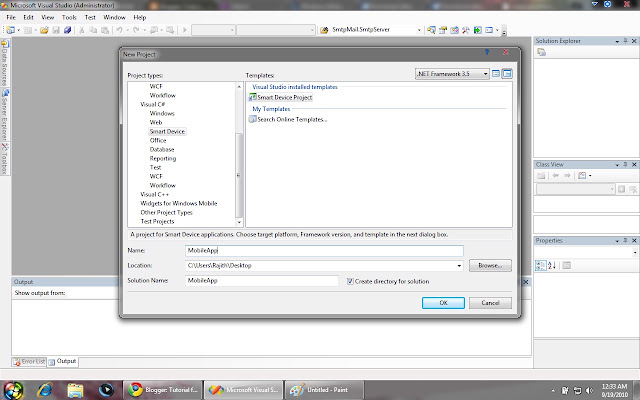
First launch MVS2008 and Select New -> Project.
Under the Visual C# project types you can see Smart Device. Just click it and select the Smart device Project. Add a name for your project and select OK.
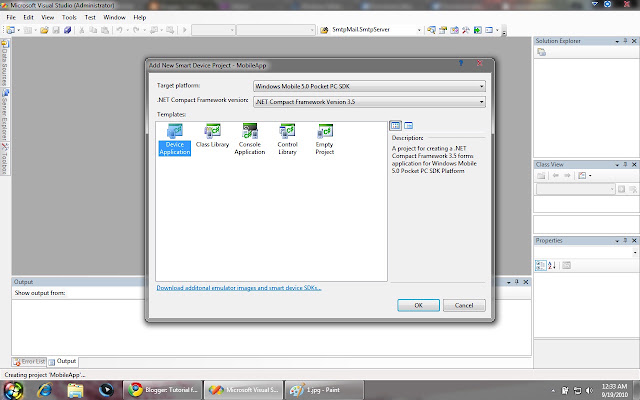
after that Select Device Application in Device templates and click OK.
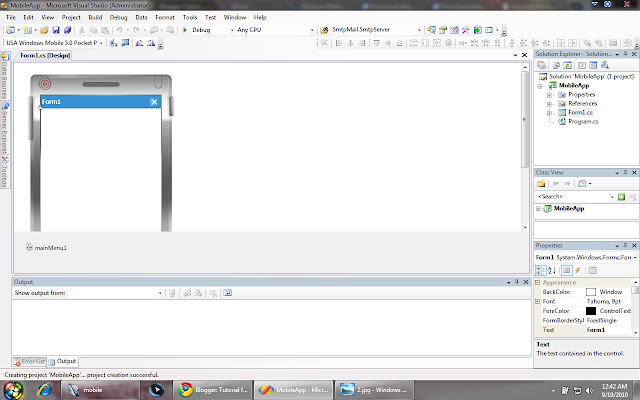
Now You will get something like this....
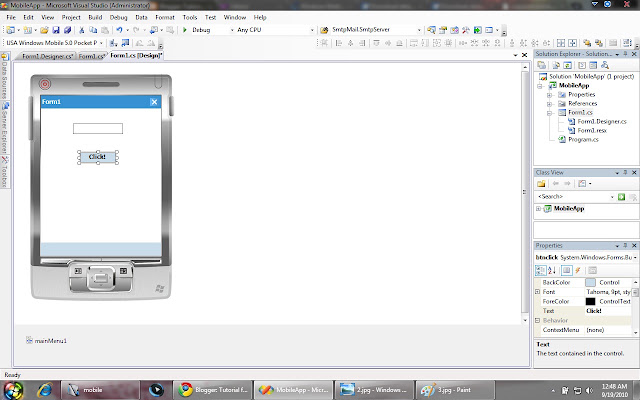
Simply Drag and Drop a Label,Textbox and Button to the design area and change name and text as follows.
Label name - lblText , Text - null(empty space)
TextBox name - txtText
Button name - btnclick , Text - Click!
Now your form look like this...
Now double click the button and it will direct to the source code of the form. In the btnclick_Click() paste this code..
After that right click the project and select Build. If there are no errors it will say Build succeed.
Now click the debug button to get the output.
It takes little more time to compile and run the application. So you have to wait some time. After the application build you can check with sample inputs.
You can download Sample Project In here...
http://hotfile.com/dl/70330219/2a5960d/MobileApp.rar.html
Source
but first you have to install these softwares to develop mobile application.
Windows SDK
Windows DTK
First launch MVS2008 and Select New -> Project.
Under the Visual C# project types you can see Smart Device. Just click it and select the Smart device Project. Add a name for your project and select OK.
after that Select Device Application in Device templates and click OK.
Now You will get something like this....
Simply Drag and Drop a Label,Textbox and Button to the design area and change name and text as follows.
Label name - lblText , Text - null(empty space)
TextBox name - txtText
Button name - btnclick , Text - Click!
Now your form look like this...
Now double click the button and it will direct to the source code of the form. In the btnclick_Click() paste this code..
Code:
private void btnclick_Click(object sender, EventArgs e)
        {
               lblText.Text = "Hi " + txtText.Text;
}Now click the debug button to get the output.
It takes little more time to compile and run the application. So you have to wait some time. After the application build you can check with sample inputs.
You can download Sample Project In here...
http://hotfile.com/dl/70330219/2a5960d/MobileApp.rar.html
Source


