


හුග දෙනෙක්ට දැනගන්න ඔන ඇති ඔයාලගෙ එක 32 ද 64 ද කියලා. අපිට අපෙ Processor එක 32 Bit ද නැත්නම් 64 Bit ද කියල දැනගන්න ක්රමය්ක් මම කියල දැන්නම්.
Method 1 (Suitable for Windows 7)
Go to Start -> Right click on Computer -> Click Properties. Click on Windows Experience Index.
View attachment 31155
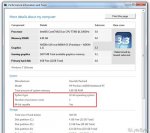
Now click on View and Print detailed performance and system information.
මෙතන ඔගොල්ලන්ට බලගන්න පුලුවන් දැනට දාලා තියන System එක 32 Bit ද 64 Bit ද කියලා. එවගේම එක 64 Bit වලට වෙඩ කරනවද කියලා. 64 Bit වෙඩ කරනවනන් 64-bit-capable කියන තෙනින් Yes කියල වෙටිල තියනවා.
Method 2 - Using Regedit
Go to Start -> Type regedit
Browse to HKEY_LOCAL_MACHINE\HARDWARE\DESCRIPTION\System\CentralProcessor\0
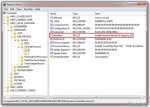
ඔතන වම් පෙත්තෙ තියනවා Identifier කියල එකක්.
එකේ තියනව එක මොන වර්ගයටඩ අය්ති කියල. 64 bit නම් 64 Family
කියල තියනවා.
Method 3 - Using MSINFO32
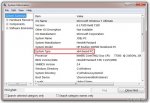
Go to Start -> Type msinfo32.exe
From the System Information page under System Type you will find as x64-based PC.
Method 1 (Suitable for Windows 7)
Go to Start -> Right click on Computer -> Click Properties. Click on Windows Experience Index.
View attachment 31155
Now click on View and Print detailed performance and system information.
මෙතන ඔගොල්ලන්ට බලගන්න පුලුවන් දැනට දාලා තියන System එක 32 Bit ද 64 Bit ද කියලා. එවගේම එක 64 Bit වලට වෙඩ කරනවද කියලා. 64 Bit වෙඩ කරනවනන් 64-bit-capable කියන තෙනින් Yes කියල වෙටිල තියනවා.
Method 2 - Using Regedit
Go to Start -> Type regedit
Browse to HKEY_LOCAL_MACHINE\HARDWARE\DESCRIPTION\System\CentralProcessor\0
ඔතන වම් පෙත්තෙ තියනවා Identifier කියල එකක්.
එකේ තියනව එක මොන වර්ගයටඩ අය්ති කියල. 64 bit නම් 64 Family
කියල තියනවා.
Method 3 - Using MSINFO32
Go to Start -> Type msinfo32.exe
From the System Information page under System Type you will find as x64-based PC.


