


Thank You - http://elakiri.com/forum/member.php?u=307147
For teaching me this.
Buy Premium Lynda Account For 500Rs. (Click Here)
Follow Steps Below.
1. Open Google Chrome.
2. Install this extension - https://chrome.google.com/webstore/detail/editthiscookie/fngmhnnpilhplaeedifhccceomclgfbg
3. Log into your premium Lynda Account.
4. Open Course which needs to download & Copy course URL.
ex. https://www.lynda.com/course-tutorials/Accidental-Web-Designer/806171-2.html
5. Click edit this cookie extension and options .
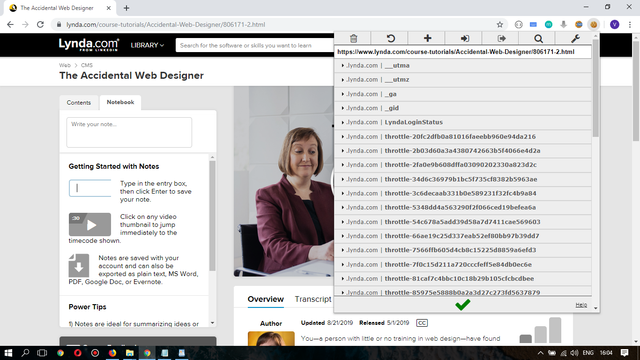
6. Change preferred export format for cookies into Netscape HTTP cookie File from JSON.

7. Download this file & Extract.
https://drive.google.com/file/d/15kSdxdZsLskSA6_tLj6AsiKxw-XW1TwL/view?usp=sharing
8. Click cookies copied to clipboard.
9. Edit cookies file extracted by pasting above copied content. (Ctrl + A then Ctrl + V)
10. Open code file extracted . and change "LINK" into copied course link in step 04.
youtube-dl --cookies cookies.txt "LINK" -o "Lynda.com - %(playlist)s/%(chapter_number)s - %(chapter)s/%(playlist_index)s - %(title)s.%(ext)s" --write-sub
11. Open CMD as admin. open extracted folder through CMD.
ex. cd "C:\Users\Thilina\Desktop\New folder\Lynda"
12. Paste edited code in step 10 into CMD and Press enter. Downloading starts.
For teaching me this.
Buy Premium Lynda Account For 500Rs. (Click Here)
Follow Steps Below.
1. Open Google Chrome.
2. Install this extension - https://chrome.google.com/webstore/detail/editthiscookie/fngmhnnpilhplaeedifhccceomclgfbg
3. Log into your premium Lynda Account.
4. Open Course which needs to download & Copy course URL.
ex. https://www.lynda.com/course-tutorials/Accidental-Web-Designer/806171-2.html
5. Click edit this cookie extension and options .
6. Change preferred export format for cookies into Netscape HTTP cookie File from JSON.

7. Download this file & Extract.
https://drive.google.com/file/d/15kSdxdZsLskSA6_tLj6AsiKxw-XW1TwL/view?usp=sharing
8. Click cookies copied to clipboard.
9. Edit cookies file extracted by pasting above copied content. (Ctrl + A then Ctrl + V)
10. Open code file extracted . and change "LINK" into copied course link in step 04.
youtube-dl --cookies cookies.txt "LINK" -o "Lynda.com - %(playlist)s/%(chapter_number)s - %(chapter)s/%(playlist_index)s - %(title)s.%(ext)s" --write-sub
11. Open CMD as admin. open extracted folder through CMD.
ex. cd "C:\Users\Thilina\Desktop\New folder\Lynda"
12. Paste edited code in step 10 into CMD and Press enter. Downloading starts.


