E-Books & Tutorials

crazydude

Member
Jan 10, 2008
844
0
0
london
MaD-DoC said:
DVD 5 k kiyanne Gb bara ganakne.ekai link godak thiyenne mama ita wada lesi ekak hoyala dennam machan...

ane thankooooooo machoooo habai eka thama maruma eka.........ekama thawa hoda links tikak hoyala diyankooo puluwannam kollo............:nerd::rofl::P:P:P

thanx again machooo
 

kasuncs

Well-known member
  • May 21, 2007
    3,590
    271
    83
    Sams Teach Yourself GTK+ Programming in 21 Days

    If any one have Sams Teach Yourself GTK+ Programming in 21 Days pls pls give me the link and PM me.
     

    MaD-DoC

    Member
    Oct 27, 2007
    6,337
    22
    0
    SLIIT/Malabe
    kasuncs said:
    If any one have Sams Teach Yourself GTK+ Programming in 21 Days pls pls give me the link and PM me.

    danata meka balapan thawa haba unoth dennam.

    [FONT=Arial, Helvetica, sans-serif]GTK+ programming with Glade[/FONT]

    [FONT=Arial, Helvetica, sans-serif]
    [/FONT]


    Introduction

    When it comes to developing programs based on Graphical User Interfaces (GUIs) on the Linux platform, you have the option to use either QuickTime libraries on KDE or GTK+ libraries with GNOME. Both these development toolkits have nice IDEs & GUI builders written for them, viz., KDevelop for QT and Glade for GTK+/GNOME. In this article, we shall explore the latter and try to create a simple GTK+ application.
    Glade is a tool, which creates the graphical front-ends for your GTK programs. Unlike Visual Basic or Delphi, Glade cannot be termed as an Integrated Development Environment (IDE). It just builds the interface exactly as you want, and then writes the GTK code which produces the actual interface after compilation of the code.
    Tip: Anjuta is a nice IDE which combines the power of GLADE to create excellent interfaces and its own code editing abilities to give the user a power packed tool for creating apps on the fly. It has Glade integrated within it such that Glade creates the interfaces and Anjuta edits the code and builds the projects. So let’s get down to some business and create a simple ‘Country Information Program’. This program, though simple, shall help understand the basic concepts of widgets, callbacks etc. in GTK+. ‘Country Information Program’ shall provide the user with an entry field where he’ll enter a country’s name. The program shall then process the user’s entry and subsequently show either its Capital or Currency.
    Example: Country Information Program

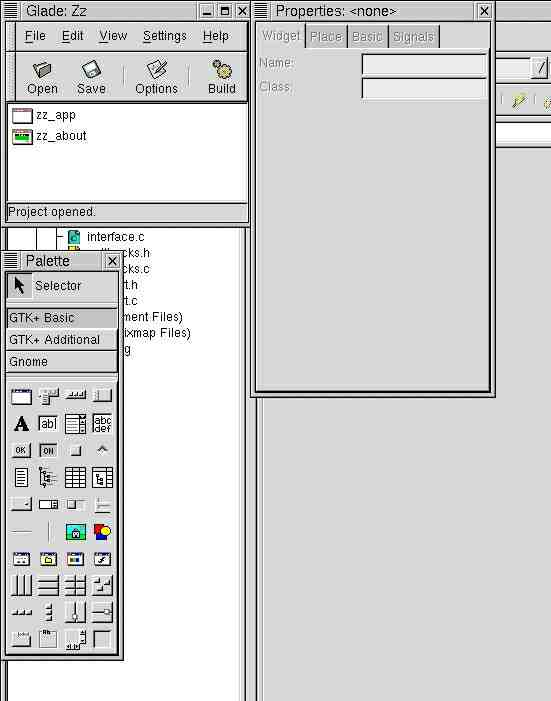
    glade-l.png

    Open Glade. You'll see three component windows of Glade (see above figure). This shall be your working environment for designing your interface(s). From the Palette window, click on the icon the insert a new window (first icon of the Palette) to your project. This shall serve as your main window of the project. The Properties window shows the properties of the selected items. From there, name this window as "main_window" and give its name as "Country Information Program."
    GTK follows the container-child concept of packing widgets. A widget can roughly be equated with User Controls in VB, but still a widget means a lot more than that. A widget can be a simple text box, text entry box or even a container like Vertical Box Container or a Fixed Position Container. In VB or Delphi, one uses the latter concept of fixed positions, i.e., the controls are placed at a fixed position in a window which are not changed when the window is resized or maximized. With the container widgets, which GTK provides, there is a lot more flexibility regarding resizing or maximizing your windows.
    To your main_window, add a Horizontal Pane container widget. This widget can hold two child widgets, one on the left of the pane and the other at the right. These child widgets can also be containers. In the left portion, add a vertical box container. For this click on the icon from the Palette, click on the left of the pane on the main_window and then specify 4 rows to be placed. This divides the area further into four rows where you can place more child widgets. Add a Frame widget into the right portion of the main_window and like before add a vertical box container with 2 rows inside the frame.
    Now into these rows of the vertical boxes, child widgets can easily be placed. Adding a Fixed Position container widget might make things easy to follow for VB users but then make sure that you disable main_window’s Grow property as things may look hideous if the main_window is resized by the user. Nevertheless, it is my opinion that one should try to use the fixed position container widget as less as possible.
    Now add a Label widget to the first row of the Vertical box on the left of the pane (vbox1). Similarly, add a Text Entry Widget into the second row of the vbox1. Now place a Horizontal Box container widget into the third row and specify 2 columns to be added. This will divide this row further into two columns. In both these columns, add a Radio Button widget each. Finally in the fourth row of vbox1, add a Button widget.
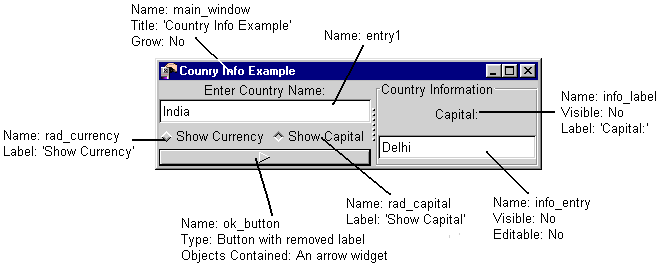
    In the two rows inside the Frame widget, add a Label widget and a Text Entry widget respectively. Your interface might look somewhat like the desired interface (see figure below), but a lot of finer tuning still needs to be done.
    interface.gif

    Now one by one select all the child widgets placed inside the vertical boxes and the horizontal box and from the Properties window change their properties as shown in above figure. For the button (named ok_button), right-click on it and select ‘Remove Label’. This removes the label from the button and acts like a conatainer where other widgets can also be placed. Place an Arrow widget (from the GTK+ Additional tab of the Palette window) in the button.
    It is easy to select the visible widgets like labels, buttons etc. but the problem arises while selecting the Vertical Boxes or Horizontal Boxes. For this, from the View menu of the Glade window, click ‘Widget Tree’. Now from this ‘Widget Tree’ window, select the hbox1 & hbox2 one-by-one and set their ‘Homogeneous’ property to Yes. This gives a better look to the arrangement of the widgets.
    Signal Handlers

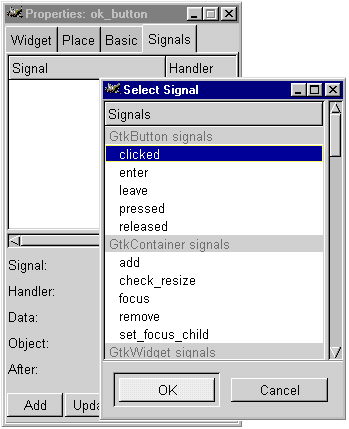
    signals.gif

    To place code to this frontend, you have to specify which widgets you want to be connected to any callback functions that shall be executed when a particular signal is emitted. Callback functions are functions which are executed when, suppose, a button is clicked or a radio-button is toggled.
    We shall have to connect the ok_button, rad_currency & rad_capital to their callback functions. For this, first select the ok_button (from the Widget Tree) and click on the ‘Signals’ tab of the Properties window. Here select the ‘clicked’ signal (see above figure) and after accepting the suggested callback function name, click on the ‘Add’ button. Similarly, connect the two radio-buttons to the callbacks of the ‘toggled’ signal. Also connect the main_window’s (Select it from the main Glade window) ‘destroy’ signal to the function: gtk_main_quit from the drop-down menu.
    This completes the entire designing part of the interface for the example program. Now save the project under a suitable project directory, e.g. /home/<username>/Projects/country. Build the source code and exit Glade. Now the time comes for writing the code, which will drive the program.
    Coding the app

    Now, in any of your favourite text editor e.g., gedit, emacs or vi etc., load the file: /home/<username>/Projects/country/src/callbacks.c. This is the source file where all the coding shall be done. The callback functions connected to the widgets are present in this file. Here we’ll add the standard GTK functions using C language.
    In the first time, you’ll see three callback functions, viz., on_ok_button_clicked, on_rad_currency_toggled & on_rad_capital_toggled. Now just before the first function and after the include directives, add the following code.
    g[FONT=Courier New, Courier, mono]boolean gb_currency=TRUE;
    [/FONT][FONT=Courier New, Courier, mono]gboolean gb_capital=FALSE;[/FONT] This declares two Boolean variables, which would be used to check whether a radio-button has been activated, or not.
    Now make the functions for the radio-buttons look like this.
    [FONT=Courier New, Courier, mono]void
    [/FONT][FONT=Courier New, Courier, mono] on_rad_currency_toggled (GtkToggleButton *togglebutton, gpointer user_data)
    [/FONT][FONT=Courier New, Courier, mono]{[/FONT]
    [FONT=Courier New, Courier, mono]gb_currency=TRUE;
    gb_capital=FALSE;
    [/FONT]
    [FONT=Courier New, Courier, mono]}[/FONT]
    [FONT=Courier New, Courier, mono]void
    on_rad_capital_toggled (GtkToggleButton *togglebutton, gpointer user_data)
    [/FONT][FONT=Courier New, Courier, mono]{[/FONT]
    [FONT=Courier New, Courier, mono] gb_currency=FALSE;
    [/FONT][FONT=Courier New, Courier, mono]gb_capital=TRUE;[/FONT]
    [FONT=Courier New, Courier, mono]}[/FONT]
    The code used here is pretty self-explanatory -- just changes the value for the currently active radio-button. For the ok_button callback, add code to the on_ok_button_clicked function such that the function looks like this.
    [FONT=Courier New, Courier, mono]void
    on_ok_button_clicked (GtkButton *button, gpointer user_data)
    [/FONT][FONT=Courier New, Courier, mono]{[/FONT]
    [FONT=Courier New, Courier, mono] GtkWidget *entry = lookup_widget(GTK_WIDGET(button), "entry1");
    [/FONT][FONT=Courier New, Courier, mono]GtkWidget *info_entry = lookup_widget (GTK_WIDGET(button), "info_entry");
    [/FONT][FONT=Courier New, Courier, mono]GtkWidget *rad_currency = lookup_widget(GTK_WIDGET(button), "rad_currency");
    [/FONT][FONT=Courier New, Courier, mono]GtkWidget *rad_capital = lookup_widget(GTK_WIDGET(button), "rad_capital");
    [/FONT][FONT=Courier New, Courier, mono]GtkWidget *info_label = lookup_widget(GTK_WIDGET(button), "info_label");
    [/FONT][FONT=Courier New, Courier, mono]gchar *entry_text = gtk_entry_get_text(GTK_ENTRY(entry));
    [/FONT][FONT=Courier New, Courier, mono]gchar *countries[2], *capitals[2], *currencies[2];
    [/FONT][FONT=Courier New, Courier, mono]GtkWidget *dialog, *dg_label, *dg_OK;
    [/FONT][FONT=Courier New, Courier, mono]gint x;[/FONT]
    [FONT=Courier New, Courier, mono] countries [0] = "India"; countries [1] = "France";
    [/FONT][FONT=Courier New, Courier, mono]capitals [0] = "Delhi"; capitals [1] = "Paris";
    [/FONT][FONT=Courier New, Courier, mono]currencies [0] = "Rupees"; currencies [1] = "Francs";
    [/FONT]
    [FONT=Courier New, Courier, mono] for (x=0; x<2; x++)
    {
    [/FONT]
    [FONT=Courier New, Courier, mono]if(!strcmp(entry_text, countries[x]) == 1)
    {
    [/FONT]
    [FONT=Courier New, Courier, mono]gtk_widget_show (info_entry);
    gtk_widget_show (info_label);
    if (gb_currency == TRUE)
    {
    gtk_entry_set_text (GTK_ENTRY(info_entry), currencies[x]);
    gtk_label_set_text(GTK_LABEL(info_label), "Currency:");
    }
    if (gb_capital == TRUE)
    {
    gtk_entry_set_text (GTK_ENTRY(info_entry), capitals[x]);
    gtk_label_set_text(GTK_LABEL(info_label), "Capital:");
    }
    break;
    [/FONT]
    [FONT=Courier New, Courier, mono]} [/FONT]
    [FONT=Courier New, Courier, mono] if(!strcmp(entry_text, countries[x]) == 0 && x == 1)
    [/FONT][FONT=Courier New, Courier, mono]{[/FONT]
    [FONT=Courier New, Courier, mono]dialog = gtk_dialog_new();
    [/FONT][FONT=Courier New, Courier, mono]dg_label = gtk_label_new ("Entry not found!");
    [/FONT][FONT=Courier New, Courier, mono]dg_OK = gtk_button_new_with_label("OK");
    [/FONT][FONT=Courier New, Courier, mono]gtk_signal_connect_object(GTK_OBJECT (dg_OK), "clicked", gtk_widget_destroy, GTK_OBJECT(dialog));
    [/FONT][FONT=Courier New, Courier, mono]gtk_container_add (GTK_CONTAINER (GTK_DIALOG(dialog)->action_area), dg_OK);
    [/FONT][FONT=Courier New, Courier, mono]gtk_container_add (GTK_CONTAINER (GTK_DIALOG(dialog)->vbox), dg_label);
    [/FONT][FONT=Courier New, Courier, mono]gtk_widget_show_all (dialog);
    [/FONT][FONT=Courier New, Courier, mono]gtk_widget_grab_focus(dialog);[/FONT]
    [FONT=Courier New, Courier, mono]}[/FONT]
    [FONT=Courier New, Courier, mono]}[/FONT]
    [FONT=Courier New, Courier, mono] }[/FONT]
    [FONT=Courier New, Courier, mono][/FONT]
    This function works in this way: i) Variables of ‘GtkWidget’ type are declared and pointers to already existing widgets are obtained using the lookup_widget() ii) A ‘gchar’ type variable is used to extract the text from the entry widget and 3 other subscripted variables of the same type are declared for storing the Country, Currency & Capital data iii) The text entered by the user is checked against the pre-defined country names from the subscripted variable. If a match is found, the widgets of the frame are made visible, it is checked which radio-button is currently activated and consequently the corresponding value (of Currency or Capital) is displayed in the info_entry widget. If no match has been found, a dialog box is created and displayed saying "Entry not found".
    It can be noted that if we are using GNOME libraries as well as GTK libraries, then gnome_app widget can be used to display message boxes. Nevertheless creating a dialog of our own, which we have done here, can help one understand how windows are built. Also, customizations can also be done to self-created windows.
    Building and executing the project

    After coding is complete, close all files and open a terminal window. Type the follwing in sequence, one-after-the-other.
    cd /home/<username>/Projects/country
    ./configure
    make
    src/country
    Remember to change the <username> with your actual username. ./configure & make might take some time depending upon the speed of your computer. If the project is built without any errors, you’ll be ready to execute the executable file country from the src directory.
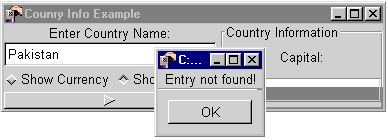
    If your program runs, rejoice! Try typing "India" in the entry box and press the button. Does it show you it’s currency or capital? Now try typing "Pakistan" in the entry. Can you see your dialog box? (figure below)
    final.gif

    Conclusion

    Hopefully, this example will carry out to you the basic way of functioning of GTK+ and the basic concepts of programming in it, which might get you started in the world of programming for the Linux platform.
     

    kasuncs

    Well-known member
  • May 21, 2007
    3,590
    271
    83
    Thanks. Machan e e-book eka wikunanna nam site wala dala thiyenawa. Thanks very much.
     

    MaD-DoC

    Member
    Oct 27, 2007
    6,337
    22
    0
    SLIIT/Malabe
    1000-PhotoShop-Tricks.jpg


    Worth 1000 Photoshop Tricks is one of the best books you can have about photoshop, written by an expert designer.

    Description: This book contains 1000 cool photoshop effects and tutorials. Pictures are included along the way, along with descriptive explanations of each step.

    - Motion Pictures
    - Turning a Character Into a Puppet
    - Out of Bounds
    - Creating Rain
    - Creating a Wormhole
    - Creating Fur
    - Motion Tweens and Guides [Flash]
    - Making Graffiti
    - Turning a Character Into a Zombie
    - Perspective
    - Gender Blending
    - Face Swapping
    - Tattoos
    - Displacement Maps and Textures
    And many, many more!

    Worth 1000 Photoshop Tricks
    Author(s): Lokale Schijf
    Pages: 326
    Size: 29 MB
    File Format: PDF

    ِDownload:Spunkins
    Code:
    Code:
    http://rapidshare.com/files/98867748/1000_PhotoShop_Tricks.rar
     

    MaD-DoC

    Member
    Oct 27, 2007
    6,337
    22
    0
    SLIIT/Malabe
    cs3-bookcover.jpg


    this DVD is together with the same-name book, format webbrowser, containts all the explaination of Tools and Palettes, many video tutors, and helpful reference... more info, search on google
    icon_smile.gif

    size: 2.17 GB
    downloaded from "Pravat Behera"'s link.

    Code:
    Code:
    http://rapidshare.com/files/46997759/PhotoshopCS3.for.Photograhpers.DVD.Martin.Evening.part01.rar 
    http://rapidshare.com/files/47002134/PhotoshopCS3.for.Photograhpers.DVD.Martin.Evening.part02.rar 
    http://rapidshare.com/files/47006314/PhotoshopCS3.for.Photograhpers.DVD.Martin.Evening.part03.rar 
    http://rapidshare.com/files/47010584/PhotoshopCS3.for.Photograhpers.DVD.Martin.Evening.part04.rar 
    http://rapidshare.com/files/47029162/PhotoshopCS3.for.Photograhpers.DVD.Martin.Evening.part05.rar 
    http://rapidshare.com/files/47032197/PhotoshopCS3.for.Photograhpers.DVD.Martin.Evening.part06.rar 
    http://rapidshare.com/files/47035263/PhotoshopCS3.for.Photograhpers.DVD.Martin.Evening.part07.rar 
    http://rapidshare.com/files/47038132/PhotoshopCS3.for.Photograhpers.DVD.Martin.Evening.part08.rar 
    http://rapidshare.com/files/47041114/PhotoshopCS3.for.Photograhpers.DVD.Martin.Evening.part09.rar 
    http://rapidshare.com/files/47043850/PhotoshopCS3.for.Photograhpers.DVD.Martin.Evening.part10.rar 
    http://rapidshare.com/files/47046526/PhotoshopCS3.for.Photograhpers.DVD.Martin.Evening.part11.rar 
    http://rapidshare.com/files/47048989/PhotoshopCS3.for.Photograhpers.DVD.Martin.Evening.part12.rar 
    http://rapidshare.com/files/47051306/PhotoshopCS3.for.Photograhpers.DVD.Martin.Evening.part13.rar 
    http://rapidshare.com/files/47053759/PhotoshopCS3.for.Photograhpers.DVD.Martin.Evening.part14.rar 
    http://rapidshare.com/files/47056299/PhotoshopCS3.for.Photograhpers.DVD.Martin.Evening.part15.rar 
    http://rapidshare.com/files/47059236/PhotoshopCS3.for.Photograhpers.DVD.Martin.Evening.part16.rar 
    http://rapidshare.com/files/47062399/PhotoshopCS3.for.Photograhpers.DVD.Martin.Evening.part17.rar 
    http://rapidshare.com/files/47065716/PhotoshopCS3.for.Photograhpers.DVD.Martin.Evening.part18.rar 
    http://rapidshare.com/files/47069772/PhotoshopCS3.for.Photograhpers.DVD.Martin.Evening.part19.rar 
    http://rapidshare.com/files/47073809/PhotoshopCS3.for.Photograhpers.DVD.Martin.Evening.part20.rar 
    http://rapidshare.com/files/47076820/PhotoshopCS3.for.Photograhpers.DVD.Martin.Evening.part21.rar 
     
    credit to Pravat Behera 
    pass: namdatviet


    MIRROR
    Code:
    Code:
    http://rapidshare.com/files/42213978/Lynda.com.Photoshop.CS3.for.Photographers.DVD9-CFE.part01.rar 
    http://rapidshare.com/files/42215865/Lynda.com.Photoshop.CS3.for.Photographers.DVD9-CFE.part02.rar 
    http://rapidshare.com/files/42218330/Lynda.com.Photoshop.CS3.for.Photographers.DVD9-CFE.part03.rar 
    http://rapidshare.com/files/42220718/Lynda.com.Photoshop.CS3.for.Photographers.DVD9-CFE.part04.rar 
    http://rapidshare.com/files/42222404/Lynda.com.Photoshop.CS3.for.Photographers.DVD9-CFE.part05.rar 
    http://rapidshare.com/files/42224070/Lynda.com.Photoshop.CS3.for.Photographers.DVD9-CFE.part06.rar 
    http://rapidshare.com/files/42225847/Lynda.com.Photoshop.CS3.for.Photographers.DVD9-CFE.part07.rar 
    http://rapidshare.com/files/42227676/Lynda.com.Photoshop.CS3.for.Photographers.DVD9-CFE.part08.rar 
    http://rapidshare.com/files/42229361/Lynda.com.Photoshop.CS3.for.Photographers.DVD9-CFE.part09.rar 
    http://rapidshare.com/files/42230942/Lynda.com.Photoshop.CS3.for.Photographers.DVD9-CFE.part10.rar 
    http://rapidshare.com/files/42232432/Lynda.com.Photoshop.CS3.for.Photographers.DVD9-CFE.part11.rar 
    http://rapidshare.com/files/42233829/Lynda.com.Photoshop.CS3.for.Photographers.DVD9-CFE.part12.rar 
    http://rapidshare.com/files/42235229/Lynda.com.Photoshop.CS3.for.Photographers.DVD9-CFE.part13.rar 
    http://rapidshare.com/files/42236455/Lynda.com.Photoshop.CS3.for.Photographers.DVD9-CFE.part14.rar 
    http://rapidshare.com/files/42237953/Lynda.com.Photoshop.CS3.for.Photographers.DVD9-CFE.part15.rar 
    http://rapidshare.com/files/42239481/Lynda.com.Photoshop.CS3.for.Photographers.DVD9-CFE.part16.rar 
    http://rapidshare.com/files/42240889/Lynda.com.Photoshop.CS3.for.Photographers.DVD9-CFE.part17.rar 
    http://rapidshare.com/files/42242330/Lynda.com.Photoshop.CS3.for.Photographers.DVD9-CFE.part18.rar 
    http://rapidshare.com/files/42243742/Lynda.com.Photoshop.CS3.for.Photographers.DVD9-CFE.part19.rar 
    http://rapidshare.com/files/42245127/Lynda.com.Photoshop.CS3.for.Photographers.DVD9-CFE.part20.rar 
    http://rapidshare.com/files/42246741/Lynda.com.Photoshop.CS3.for.Photographers.DVD9-CFE.part21.rar 
    http://rapidshare.com/files/42248315/Lynda.com.Photoshop.CS3.for.Photographers.DVD9-CFE.part22.rar 
    http://rapidshare.com/files/42249966/Lynda.com.Photoshop.CS3.for.Photographers.DVD9-CFE.part23.rar 
    http://rapidshare.com/files/42251723/Lynda.com.Photoshop.CS3.for.Photographers.DVD9-CFE.part24.rar 
    http://rapidshare.com/files/42253630/Lynda.com.Photoshop.CS3.for.Photographers.DVD9-CFE.part25.rar 
    http://rapidshare.com/files/42261070/Lynda.com.Photoshop.CS3.for.Photographers.DVD9-CFE.part25.rar 
    http://rapidshare.com/files/42263120/Lynda.com.Photoshop.CS3.for.Photographers.DVD9-CFE.part26.rar 
    http://rapidshare.com/files/42265226/Lynda.com.Photoshop.CS3.for.Photographers.DVD9-CFE.part27.rar 
    http://rapidshare.com/files/42267396/Lynda.com.Photoshop.CS3.for.Photographers.DVD9-CFE.part28.rar 
    http://rapidshare.com/files/42269572/Lynda.com.Photoshop.CS3.for.Photographers.DVD9-CFE.part29.rar 
    http://rapidshare.com/files/42271906/Lynda.com.Photoshop.CS3.for.Photographers.DVD9-CFE.part30.rar 
    http://rapidshare.com/files/42313681/Lynda.com.Photoshop.CS3.for.Photographers.DVD9-CFE.part30.rar 
    http://rapidshare.com/files/41889698/Lynda.com.Photoshop.CS3.for.Photographers.DVD9-CFE.part31.rar 
    http://rapidshare.com/files/41892007/Lynda.com.Photoshop.CS3.for.Photographers.DVD9-CFE.part32.rar 
    http://rapidshare.com/files/41905286/Lynda.com.Photoshop.CS3.for.Photographers.DVD9-CFE.part33.rar 
    http://rapidshare.com/files/41908016/Lynda.com.Photoshop.CS3.for.Photographers.DVD9-CFE.part34.rar 
    http://rapidshare.com/files/41911046/Lynda.com.Photoshop.CS3.for.Photographers.DVD9-CFE.part35.rar 
    http://rapidshare.com/files/41914028/Lynda.com.Photoshop.CS3.for.Photographers.DVD9-CFE.part36.rar 
    http://rapidshare.com/files/41916952/Lynda.com.Photoshop.CS3.for.Photographers.DVD9-CFE.part37.rar 
    http://rapidshare.com/files/41944149/Lynda.com.Photoshop.CS3.for.Photographers.DVD9-CFE.part38.rar 
    http://rapidshare.com/files/41959661/Lynda.com.Photoshop.CS3.for.Photographers.DVD9-CFE.part38.rar 
    http://rapidshare.com/files/41946803/Lynda.com.Photoshop.CS3.for.Photographers.DVD9-CFE.part39.rar 
    http://rapidshare.com/files/41962935/Lynda.com.Photoshop.CS3.for.Photographers.DVD9-CFE.part39.rar 
    http://rapidshare.com/files/41949673/Lynda.com.Photoshop.CS3.for.Photographers.DVD9-CFE.part40.rar 
    http://rapidshare.com/files/41965657/Lynda.com.Photoshop.CS3.for.Photographers.DVD9-CFE.part40.rar 
    http://rapidshare.com/files/41968655/Lynda.com.Photoshop.CS3.for.Photographers.DVD9-CFE.part41.rar 
    http://rapidshare.com/files/41952392/Lynda.com.Photoshop.CS3.for.Photographers.DVD9-CFE.part41.rar 
    http://rapidshare.com/files/42194210/Lynda.com.Photoshop.CS3.for.Photographers.DVD9-CFE.part42.rar 
    http://rapidshare.com/files/42196821/Lynda.com.Photoshop.CS3.for.Photographers.DVD9-CFE.part43.rar 
    http://rapidshare.com/files/42199539/Lynda.com.Photoshop.CS3.for.Photographers.DVD9-CFE.part44.rar 
    http://rapidshare.com/files/42202297/Lynda.com.Photoshop.CS3.for.Photographers.DVD9-CFE.part45.rar 
    http://rapidshare.com/files/42204766/Lynda.com.Photoshop.CS3.for.Photographers.DVD9-CFE.part46.rar 
    http://rapidshare.com/files/42207102/Lynda.com.Photoshop.CS3.for.Photographers.DVD9-CFE.part47.rar 
    http://rapidshare.com/files/42209447/Lynda.com.Photoshop.CS3.for.Photographers.DVD9-CFE.part48.rar 
    http://rapidshare.com/files/42211822/Lynda.com.Photoshop.CS3.for.Photographers.DVD9-CFE.part49.rar 
    http://rapidshare.com/files/42211871/Lynda.com.Photoshop.CS3.for.Photographers.DVD9-CFE.part50.rar
     

    MaD-DoC

    Member
    Oct 27, 2007
    6,337
    22
    0
    SLIIT/Malabe
    New to Photoshop or just need to figure out how to get that effect your looking for??? Than this is for you. Learn it all with Photoshop CS3 for Dummies.

    Code:
    Code:
    http://rapidshare.com/files/98861417/Photoshop_CS3_For_Dummies.rar
     

    MaD-DoC

    Member
    Oct 27, 2007
    6,337
    22
    0
    SLIIT/Malabe
    Lynda.com Photoshop Lightroom for Digital Photographers

    6db6db4d38.png


    Latest Releases!

    Product Description:
    Photoshop Lightroom for Digital Photographers
    with: Colin Smith
    Running Time: 7.25 hours

    Photoshop Lightroom for Digital Photographers was created and produced by Colin Smith. We are honored to host his material in the lynda.com Online Training Library®.
    There's nothing more frustrating than having hundreds of digital pictures clogging up one's hard drive. Photoshop Lightroom for Digital Photographers teaches picture-takers how to import, organize, develop, and output images with ease. Instructor Colin Smith breaks down even the most complex tasks into quick and easy-to-understand techniques, and demonstrates multiple methods that work in real-world situations. He teaches photographers how to work efficiently with metadata; create custom keyword sets; and understand Lightroom's ratings, flags, and labels. Colin also shares some of his secret tips!

    Table of contents
    Introduction
    Welcome 0:54 2.5 MB

    1. Getting Started
    Setting Lightroom preferences 12:04 11.5 MB
    Importing images from a hard drive 6:30 7.5 MB
    Importing images from a flash card, CD, or DVD 5:01 5.6 MB
    Setting up a watched folder to automatically import images 4:53 7 MB
    Creating custom identity plates and using logos for end markers 6:51 9.4 MB
    Overview of the Lightroom interface and the Lights Out feature 5:50 7.6 MB
    Working with the panels efficiently 4:22 8.4 MB
    Overview of the side panels 3:17 4.9 MB
    Overview of the toolbar 4:07 6.9 MB

    2. The Library and Catalogs
    Working with collections and folders 9:11 15.8 MB
    Working with Grid view and thumbnails 7:36 11.2 MB
    Using Loupe view to get a closer look at images 5:26 13.4 MB
    Comparing images and choosing the best 6:02 9.6 MB
    Viewing multiple images at once 4:33 6.6 MB
    Understanding previews 5:09 7.4 MB
    Managing catalogs 4:58 6.7 MB
    Exporting catalogs 3:42 4.9 MB
    Importing catalogs and managing catalogs on multiple computers 8:16 10.5 MB

    3. Metadata
    Using ratings, flags, and labels to organize photos 7:27 16.8 MB
    Using filters to find photos 7:31 12 MB
    Understanding and applying metadata 7:13 10.4 MB
    Filtering by metadata to find photos quickly 2:50 4.4 MB
    Working efficiently with metadata 4:48 6.7 MB
    Using keywords to organize images 5:38 7.2 MB
    Saving time with custom keyword sets 5:35 7.1 MB
    Fixing misspelled keywords on multiple images 1:17 1.6 MB
    Organizing keywords 7:12 13 MB
    Locating photos 4:39 6.8 MB

    4. Tools
    Making molehills out of mountains 9:21 18.6 MB
    Changing the time zone on photos 2:40 3.4 MB
    Straightening crooked photos 1:15 1.6 MB
    Practical and creative cropping 2:56 4.6 MB
    Removing the dreaded red-eye with ease 1:25 2.3 MB
    Removing blemishes 1:34 2 MB
    Cleaning lenses and sensors to remove dust 2:32 2.8 MB
    Using the Painter tool to copy settings to multiple photos 5:02 8 MB

    5. Adjustments
    Setting white balance 6:37 8.5 MB
    Understanding and using histograms 6:30 8.8 MB
    The Basic Adjustments panel 4:31 6.7 MB
    Special considerations for adjusting skin tones 11:40 16.8 MB
    Fixing underexposed and overexposed images 6:29 12.7 MB
    Comparing "before" and "after" images 2:52 7.9 MB
    Using curves for targeted adjustments 7:29 10.2 MB
    Using HSL and the color controls 7:47 10.1 MB
    Using image history and snapshots 3:03 4.7 MB
    Saving and using presets 4:28 6.9 MB

    6. Advanced Adjustments
    Converting grayscale images 4:56 6.5 MB
    Advanced grayscale workflow 5:05 8.1 MB
    Using Split Toning to color grayscale images 3:50 5.3 MB
    Using Split Toning on color images for a cross-processed effect 1:18 2.1 MB
    Removing noise 3:16 4.5 MB
    Understanding and using the sharpening tools 4:51 7.1 MB
    Special considerations for sharpening faces 4:30 6.6 MB
    Removing color fringes 3:08 4.7 MB
    Compensating for a lens vignette and adding a vignette for a creative feel 2:01 2.3 MB

    7. Workflows
    Overview of the correction tools 10:21 16.7 MB
    Overview of the correction tools with people 11:37 17.3 MB
    Integrating Photoshop with a Lightroom workflow 8:10 11.1 MB
    Processing multiple images at once 5:01 7.6 MB
    Understanding virtual copies 4:24 7.1 MB
    Syncing RAW files with Bridge, Lightroom, and Photoshop 9:11 13.5 MB
    Exporting photos from Lightroom 10:09 12.8 MB
    What is DNG, and how can Lightroom help? 5:58 7.4 MB
    Sharing Lightroom presets with other computers 2:27 3.4 MB
    What is camera calibration? 3:13 3.7 MB

    8. Output
    A quick slideshow 1:31 3.2 MB
    Using slideshow templates 2:38 4.4 MB
    Customizing slideshows 10:43 13.5 MB
    Adding custom text to slideshows 1:38 1.8 MB
    Adding music to slideshows 2:59 5.3 MB
    Exporting slideshows for CDs or email 1:56 3 MB
    Getting accurate colors for prints 9:51 12.4 MB
    Creating contact sheets for proofing image collections 7:46 11.5 MB

    9. Lightroom for the Web
    Overview of web galleries 9:17 17.5 MB
    Using fancy Flash galleries 9:52 19.2 MB
    Customizing the Flash galleries 10:22 15 MB
    Customize the HTML galleries 10:17 15.1 MB
    Uploading galleries to a website or exporting to disk 5:22 7.3 MB

    Conclusion
    Goodbye 0:39 0.8 MB


    Official Site:
    Code:
    Code:
    http://movielibrary.lynda.com/html/modPage.asp?ID=563

    2n0k2s6.gif

    Lynda.com Photoshop Lightroom for Digital Photographers (RapidShare.com)
    Code:
    Code:
    Part 1   http://rapidshare.com/files/95784396/Lynda.com_Photoshop_Lightroom_for_Digital_Photographers.part1.rar 
    Part 2   http://rapidshare.com/files/95787148/Lynda.com_Photoshop_Lightroom_for_Digital_Photographers.part2.rar 
    Part 3   http://rapidshare.com/files/95790565/Lynda.com_Photoshop_Lightroom_for_Digital_Photographers.part3.rar 
    Part 4   http://rapidshare.com/files/95792755/Lynda.com_Photoshop_Lightroom_for_Digital_Photographers.part4.rar 
    Part 5   http://rapidshare.com/files/95795056/Lynda.com_Photoshop_Lightroom_for_Digital_Photographers.part5.rar 
    Part 6   http://rapidshare.com/files/95795831/Lynda.com_Photoshop_Lightroom_for_Digital_Photographers.part6.rar
    Note:
    1. 6 segment files are required
    2. The exercise files or Mac GUI are not included
    3. Please using UnRarX to join these files, by double clicking the .part1.rar
    4. Please using VLC media player or Apple QuickTime ... etc. to view the Tutorials (.mov)

    VLC media player
    Code:
    Code:
    http://www.videolan.org/vlc/

    Apple QuickTime
    Code:
    Code:
    http://www.apple.com/quicktime/download/


    No Password Required
    Please do NOT forget to say "Thank You"
     

    zed

    Member
    Dec 28, 2007
    5,703
    6
    0
    34
    in bootsector
    Discovering Computers 2007: A Gateway to Information,


    Author Bio
    Gary B. Shelly wrote and published his first computer education textbook in 1969. More than twenty million copies of Shelly Cashman Series' textbooks have been sold. Gary and a talented group of contributing authors have produced books on computer programming, computer concepts, and application software that are the leading textbooks in the computer technology market today. Gary has hosted the annual Shelly Cashman Institute, a week-long training event focusing on the latest topics in technology, for the past 34 years.

    Thomas J. Cashman received his education at California State University, Los Angeles. He established one of the first business data processing programs in the U.S. at Long Beach City College in California, where he taught and served as department head. In 1969, he began collaborating with now best-selling author, Gary Shelly.

    Misty E. Vermaat has more than 20 years of experience in the field of computer information systems. She has co-authored many textbooks for the Shelly Cashman Series, including multiple versions of Discovering Computers, Microsoft Office, and Microsoft Office Word books.

    MEKE BOOK 1KK
     

    MaD-DoC

    Member
    Oct 27, 2007
    6,337
    22
    0
    SLIIT/Malabe
    zed said:
    Discovering Computers 2007: A Gateway to Information,


    Author Bio
    Gary B. Shelly wrote and published his first computer education textbook in 1969. More than twenty million copies of Shelly Cashman Series' textbooks have been sold. Gary and a talented group of contributing authors have produced books on computer programming, computer concepts, and application software that are the leading textbooks in the computer technology market today. Gary has hosted the annual Shelly Cashman Institute, a week-long training event focusing on the latest topics in technology, for the past 34 years.

    Thomas J. Cashman received his education at California State University, Los Angeles. He established one of the first business data processing programs in the U.S. at Long Beach City College in California, where he taught and served as department head. In 1969, he began collaborating with now best-selling author, Gary Shelly.

    Misty E. Vermaat has more than 20 years of experience in the field of computer information systems. She has co-authored many textbooks for the Shelly Cashman Series, including multiple versions of Discovering Computers, Microsoft Office, and Microsoft Office Word books.

    MEKE BOOK 1KK


    ekanam na machan .............:no::no::no:
     

    MaD-DoC

    Member
    Oct 27, 2007
    6,337
    22
    0
    SLIIT/Malabe
    Java is generally a well-documented language, but not every language feature is fully specified, documented, or identical across all platforms. Java Secrets takes you into this Java twilight zone and introduces you to the language's hidden power. The book's first section explores the inner workings of many Java mechanisms, including representation of data types in memory, argument passing, and the implementation of strings and arrays. The author also investigates niceties of threading models and garbage collection as implemented on different Java platforms.

    A large group of undocumented classes (the sun.* packages) constitute what amounts to an undocumented Java application programming interface (API). The next large section of Java Secrets details these classes and how to use them safely. Although these classes ostensibly exist to support the Java environment, you'll learn how to use many of their interfaces for a variety of tasks including layout management; FTP, HTTP, mail, and news communication; data encoding; and character conversion. A final big chunk of the book is devoted to techniques for adding platform-dependent features to Java applications. This is a controversial subject for a supposedly platform-independent programming system, but the author provides a balanced assessment of the benefits and drawbacks.

    All in all, this is one of the most interesting, unusual, and engagingly written books on Java programming we've seen. It's hard to imagine a serious Java programmer who wouldn't find it well worth his or her time.


    John.Wiley.and.Sons.JavaScript.Bible.5th.Edition

    Code:
     

    yoh_tha

    Junior member
  • Nov 13, 2006
    224
    1
    18
    Machan do you have the BASIC "Web development Book" and any languages like Dutch, I am very much intrested in dutch. If you could help me these two. Thanks in advance,

    YoH.