`':..EK SOFTWARE SOLUTIONS..:'`

Clerk_Kent

Well-known member
  • Jan 17, 2008
    25,206
    65
    48
    SwishMAX 2.0

    20pee4l.png


    With SWiSH Max2 you can build anything from flash websites, animated menus, banner ads, text effects, presentations, cartoons, slideshows, applications to video productions. Take a look at our samples section for just a few examples of what you can create


    Download
    File size:24.9mb
    Code:http://rapidshare.com/files/103457114/SWiSH.Max2.rar
     

    raac

    Active member
  • Oct 18, 2006
    1,085
    9
    38
    Where
    KZRO said:
    me mata gadmei tv card1ta vista drivers ona.....:rofl::rofl:

    machan drivers evilla nam ochchara hoyanna deyak naa. un original website eke daanawa. Vista walata drivers neththam monawa karannada/ hema daama ahala wedak naa. iwasala idapan. samahara welawata un card eke service nawaththalada danneth naa. :baffled:
     

    raac

    Active member
  • Oct 18, 2006
    1,085
    9
    38
    Where
    UltimateDefrag 2008

    UDlogoFinal.gif


    ud2008600x400.jpg


    UltimateDefrag is the world's most powerful defragger in terms of the file placement flexibility it gives you for defragging and strategically placing files on your hard drive - right down to the individual file level. With The Defragger And File Placement Optimizer That Lets You Defrag & Optimize Your Hard Drive - Any Way You Want To!
    UltimateDefrag is the Ultimate Defragger and File Placement Optimizer. Defragging hard drives helps to restore your hard drive performance. File placement optimizing on the other hand, boosts your theoretical hard drive file access performance by up to 300% of manufacturers quoted averages (typical performance increase you'll experience is between 25 and 100%) by placing the files you want performance from onto the faster performing (outer tracks) areas of your hard drive. With UltimateDefrag - you can specify which individual files, programs or games you want the best performance from. The "Archive" function places all of your unused files out of the way and onto the slower performing areas of your hard drive.
    If you run complex games, simulations and applications, UltimateDefrag gives you the capability to place the files associated with these applications in the position on your hard drive that will give you the best performance possible.
    Now watch your programs launch faster! Your games perform like they never have! Experience a Windows Desktop and Operating System with the same sprightly performance as when your PC was brand new!

    UltimateDefrag Features:
    - Achieve Optimum Performance Hard Drive File Access That Gives You A Much More Responsive PC
    - Strategic File Placement Gives You Complete Control Over Which Files And Programs You Want Increased Performance From
    - Place Unused Data (such as ZIP Files and unused Windows files) Out Of The Way
    - Place Directories In The Optimum Position For Superior Performance
    - Defrag with as little as 1% FREE space
    - Enjoy fast 3 to 5 minute complete defrags
    - Choose From 4 Powerful Defrag Methods With Over 33 Defrag Option Combinations
    - Make Full Drives Perform Almost Like They've Been Newly Formatted
    - You No Longer Need To Consider Partitioning - UltimateDefrag Is Like Partitioning-On-The-Fly!
    - The First Complete "DISK" Metaphor In Any Defragger
    - Say Goodbye To "Hard Drive Fatigue" Forever!
    - Based Upon True Scientific And Natural Laws
    - More Than Just A Defragger - It's Also a File Placement Optimizer
    - Defragging Defrags Your Files - UltimateDefrag Defrags Your File System
    - Nothing "Black Box" about this - you have total control over which files go where
    - Flexible Scheduling lets you defrag while you're away from your computer
    - All This In An Incredibly Powerful Program That's Less Than 1 Mb In Size!

    Changes in UltimateDefrag 2008 2.0.0.47 - 26 April 2008:
    IMPROVEMENTS
    - Reprogrammed and recoded from scratch.
    - New Custom Graphical User Interface.
    - Vastly accelerated and more intelligent Defrag engine. Includes new defrag and file placement techniques that result in faster file placement and less data moved
    - Nearest free space placement for scratch files
    - Pre-emptive space clearing
    - Minimal file movement
    - Better fitting of files for free space
    - Very fast file placement leaves a few gaps for the benefit of a much faster defrag.
    - Added Consolidate and Very Fast File Placement for High Performance Files and Archive Files resulting in much faster defrag times for HP and archive files.
    - Added very fast file placement for consolidate defrag method
    - Additional file selection options include
    - Wildcard file selection
    - Ability to select HP and Archive based upon absolute data, percentage of data and days since use.
    - Ability to sort or consolidate HP and archive files
    - Additional File selection options enable over 200 file selection/defrag option permutations
    - Added more information to GUI
    - File progress indicator updates as file data is being moved
    - HP and Archive bands differentiated in their own color enabling user to see which files are being placed in archive, HP or normal zones.
    - Added functionality to Auto defrag method enabling user to please least used files to inner tracks or inside regular data.
    - Removed boot time defrag option to make way for very powerful and flexible boot time defrag utility which will be provided free of charge to all V2.XX owners by end of June 2008. Current version of boot time defrag module was rudimentary and mostly ineffectual.

    Future boot time defrag module will have option to:
    - Defrag and Specifically place MFT in optimal location on drive based upon "center of data" distribution.
    - Defrag and specifically place paging file in optimal location on drive based upon "center of data" distribution.
    - Defrag and optimize placement of all NTFS metafiles
    - Reindex, pack and optimize MFT to eliminate MFT slack.
    - Other, yet unpublished functionality.


    Setup:
    http://rapidshare.com/files/110905688/UD200820047.rar
    http://www.megaupload.com/?d=V4AFODNO


    Portable Version:
    http://rapidshare.com/files/110904794/P-08UD20047.rar
    http://www.megaupload.com/?d=RUNPUG5M
     

    KZRO

    Member
    Jan 18, 2008
    5,329
    8
    0
    41
    ~Kuliyapitiya~
    raac said:
    machan drivers evilla nam ochchara hoyanna deyak naa. un original website eke daanawa. Vista walata drivers neththam monawa karannada/ hema daama ahala wedak naa. iwasala idapan. samahara welawata un card eke service nawaththalada danneth naa. :baffled:


    eka thama macho.....podi solution1k hambuna try karala balamuko.......:P:P
     

    Clerk_Kent

    Well-known member
  • Jan 17, 2008
    25,206
    65
    48
    Today's Exclusive

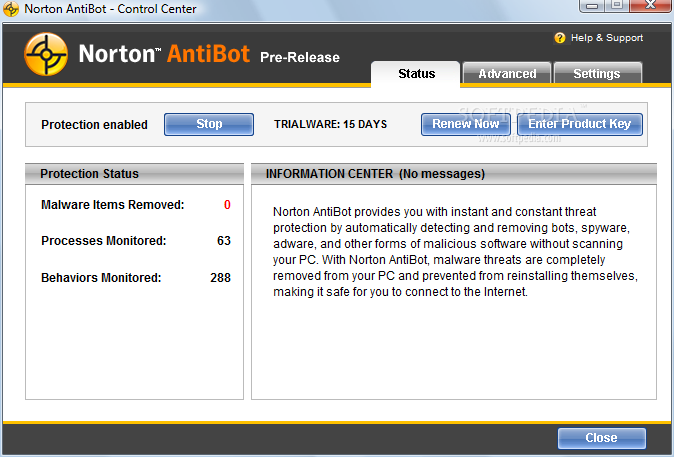
    Norton Antibot

    Norton-AntiBot_1.png


    f_Informationm_5aff5c4.png


    Quote:
    Key Technologies
    * Antibot
    * Active Behavioral-Based Analysis

    Features
    * Actively monitors your PC 24x7
    * Real-time protection against Web robot (bot) attacks
    * Blocks bots from hijacking of your PC
    * Stops identity theft by bots
    * Blocks botnets
    * Detects unusual behavior on your PC and eliminates threat
    * Detects malicious software at the deepest levels of your system
    * Adds extra layer of threat protection
    * Works with other security software
    * Has minimal impact on PC performance


    f_downloadm_1c3e8bf.png


    Code:
    http://rapidshare.com/files/120438723/Norton_AntiBot_1.1.838.smforum.net.rar
    Code:
    http://www.megaupload.com/?d=LFCPP6YR
     

    KZRO

    Member
    Jan 18, 2008
    5,329
    8
    0
    41
    ~Kuliyapitiya~
    Genie Backup Manager Professional 8.0.318.488

    Genie Backup Manager Professional 8.0.318.488


    Genie Backup Manager Professional is a total system and data protection solution that combines ease-of-use and robust performance. It allows users to perform fast backup and recovery jobs reliably, and protects all MS Windows based desktops, laptops, and networked systems against various types of threats such as system failure, human error, and disaster.

    GBM Pro V8.0; equipped with Windows Vista compatible disaster recovery feature, guarantees your business continuity by backing up your whole system (Operating System, Applications, Documents, E-mails, Settings, Desktop, Files/Folders, MS Outlook, and Win Mail, etc) and offering faster and easier recovery without the need for MS Windows installation CD, through a clear cut wizard-based interface.


    GBM Pro V8.0; equipped with Windows Vista compatible disaster recovery feature, guarantees your business continuity by backing up your whole system (Operating System, Applications, Documents, E-mails, Settings, Desktop, Files/Folders, MS Outlook, and Win Mail, etc) and offering faster and easier recovery without the need for MS Windows installation CD, through a clear cut wizard-based interface.

    With GBM Pro V8.0, users can backup their data to virtually any storage destination including: Local/LAN location, Removable Media Devices (USB, REV disks, Floppy disks, etc), Remote location using FTP, CD/DVD media, Tape Drives, as well as Online using Ajax-based backup technology, offering better data management and greater data availability.

    GBM Pro V8.0 delivers higher reliability as it packs everything under one roof by providing a built-in open/used files backup agent together with an easy-to-use smart backup scheduler where users can set GBM to perform different backup jobs in different times and intervals, snooze or even pause scheduled backup(s), and prompt GBM to postpone backup if the system is running on batteries (Laptop Power Optimization Support).

    Using U.S. government-certified Advanced Encryption Standard (AES), Genie Backup Manager Pro V8.0 provides premium security and prevents unauthorized access to backed up data, and employs a 128-Bit Secure Socket Layer (SSL) for data transmission, certified by the leading global provider of SSL certificates Thawte, assuring data integrity and forbidding eavesdroppers from intervening data.

    Genie Backup Manager Pro Features:
    � Disaster Recovery
    Keep yourself protected and be ready in case of system failure by performing fast and easy recovery.
    � Online Backup
    Keep your data far from reach and backup to our online servers. Access your data anytime/anywhere with proper authentication.
    � Backup Media
    Backup to virtually any storage device including REV, CD/DVD, FTP, Local/LAN AND Tape media.
    � Secure
    Safeguard your data from unauthorized access using multiple levels of AES encryption as well as Zip Password protection.
    � Backup locked & open files
    Ensure business continuity of all mission critical data using Genie�s integrated Open File Backup utility to backup open and locked files while in use.

    What�s New in Genie Backup Manager Pro 8.0:
    - Disaster Recovery. GBM can recover your system from malicious spyware, virus attacks, system failure, or deletion with the enhanced PE technology that also supports Vista and you can perform your Disaster Recovery backups online
    - Free Open File Backup Option. GBM currently added Microsoft�s latest Volume Shadow-Copy Service (VSS) framework, to permit consistent backup of open files without the need for additional applications or plug-ins.
    - Enhanced Online Backup Integration. Now it is easier to view, manage and delete your online backup storage. Added Bandwidth Throttling to control how much GBM takes from internet connection. Also improved connectivity that auto resumes when connection returns.
    - Improved Scheduling Capabilities. Now it is easier to protect and rotate backups with the intuitive easy to use scheduling interface that is integrated in the backup wizard with two modes; Basic Schedule and Advanced Schedule
    - REV Support. Now with the new Iomega REV support, users can automatically erase, enable/disable write and password protection before and after backup.
    - Enhanced Graphical User Interface. Now more organized with clear options making GBM�s interface better than ever
    - Enhanced Filtering Options. Added support of Date and file size filtering and newly added in scripting
    - Control Power Options and Backup Speed. You can control backup speed before or during backup and enable/disable power options or change them during backup.
    - Pause/Snooze Backups. You can pause currently pause backups and postpone scheduled backups to start later via snoozing
    - New Compression Engine. The new zip engine is more resource friendly making backups faster and with better compressing capabilities
    - Improved Connectivity. GBM now detects when backup destination is accessible and also reports disconnected network drives being backed up


    Genie.Backup.Manager.Professional.v8.0.318.488-TE

    Size: 26.38 MB


    Download:
    http://rapidshare.com/files/109543305/GBMPro.v3r.8.0.318.488.rar

    :P:P