kokatat virtual memory wadi karala balanna...
wadi karanne...
How to increase Virtual Memory?
In Windows XP
1.Click Start, and then click Control Panel.
2.Click Performance and Maintenance, and then click System.
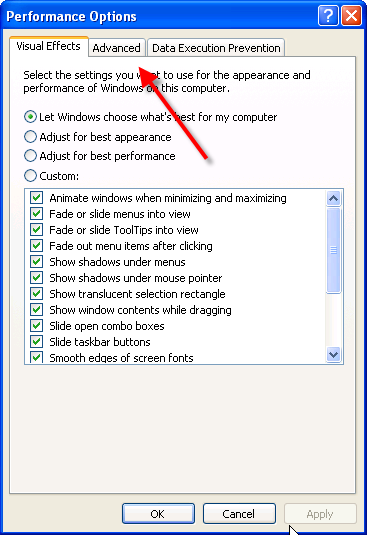
3.On the Advanced tab, under Performance, click Settings.
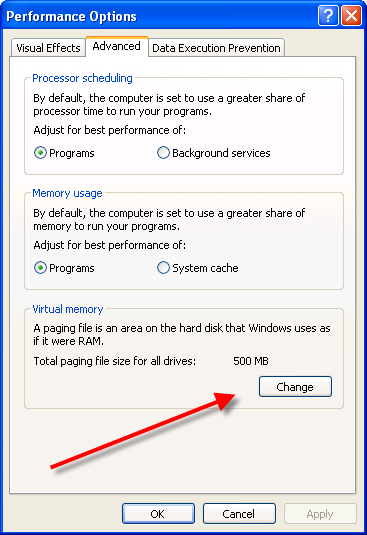
4.On the Advanced tab, under Virtual memory, click Change.
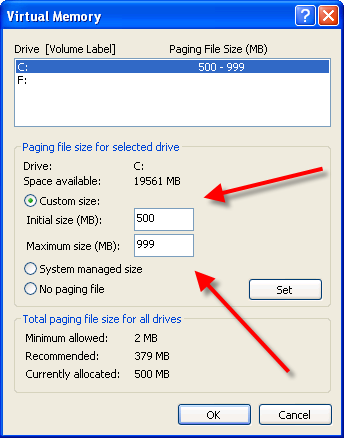
5.Under Drive [Volume Label], click the drive that contains the paging file that you want to change.
6.Under Paging file size for selected drive, click to Custom size check box. You can enter the amount of memory you would like to reserve for Virtual memory by entering the initial and maximum size.
7.Click Set
When you are prompted to restart the computer, click Yes.
Special Note: You should choose the same amount for the initial size and maximum size. This will Stop your CPU from constantly changing the paging file.
HOT TIP: To stop your CPU from constantly changing the paging file, set the initial and maximum size to the same value. For example 500 and 500. The value should be at least 1.5 times more than your physical RAM. If your computer has 512MB of RAM increase the virtual memory paging file to 1.5*512= 768
Increase Virtual Memory Picture 1
increase virtual memory picture 2
increase virtual memory 3
Remember to choose the drive you would like to use to increase the virtual memory. In most cases it usually your C: Drive. You can set the initial size and maximum size after clicking the Custom size check box.Remember its better to keep the Virtual memory values the same.
Also having enough available space is absolutely necessary for your virtual memory and RAM to function properly.