Help - SATA to USB Converter eka hondaida?

SATA to USB Converter eka hondai da/safe da?


  • Total voters
    7

chandima3010

Well-known member
  • Jul 6, 2007
    5,923
    196
    63
    Kurunegala
    Mata internal SATA2 hard drive ekak externaly use karanna USB walata convert karaganna one. Ekata converter 1k market eke tiyenawa.:cool:

    Namuth mata daganna one SATA 2 USB Converter risk 1k tiyenawada kiyala. Ekiyanne hard disk eke circuit ekata ho lifetime 1ta haniyak wenawadaa kiyala danaganna one.:( Mama hard disk 1 geniyanne na kohewath, just want it to be external.

    Any ideas?:confused:
     

    chanaka89

    Well-known member
  • Sep 27, 2007
    7,286
    53
    48
    36
    Kandy / Kurunegala
    Machan okata external power deddi avulda manda :confused: man IDE 2 USB converter ekak use kara.HDD eka restart venna gaththa passe :baffled: oka hinda vunada kiala nan dan ne hebei.anyways safe madi vage mata nan :oo:
     

    chandima3010

    Well-known member
  • Jul 6, 2007
    5,923
    196
    63
    Kurunegala
    Machan okata external power deddi avulda manda :confused: man IDE 2 USB converter ekak use kara.HDD eka restart venna gaththa passe :baffled: oka hinda vunada kiala nan dan ne hebei.anyways safe madi vage mata nan :oo:

    mama ahanne SATA machan, external power newe PC PSU eken power denne. aulakda?

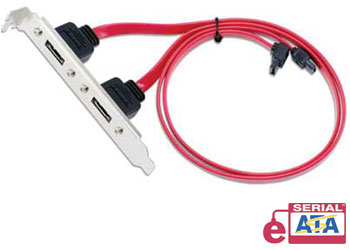
    its better to use e-Sata ;) (that is if u can)

    u mean SATA 2 eSATA ?
    can u explain why eSata? is it speed?
     

    VSGM

    Well-known member
  • Aug 2, 2007
    10,330
    213
    63
    eSATA is 3.0GB/s as i think.... It is Faster than SATA.. :):)

    no macho SATA and E-SATA both work at 3Gbs, but e-sata ports can be found out side the computers case!

    eSATA_TypA_lrg.jpg
     

    kosandpol

    Well-known member
  • Jun 10, 2008
    45,329
    1,492
    113
    No problem in using USB-SATA converters. Just make sure to turn on the power to the disk drive AFTER all the cables are connected.
     

    chandima3010

    Well-known member
  • Jul 6, 2007
    5,923
    196
    63
    Kurunegala
    No problem in using USB-SATA converters. Just make sure to turn on the power to the disk drive AFTER all the cables are connected.

    I wanna know how to turn off a hard drive without turning off the PC. (i think pulling the power cable is a gud idea:no:)

    and what about the SATA 2 eSATA converter?
     

    kosandpol

    Well-known member
  • Jun 10, 2008
    45,329
    1,492
    113
    I wanna know how to turn off a hard drive without turning off the PC. (i think pulling the power cable is a gud idea:no:)

    and what about the SATA 2 eSATA converter?
    the USB-SATA / USB-IDE converters usually have a switch on the power cable. You can use that to switch it on and off. So no need to pull the power cable to turn it off.

    Havent used Sata-eSata cables so no idea about them.