This guide aims to show you that how to backup your iPod songs and videos on your computer for Windows and Mac users.
It includes 2 parts:
Part 1: How to transfer iPod songs and videos to computer for Windows users
Part 2: How to transfer iPod songs and videos to Mac.
Part 1: How to transfer iPod songs and videos to computer for Windows users
Software Requirement: Aiseesoft iPod to Coumputer Transfer
It is a powerful iPod to computer transfer that can transfer all the iPod things to your computer; most importantly it supports all the iPods, from the oldest one to iPod nano-chromatic.
Step 1: Connect your iPod to your computer
When you plug your iPod into your computer, Aiseesoft iPod to Computer Transfer can automatically load your iPod into it.
Step 2: Choose songs
Choose the songs, videos, and other things that you want to backup at the top of the window. (1)
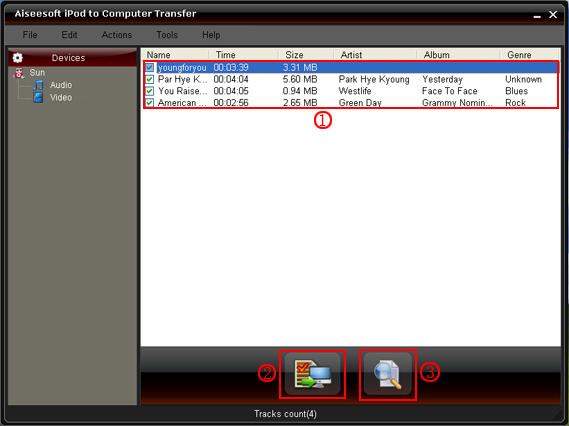
Step 3: The most important and the last thing you need to do are to click the “export to pc” button. (2).
After you click “export to pc” button a pop-up window will appear and with it you can choose where you place your iPod songs and videos.
Few seconds later you will have your iPod songs, videos and other things on your computer.
Part 2: How to transfer iPod songs and videos to Mac
Step 1: Download Aiseesoft iPod to Mac Transfer.
For Intel: http://www.aiseesoft.com/downloads/mac/ipod-to-mac-transfer-intel.dmg
For PPC: http://www.aiseesoft.com/downloads/mac/ipod-to-mac-transfer-power-pc.dmg
And install it.
Step 2: Plug your iPod to your Mac and run Aiseesoft iPod to Mac Transfer. It will find your iPod automatically.
Step 3: Just click Music and all of your music on your iPod will be listed, so you can pick up which songs you want to transfer. (Click “Video”/“Picture”, if you want to backup your videos and image.)
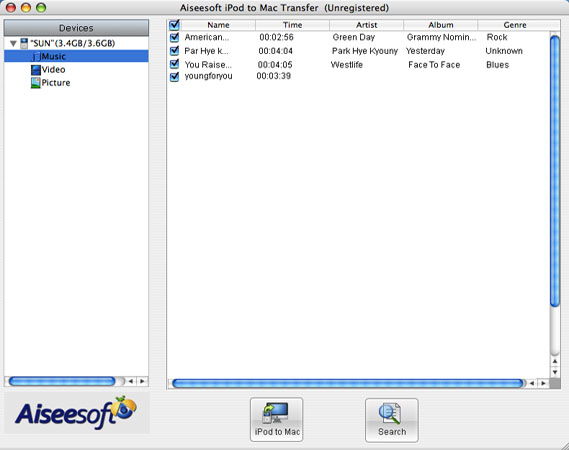
Step 4: Click “iPod to Mac” and few seconds later you will get your iPod songs on your Mac.
For all the users of iPod, this two iPod transfer can help you to backup all your iPod info, and you do not need to worry about loosing them.
It includes 2 parts:
Part 1: How to transfer iPod songs and videos to computer for Windows users
Part 2: How to transfer iPod songs and videos to Mac.
Part 1: How to transfer iPod songs and videos to computer for Windows users
Software Requirement: Aiseesoft iPod to Coumputer Transfer
It is a powerful iPod to computer transfer that can transfer all the iPod things to your computer; most importantly it supports all the iPods, from the oldest one to iPod nano-chromatic.
Step 1: Connect your iPod to your computer
When you plug your iPod into your computer, Aiseesoft iPod to Computer Transfer can automatically load your iPod into it.
Step 2: Choose songs
Choose the songs, videos, and other things that you want to backup at the top of the window. (1)
Step 3: The most important and the last thing you need to do are to click the “export to pc” button. (2).
After you click “export to pc” button a pop-up window will appear and with it you can choose where you place your iPod songs and videos.
Few seconds later you will have your iPod songs, videos and other things on your computer.
Part 2: How to transfer iPod songs and videos to Mac
Step 1: Download Aiseesoft iPod to Mac Transfer.
For Intel: http://www.aiseesoft.com/downloads/mac/ipod-to-mac-transfer-intel.dmg
For PPC: http://www.aiseesoft.com/downloads/mac/ipod-to-mac-transfer-power-pc.dmg
And install it.
Step 2: Plug your iPod to your Mac and run Aiseesoft iPod to Mac Transfer. It will find your iPod automatically.
Step 3: Just click Music and all of your music on your iPod will be listed, so you can pick up which songs you want to transfer. (Click “Video”/“Picture”, if you want to backup your videos and image.)
Step 4: Click “iPod to Mac” and few seconds later you will get your iPod songs on your Mac.
For all the users of iPod, this two iPod transfer can help you to backup all your iPod info, and you do not need to worry about loosing them.