How to Backup iPod Files to PC or Mac

miyallian

Member
Dec 1, 2009
1
0
0
This guide aims to show you that how to backup your iPod songs and videos on your computer for Windows and Mac users.
It includes 2 parts:
Part 1: How to transfer iPod songs and videos to computer for Windows users
Part 2: How to transfer iPod songs and videos to Mac.


Part 1: How to transfer iPod songs and videos to computer for Windows users
Software Requirement: Aiseesoft iPod to Coumputer Transfer
It is a powerful iPod to computer transfer that can transfer all the iPod things to your computer; most importantly it supports all the iPods, from the oldest one to iPod nano-chromatic.
Step 1: Connect your iPod to your computer
When you plug your iPod into your computer, Aiseesoft iPod to Computer Transfer can automatically load your iPod into it.
Step 2: Choose songs
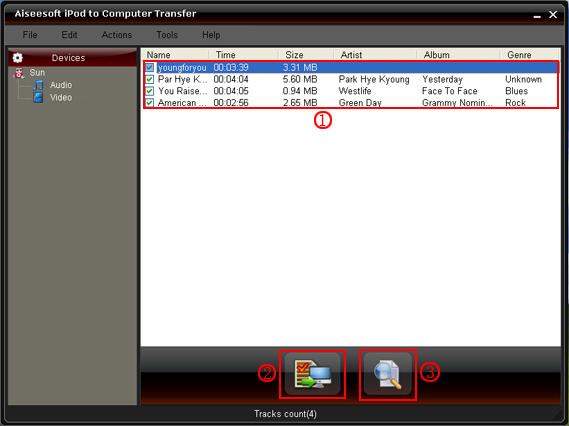
Choose the songs, videos, and other things that you want to backup at the top of the window. (1)
step.jpg


Step 3: The most important and the last thing you need to do are to click the “export to pc” button. (2). After you click “export to pc” button a pop-up window will appear and with it you can choose where you place your iPod songs and videos.
Few seconds later you will have your iPod songs, videos and other things on your computer.

Part 2: How to transfer iPod songs and videos to Mac
Step 1: Download Aiseesoft iPod to Mac Transfer.
For Intel: http://www.aiseesoft.com/downloads/mac/ipod-to-mac-transfer-intel.dmg
For PPC: http://www.aiseesoft.com/downloads/mac/ipod-to-mac-transfer-power-pc.dmg
And install it.
Step 2: Plug your iPod to your Mac and run Aiseesoft iPod to Mac Transfer. It will find your iPod automatically.
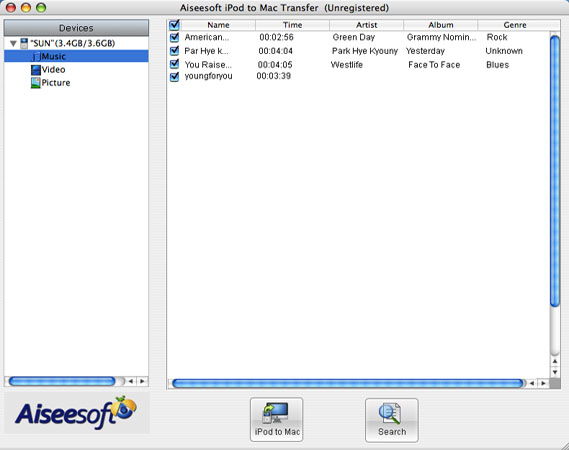
Step 3: Just click Music and all of your music on your iPod will be listed, so you can pick up which songs you want to transfer. (Click “Video”/“Picture”, if you want to backup your videos and image.)
list.jpg


Step 4: Click “iPod to Mac” and few seconds later you will get your iPod songs on your Mac.

For all the users of iPod, this two iPod transfer can help you to backup all your iPod info, and you do not need to worry about loose them.

iPod Transfer
iPod Manager for Mac
 

taiyniuoj

Member
Dec 30, 2009
7
0
0
Most people has the habit of collecting DVD movies, however, the disc is really easy to be broken. it is really hard to protect them. So i backup my DVD collection on my computer. i watch the movies whenever i want. i use this DVD Ripper to help me.
it can convert dvd to any video format you want, such as: mp4, wmv, avi, mov, mkv, flv, 3gp and so on. Here i also recommend you a really powerful Video Converter. it can convert all videos to different formats.
More, I use DVD to iPod Converter to put my DVD on my iPod easily.
it is really fast and easy to use
 

nickbob26

Member
Apr 22, 2010
6
0
0
Backup your DVD movies and home-made DVD to another DVD disc/DVD Folder/ISO image File, i use Aiseesoft DVD Copy. it can help you to copy DVD-5 video to DVD-5 format, copy DVD-9 to DVD-9 in 1:1 ratio exactly and compress DVD-9 video to DVD-5 format. It can not only copy DVD but copy DVD disk to DVD folder or ISO image files for backup and other use. Burn local DVD Folders or ISO image Files to DVD disk is also available.
Key Feature:
1. Choose for copy the whole DVD or the main movie
2. Compatible with all DVD formats
3. More specific settings

I have used many dvd ripping software, but i think this Best DVD Ripper is the best. it is fast[Provide the fastest conversion speed (>300%)] and easy to use. it can help you to rip your DVD to MP4, H.264, AVI, MP3, WMV, WMA, FLV, MKV, MPEG-1, MPEG-2, 3GP, 3GPP, VOB, DivX, Mov, RM, RMVB, M4A, AAC, WAV, etc.

key Feature:
1. Trim DVD freely
2. Setting output video and audio parameters
3. Merge into one file
4. Crop your video
5. Capture your favorite image

Nowadays, hd video is widely used in hd camcorder. But there are not many video converter can convert them, here i know a really nice M2TS Converter. it can help you to convert M2TS to AVI, MP4, WMV, 3GP and all the popular video formats. It also natively supports converting MTS, TS, TOD, MOD and more. it can convert hd video to normal video format, but also can convert video between normal video formats, such as mp4, wmv, avi, mov, 3gp, flv, mkv, mpeg and so on.

Key Feature:
1. Unmatched Video Editing Feature
Get your desired video quality by modifying video Brightness, Contrast, Saturation. With it, you also can apply your modified standard to all the movies
2. Improve the effects of interlacing video by using deinterlacing
3. Cut any clip of video (Trim) and Crop Video Size
4. Merge several videos into one file
 

evanovaci

Banned
Apr 23, 2010
5
0
0
MTS Converter is a really nice converter that can convert your MTS file to other video format, it is also a HD Converter that can convert M2TS, TS and other HD video. it also has powerful video editing functions, such as effect, trim, crop, merge ans so on.
 

whoooawy

Member
Apr 28, 2010
2
0
0
I know a really nice Total video converter. it can convert almost all popular video format. it can also a TS Converter that can compress HD video to standard video mp4 video to put on iPod, iPhone, Archos, PSP and other portable devices. it also has powerful video editing functions, such as effect, trim, crop, and so on.
i found a really nice M2TS Converter. it is really powerful that can convert M2TS to AVI, MP4, WMV, 3GP and all the popular video formats. It also natively supports converting MTS, TS, TOD, MOD and more.
 

firstday67

Banned
May 4, 2010
7
0
0
convert .mod/.tod video file to other video formats, i use mod video converter. it can help you to convert your mod/tod file to MPG, MPEG, MPEG2, VOB, MP4, M4V, RM, RMVB, WMV, ASF, QT, TS, MKV, AVI, 3GP, FLV, MPV.
This mod converter also can help you to edit the video, such as trim, crop, merge, effect and so on. it is really fast and easy to use.
 

banwan42

Banned
May 6, 2010
7
0
0
So many third-party software development companies have already set their sights on this huge potential market and aimed at the profits this iPad can bring. Since this revolutionary and innovative iPad is running on the iPhone operating system (currently, version 3.2), users cannot transfer files between PC and iPad freely. In order for iPad users to transfer video and audio to iPad, we, the Aiseesoft Studio, as well as being before, will work better to enhance your enjoyment between iPad and any other portable device.DVD to iPad Converter | iPad Video Converter | iPad Transfer | iPad Converter Suite.
 

qibajiu

Banned
May 7, 2010
4
0
0
This new iPad has a height of 9.56 inches (242.8 mm), width of 7.47 inches (189.7 mm), depth of 0.5 inch (13.4 mm), and a screen size of 9.7 inches diagonally (1024×768 resolution). It weighs 1.5 pounds (.68 kg) Wi-Fi model; 1.6 pounds (.73 kg) Wi-Fi + 3G model. According to its spec, the Apple iPad’s battery will last around 10 hours on a single charge and 30 days on a standby mode.
DVD to iPad Converter for Mac | iPad Video Converter for Mac
 

kettyfox

Member
May 20, 2010
6
0
0
I am a Mac user and i have bunches of DVD movies and home-made DVD videos, sometimes i break my DVD disc and it is really bad. Now i found a really powerful and easy to use DVD Copy for Mac. it can help me to copy my DVD movies to another DVD disc and when i want to watch my dvd or borrow to friends i can use the copy one not the original. it is really nice that i can protect my DVD movie from being destroyed.
it can copy DVD-5(holds 4.7 G) to DVD-5, copy DVD-9 (holds 8.5 G) to DVD-9, or compress DVD-9 to DVD-5. This Mac DVD Copy software also provides you to Copy DVD successively, select what you want subtitle, audio tracks, include the DVD Menus or remove it to your own defined DVD, or edit your DVD volume.

if you do not want to copy the DVD disc, you can also use this DVD Ripper for Mac to convert your DVD movies to normal video format that can be played on your Mac, such as AVI, MP4, MOV, MKV, WMV, DivX, XviD, MPEG-1/2, 3GP, 3G2, VOB… video formats, and MP3, AAC, AC3… audio formats on Mac.
it is really fast and with high output quality. it can also do many video editing works, such as trim, crop, merge and snapshot, effect, etc.

When you have many video with different video formats, it is really unconvenient. here i know a really powerful video converter for Mac that will help you to convert your videos to the video format you want on your Mac.it can convert your videos to AVI, MP4, MOV, MKV, WMV, DivX, XviD, MPEG-1/2, 3GP, 3G2, VOB and HD Video (TS, MTS, M2TS), MP3, AAC, and AC3 Audio etc. In addition, the best video converter for Mac can also extract audio from video file and convert video to MP3, AC3, and AAC…as you want.
 

nacepull

Member
May 27, 2010
5
0
0
Share a Blu Ray Ripper, which can rip Blu-Ray DVD and Common DVD with Only One Ripper.
This Blu Ray Ripper can convert Blu Ray DVD and m2ts files to HD video including HD AVI, HD XviD/DivX, HD MP4, MOV, HD WMV files and all the common video formats MP4, AVI, WMV, MKV, FLV, SWF with high quality.
 

cookcheap

Banned
Jun 10, 2010
6
0
0
MTS Converter is a really nice converter that can convert your MTS file to other video format, it is also a HD Converter that can convert M2TS, TS and other HD video. it also has powerful video editing functions, such as effect, trim, crop, merge ans so on.
 

craseyb

Member
Jun 11, 2010
5
0
0
I know a really nice Total video converter. it can convert almost all popular video format. it can also a TS Converter that can compress HD video to standard video mp4 video to put on iPod, iPhone, Archos, PSP and other portable devices. it also has powerful video editing functions, such as effect, trim, crop, and so on.
i found a really nice M2TS Converter. it is really powerful that can convert M2TS to AVI, MP4, WMV, 3GP and all the popular video formats. It also natively supports converting MTS, TS, TOD, MOD and more.
 

gedenbull

Banned
Jun 17, 2010
5
0
0
I am a Mac user and i have bunches of DVD movies and home-made DVD videos, sometimes i break my DVD disc and it is really bad. Now i found a really powerful and easy to use DVD Copy for Mac. it can help me to copy my DVD movies to another DVD disc and when i want to watch my dvd or borrow to friends i can use the copy one not the original. it is really nice that i can protect my DVD movie from being destroyed.
it can copy DVD-5(holds 4.7 G) to DVD-5, copy DVD-9 (holds 8.5 G) to DVD-9, or compress DVD-9 to DVD-5. This Mac DVD Copy software also provides you to Copy DVD successively, select what you want subtitle, audio tracks, include the DVD Menus or remove it to your own defined DVD, or edit your DVD volume.

if you do not want to copy the DVD disc, you can also use this DVD Ripper for Mac to convert your DVD movies to normal video format that can be played on your Mac, such as AVI, MP4, MOV, MKV, WMV, DivX, XviD, MPEG-1/2, 3GP, 3G2, VOB… video formats, and MP3, AAC, AC3… audio formats on Mac.
it is really fast and with high output quality. it can also do many video editing works, such as trim, crop, merge and snapshot, effect, etc.

When you have many video with different video formats, it is really unconvenient. here i know a really powerful video converter for Mac that will help you to convert your videos to the video format you want on your Mac.it can convert your videos to AVI, MP4, MOV, MKV, WMV, DivX, XviD, MPEG-1/2, 3GP, 3G2, VOB and HD Video (TS, MTS, M2TS), MP3, AAC, and AC3 Audio etc. In addition, the best video converter for Mac can also extract audio from video file and convert video to MP3, AC3, and AAC…as you want.
 

bikycook

Banned
Jun 18, 2010
4
0
0
Share a Blu Ray Ripper, which can rip Blu-Ray DVD and Common DVD with Only One Ripper.
This Blu Ray Ripper can convert Blu Ray DVD and m2ts files to HD video including HD AVI, HD XviD/DivX, HD MP4, MOV, HD WMV files and all the common video formats MP4, AVI, WMV, MKV, FLV, SWF with high quality.