


As we all know that MP4 is a container format that can be used for cell phone, iPod, iPhone, PSP, Zune, Creative Zen Vision, Archos, etc. So most of the time, MP4 converter can meet all the portable device users’ converting needs.
Recently 4Easysoft Studio has updated their MP4 Converter with more powerful functions but the same price. This article is designed to show you how to convert and edit any video to MP4 format.
Preparation: Intall and run 4Easysoft MP4 Converter
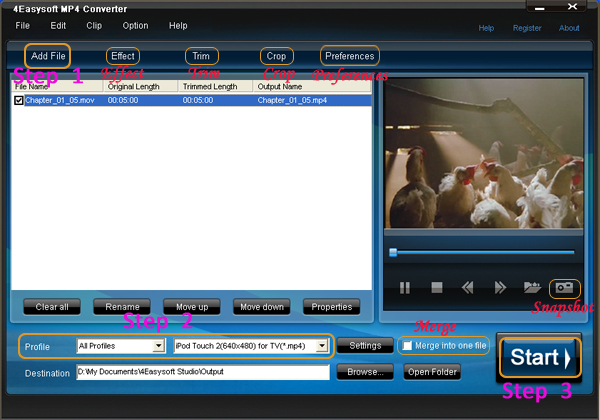
Step 1: Import files
Click “Add File” button, you are allowed to import versatile video/audio files.
New: Except normal video and audio formats, this converter can aslo support various HD videos, such as HD MTS, HD MPEG, HD WMV, HD MOV, HD H.264, HD RM, etc as its input formats.
Step 2: Select output format
Click the “Profile” button to select the output video format from the drop-down list button.
New: The output format can be MPEG-4, H.264/MPEG-4 AVC, MOV, H.264 AVI, DivX, XviD, HD H.264, HD AVI, HD MPEG 4, HD MOV to support iPod, iPhone, PSP, Zune, Walkman, BlackBerry, Archos and Creative Zen Vision, etc.
Step 3: Start conversion
Click “Start” button, you are allowed to start conversion. All the tasks of conversion will be finished at fast speed and high output quality.
Editting Tips:
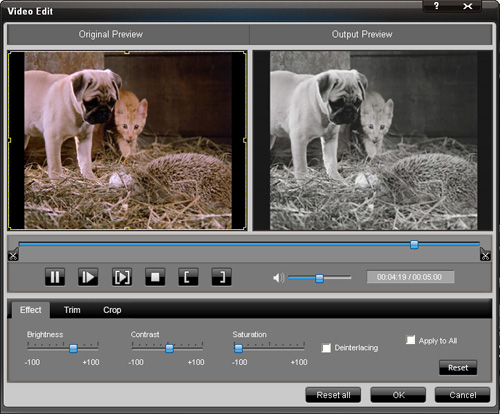
1. Adjust video effect
Click “Effect” button and a dialogue pops up, you can set the video Brightness, Contrast, Saturation and check the Deinterlacing which helps you to optimize the video effect.
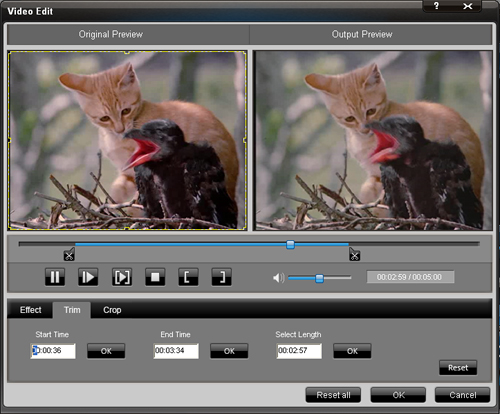
2. Trm video
Click “Trim” button, a dialogue will pops up.Then you can trim the videos by dragging the slider bar, click "Start Time" and "End Time" button, or setting the values
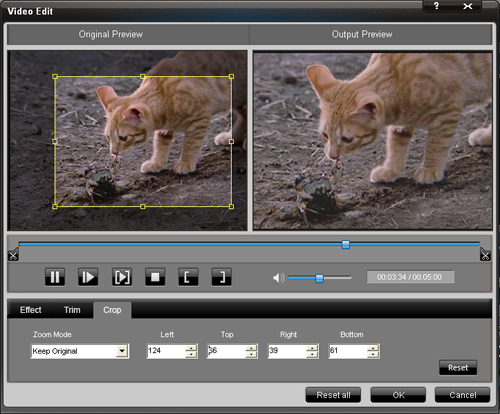
3.Crop video
Click “Crop” button and you can crop videos by selecting a crop mode, adjusting the crop frame, or setting the crop values.
4. Select preference
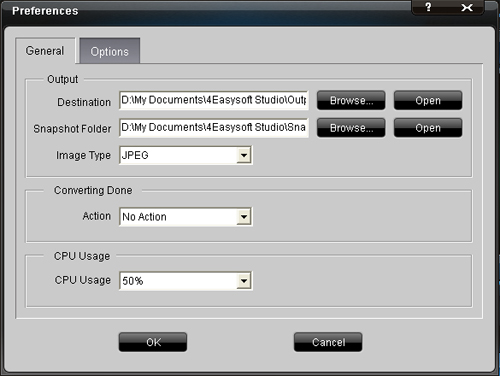
Click the “Preference” button you can select the output destination, the Snapshot foler, the format of the snapshot image,etc.
5.Take snapshot
Just click the "Snapshot" button, you can save any picture you like when you are previewing vdieos.
6.Merge your files
If you want to merge several files into one file you can choose them and click the "Merge into one file" to do it.
Now you can enjoy any video on your iPod, PSP, iPhone, PSP, Zune, Creative Zen Vision…...
More useful tools:
4Easysoft HD Converter:
It can convert HD DV, HD TS, MTS, M2TS and other HD videos; convert SD (Standard-Definition) video or general video to HD video; convert among SD videos; and has bility to edit or polish video - Merge, Effect, Trim, Crop and Snapshot.
4Easysoft MTS Converter:
It can convert MTS to AVI, MPEG, MP4, WMV and other videos; support broad inputing formats, like TS, MTS, TS, MOD, TOD, MOV, FLV, WMV, HD MP4, etc; get audio from videos and audios; and has powerful editing functions.
Recently 4Easysoft Studio has updated their MP4 Converter with more powerful functions but the same price. This article is designed to show you how to convert and edit any video to MP4 format.
Preparation: Intall and run 4Easysoft MP4 Converter
Step 1: Import files
Click “Add File” button, you are allowed to import versatile video/audio files.
New: Except normal video and audio formats, this converter can aslo support various HD videos, such as HD MTS, HD MPEG, HD WMV, HD MOV, HD H.264, HD RM, etc as its input formats.
Step 2: Select output format
Click the “Profile” button to select the output video format from the drop-down list button.
New: The output format can be MPEG-4, H.264/MPEG-4 AVC, MOV, H.264 AVI, DivX, XviD, HD H.264, HD AVI, HD MPEG 4, HD MOV to support iPod, iPhone, PSP, Zune, Walkman, BlackBerry, Archos and Creative Zen Vision, etc.
Step 3: Start conversion
Click “Start” button, you are allowed to start conversion. All the tasks of conversion will be finished at fast speed and high output quality.
Editting Tips:
1. Adjust video effect
Click “Effect” button and a dialogue pops up, you can set the video Brightness, Contrast, Saturation and check the Deinterlacing which helps you to optimize the video effect.
2. Trm video
Click “Trim” button, a dialogue will pops up.Then you can trim the videos by dragging the slider bar, click "Start Time" and "End Time" button, or setting the values
3.Crop video
Click “Crop” button and you can crop videos by selecting a crop mode, adjusting the crop frame, or setting the crop values.
4. Select preference
Click the “Preference” button you can select the output destination, the Snapshot foler, the format of the snapshot image,etc.
5.Take snapshot
Just click the "Snapshot" button, you can save any picture you like when you are previewing vdieos.
6.Merge your files
If you want to merge several files into one file you can choose them and click the "Merge into one file" to do it.
Now you can enjoy any video on your iPod, PSP, iPhone, PSP, Zune, Creative Zen Vision…...
More useful tools:
4Easysoft HD Converter:
It can convert HD DV, HD TS, MTS, M2TS and other HD videos; convert SD (Standard-Definition) video or general video to HD video; convert among SD videos; and has bility to edit or polish video - Merge, Effect, Trim, Crop and Snapshot.
4Easysoft MTS Converter:
It can convert MTS to AVI, MPEG, MP4, WMV and other videos; support broad inputing formats, like TS, MTS, TS, MOD, TOD, MOV, FLV, WMV, HD MP4, etc; get audio from videos and audios; and has powerful editing functions.


