How to Convert Video Files on Mac/Windows

groveyy

Member
Nov 10, 2009
1
0
0
Nowadays, people can enjoy videos in different ways, such as youtube.com and other online video websites, iPod/Zune and other portable players, and also play video on computer, and you can also make you own videos with windows movie make or iMovie for Mac users. So how to convert videos between different video formats is a big problem for both windows and Mac users. Today I will share you guys two powerful video converter for Mac and Windows users.

For Mac users, this powerful video converter for mac is really nice.
Let's use it to convert a video for Example
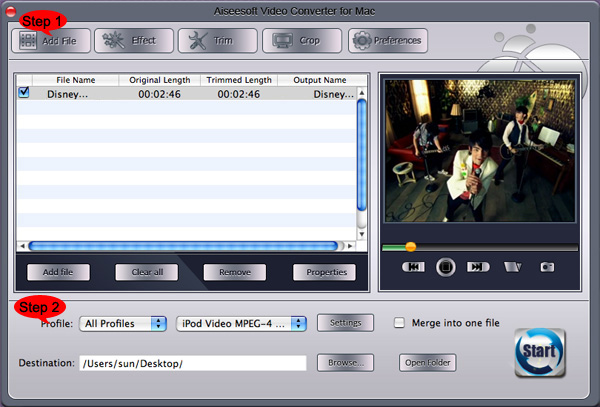
steps.jpg


Step 1: Add File
Click “Add File” button to load the video you want to converter

Step 2: Choose profile and adjust settings
You can find your output video format from a drop-list called “Profile”
You can also adjust the specific settings of the output video, such as “Resolution”, “Bitrate”, “Encoder” and so on.

Step 3: Edit Video
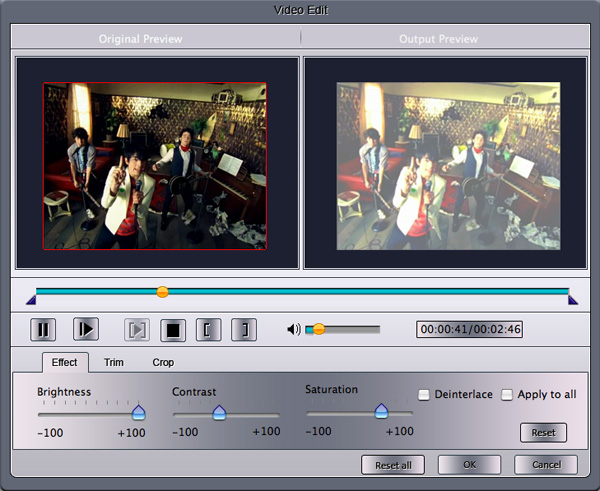
1. Effect:
You can adjust the “Brightness”, “Contrast”, “Saturation” and “Volume”
effect.jpg

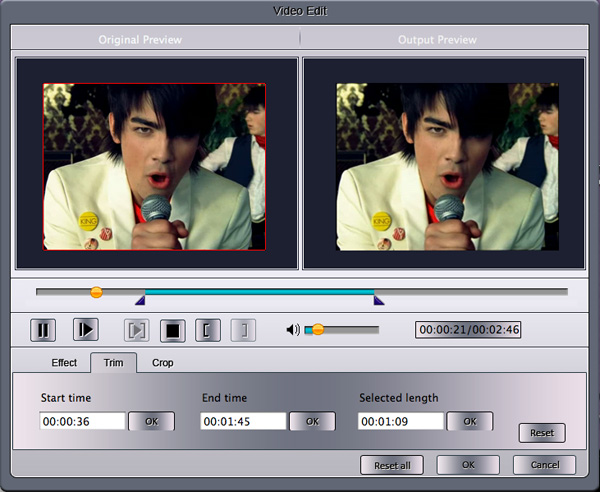
2. Trim:
You are allowed to pick up any part of the video to convert.
trim.jpg

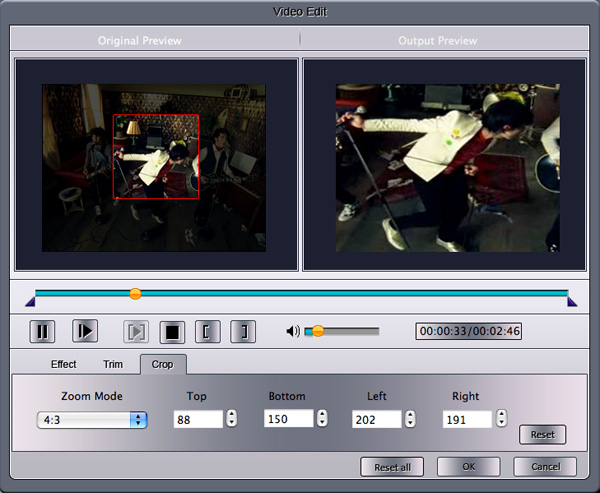
3. Crop:
To remove the black edges and choose a play area to convert.
crop.jpg

Step 4: Start Conversion
Click “Start” button to begin your conversion and you will get your video soon.

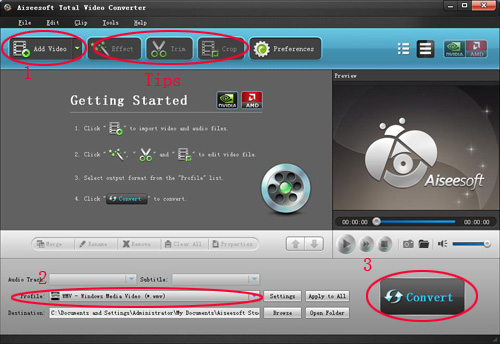
For Windows users, you need Total Video Converter.
screen-new.jpg


Step 1: Load Video
You can load your videos into the converter by clicking “Add File”

Step 2: Choose output info
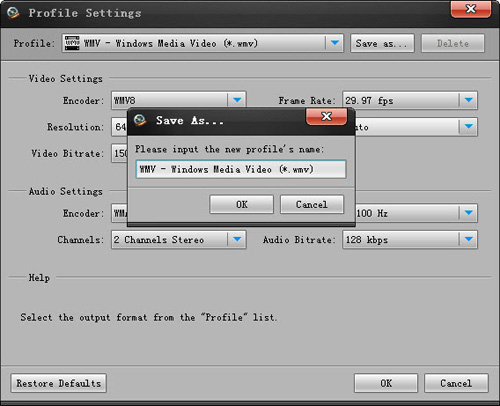
This converter provides you many output profiles for you to choose, you can choose your output profiles according to your need. And also you can just choose a certain video format.

You can also adjust the settings of your output profiles. You can even save a certain settings as your own output settings.
settings-new.jpg


Step 3: Conversion
Click “Start” button to begin your conversion and few mins later you can get your video.

Tips: How to effect, trim and crop the video to improve your output video quality.
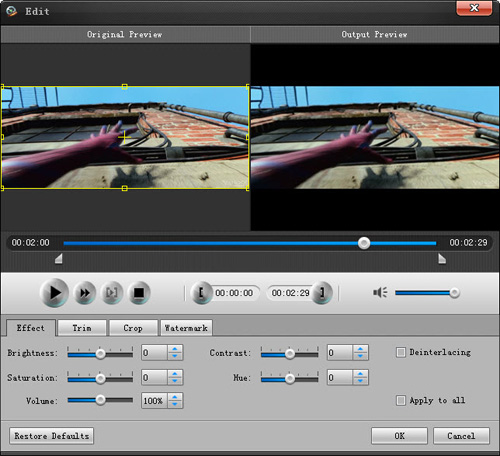
After your Load your video you can click “Effect” button to access the effect panel

1: Effect
Adjust the video effect as you want: Brightness, Contrast, Saturation and Deinterlacing.
effect-new.jpg


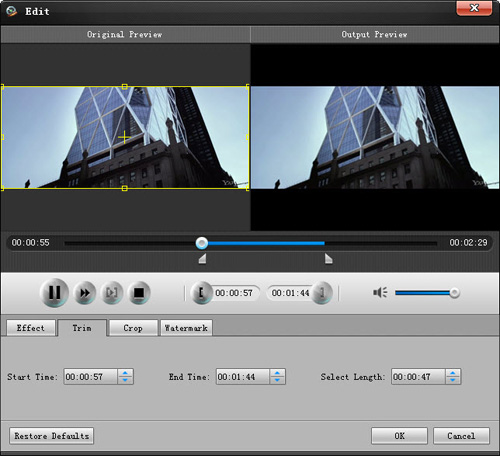
2: Trim
Clip your video, pick up any part of your video to convert.
You have 3 ways to do trim:

1.Dragging the slider

2.Controlling the “Trim From” and “Trim To” button

3.Setting the Start and End time
trim-new.jpg


3: Crop
Adjust video size, Cut off the black edge of your video to let you enjoy your movie in full screen by click the 'Crop' button
You have 2 ways to do crop:

1.Move your mouse cursor onto one of the eight small adjustment boxes on the cropping frame and drag the crop frame to crop the video such as cutting off top and bottom black bar. The cropped result will be shown on the Output Preview at the same time

2.Type the value directly or set the value in "Left", "Right" and "Cropped area size" area to set the position of the cropping frame.
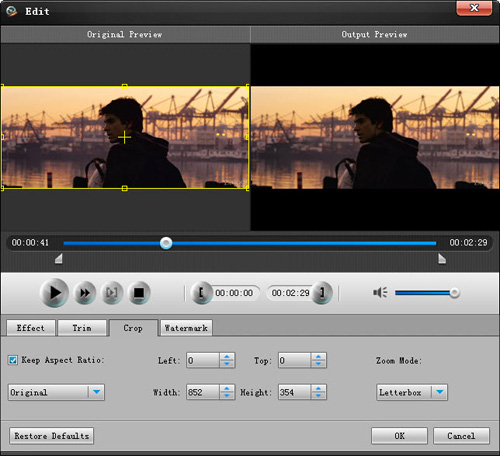
crop-new.jpg


You can also select the aspect ratio from the Zoom Mode drop-down list. There are 4 choices for you: Full Screen, 16:9, 4:3 and Keep Original.
 

firstday67

Banned
May 4, 2010
7
0
0
convert .mod/.tod video file to other video formats, i use mod video converter. it can help you to convert your mod/tod file to MPG, MPEG, MPEG2, VOB, MP4, M4V, RM, RMVB, WMV, ASF, QT, TS, MKV, AVI, 3GP, FLV, MPV.
This mod converter also can help you to edit the video, such as trim, crop, merge, effect and so on. it is really fast and easy to use.
 

kettyfox

Member
May 20, 2010
6
0
0
I am a Mac user and i have bunches of DVD movies and home-made DVD videos, sometimes i break my DVD disc and it is really bad. Now i found a really powerful and easy to use DVD Copy for Mac. it can help me to copy my DVD movies to another DVD disc and when i want to watch my dvd or borrow to friends i can use the copy one not the original. it is really nice that i can protect my DVD movie from being destroyed.
it can copy DVD-5(holds 4.7 G) to DVD-5, copy DVD-9 (holds 8.5 G) to DVD-9, or compress DVD-9 to DVD-5. This Mac DVD Copy software also provides you to Copy DVD successively, select what you want subtitle, audio tracks, include the DVD Menus or remove it to your own defined DVD, or edit your DVD volume.

if you do not want to copy the DVD disc, you can also use this DVD Ripper for Mac to convert your DVD movies to normal video format that can be played on your Mac, such as AVI, MP4, MOV, MKV, WMV, DivX, XviD, MPEG-1/2, 3GP, 3G2, VOB… video formats, and MP3, AAC, AC3… audio formats on Mac.
it is really fast and with high output quality. it can also do many video editing works, such as trim, crop, merge and snapshot, effect, etc.

When you have many video with different video formats, it is really unconvenient. here i know a really powerful video converter for Mac that will help you to convert your videos to the video format you want on your Mac.it can convert your videos to AVI, MP4, MOV, MKV, WMV, DivX, XviD, MPEG-1/2, 3GP, 3G2, VOB and HD Video (TS, MTS, M2TS), MP3, AAC, and AC3 Audio etc. In addition, the best video converter for Mac can also extract audio from video file and convert video to MP3, AC3, and AAC…as you want.
 

deepdarl

Member
May 26, 2010
2
0
0
I know a really nice Total video converter. it can convert almost all popular video format. it can also a TS Converter that can compress HD video to standard video mp4 video to put on iPod, iPhone, Archos, PSP and other portable devices. it also has powerful video editing functions, such as effect, trim, crop, and so on.
i found a really nice M2TS Converter. it is really powerful that can convert M2TS to AVI, MP4, WMV, 3GP and all the popular video formats. It also natively supports converting MTS, TS, TOD, MOD and more.
 

naygreen9

Banned
Jun 9, 2010
2
0
0
So many third-party software development companies have already set their sights on this huge potential market and aimed at the profits this iPad can bring. Since this revolutionary and innovative iPad is running on the iPhone operating system (currently, version 3.2), users cannot transfer files between PC and iPad freely. In order for iPad users to transfer video and audio to iPad, we, the Aiseesoft Studio, as well as being before, will work better to enhance your enjoyment between iPad and any other portable device.DVD to iPad Converter | iPad Video Converter | iPad Transfer | iPad Converter Suite.
 

gedenbull

Banned
Jun 17, 2010
5
0
0
I am a Mac user and i have bunches of DVD movies and home-made DVD videos, sometimes i break my DVD disc and it is really bad. Now i found a really powerful and easy to use DVD Copy for Mac. it can help me to copy my DVD movies to another DVD disc and when i want to watch my dvd or borrow to friends i can use the copy one not the original. it is really nice that i can protect my DVD movie from being destroyed.
it can copy DVD-5(holds 4.7 G) to DVD-5, copy DVD-9 (holds 8.5 G) to DVD-9, or compress DVD-9 to DVD-5. This Mac DVD Copy software also provides you to Copy DVD successively, select what you want subtitle, audio tracks, include the DVD Menus or remove it to your own defined DVD, or edit your DVD volume.

if you do not want to copy the DVD disc, you can also use this DVD Ripper for Mac to convert your DVD movies to normal video format that can be played on your Mac, such as AVI, MP4, MOV, MKV, WMV, DivX, XviD, MPEG-1/2, 3GP, 3G2, VOB… video formats, and MP3, AAC, AC3… audio formats on Mac.
it is really fast and with high output quality. it can also do many video editing works, such as trim, crop, merge and snapshot, effect, etc.

When you have many video with different video formats, it is really unconvenient. here i know a really powerful video converter for Mac that will help you to convert your videos to the video format you want on your Mac.it can convert your videos to AVI, MP4, MOV, MKV, WMV, DivX, XviD, MPEG-1/2, 3GP, 3G2, VOB and HD Video (TS, MTS, M2TS), MP3, AAC, and AC3 Audio etc. In addition, the best video converter for Mac can also extract audio from video file and convert video to MP3, AC3, and AAC…as you want.
 

Yalnaioe

Banned
Jun 19, 2010
6
0
0
I know a really nice Total video converter. It can convert almost all popular video format. It can also a HD Converter that can compress HD video to standard video mp4 video to put on iPod, iPhone, Archos, PSP and other portable devices. it also has powerful video editing functions, such as effect, trim, crop, and so on.
I found a really nice M2TS Converter. it is really powerful that can convert M2TS to AVI, MP4, WMV, 3GP and all the popular video formats. It also natively supports converting MTS, TS, TOD, MOD and more.
 

tomusgreen

Member
Jul 1, 2010
8
0
0
So many third-party software development companies have already set their sights on this huge potential market and aimed at the profits this iPad can bring. Since this revolutionary and innovative iPad is running on the iPhone operating system (currently, version 3.2), users cannot transfer files between PC and iPad freely. In order for iPad users to transfer video and audio to iPad, we, the Aiseesoft Studio, as well as being before, will work better to enhance your enjoyment between iPad and any other portable device.DVD to iPad Converter | iPad Video Converter | iPad Transfer | iPad Converter Suite.

DVD to iPhone 4 Converter | iPhone 4 Video Converter
 

Mandndoi

Member
Jul 14, 2010
10
0
0
These days I was puzzled about how rip a DVD, convert video and transfer music from ipod to computer . I hope all my needs can be satisfied with only one tool. Occasionally , I found the DVD Converter Suite. It has the function of DVD and video converting , extracting audio from DVD movie and video files , transfering songs from iPod to PC. Besides, the transfering speed and quality is really excellent. If you are a Mac user, the DVD Converter for Mac is just for you. You can first read this this article to know how to convert DVD or video step by step .
 

Mandndoi

Member
Jul 14, 2010
10
0
0
These days I was puzzled about how rip a DVD, convert video and transfer music from ipod to computer . I hope all my needs can be satisfied with only one tool. Occasionally , I found the DVD Converter Suite. It has the function of DVD and video converting , extracting audio from DVD movie and video files , transfering songs from iPod to PC. Besides, the transfering speed and quality is really excellent. If you are a Mac user, the DVD Converter for Mac is just for you. You can first read this this article to know how to convert DVD or video step by step .
 

Ralimne

Member
Aug 21, 2010
6
0
0
I found a really nice M2TS Converter. it is really powerful that can convert M2TS to AVI, MP4, WMV, 3GP and all the popular video formats. It also natively supports converting MTS, TS, TOD, MOD and more. Aiseesoft M2TS Converter can efficiently convert all audios to AAC, AC3, MP3, M4A, MP2, OGG, WAV, WMA and more, or extract audio from M2TS, TS and others to those audio formats.
It is really fast and can do many video editing works, such as trim, crop, merge and so on.