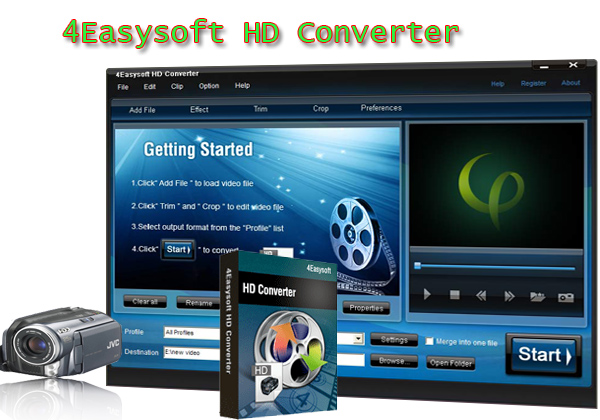
Many of my friends has asked me how to make back-up copies of some of their DVDs, and is it possible to play a movie on your pc, pause it, and then copy that image to desktop background? To be frank, I really don’t know how to answer them. But now, with the help of a DVD Copier, I can easily to solve their questions.
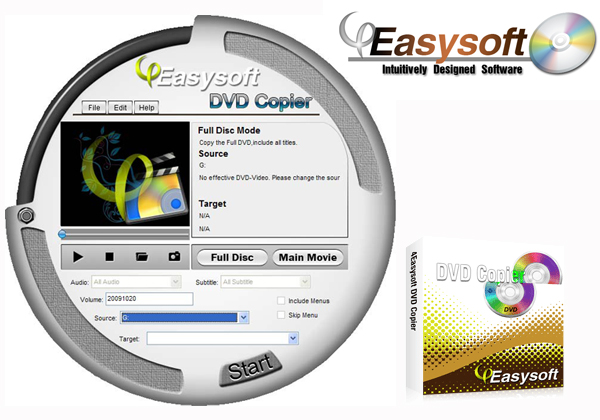
It is 4Easysoft DVD Copier which can easily copy DVD to DVD in 1:1 ratio or compress DVD-9 to DVD-5, backup DVD to DVD folders or ISO image files on your local disk, and burn DVD from local DVD folders or ISO files. The following are the detailed guide:
Preparation:Download and install 4Easysoft DVD Copier
Step 1: Select DVD Source.
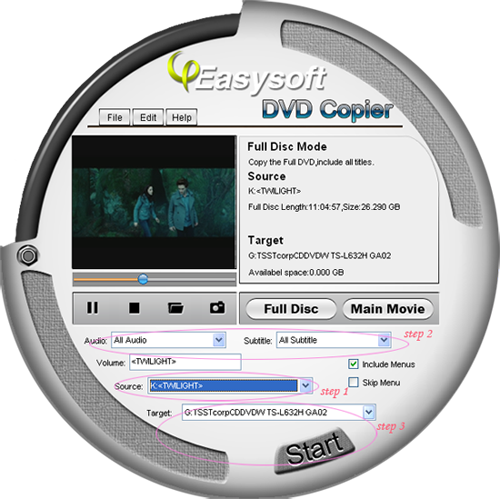
After you have launched this software and insert DVD to your DVD driver, from the “Source” drop-down menu, you can load DVD folder or DVD image ISO
Step 2: Set the output information
Audio: You can choose your output audio from the "Audio" drop-down list, such as "all audio", "None" or some audio the DVD provide.
Subtitle: Subtitle is always an important thing, you can choose your output subtitle in "Subtitle" drop-down list.
Volume name: You can also name your output volume's nameA
Step 3: Select the target and start the copy
From the “Target” drop-down list, you can copy DVD to another DVD disc, DVD folder or DVD image ISO.
Click "Start" button to begin your DVD Copying.
After the copy is done, a window will appear to inform you that the copy is finished. Click "Finish" to close the window and end the copy.
Tips:
Tip 1:Select the copy mode
Before you start the copy, you can choose to copy the “Full Disc” or “Main Movie”
Full Disc: Copy the entire DVD-Video discs, DVD-Video images (.iso) or DVD-Video folders, including all the titles;
Main Movie: Copy the longest title contained in DVD-Video discs, DVD-Video images (.iso) or DVD-Video folders to one DVD disc, getting rid of the features and the movie trailers.
Tip 2:Select preferences
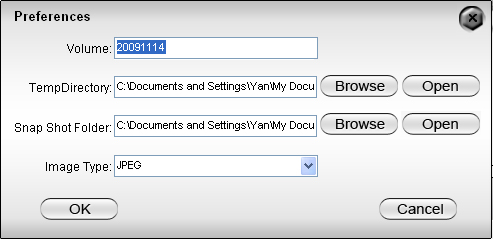
From the “Edit” drop-down list, you can click “Preferences” to choose the Snap Shot folder, Image type, etc.
Tip 3: Has broad applicability
This DVD copier software is compatible with DVD+-R/RW, DVD-RAM, most DVD players and burners, and Dual Layer 8.5GB disc.
Tip 4:Take snapshot
While previewing your DVD movies, you can take your favorite pictures.
Now just enjoy this wonderful tool[FONT=宋]![/FONT]
Related tools:
4Easysoft DVD to Video Converter:
It is one multifunctional DVD Video Converter, which brings you to convert DVD to AVI, MP4, WMV, MOV, M4V, FLV, SWF, 3GP, and HD H.264, HD AVI, HD MPG, HD TS, HD WMV, HD MPEG 4, HD MOV, HD ASF, and more. This DVD to Video Converter also available to convert DVD to your portable players like iPod, iPhone, PSP, Zune, Creative Zen, Xbox, Wii... in great compatibility.
4Easysoft Total Video Converter:
This converter can help you convert among all mainstream video and audio formats and help you take videos easily on PSP, PS3, iPod, iPhone, Apple TV, Xbox or other digital devices.
It is 4Easysoft DVD Copier which can easily copy DVD to DVD in 1:1 ratio or compress DVD-9 to DVD-5, backup DVD to DVD folders or ISO image files on your local disk, and burn DVD from local DVD folders or ISO files. The following are the detailed guide:
Preparation:Download and install 4Easysoft DVD Copier
Step 1: Select DVD Source.
After you have launched this software and insert DVD to your DVD driver, from the “Source” drop-down menu, you can load DVD folder or DVD image ISO
Step 2: Set the output information
Audio: You can choose your output audio from the "Audio" drop-down list, such as "all audio", "None" or some audio the DVD provide.
Subtitle: Subtitle is always an important thing, you can choose your output subtitle in "Subtitle" drop-down list.
Volume name: You can also name your output volume's nameA
Step 3: Select the target and start the copy
From the “Target” drop-down list, you can copy DVD to another DVD disc, DVD folder or DVD image ISO.
Click "Start" button to begin your DVD Copying.
After the copy is done, a window will appear to inform you that the copy is finished. Click "Finish" to close the window and end the copy.
Tips:
Tip 1:Select the copy mode
Before you start the copy, you can choose to copy the “Full Disc” or “Main Movie”
Full Disc: Copy the entire DVD-Video discs, DVD-Video images (.iso) or DVD-Video folders, including all the titles;
Main Movie: Copy the longest title contained in DVD-Video discs, DVD-Video images (.iso) or DVD-Video folders to one DVD disc, getting rid of the features and the movie trailers.
Tip 2:Select preferences
From the “Edit” drop-down list, you can click “Preferences” to choose the Snap Shot folder, Image type, etc.
Tip 3: Has broad applicability
This DVD copier software is compatible with DVD+-R/RW, DVD-RAM, most DVD players and burners, and Dual Layer 8.5GB disc.
Tip 4:Take snapshot
While previewing your DVD movies, you can take your favorite pictures.
Now just enjoy this wonderful tool[FONT=宋]![/FONT]
Related tools:
4Easysoft DVD to Video Converter:
It is one multifunctional DVD Video Converter, which brings you to convert DVD to AVI, MP4, WMV, MOV, M4V, FLV, SWF, 3GP, and HD H.264, HD AVI, HD MPG, HD TS, HD WMV, HD MPEG 4, HD MOV, HD ASF, and more. This DVD to Video Converter also available to convert DVD to your portable players like iPod, iPhone, PSP, Zune, Creative Zen, Xbox, Wii... in great compatibility.
4Easysoft Total Video Converter:
This converter can help you convert among all mainstream video and audio formats and help you take videos easily on PSP, PS3, iPod, iPhone, Apple TV, Xbox or other digital devices.