


An IP Address is like a telephone number for your computer. Each time you connect to the Internet you may be assigned a different IP address, or you may always have the same IP address. Your IP address is the way other computers contact you. In some situations it is helpful to know what your IP address is. For example, when doing teleconferencing, other people can call you up if they know what your IP address is. In office situations, other devices such as printers and file servers may have their own IP numbers. An IP address consists of a series of four numbers, connected by dots. An example would be: 123.99.45.67
How to look up your IP address depends on what operating system you are using.
Windows XP, Windows 2000, or Windows NT
* Click the Start menu
* Select Programs
* Select Command Prompt
* Type ipconfig /all
* Press Enter
Windows 95, Windows 98, or Windows ME
* Click the Start button
* Select Run
* Type winipcfg
* Click OK
Linux, MAC OS X, Solaris, AIX and other UNIX variants
* At the command Prompt type hostname | nslookup
* At the command Prompt type ifconfig -a
* You may need to become root and include a full path when typing these commands.
Mac OS X
* Open the System Preferences in Mac OS X
* In the resulting window, click the Network icon.
* In the Network window select the appropriate location
* IP Address will be shown
Macintosh Mac OS 7.x - Mac OS 9.x
* Computer must have an active Internet connection
* Go to the Apple menu by clicking the Apple picture icon
* Select Control Panels
* Go to the TCP/IP control panel or MacTCP control panel depending on operating system
* Choose File
* Click Get Info
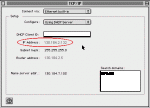
TCP/IP Control Panel
TCP/IP panel
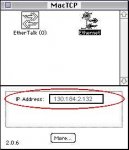
MacTCP Control Panel
MacTCP Control Panel
How to look up your IP address depends on what operating system you are using.
Windows XP, Windows 2000, or Windows NT
* Click the Start menu
* Select Programs
* Select Command Prompt
* Type ipconfig /all
* Press Enter
Windows 95, Windows 98, or Windows ME
* Click the Start button
* Select Run
* Type winipcfg
* Click OK
Linux, MAC OS X, Solaris, AIX and other UNIX variants
* At the command Prompt type hostname | nslookup
* At the command Prompt type ifconfig -a
* You may need to become root and include a full path when typing these commands.
Mac OS X
* Open the System Preferences in Mac OS X
* In the resulting window, click the Network icon.
* In the Network window select the appropriate location
* IP Address will be shown
Macintosh Mac OS 7.x - Mac OS 9.x
* Computer must have an active Internet connection
* Go to the Apple menu by clicking the Apple picture icon
* Select Control Panels
* Go to the TCP/IP control panel or MacTCP control panel depending on operating system
* Choose File
* Click Get Info
TCP/IP Control Panel
TCP/IP panel
MacTCP Control Panel
MacTCP Control Panel


