:::::::How To Hack::::::::::

Chooty malli

Well-known member
  • Mar 17, 2010
    11,438
    854
    113
    ඉන්න තැනක් හොයනව

    Bypass Megavideo 72 Mins Time Limit

    avoid-megavideo_s-time-limit-_72mins_-200X200.jpg


    Bypass Megavideo 72 Mins Time Limit


    There are Three main ways to stop the 72 limits on Megavideo. All of these methods have been used and tested by several. It just depends on the approach you want to use. Now you can watch your Movies & Shows without interruption!


    There are Three main ways to stop the 72 limits on Megavideo. All of these methods have been used and tested by several. It just depends on the approach you want to use. Now you can watch your Movies & Shows without interruption!


    Stop Megavideo time restrictions and pauses and use it for free

    Difficulty: Easy
    Instructions

    1) Method 1 (Easiest): First, clear your browsers and cookies.

    Then, If your using Firefox, Go to: Tools > Options and click "Exceptions" and block "megavideo.com" & "www.megavideo.com" (without quotes)

    If you don't want to clear browsers & cookies follow step 2


    2) Method 2 (Patience Required): Hit play on the TV show/Movie you are about to watch.

    Once its done loading fully, in Firefox go to File > Work offline and your file won't get interrupted. For non Firefox users you can just go offline with your computer.


    avoid-megavideo_s-time-limit-_72mins_-1.2-800X800.jpg


    3) Method 3 (DL Required): First Right Click the video and Click Settings and go to Local Storage and set Video to 0.
    Then clear browsers & cookies
    Last Run Hot Spot Shield > Click Disconnect & connect to get a new IP address

    Hope all of these options work well for all of you!!


    :P:P:P:P:P:P:P:P
     

    Chooty malli

    Well-known member
  • Mar 17, 2010
    11,438
    854
    113
    ඉන්න තැනක් හොයනව
    How to hide files in a jpg

    1. Save the picture of choice to your desktop.
    2. Make a new .rar or .zip folder on your desktop.
    3. Add the files you want to hide into the .zip or .rar
    4. Click start menu, run, cmd.
    5. In Command Prompt type cd "desktop" with the quotation marks.
    6. Now type in copy /b picturename.jpg + foldername.rar outputfilename.jpg
    ( If you use .zip then: copy /b picturename.jpg + foldername.zip outputfilename.jpg)
    7. Now there should be the outputed file name with a .jpg extension on the desktop.
    ( Do not close Command Prompt just yet )
    8. Double click it to open the picture and check it out.
    9. When your done looking, and want to view the hidden files
    Type: ren outputfilename.jpg outputfilename.rar or zip
    Now you're done!
    A quick info-fact:
    With this technique of hiding files in a jpg you can send this to anyone and they just have to rename the file extension to .zip or .rar.
    With this technique the Al-Qaeda operatives were able to send info to others secretively.

    :):):):):):):):):)
     

    Mickey_lk

    Member
    Jan 19, 2011
    452
    23
    0
    ෙගදර
    Extreme Hack - Install Windows Xp in 10 minutes


    This Is another Extreme Hack That You Will Never Imagine But Its Truth and We have Done It. This Time I will explain How to Install Windows In Just 10 minutes??
    As We all know that During Formatting a Computer After the File Copying is Completed then windows Require 39 Minutes Time...But What Extreme In It.... Yes We can Bypass this fking Time .... How TO DO IT??? So read On..
    I have Included Snaps That will help you all....

    INSTALLING XP IN 10 MINUTES!
    STEP1 : After the Copy Part is Over ... System is Rebooted as we all know In general Foramatting Procedure...
    Now After Reboot The Below Image Will Appear....

    1239269026.gif


    STEP 2: Now As This Image APPEARS You Have to Press "Shift + F10 " . This Will Open The command Prompt... Now type taskmgr in it. This will open the Task manager .

    STEP 3 : After The task Manager Opens Goto Processes ... And Find "Setup.exe" process and Right CLICK on It.... and set the Priority to Highest....
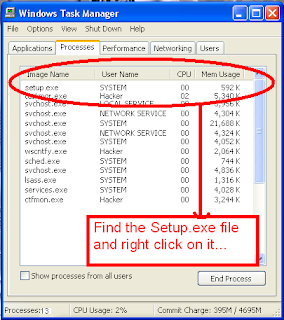


    STEP 4: Now Just Watch the Set It will take around 9 minutes and 2 minutes for Tolerance(depends System to system)....

    Thats the Overall Tutorial...Hope You all Have LIKED IT...

    So When you Format your PC Next Time It will Really Save Your TIME i.e around 20 to 25 minutes...
    macho... setup right click karala mokakada select karanne.:confused: