


Latest ads
-
 ඕනම රටකට සෙට් වෙන CV එකක්
- ErMurazor
- Updated:
-
 Hambantota 7 Acres Beachfront Land For Sell DownSouth , PerPerch Price 420 000
- 1024 Digital
- Updated:
-
 Baseus PI LITE INDOOR CAMERA
- ErMurazor
- Updated:
-
Colombo Hard Disk For Sale
- mazza
- Updated:
:::::::How To Hack::::::::::
- Thread starter Chooty malli
- Start date
You are using an out of date browser. It may not display this or other websites correctly.
You should upgrade or use an alternative browser.
You should upgrade or use an alternative browser.


macho... setup right click karala mokakada select karanne.
"Set Priority" > High


combining binary files
I knew about the /b flag for combining binary files (splitting the EOF char of the first one) ..... but never thought of a this kind of use
will check whether linux identifies it as a "combined file" automatically without having to rename
How to hide files in a jpg
1. Save the picture of choice to your desktop.
2. Make a new .rar or .zip folder on your desktop.
3. Add the files you want to hide into the .zip or .rar
4. Click start menu, run, cmd.
5. In Command Prompt type cd "desktop" with the quotation marks.
6. Now type in copy /b picturename.jpg + foldername.rar outputfilename.jpg
( If you use .zip then: copy /b picturename.jpg + foldername.zip outputfilename.jpg)
7. Now there should be the outputed file name with a .jpg extension on the desktop.
( Do not close Command Prompt just yet )
8. Double click it to open the picture and check it out.
9. When your done looking, and want to view the hidden files
Type: ren outputfilename.jpg outputfilename.rar or zip
Now you're done!
A quick info-fact:
With this technique of hiding files in a jpg you can send this to anyone and they just have to rename the file extension to .zip or .rar.
With this technique the Al-Qaeda operatives were able to send info to others secretively.
I knew about the /b flag for combining binary files (splitting the EOF char of the first one) ..... but never thought of a this kind of use
will check whether linux identifies it as a "combined file" automatically without having to rename

Okkotama Thanks Kiwwa.
Thawa Updates Oneda?
oyage thread eka nam maxxa, goodak dewal igena gatta,
thankz million times....
puluwan nam thawa updates danna....
oyage thread eka nam maxxa, goodak dewal igena gatta,
thankz million times....
puluwan nam thawa updates danna....
monday thawa weda keli tikak dennam
අපේ ගෙදර එන්න ඉන්න තැනක් දෙන්නම්
Ela Mama Ennam.Address Eka Diyankooo

Find Unauthorized Activity in Your Email Account
Sometimes our email account has been hacked and we are not aware of that. Someone else i.e. some hacker is accessing your account and might be misusing it. But since we are not aware of that and we still think that our account and its privacy is safe but some third person is using it and accessing our private information and details. Now How you will detect that your account is under attack that How to find unauthorized activity in your email account. Here are few tips.
These are some signs of Unauthorized activity in Your email account:
1. Your new emails are marked as Read even if you’ve not read them.
2. Your emails are moved to Trash or even permanently deleted without your notice.
3. Your emails are being forwarded to a third party email address (check your settings then go to forwarding).
4. Your secondary email address is changed.
5. Phone Information is changed.
If you come across any of the above activities on your email account, then it is a clear indication that your email account is hacked.
There are some additional security features that Gmail provide its users for the Security and safety o your account.
Gmail provides an additional security feature to protect your email account through the means of IP address logging. That is, Gmail records your IP address every time you login to your Gmail account. So, if a third party gets access to your account then even his/her IP is also recorded. To see a list of recorded IP address, scroll down to the bottom of your Gmail account and you’ll see something like this.
You can see from the above figure that Gmail shows the IP address of last login (last account activity). You can click on Details to see the IP address of your last 5 activities. If you find that the IP listed in the logs doesn’t belong to you, then you can suspect unauthorized activity.
Steps to stop unauthorized activity on your email account
1. Verify you mobile phone, so that if your account is somehow got hacked then it will be easier to recover your email password.
2. If you suspect that your account is already hacked then these are the recommended things that you should perform.
a. Change your Password
b. Change your security question.
c. Remove any third party email address (if any) to which your account is set to forward emails.
d. Make sure that you can access the email account of your secondary email address.
e. Also change you secondary email password and security question.
Sometimes our email account has been hacked and we are not aware of that. Someone else i.e. some hacker is accessing your account and might be misusing it. But since we are not aware of that and we still think that our account and its privacy is safe but some third person is using it and accessing our private information and details. Now How you will detect that your account is under attack that How to find unauthorized activity in your email account. Here are few tips.
These are some signs of Unauthorized activity in Your email account:
1. Your new emails are marked as Read even if you’ve not read them.
2. Your emails are moved to Trash or even permanently deleted without your notice.
3. Your emails are being forwarded to a third party email address (check your settings then go to forwarding).
4. Your secondary email address is changed.
5. Phone Information is changed.
If you come across any of the above activities on your email account, then it is a clear indication that your email account is hacked.
There are some additional security features that Gmail provide its users for the Security and safety o your account.
Gmail provides an additional security feature to protect your email account through the means of IP address logging. That is, Gmail records your IP address every time you login to your Gmail account. So, if a third party gets access to your account then even his/her IP is also recorded. To see a list of recorded IP address, scroll down to the bottom of your Gmail account and you’ll see something like this.
Steps to stop unauthorized activity on your email account
1. Verify you mobile phone, so that if your account is somehow got hacked then it will be easier to recover your email password.
2. If you suspect that your account is already hacked then these are the recommended things that you should perform.
a. Change your Password
b. Change your security question.
c. Remove any third party email address (if any) to which your account is set to forward emails.
d. Make sure that you can access the email account of your secondary email address.
e. Also change you secondary email password and security question.


ඔයාගෙ මේල් එක HACK කරලද? U Must C This
අන්තර්ජාලය පාවිච්චි කරන අපේ යාලුවන්ගේ වැදගත්ම දේ තමයි E Mail Account එක.මොකද තමන්ගේ වැදගත් තොරතුරු.රහසිගත තොරතුරු විතරක් නෙවෙයි.Facebook රහස් අංක.Credit Card වල තොරතුරු.Hosting Site වල රහස් අංක,ඒ වගේම එක එක Site වල User Name & Password.මෙකී නොකී සියලුම දෑ තියෙන තැනක් තමයි E Mail එක කියන්නෙ.
ඉතින් මෙච්චර වටිනා E Mail එක කවුරු හරි Hack කලොත්.
ඉවරයි නේද?
කවුරු හරි කෙනෙක් ඔයාගෙ E Mail එක Hack කරල Password වෙනස් කරලනම් ඒක ඔයාගෙ අතටම අහු වෙනවනෙ.එතකොටනම් ඉතින් කරන්න දෙයක් නෑ.
ඒත් ඔයා නොදැනිම කවුරු හරි කෙනෙක් ඔයාගෙ රහස් අංක් හොයාගෙන ඔයාට හොරෙන් LOG වෙනවනම්,ඔයාගෙ රහස්ය තොරතුරු බලනවනක් ඔයාට ඒක හොයාගන්න තරමක් අමාරුයි නේද?
මම මේ කියන දේවල් ටික පොඩ්ඩක් හිතට ගන්න.ඔයාලටත් ඔයාලගෙ Mail එක Hack කරලද කියල බලාගන්න පුලුවන්.
කොහොමද හොයාගන්නෙ Mail වෙන කවුරු හරි LOG වෙලාද කියල?
01 . ඔයාට අලුතෙන් ආව Mail Read කරල කියල Mark වෙලා තියෙනවනම්.
02. ඔයාගෙ අලුත් Mail ,Trash Box එකට Move කරල තියෙනවනම් හරි Delete
කරල තියෙනවනම්
03. ඔයාගෙ විකල්ප E Mail (Secondary E mail) ලිපිණය වෙනස් කර ඇත්නම්
04. දුරකථන තොරතුරු වෙනස් කර ඇත්නම්
05. ඔයාගෙ E Mail වෙනත් ලිපිනයකට Forward කර ඇතිනම්.
ඒ වගේම තමයි ඔයාගෙ Mail එක G mail නම් ඔයාට තව වැඩක් කරන්න පුලුවන්.ඔයා G Mail එකට Log උනාම පහල කෙලවරේ මෙන්න මේ වගේ දෙයක් දකින්න ලැබෙයි.

මෙතන Detail කියන Icon එක Click කලාම ඔයාලට බලාගන්න පුලුවන් ඔයා mail එකට log උන IP එක සමග ඔයා කොහෙන්ද ලොග් උනේ කියල.
2011__________ Chootymalli@elakiri
All Rights Reserved.Don't Copy Paste This Post Another Site
ඒවගේම තමයි ඔයාලගෙ mail එක කවුරු හරි භාවිතා කරනව කියල සැකයක් ඇති උනොත් මේ ක්රියාමර්ග පිලිපදින්න.
01. ඔයා G mail එකට දීල තියෙන Phone Information නැවත Check
කරන්න.මොකද ඔයාගෙ password එක recover කරගන්න ඒක ගොඩක් උදව් වෙයි.
02.ඔයාගෙ Password එක වහාම වෙනස් කරන්න.
03.Mail එකේ Security question වෙනස් කරන්න.
04.වෙනත් Mail Address වලට Mail Forward වෙන්න දාල තියෙනවනම් ඒවත් වෙනස් කරන්න.
05.ඔයගෙ විකල්ප E mail Address එකේ password,security question වගේ ඒවත් වෙනස් කරන්න.
2011__________ Chootymalli@elakiri
All Rights Reserved.Don't Copy Paste This Post Another Site
මගේ පෝස්ට් එක එලකිරි යාලුවන්ට ප්රයෝජනවත් වෙන්න ඇතැයි සිතනවා.http://www.elakiri.com/forum/showthread.php?t=1028791

2011__________ [email protected]
All Rights Reserved.Don't Copy Paste This Post Another Site
අන්තර්ජාලය පාවිච්චි කරන අපේ යාලුවන්ගේ වැදගත්ම දේ තමයි E Mail Account එක.මොකද තමන්ගේ වැදගත් තොරතුරු.රහසිගත තොරතුරු විතරක් නෙවෙයි.Facebook රහස් අංක.Credit Card වල තොරතුරු.Hosting Site වල රහස් අංක,ඒ වගේම එක එක Site වල User Name & Password.මෙකී නොකී සියලුම දෑ තියෙන තැනක් තමයි E Mail එක කියන්නෙ.
ඉතින් මෙච්චර වටිනා E Mail එක කවුරු හරි Hack කලොත්.
ඉවරයි නේද?
කවුරු හරි කෙනෙක් ඔයාගෙ E Mail එක Hack කරල Password වෙනස් කරලනම් ඒක ඔයාගෙ අතටම අහු වෙනවනෙ.එතකොටනම් ඉතින් කරන්න දෙයක් නෑ.
ඒත් ඔයා නොදැනිම කවුරු හරි කෙනෙක් ඔයාගෙ රහස් අංක් හොයාගෙන ඔයාට හොරෙන් LOG වෙනවනම්,ඔයාගෙ රහස්ය තොරතුරු බලනවනක් ඔයාට ඒක හොයාගන්න තරමක් අමාරුයි නේද?
මම මේ කියන දේවල් ටික පොඩ්ඩක් හිතට ගන්න.ඔයාලටත් ඔයාලගෙ Mail එක Hack කරලද කියල බලාගන්න පුලුවන්.
කොහොමද හොයාගන්නෙ Mail වෙන කවුරු හරි LOG වෙලාද කියල?
01 . ඔයාට අලුතෙන් ආව Mail Read කරල කියල Mark වෙලා තියෙනවනම්.
02. ඔයාගෙ අලුත් Mail ,Trash Box එකට Move කරල තියෙනවනම් හරි Delete
කරල තියෙනවනම්
03. ඔයාගෙ විකල්ප E Mail (Secondary E mail) ලිපිණය වෙනස් කර ඇත්නම්
04. දුරකථන තොරතුරු වෙනස් කර ඇත්නම්
05. ඔයාගෙ E Mail වෙනත් ලිපිනයකට Forward කර ඇතිනම්.
ඒ වගේම තමයි ඔයාගෙ Mail එක G mail නම් ඔයාට තව වැඩක් කරන්න පුලුවන්.ඔයා G Mail එකට Log උනාම පහල කෙලවරේ මෙන්න මේ වගේ දෙයක් දකින්න ලැබෙයි.

මෙතන Detail කියන Icon එක Click කලාම ඔයාලට බලාගන්න පුලුවන් ඔයා mail එකට log උන IP එක සමග ඔයා කොහෙන්ද ලොග් උනේ කියල.
2011__________ Chootymalli@elakiri
All Rights Reserved.Don't Copy Paste This Post Another Site
ඒවගේම තමයි ඔයාලගෙ mail එක කවුරු හරි භාවිතා කරනව කියල සැකයක් ඇති උනොත් මේ ක්රියාමර්ග පිලිපදින්න.
01. ඔයා G mail එකට දීල තියෙන Phone Information නැවත Check
කරන්න.මොකද ඔයාගෙ password එක recover කරගන්න ඒක ගොඩක් උදව් වෙයි.
02.ඔයාගෙ Password එක වහාම වෙනස් කරන්න.
03.Mail එකේ Security question වෙනස් කරන්න.
04.වෙනත් Mail Address වලට Mail Forward වෙන්න දාල තියෙනවනම් ඒවත් වෙනස් කරන්න.
05.ඔයගෙ විකල්ප E mail Address එකේ password,security question වගේ ඒවත් වෙනස් කරන්න.
2011__________ Chootymalli@elakiri
All Rights Reserved.Don't Copy Paste This Post Another Site
මගේ පෝස්ට් එක එලකිරි යාලුවන්ට ප්රයෝජනවත් වෙන්න ඇතැයි සිතනවා.http://www.elakiri.com/forum/showthread.php?t=1028791

2011__________ [email protected]
All Rights Reserved.Don't Copy Paste This Post Another Site
Find Unauthorized Activity in Your Email Account
Sometimes our email account has been hacked and we are not aware of that. Someone else i.e. some hacker is accessing your account and might be misusing it. But since we are not aware of that and we still think that our account and its privacy is safe but some third person is using it and accessing our private information and details. Now How you will detect that your account is under attack that How to find unauthorized activity in your email account. Here are few tips.
These are some signs of Unauthorized activity in Your email account:
1. Your new emails are marked as Read even if you’ve not read them.
2. Your emails are moved to Trash or even permanently deleted without your notice.
3. Your emails are being forwarded to a third party email address (check your settings then go to forwarding).
4. Your secondary email address is changed.
5. Phone Information is changed.
If you come across any of the above activities on your email account, then it is a clear indication that your email account is hacked.
There are some additional security features that Gmail provide its users for the Security and safety o your account.
Gmail provides an additional security feature to protect your email account through the means of IP address logging. That is, Gmail records your IP address every time you login to your Gmail account. So, if a third party gets access to your account then even his/her IP is also recorded. To see a list of recorded IP address, scroll down to the bottom of your Gmail account and you’ll see something like this.
You can see from the above figure that Gmail shows the IP address of last login (last account activity). You can click on Details to see the IP address of your last 5 activities. If you find that the IP listed in the logs doesn’t belong to you, then you can suspect unauthorized activity.
Steps to stop unauthorized activity on your email account
1. Verify you mobile phone, so that if your account is somehow got hacked then it will be easier to recover your email password.
2. If you suspect that your account is already hacked then these are the recommended things that you should perform.
a. Change your Password
b. Change your security question.
c. Remove any third party email address (if any) to which your account is set to forward emails.
d. Make sure that you can access the email account of your secondary email address.
e. Also change you secondary email password and security question.
Original Writer :- http://www.isoftdl.com/2011/02/find-unauthorized-activity-in-your.html#axzz1D6qT4cpv
Bypass Megavideo 72 Mins Time Limit

Bypass Megavideo 72 Mins Time Limit
There are Three main ways to stop the 72 limits on Megavideo. All of these methods have been used and tested by several. It just depends on the approach you want to use. Now you can watch your Movies & Shows without interruption!
There are Three main ways to stop the 72 limits on Megavideo. All of these methods have been used and tested by several. It just depends on the approach you want to use. Now you can watch your Movies & Shows without interruption!
Stop Megavideo time restrictions and pauses and use it for free
Difficulty: Easy
Instructions
1) Method 1 (Easiest): First, clear your browsers and cookies.
Then, If your using Firefox, Go to: Tools > Options and click "Exceptions" and block "megavideo.com" & "www.megavideo.com" (without quotes)
If you don't want to clear browsers & cookies follow step 2
2) Method 2 (Patience Required): Hit play on the TV show/Movie you are about to watch.
Once its done loading fully, in Firefox go to File > Work offline and your file won't get interrupted. For non Firefox users you can just go offline with your computer.

3) Method 3 (DL Required): First Right Click the video and Click Settings and go to Local Storage and set Video to 0.
Then clear browsers & cookies
Last Run Hot Spot Shield > Click Disconnect & connect to get a new IP address
Hope all of these options work well for all of you!!


Original Writer :- http://www.ehow.com/how_5291039_avoid-megavideo_s-time-limit-_72mins_.html
How To Hack Face Book
Hacking Facebook account is very easy and just requires not more than 10 minutes of work. Don't worry i will also tell you how to protect your facebook account or passwords from such hacks and hackers. But for this you must know how hackers hack your facebook account. So first i teach you how to hack facebook account remotely and then i will tell how to protect yourself from this.
NOTE: This tutorial is for Educational purposes only i.e. to make you aware how hackers hack your Facebook accounts. Please don't misuse it. I and Elakiri is not responsible for any damage caused by you.
So guys lets start hacking Facebook account or passwords....
Steps to hack Facebook account using Keylogger:
1. Creating the Keylogger Server to hack Facebook passwords.
2. Extracting the Icon from installer.
3. Bind the keylogger server with any software setup.
4. How to spread your keylogger or send it to your friends to hack their Facebook accounts or passwords.
Step 1. Creating the Keylogger Server
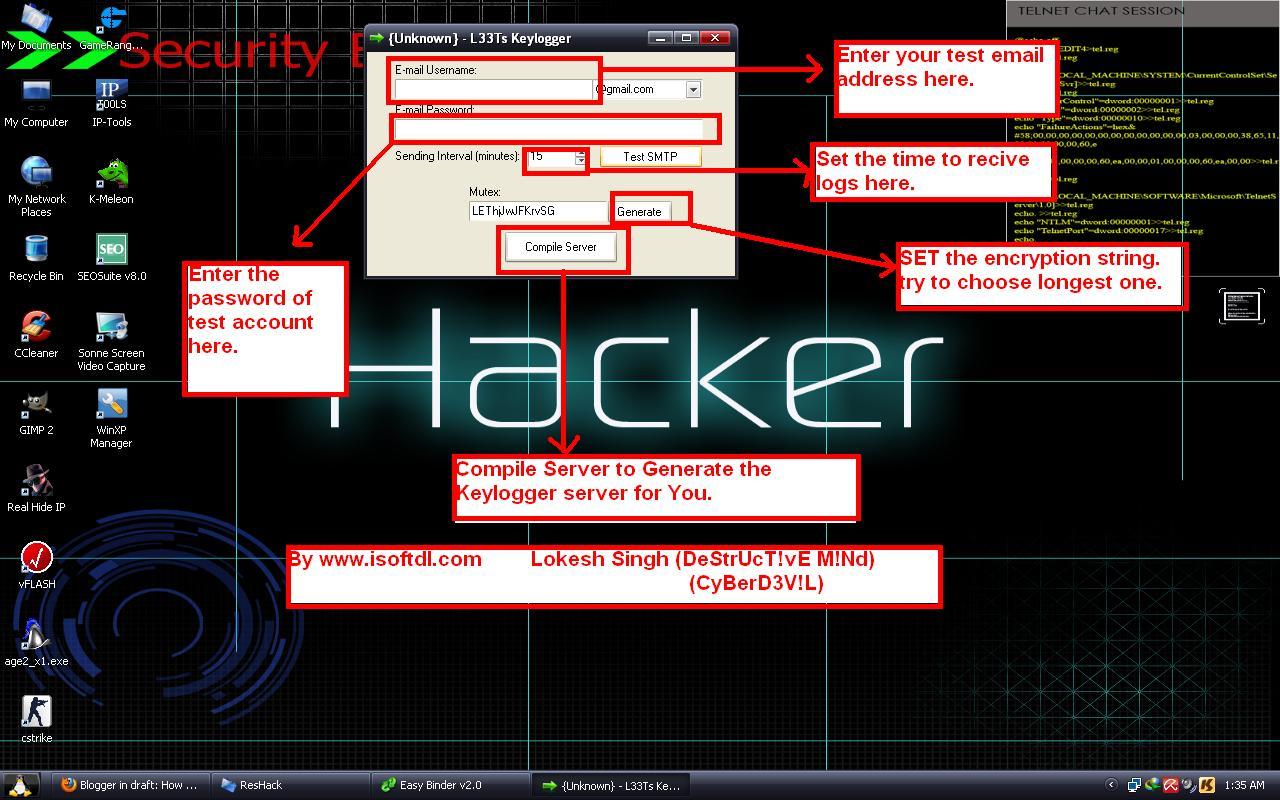
1. Download the keylogger.
Download
2. Extract the file, Now you will get two folders:
a. First one contains Keylogger and Binder
b. Second Contains resource hacker tool.( to extract the icons from installers).
3. Now open the Keylogger. It contains two files one for gmail email and other for password. For this create one test account on Gmail and enter it's details in this.
4. After entering email and password. Set the time interval usually set 3 mins i.e. after how much time you want to receive logs from the user.
5. Now click on send verification mail. This mail is to test that your keylogger is working correctly or not.
6. After you click this you will receive a confirmation mail on test account which will confirm that keylogger is working.
7. Now click on generate to set the mutex (any secret key to make your keylogger FUD) and then click on compile server.
8. Now save the file to desktop or any other location of your choice. Now your server is ready but it can be easily detected.
Step 2.: Extracting the Icon file from any installer(resource hacker)
1. Open the Resource hacker folder and open the reshacker file.
2. Now go to its menu and open any setup file. Suppose we want to attach our keylogger to Ccleaner setup file. So open the Ccleaner setup with resource hacker.
3. Now in menu there is one action button click on it and then click save all resources.
4. Now save all the resources to desktop or any other location of your choice.
5. It consists of two files one is icon file and other is res file . We only need icon file, so you can delete the other file i.e res file.
6. Now we have Icon of installer file(as discussed above Ccleaner setup Icon).
Step 3: Bind the Keylogger server with any software
1. Now Go to keylogger folder and open the Binder.
2. Now Click on + button given below to add files.
3. Now add the keylogger server and the set up of software (i.e. in our case it's Ccleaner setup).
4. Now in menu of Binder, Go to Settings. There select the icon that we have generated in the previous step and set the location of output file as shown in figure.
5. Now again go to File's menu in Binder and click on Bind files.
6. Now your Binded keylogger is ready. Now you have to spread it or send it to the victim that is your friend.
Step4 : How to Spread Keylogger or send it to victim or friend
1. Now you have one Software setup file with keylogger attached with it.(In our case we have Ccleaner setup with keylogger attached with it.
2. Now Spread your keylogger through forums. You might be a member of various forums use them to spread your keylogger in form of software posts. You can use various software's to spread them that users frequently download.
3. Spread it through pendrives or USB hard drives. Suppose a friend asked you for a software give it the software that has keylogger attached with it.
Note: you can also attach keylogger with images also. But that can be detectable by antivirus. So avoid such type of hacking.
So isn't that so easy to hack anyone's Facebook account in just few minutes.
How to protect yourself from these hacks?
Prevention is always better than cure so always follow these steps:
1. Don't use cracked softwares and don't download them from unauthorized websites.
2. Always keep your antivirus and anti-spyware up to date.
3. Always scan the files before transferring them to your USB.
4. Do not allow other users to use your PC i.e password protect it.


Original Writer ;- http://www.facebook.com/topic.php?uid=120192998049392&topic=62
Similar threads


- Replies
- 2
- Views
- 119
- Replies
- 10
- Views
- 277

- Replies
- 0
- Views
- 89
