How to put dvd and video on Walkman

kaimogu

Member
Aug 29, 2009
7
0
0
Walkman is Sony's portable audio cassette player brand, now used to market its portable audio and video players. A lot of people choose walkman as their MP3 player to kill time when they are free. walkman provides its user an important function is to play videos. Some people know how to put dvds and videos on it, some not. In the following text, I will show everyone who has a walkman and want to enjoy videos on their players.
Before reading the guide, I need walkman users to know a few general parameters.
Sony Walkman supports viewing JPEG photos and supports playback of MP3, WMA, DRM protected WMA and unprotected AAC audio files. Sony Walkman also supports high quality video playback at 30 frames per second, the supportable video codec MPEG4 and AVC baseline H264 in .MP4 extension.

Now I will explain how to put dvds and videos on walkman.
I divide this article into two parts:
1. How to put dvd on walkman
2. How to put video on walkman
To complete this process, I need a tool called 4Videosoft DVD to Walkman Suite

Part 1: How to put dvd on walkman with DVD to Walkman Converter

Step 0: Download and install 4Videosoft DVD to Walkman Converter
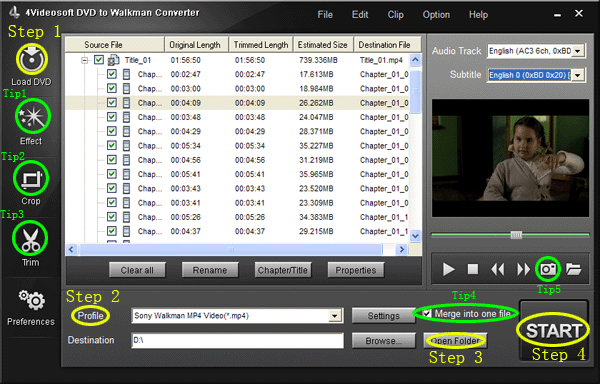
dvd-to-walkman.gif


Step 1: Import DVD.
Place the DVD into your DVD drive and click the “Load DVD” button to load DVD.

Step 2: Video settings.
Select the output video format you want from the “Profile” drop-down list.

Step 3: Place video
Click “Open Folder” button to open your output destination file.

Step 4: Start conversion
Click the “Start” button to start your conversion and in a short while it will be finished.

Part 2: How to put video on walkman with Walkman Video Converter

Step 0: Download and install 4Videosoft Walkman Video Converter
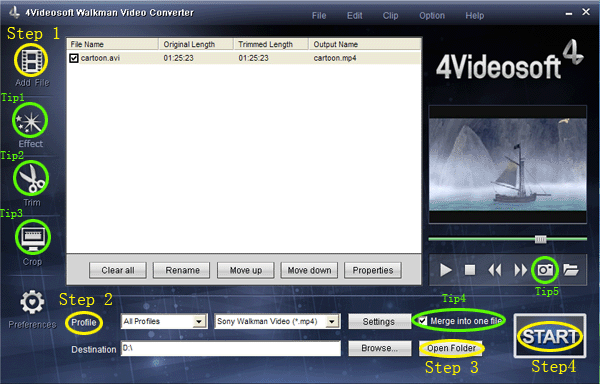
video-to-walkman.gif


When you finished the download process, run the .exe file to install it.

Step 1: Click “Add files” button to import videos.

Step 2: Extend the "Profile" category to select an output format.

Step 3: Click “Open Folder” button to open your output destination file.

Step 4: Click the “Start” to convert.

Tips----- Basic functions for all the 4videosoft:

1. How to change your video effect
If you want to adjust the effect of your movie, please click the “Effect” button and a pop-up effect window will appear. It allows you to edit your movie’s effect including “Brightness, Contrast, Saturation and Volume”.
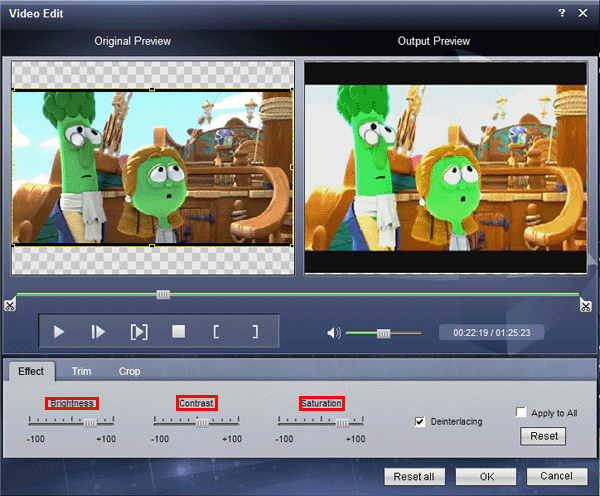
effect.gif


2: How to crop off the black edges and adjust the size of video play region
By using the "Crop" function you can crop off the black edge of your video and you can also drag the line around the video image to adjust the video play region to fit for your mobile devices
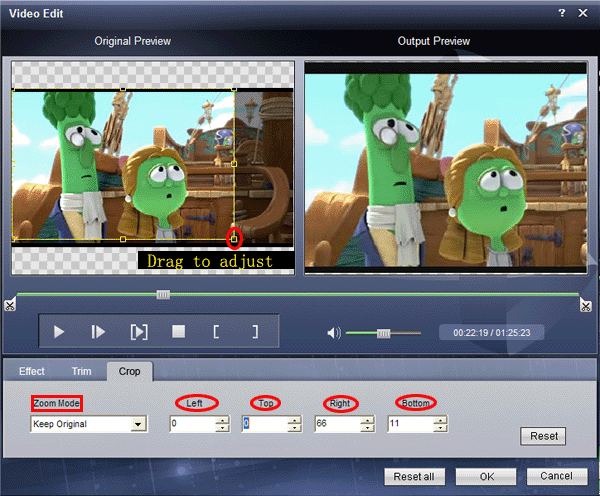
crop.gif


3: How to split your video
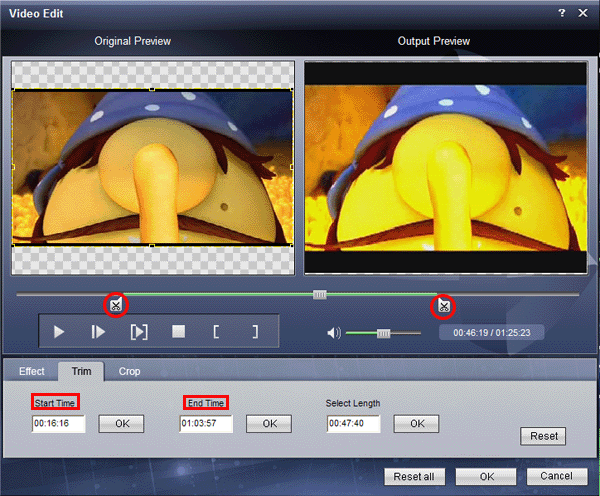
The "Trim" function also servers as a video splitter for you to get any time-length video episode. You can set the "Start Time" and "End Time" to set the exact time-length of the clip or you can directly drag the slide bar to the position you want.
trim.gif


4: How to join the videos
If you would like to put several files into one output file, please tick the check box of the “Merge into one file”.

5: How to save your favorite picture
If you like the current image when preview video, you can use the "Snapshot" option. Just click the "Snapshot" button, the image will be saved and you can click the "Open" button next to "Snapshot" button to open your picture.




avcnana

Banned
Aug 4, 2009
89
0
0
[FONT=宋体]I have been seeking for an ideal thing which enables me to enjoy my players fully, now I find this one is the right thing I have been looking for. It works with high speed and quality which brings me convenience and saves a lot of time[/FONT][FONT=宋体][/FONT]
 

Athna

Banned
Sep 11, 2009
1
0
0
How to rip DVD to Sony Walkman on Mac?

DVD to Walkman Converter for Mac is the excellent DVD to
Walkman Converter with combo function specially designed for Mac system. It can rip DVD and convert all sorts of video formats such
as: WMV, AVI, FLV, MPG/MPEG, MOV, 3GP, 3G2, MKV, ASF to the MP4 format to playback on your Sony Walkman. It supports to output many popular video and audio formats like MP4, MOV, WMV, AVI, MP3, WMA,WAV for many Apple's media player: QuickTime player, iTunes and portable player: iPod, iPhone, iRiver, etc. In addtion, the program can extract audio from DVD and video to MP3, AAC, WMV, etc
formats with perfect sound quality.

Mac DVD to Walkman Converter has enhanced its editing function to a large degree. You can trim the video by setting the start and end time to specify the length of clips to be converted, crop the unwanted black sides in the frame, apply video effects like brightness, contrast, saturation, or post picture or text watermark on your videos to make them more personalized. And the Real-Time Preview function makes what you see is what you get.
How to rip DVD to Sony Walkman on Mac?

1.Download and install the DVD to Walkman Converter on your Mac.

2.Launch the DVD to Walkman Converter and select the input video files.

Click "Load DVD" or "Add Video" on the left top panel, it will open a window, browse the window and import the DVD files and videos to be converted, and they will be displayed in the program. You can load many DVD files and videos at once.

input-dvd-video-files.jpg


3.Select the output format and the output path.

Select the output format from the drop down profile list, to import the converted videos to your Walkman, you have to choose Walkman Video(*.mp4) as the output format.

Specify the output destination on your computer to store the converted video files.

output-mp4-format.jpg


4.Add Watermark.

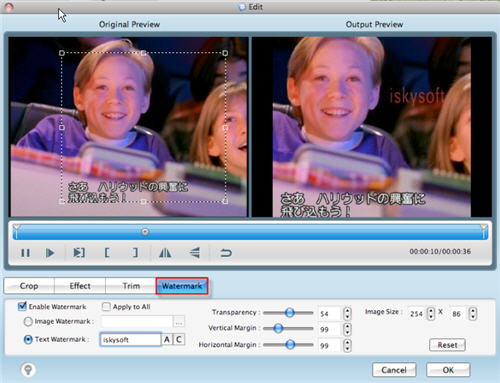
Press "Edit" on the top left panel, it will open the "Edit" window. Check "Enable
Watermark" and then you will be able to post image or text mark on the video. You can add watermark content in the brackets or adjust the size and colour by clicking "A" and "C" respectively. You can also move the place of the watermark by dragging the sliders of "Vertical Margin" or "Horizontal Margin".

watermark.jpg


5.Start conversion.

After all the parameters are set done, click "Convert" on the right bottom to convert the DVD files to MP4 format.
When the conversion is over, connect your Walkman with the computer and import the converted videos to your Walkman.
 

skyousky

Member
Oct 16, 2009
17
0
0
economic converters

I find some good conveters in the market.
TOD Converter makes it easy to convert TOD file to your video equipment compatible formats, like convert TOD to MP4, AVI, WMV, 3GP, HD videos and more.
MP4 Converter convert all the mainstream video, like AVI, FLV, WMV to MP4, H.264/MPEG-4 AVC(.mp4), MOV, AVI, and convert audio or take out audio from videos to AAC, AC3, AIFF, AMR, AU, FLAC, MP3, M4A, MP2, OGG, WAV, WMA,etc.
Archos Video Converter can convert any video and audio formats to Archos MP4, H.264/MPEG-4 AVC(.mp4), WMV, AVI, MP3, WMA, M4A, WAV video and audio formats.
 

skyousky

Member
Oct 16, 2009
17
0
0
Those majoy converters are really economice and functional. I hope more friends can eojoy its convenience.
iPhone Ringtone Maker convert MP3 to iPhone, iPhone OS 3.0/3.1 Ringtone, even convert any video/audio to iPhone M4R Ringtone, including 3GP, AVI, MKV, RM, MOV, XviD,MPEG, WMV, DivX, MP4, H.264/AVC, AVCHD, WMA, WAV, RA, M4A, MP3 to M4R iPhone ringtone.
Total Video Converter can convert between any video formats including MPG, MPEG, MPEG2, MP4, H.264, SWF, FLV, VOB, MOD, M4V, AVI, WMV, 3GP, 3GPP, MOV, DivX, XviD, QuickTime Video, DV, MJPG, MJPEG, MPV, etc, along with HD videos, like HD TS, HD MPG, HD MPEG, HD MP4, HD AVI, etc and extract audio from these video. It also converts between all audio formats including MP3, MP2, AAC, AC3, WAV, WMA, M4A, RM, RAM, OGG, AU, AIF, AIFF, APE, FLAC, NUT with excellent conversion speed and quality. Then you can easily full enjoy your portable player.
iPod Video Converter convert all video like MPG, MPEG, MPEG2, MTS, M2TS, TS, VOB, MP4, M4V, RM, RMVB, WMV, ASF, etc to MP4, H.264/MPEG-4 AVC(.mp4), MOV format for your iPod, iPod touch, iPod nano, iPhone.
 

hobbswhite

Member
Nov 3, 2009
3
0
0
The advantage of choosing 4videosoft HD Converter
*Convert among HD videos, HD video to SD(Standard-Definition) videos
*Convert among SD videos or general videos
*Get music from HD videos and general videos or convert audio to audio
*Multiple editing functions
4videosoft MTS Converter is also a nice choice for HD movie lovers.
 

marcissism

Member
Oct 29, 2009
26
0
0
I recomend you some good DPG converters. Hope they can help you greatly.
dpg converter can convert any video like convert MPEG to DPG, convert AVI, MP4, 3GP, VOB, H.264/AVC, WMV, DivX, MOV, RM, ASF and HD video to DPG, DPG2, DPG3, DPG4 video, and convert WMA, WAV, M4A, AAC, etc audio to MP3/MP2 for Nintendo DS.
dvd to dpg converter can convert DVD to other popular video files, like AVI, WMV, MP4, MPG, MPEG, MOV, and HD video formats.
 

marcissism

Member
Oct 29, 2009
26
0
0
I'd like to share 3 good pop converters which I think can help you to enjoy your players easily. Hope you can visit them
Video Converter with you
It can onvert between any video formats including MPG, MPEG, MPEG2, MP4, H.264, SWF, FLV, VOB, MOD, M4V, AVI, WMV, 3GP, 3GPP, MOV, DivX, XviD, QuickTime Video, DV, MJPG, MJPEG, MPV, etc, along with HD videos, like HD TS, HD MPG, HD MPEG, HD MP4, HD AVI, etc and extract audio from these video. It also converts between all audio formats including MP3, MP2, AAC, AC3, WAV, WMA, M4A, RM, RAM, OGG, AU, AIF, AIFF, APE, FLAC, NUT with excellent conversion speed and quality. Then you can easily full enjoy your portable player.
MTS Converter for Mac can convert your camcorder MTS file to your players compatible videos, like AVI, MP4, WMV, 3GP, 3GPP, MKV, FLV, SWF, VOB, DV, even HD videos, etc. Additionally, 4Videosoft MTS Converter for Mac owns the solution to convert M2TS, TS and others. Then put the converted file on iPod, iPhone, PSP, Xbox, PSP, PS3, etc.
HD Converter can convert HD TS, HD MTS, HD M2TS, HD MPEG, HD WMV, HD MPG, HD MP4, QuickTime HD MOV, HD H.264, HD RM video, etc, and convert video to HD video. This HD Video Converter adds the ability to convert among general videos, like RM, RMVB, WMV, ASF, MKV, AVI, 3GP, 3G2, FLV, SWF, MPV, MOD, TOD, and so on.
 

pulogreblu

Member
Nov 16, 2009
5
0
0
I'd like to share 3 good pop converters which I think can help you to enjoy your players easily. Hope you can visit them
Video Converter with you
It can onvert between any video formats including MPG, MPEG, MPEG2, MP4, H.264, SWF, FLV, VOB, MOD, M4V, AVI, WMV, 3GP, 3GPP, MOV, DivX, XviD, QuickTime Video, DV, MJPG, MJPEG, MPV, etc, along with HD videos, like HD TS, HD MPG, HD MPEG, HD MP4, HD AVI, etc and extract audio from these video. It also converts between all audio formats including MP3, MP2, AAC, AC3, WAV, WMA, M4A, RM, RAM, OGG, AU, AIF, AIFF, APE, FLAC, NUT with excellent conversion speed and quality. Then you can easily full enjoy your portable player.
MTS Converter for Mac can convert your camcorder MTS file to your players compatible videos, like AVI, MP4, WMV, 3GP, 3GPP, MKV, FLV, SWF, VOB, DV, even HD videos, etc. Additionally, 4Videosoft MTS Converter for Mac owns the solution to convert M2TS, TS and others. Then put the converted file on iPod, iPhone, PSP, Xbox, PSP, PS3, etc.
HD Converter can convert HD TS, HD MTS, HD M2TS, HD MPEG, HD WMV, HD MPG, HD MP4, QuickTime HD MOV, HD H.264, HD RM video, etc, and convert video to HD video. This HD Video Converter adds the ability to convert among general videos, like RM, RMVB, WMV, ASF, MKV, AVI, 3GP, 3G2, FLV, SWF, MPV, MOD, TOD, and so on.
 

fengyunren

Member
Nov 18, 2009
48
0
0
Hi! recently I find two most popular but economic converters. Now I want to share them with you. Hope you do not miss this good opportunity.
4Videosoftvideo converter is the most advanced total video converter which can convert between any video formats including MPG, MPEG, MPEG2, MP4, H.264, SWF, FLV, VOB, MOD, M4V, AVI, WMV, 3GP, 3GPP, MOV, DivX, XviD, QuickTime Video, DV, MJPG, MJPEG, MPV, etc, along with HD videos, like HD TS, HD MPG, HD MPEG, HD MP4, HD AVI, etc and extract audio from these video. It also converts between all audio formats including MP3, MP2, AAC, AC3, WAV, WMA, M4A, RM, RAM, OGG, AU, AIF, AIFF, APE, FLAC, NUT with excellent conversion speed and quality. Then you can easily full enjoy your portable player.
4VideosoftiPod Video Converter is a professional video to iPod converter for you to convert all video like MPG, MPEG, MPEG2, MTS, M2TS, TS, VOB, MP4, M4V, RM, RMVB, WMV, ASF, etc to MP4, H.264/MPEG-4 AVC(.mp4), MOV format for your iPod, iPod touch, iPod nano, iPhone. So, it also acts as iPod touch video converter, iPod nano Video Converter. This wonderful converter also supports converting all the popular audio formats to iPod MP3, AAC, WAV, M4A, AIFF.
4VideosoftDVD Ripper is best DVD Ripper, DVD Rip software to rip DVD to AVI, rip DVD to MP4, rip DVD to MPEG, MOV, 3GP, HD video(HD AVI, HD TS, HD MOV, HD WMV…), MP3 etc with super fastest DVD ripping speed. Therefore, with this DVD Ripper software you are easy to put your DVD on iPod, iPhone, PSP, Apple TV, Zune, BlackBerry etc with excellent sound and image quality.
 

fengyunren

Member
Nov 18, 2009
48
0
0
Hi! recently I find two most popular but economic converters. Now I want to share them with you. Hope you do not miss this good opportunity.
4Videosoftvideo converter is the most advanced total video converter which can convert between any video formats including MPG, MPEG, MPEG2, MP4, H.264, SWF, FLV, VOB, MOD, M4V, AVI, WMV, 3GP, 3GPP, MOV, DivX, XviD, QuickTime Video, DV, MJPG, MJPEG, MPV, etc, along with HD videos, like HD TS, HD MPG, HD MPEG, HD MP4, HD AVI, etc and extract audio from these video. It also converts between all audio formats including MP3, MP2, AAC, AC3, WAV, WMA, M4A, RM, RAM, OGG, AU, AIF, AIFF, APE, FLAC, NUT with excellent conversion speed and quality. Then you can easily full enjoy your portable player.
4VideosoftiPod Video Converter is a professional video to iPod converter for you to convert all video like MPG, MPEG, MPEG2, MTS, M2TS, TS, VOB, MP4, M4V, RM, RMVB, WMV, ASF, etc to MP4, H.264/MPEG-4 AVC(.mp4), MOV format for your iPod, iPod touch, iPod nano, iPhone. So, it also acts as iPod touch video converter, iPod nano Video Converter. This wonderful converter also supports converting all the popular audio formats to iPod MP3, AAC, WAV, M4A, AIFF.
4VideosoftDVD Ripper is best DVD Ripper, DVD Rip software to rip DVD to AVI, rip DVD to MP4, rip DVD to MPEG, MOV, 3GP, HD video(HD AVI, HD TS, HD MOV, HD WMV…), MP3 etc with super fastest DVD ripping speed. Therefore, with this DVD Ripper software you are easy to put your DVD on iPod, iPhone, PSP, Apple TV, Zune, BlackBerry etc with excellent sound and image quality.