


|| Image / Screenshot Upload කරන්න ලේසිම විදිය ||
අද එළකිරියේ malware warning එකක් ආවා ඔක්කොම දැක්කනේ. ලොක්කා කියන්නේ
malware site වල ඉමේජ් වගයක් ත්රෙඩ් වල දාපු නිසයි මෙහෙම වෙලා තියෙන්නේ කියලා. එයා
ඒකට විසදුමක් විදියට කියන්නේ free Image Hosting site හරහා ඉමේජ් අප් කරන්න කියලා.
http://www.elakiri.lk/forum/showthread.php?t=1740968
සමහරු ඕකට කම්මැලිනේ. සයිට් එකට යන්න. ලොග් වෙන්න. කැප්චා ගහන්න. වැඩ ගොඩයිනෙ..
මේ ලේසිම ක්රමේ. මේක ඔයාලට use කරන්න පුළුවන් screenshot ගහන්න, GIF හදන්න
(screen recording) වගේ වැඩ ගොඩක් වලට.

සොෆ්ට්වෙයාර් එක තමයි ShareX
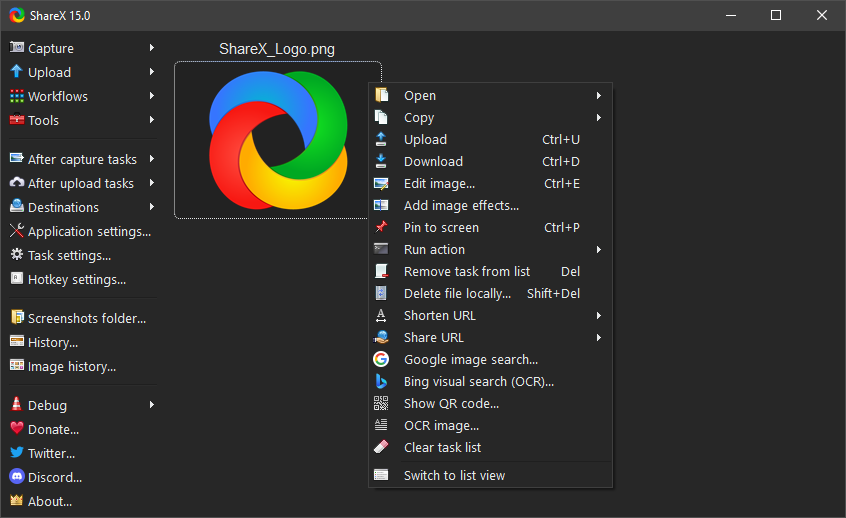
මෙයාගේ තියෙන වාසි මොනාද බලමු
1. Open source ( මේක ෆ්රී දෙන්නේ)
2. Advanced screenshot capture,
3. Screen recorder
4. File sharing
5. Screenshot ගන්න විවිද ක්රම. (full screen, window, monitor, region, freehand,
scrolling)
6. Capture කරාට පස්සේ තව වැඩ කිඩ (annotating, adding effects, watermarking,
uploading, printing)
7. Hot Keys config කරන්න පුළුවන් upload වෙන්න.
8. තව මේකේ තියෙනවා screen color picker, an image editor, a ruler, a DNS
changer, a QR code generator, a directory indexer වගේ වැඩ කෑලි ගොඩක්
9. මේක තමයි වටිනාම ඩේ ඉමේජ් එක right click කරලා upload වෙන්න දෙන්න පුළුවන්.
Upload වෙලා ඉවරවුනාම clipboard එකට ලින්ක් එක කොපි වෙලා ඉවරයි. මේක හරිම ලේසි .

මෙන්න මේ ඉමේජ් upload site වලට තමයි upload වෙන්නේ. එකකට upload වෙලා fail
වුනොත් ඊලග එකට. අපි මේ පිළිවෙලත් වෙනස් කරන්න පුළුවන්. අපිට මොකුත් කරන්න නැහැ
automatically මේක වෙන්නේ.
Image uploaders
Imgur
ImageShack
TinyPic
Flickr
Photobucket
Picasa
Twitter
Chevereto
UltraIMG
Yukle.at
PatiFile
BoltIMG
Snapie
picgur
pixr
sexr
Lightpics
Imgfly
ImgPinas
imu.gr
Upsieutoc
StoreMyPic
TL Things
vgy.me
SomeImage
Imgland
Custom image uploader
File uploader
තව features ගොඩක් තියෙනවා මෙතනින් බලාගන්න
https://getsharex.com/features/
එහනම් Download කරගන්න.
https://github.com/ShareX/ShareX/releases/download/v10.9.1/ShareX-10.9.1-setup.exe
malware site වල ඉමේජ් වගයක් ත්රෙඩ් වල දාපු නිසයි මෙහෙම වෙලා තියෙන්නේ කියලා. එයා
ඒකට විසදුමක් විදියට කියන්නේ free Image Hosting site හරහා ඉමේජ් අප් කරන්න කියලා.
http://www.elakiri.lk/forum/showthread.php?t=1740968
සමහරු ඕකට කම්මැලිනේ. සයිට් එකට යන්න. ලොග් වෙන්න. කැප්චා ගහන්න. වැඩ ගොඩයිනෙ..
මේ ලේසිම ක්රමේ. මේක ඔයාලට use කරන්න පුළුවන් screenshot ගහන්න, GIF හදන්න
(screen recording) වගේ වැඩ ගොඩක් වලට.
සොෆ්ට්වෙයාර් එක තමයි ShareX
මෙයාගේ තියෙන වාසි මොනාද බලමු
1. Open source ( මේක ෆ්රී දෙන්නේ)
2. Advanced screenshot capture,
3. Screen recorder
4. File sharing
5. Screenshot ගන්න විවිද ක්රම. (full screen, window, monitor, region, freehand,
scrolling)
6. Capture කරාට පස්සේ තව වැඩ කිඩ (annotating, adding effects, watermarking,
uploading, printing)
7. Hot Keys config කරන්න පුළුවන් upload වෙන්න.
8. තව මේකේ තියෙනවා screen color picker, an image editor, a ruler, a DNS
changer, a QR code generator, a directory indexer වගේ වැඩ කෑලි ගොඩක්
9. මේක තමයි වටිනාම ඩේ ඉමේජ් එක right click කරලා upload වෙන්න දෙන්න පුළුවන්.
Upload වෙලා ඉවරවුනාම clipboard එකට ලින්ක් එක කොපි වෙලා ඉවරයි. මේක හරිම ලේසි .

මෙන්න මේ ඉමේජ් upload site වලට තමයි upload වෙන්නේ. එකකට upload වෙලා fail
වුනොත් ඊලග එකට. අපි මේ පිළිවෙලත් වෙනස් කරන්න පුළුවන්. අපිට මොකුත් කරන්න නැහැ
automatically මේක වෙන්නේ.
Image uploaders
Imgur
ImageShack
TinyPic
Flickr
Photobucket
Picasa
Chevereto
UltraIMG
Yukle.at
PatiFile
BoltIMG
Snapie
picgur
pixr
sexr
Lightpics
Imgfly
ImgPinas
imu.gr
Upsieutoc
StoreMyPic
TL Things
vgy.me
SomeImage
Imgland
Custom image uploader
File uploader
තව features ගොඩක් තියෙනවා මෙතනින් බලාගන්න
https://getsharex.com/features/
එහනම් Download කරගන්න.
https://github.com/ShareX/ShareX/releases/download/v10.9.1/ShareX-10.9.1-setup.exe


 good work bro. 4+


