


Internet Speed එක වැඩි කරගන්න
පරිගණකයේ ඉන්ටර්නෙට් වේගය වැඩිකරගන්න ක්රමයක්.
Network හරහා TCP (Transmission Control Protocol) දත්ත හුවමාරු කළ හැකි programs වල performance වැඩි කරන්න පුළුවන් පහසුකමක් Microsoft මගින් හදුන්වල දුන්නා. මේ feature එක මුලින්ම ආවේ වින්ඩොස් විස්ටා මෙහෙයුම් පද්ධතියත් සමගයි. වින්ඩොස් 10 ඇතුළු ඊට පෙර ආව සියළුම් වින්ඩෝස් මෙහෙයුම් පද්ධති වල මේ feature එක තියෙනවා. windows auto-tuning කියල තමයි මෙය හදුන්වන්නේ. මේ feature එක Disable කිරීමෙන් internet speed එක තරමක් වැඩි කරගන්න පුළුවන්. අපි බලමු මේ feature එක Disable කරන්නේ කොහොමද කියලා.
මුලින්ම windows key එක click කරල cmd.exe ලෙස type කරන්න. ඊට පස්සේ shift key + Ctrl key දෙක press කරගෙන ඉන්න ගමන් enter press කරන්න. පළමු පියවර හරියට කරා නම් UAC (User Account Control) prompt එක open වෙනවා. ඒක confirm කරන්න.
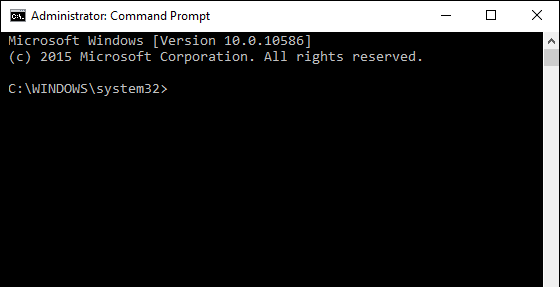
දැන් මේ පහළ command එක cmd එකේ type කරල enter කරන්න.
netsh interface tcp show global
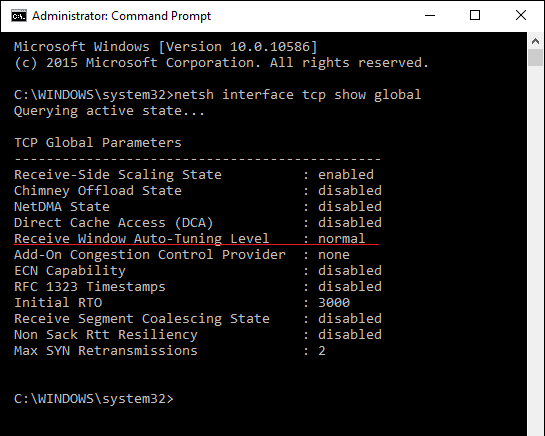
එන List එකේ ඔයාට බලාගන්න පුළුවන් "Receive Window Auto-Tuning setting" එක ඉදිරියෙන් normal කියල set කරල තියෙනවා. feature එක disable කරන්න මේ පහළ command type කරල enter කරන්න.
netsh int tcp set global autotuninglevel=disabled
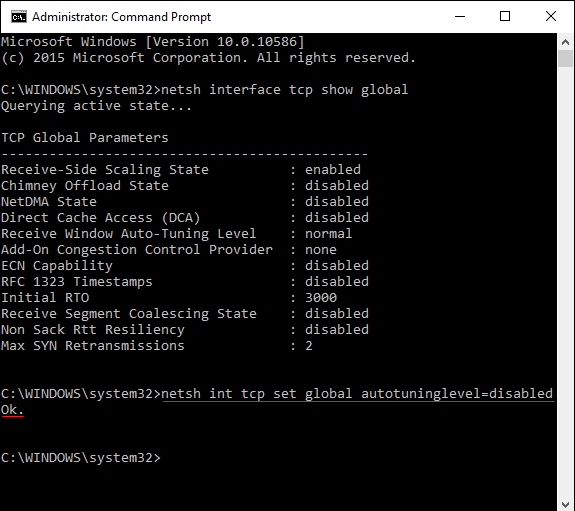
setting නිවැරදිව කරා නම් message එකක් එනවා ok කියල. දැන් internet speed බලන site එකක් භාවිත කරල internet speed එක check කරල බලන්න. මේ ක්රමයෙන් හැමොගේම connection speed එක වැඩි වෙනවා කියලා සහතික වෙන්න බැහැ. ඔයාගේ internet speed එකේ වෙනසක් නැත්තම් Window Auto-Tuning setting නැවත normal වලට set කරන්න මේ command එක type කරල enter කරන්න.
P.S : අත්දැකීමෙන් DIALOG 4G 7 mbps upto 18 mbps
aluth.com
GIVE SOME +REP & BUMP
Network හරහා TCP (Transmission Control Protocol) දත්ත හුවමාරු කළ හැකි programs වල performance වැඩි කරන්න පුළුවන් පහසුකමක් Microsoft මගින් හදුන්වල දුන්නා. මේ feature එක මුලින්ම ආවේ වින්ඩොස් විස්ටා මෙහෙයුම් පද්ධතියත් සමගයි. වින්ඩොස් 10 ඇතුළු ඊට පෙර ආව සියළුම් වින්ඩෝස් මෙහෙයුම් පද්ධති වල මේ feature එක තියෙනවා. windows auto-tuning කියල තමයි මෙය හදුන්වන්නේ. මේ feature එක Disable කිරීමෙන් internet speed එක තරමක් වැඩි කරගන්න පුළුවන්. අපි බලමු මේ feature එක Disable කරන්නේ කොහොමද කියලා.
මුලින්ම windows key එක click කරල cmd.exe ලෙස type කරන්න. ඊට පස්සේ shift key + Ctrl key දෙක press කරගෙන ඉන්න ගමන් enter press කරන්න. පළමු පියවර හරියට කරා නම් UAC (User Account Control) prompt එක open වෙනවා. ඒක confirm කරන්න.
දැන් මේ පහළ command එක cmd එකේ type කරල enter කරන්න.
netsh interface tcp show global
එන List එකේ ඔයාට බලාගන්න පුළුවන් "Receive Window Auto-Tuning setting" එක ඉදිරියෙන් normal කියල set කරල තියෙනවා. feature එක disable කරන්න මේ පහළ command type කරල enter කරන්න.
netsh int tcp set global autotuninglevel=disabled
setting නිවැරදිව කරා නම් message එකක් එනවා ok කියල. දැන් internet speed බලන site එකක් භාවිත කරල internet speed එක check කරල බලන්න. මේ ක්රමයෙන් හැමොගේම connection speed එක වැඩි වෙනවා කියලා සහතික වෙන්න බැහැ. ඔයාගේ internet speed එකේ වෙනසක් නැත්තම් Window Auto-Tuning setting නැවත normal වලට set කරන්න මේ command එක type කරල enter කරන්න.
P.S : අත්දැකීමෙන් DIALOG 4G 7 mbps upto 18 mbps
aluth.com
GIVE SOME +REP & BUMP


