.jar file එකක් AWS EC2 ubuntu instance එකකට කොපි කරන්නේ කොහොමදා?

IT kolla

Active member
  • Mar 8, 2022
    174
    168
    43
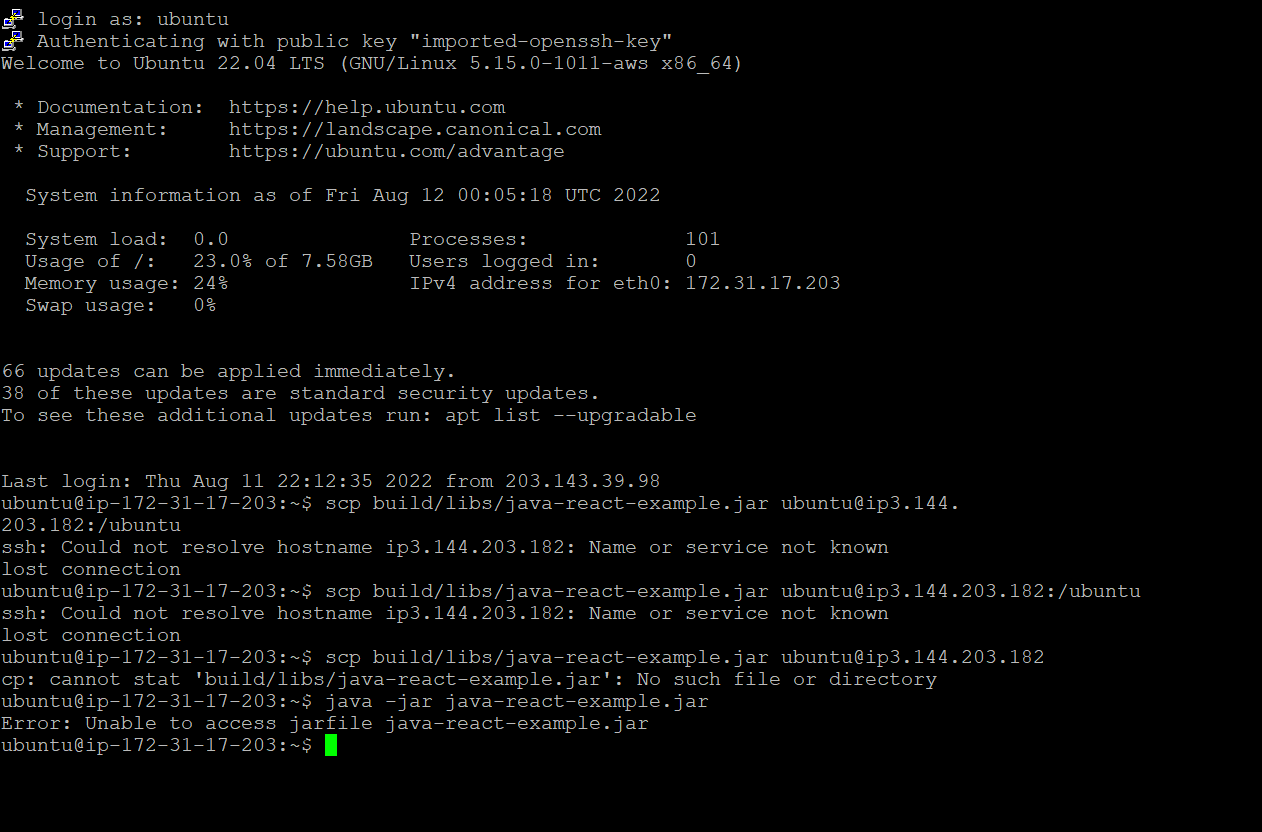
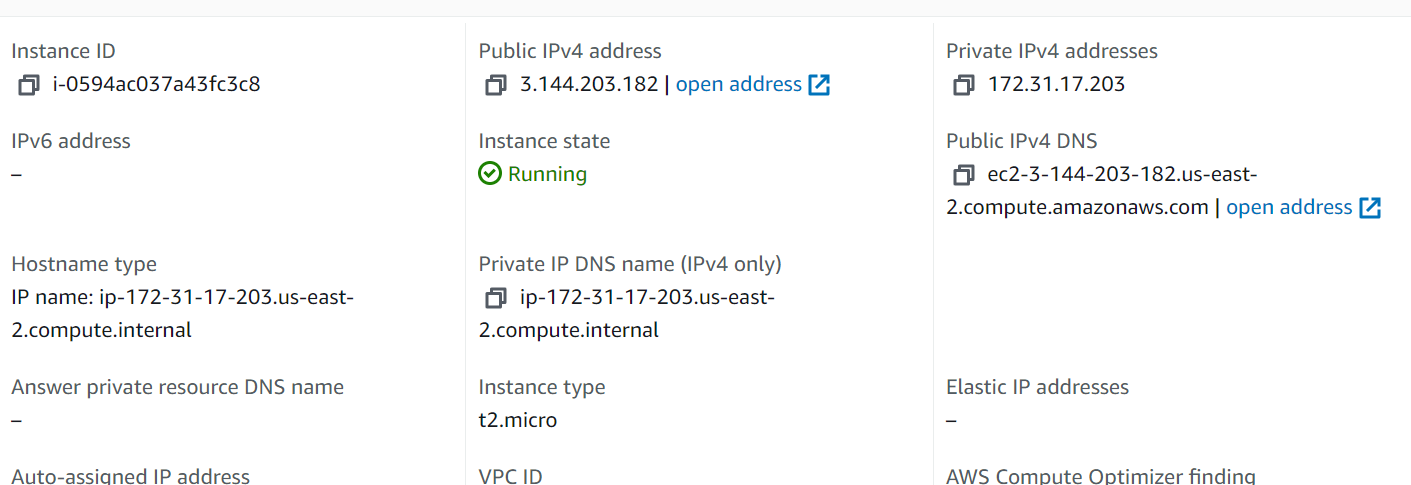
    Nanage devops 57 වෙනි ලෙසන් එකේ තියෙන්නේ gradle වලින් build කරපු jar file එක digitalocean එකේ හදපු ubuntu droplet එකට copy කරන්න. ඒත් මම aws එකෙ ec2 instance එකක් හදලා තිබ්බ නිසා එකේ තමයි මම ubuntu සර්වර් එක හැදුවේ. මට නානගෙ කරන එක තේරුනෙ නෑ. මම හරියට මේක build කරා. ඒත් jar file එක 1 පින්තූරේ විදියට මගෙ ec2 instance එකට කොපි කරන්න දෙන්නෙ නෑ lost connection කියලා එනවා. මම නනාගේ command එකමයි ගැහුවේ. Intellij වලින් aws වලට jar file එක කොපි කරන්න ක්‍රමයක් තියේද?
    සහ
    කවුරු හරි මේක කරපු කෙනෙක් ඉන්නවනම් මට කියන්නකෝ නානා ඒ ලෙසන් එකේ කරේ මොක්ද්ද කියලා?
    2 රූපයේ තියෙන්නේ මම putty හරහා මගේ ubuntu instance එකට log una terminal eka.

    1.
    1.PNG

    2.
    2.PNG


    3.
    3.PNG
     

    Attachments

    • 4.PNG
      4.PNG
      726.9 KB · Views: 48
    • Love
    Reactions: siri_ayya

    IT kolla

    Active member
  • Mar 8, 2022
    174
    168
    43
    Security rule wala port 22 open karanna ppk eke puttuy walin log wenn...puty gen eken generate krnna puluwan windows wala....file zila eken server ekata log wenna ita passe drag &drop krnna
    Kohomath inbound rule wala default port 22 open wela neda thiyenne. Mama putty walin log wela ubuntu eka update kala. Thwa javath install kala server ekata.
    Mata me file zila eken karana de nm therune ne. Eka ahuweth dn. Eka gena poddk kiynna puluwnda?
     

    brayan.perera

    Active member
  • Mar 15, 2010
    101
    88
    28
    Machan, Use the public IP for the host. also, you require to use the ssh-key file (pem file -- ssh-key created when creating the instance)
    In your case, the public IP is 3.144.203.182 based on the screenshot. Also please ensure the file copy location in the EC2 instance is available and has permission to write by the ubuntu user.

    From your PC to EC2:

    File copy:
    scp -i <ssh key> <file> <username>@<hostname/host_address>:<file_location>

    SSH:
    ssh -i <ssh key> <username>@<hostname/host_address>

    Also if you use programs like MobaXterm, it will be easier to create ssh connections and file transfers
    https://mobaxterm.mobatek.net/
     

    rockmon

    Well-known member
  • Jul 31, 2017
    3,513
    3,896
    113
    Nanage devops 57 වෙනි ලෙසන් එකේ තියෙන්නේ gradle වලින් build කරපු jar file එක digitalocean එකේ හදපු ubuntu droplet එකට copy කරන්න. ඒත් මම aws එකෙ ec2 instance එකක් හදලා තිබ්බ නිසා එකේ තමයි මම ubuntu සර්වර් එක හැදුවේ. මට නානගෙ කරන එක තේරුනෙ නෑ. මම හරියට මේක build කරා. ඒත් jar file එක 1 පින්තූරේ විදියට මගෙ ec2 instance එකට කොපි කරන්න දෙන්නෙ නෑ lost connection කියලා එනවා. මම නනාගේ command එකමයි ගැහුවේ. Intellij වලින් aws වලට jar file එක කොපි කරන්න ක්‍රමයක් තියේද?
    සහ
    කවුරු හරි මේක කරපු කෙනෙක් ඉන්නවනම් මට කියන්නකෝ නානා ඒ ලෙසන් එකේ කරේ මොක්ද්ද කියලා?
    2 රූපයේ තියෙන්නේ මම putty හරහා මගේ ubuntu instance එකට log una terminal eka.

    1.
    View attachment 181487
    2.
    View attachment 181488

    3.
    View attachment 181489
    ube comand eka waradiyi bn

    ip kiyla danna epa ip ekata

    anith eka /ubnutu kiyala locatiuon ekak na uba ehema ekak haduwe nathnm
    /home/ubunutu kiyala default tiyenne


    scp -i <path-to-pem-key> <localfilepath> [email protected]:/home/ubuntu/
     

    Poththa

    Well-known member
  • Mar 21, 2016
    1,736
    2,215
    113
    Machan, Use the public IP for the host. also, you require to use the ssh-key file (pem file -- ssh-key created when creating the instance)
    In your case, the public IP is 3.144.203.182 based on the screenshot. Also please ensure the file copy location in the EC2 instance is available and has permission to write by the ubuntu user.

    From your PC to EC2:

    File copy:
    scp -i <ssh key> <file> <username>@<hostname/host_address>:<file_location>

    SSH:
    ssh -i <ssh key> <username>@<hostname/host_address>

    Also if you use programs like MobaXterm, it will be easier to create ssh connections and file transfers
    https://mobaxterm.mobatek.net/
    :yes:
     

    IT kolla

    Active member
  • Mar 8, 2022
    174
    168
    43
    ube comand eka waradiyi bn

    ip kiyla danna epa ip ekata

    anith eka /ubnutu kiyala locatiuon ekak na uba ehema ekak haduwe nathnm
    /home/ubunutu kiyala default tiyenne

    scp -i <path-to-pem-key> <localfilepath> [email protected]:/home/ubuntu/
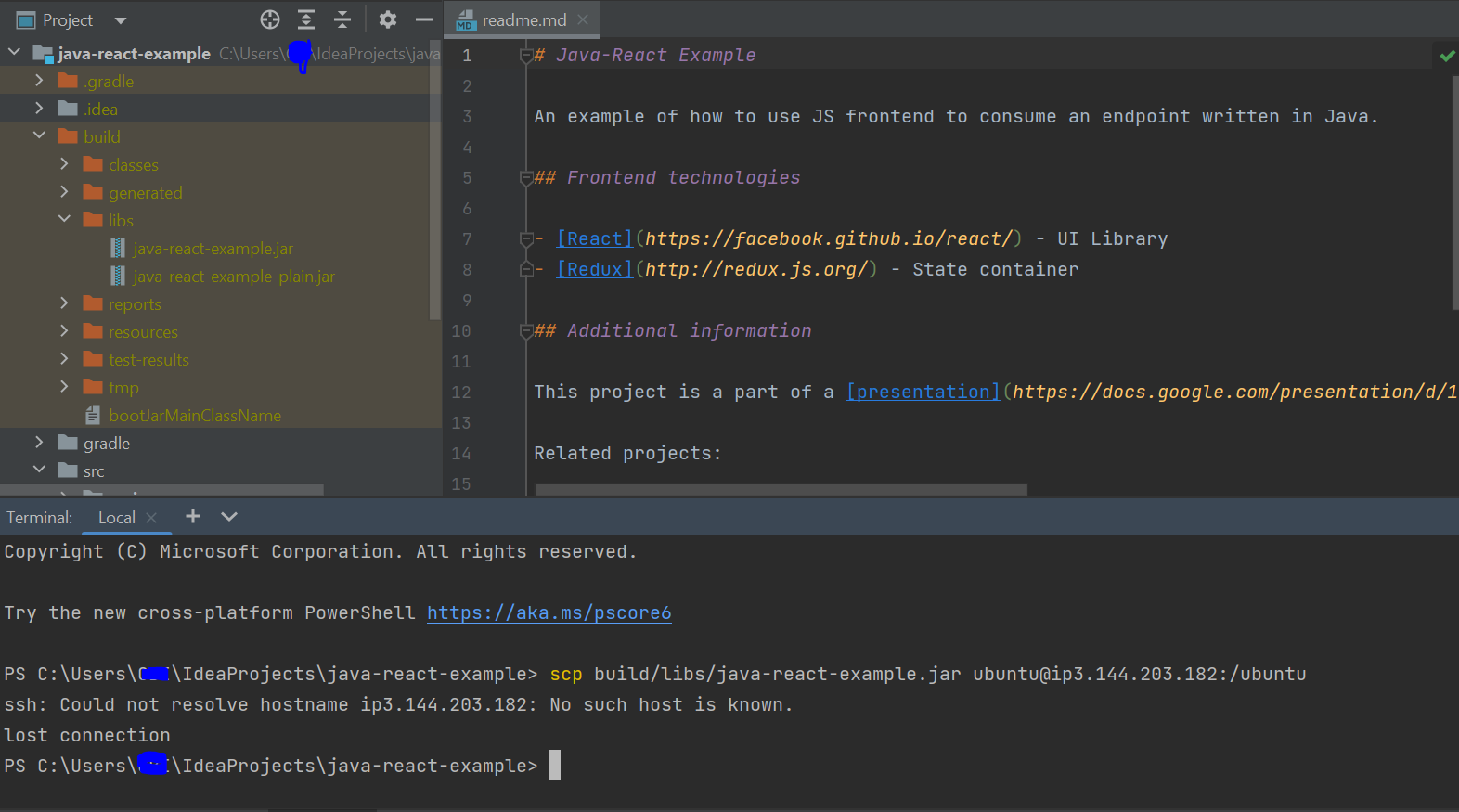
    මම මෙහෙම කරා ඒත් හරි ගියේ නෑනේ. Public key permission denied kiyala enawa. Mama meka intellij terminal eke hari putty ec2 terminal eke neda type karanna one?
    Mokdda methana awla kiyanna puluwnda? Methods kipayakma use karata hari giye nene

    1.PNG


    2.PNG

    මේ තියෙන්නේ ක්‍රම දෙකකට type කරපු image දෙකක්.

    Machan, Use the public IP for the host. also, you require to use the ssh-key file (pem file -- ssh-key created when creating the instance)
    In your case, the public IP is 3.144.203.182 based on the screenshot. Also please ensure the file copy location in the EC2 instance is available and has permission to write by the ubuntu user.

    From your PC to EC2:

    File copy:
    scp -i <ssh key> <file> <username>@<hostname/host_address>:<file_location>

    SSH:
    ssh -i <ssh key> <username>@<hostname/host_address>

    Also if you use programs like MobaXterm, it will be easier to create ssh connections and file transfers
    https://mobaxterm.mobatek.net/

    ubuntu@ip<ipaddress>
    Wenuwata ubuntu@<ipaddress> try karanna.

    ie. [email protected]
    Publickey permission denied kiyala awlak enwa mona widiyakata karath..☹️☹️
    ------ Post added on Aug 12, 2022 at 10:57 PM
     

    IT kolla

    Active member
  • Mar 8, 2022
    174
    168
    43
    අවසානයේ මම මේක කරා යාලුවනේ. උදවු උපකාර කල සැමට ස්තූතියි. සෑහෙන්න ගේමක් දුන්න හදාගන්න.


    මේක කලේ මම cmd එකෙන්. Jar file එකයි pem file එකයි දෙකම එක folder එකට දාලා cmd එකේ scp කෝඩ් එක run කලාම හරිගියා. Youtube එකෙන් තමා හොයාගත්තෙ
     

    mahadana_muththa

    Well-known member
  • Jan 5, 2020
    2,098
    2,600
    113
    අවසානයේ මම මේක කරා යාලුවනේ. උදවු උපකාර කල සැමට ස්තූතියි. සෑහෙන්න ගේමක් දුන්න හදාගන්න.


    මේක කලේ මම cmd එකෙන්. Jar file එකයි pem file එකයි දෙකම එක folder එකට දාලා cmd එකේ scp කෝඩ් එක run කලාම හරිගියා. Youtube එකෙන් තමා හොයාගත්තෙ
    pem file eka public thiyanna epa.
     

    u_make_me_sick_

    Well-known member
  • Oct 1, 2011
    11,522
    7,320
    113
    Instance එකට ssh කරන්න පුලුවන්නම් scp කරලා කොපි කරන්න. එහෙම නැත්තම් AWS cli එකෙනුත් පුලුවන්.
     
    • Like
    Reactions: kinkon

    rockmon

    Well-known member
  • Jul 31, 2017
    3,513
    3,896
    113
    මම මෙහෙම කරා ඒත් හරි ගියේ නෑනේ. Public key permission denied kiyala enawa. Mama meka intellij terminal eke hari putty ec2 terminal eke neda type karanna one?
    Mokdda methana awla kiyanna puluwnda? Methods kipayakma use karata hari giye nene

    View attachment 181550

    View attachment 181552
    මේ තියෙන්නේ ක්‍රම දෙකකට type කරපු image දෙකක්.


    Publickey permission denied kiyala awlak enwa mona widiyakata karath..☹️☹️
    ------ Post added on Aug 12, 2022 at 10:57 PM
    ow ow
    400 da kohedo permssion denna one
     

    siri_ayya

    Well-known member
  • Feb 1, 2022
    16,966
    1
    29,885
    113
    අඩේ උඹ සෑහෙන්න progress වෙලා නේද 🤩 පට්ට බන් ❤️❤️මං nana ගේ course එක කරන්න හිටියා තාම virtualbox වල :( anyways, උඹට මේ අවුරුද්දේ intern එකක් සෙට් වෙන්න කියල ප්‍රර්ථනා කරනවා මචන් :🤩
     

    IT kolla

    Active member
  • Mar 8, 2022
    174
    168
    43
    අඩේ උඹ සෑහෙන්න progress වෙලා නේද 🤩 පට්ට බන් ❤️❤️මං nana ගේ course එක කරන්න හිටියා තාම virtualbox වල :( anyways, උඹට මේ අවුරුද්දේ intern එකක් සෙට් වෙන්න කියල ප්‍රර්ථනා කරනවා මචන් :🤩
    තෑන්ක්ස් මචන්. ඔයාලා නිසා තම ඉතින්. අමාරුයි තමා මොකද මම කලින් මේවට expose වෙලා නැති නිසා. හැබැයි කොහොමහරි අල්ලන් යනවා.ජොබ් එකත් එක්කනෙ මේක කරන්නේ. දැන් docker එකයි jenkins එකයි පැරලලි කරන් යන්නේ. අනිත් ටික නම් ගොඩ දාගත්තා.
    මට මේක අතාරින්නෙ හිතෙන්නෙ නෑ කොච්චර අමාරු උනත්.❤
     
    • Love
    Reactions: siri_ayya