kohomada karanne???

SIRUS3001

Well-known member
  • Jan 23, 2008
    13,222
    95
    48
    Use Internet Download Manager !

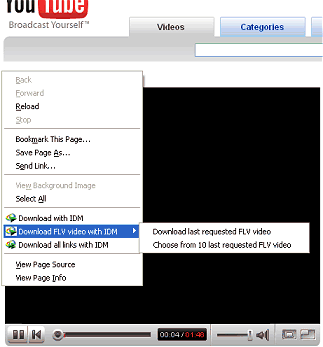
    Internet Download Manager 5.11 build 3 features YouTube grabber to download FLV videos from popular sites like YouTube, MySpaceTV, Google Video, etc. When your browser starts playing a video file, IDM grabs its download link. If you like the video, and you would like to save it on your computer, you should open IE context menu by right clicking on the web page that plays the video, and select "Download FLV video content with IDM" menu item. The context menu appears when you right click on a web page (but not on an flv player) in your browser or by using context menu key on the keyboard

    Go to the Desired Page Of the Video You Like..and press The Play Button
    Then
    click_on_youtube_ff.png

    Right Click and Select Download FLV Video With IDM
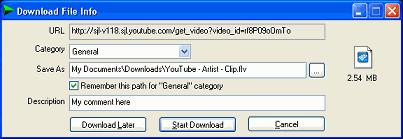
    IDM will start downloading the video and show its standard download dialog. If the server has not specified the file name explicitly, IDM will name the file based on the web page title. You can also edit the filename, add a description, and change its path or category on this dialog.
    flv_download_file_info.png


    Then Slect Start Download

    and You're Done !
     

    naleema

    Member
    Oct 31, 2007
    1,946
    3
    0
    verona
    SIRUS3001 said:
    Use Internet Download Manager !

    Internet Download Manager 5.11 build 3 features YouTube grabber to download FLV videos from popular sites like YouTube, MySpaceTV, Google Video, etc. When your browser starts playing a video file, IDM grabs its download link. If you like the video, and you would like to save it on your computer, you should open IE context menu by right clicking on the web page that plays the video, and select "Download FLV video content with IDM" menu item. The context menu appears when you right click on a web page (but not on an flv player) in your browser or by using context menu key on the keyboard

    Go to the Desired Page Of the Video You Like..and press The Play Button
    Then
    click_on_youtube_ff.png

    Right Click and Select Download FLV Video With IDM
    IDM will start downloading the video and show its standard download dialog. If the server has not specified the file name explicitly, IDM will name the file based on the web page title. You can also edit the filename, add a description, and change its path or category on this dialog.
    flv_download_file_info.png


    Then Slect Start Download

    and You're Done !
    hmmm...... tnx
     

    dhanusha83

    Well-known member
  • May 24, 2007
    3,533
    62
    48
    Mirigama
    Mozilla Firefox use karanawanam Ekata thiyanawa Download helper kiyala SW ekak
    Eken Puluwan....
    flv format eken download wenne